Windows can't update anymore

Satangel

New member
Member
Local time
2:01 AM
Messages
31
I'm using a brandnew ASUS PRO64JQ laptop, received it 3 days ago. It has Windows 7 Home Premium 64bit and it says it has been activated in the System control panel. I did not do that, the shop I bought it from did that so I don't have my key.

Yesterday and today everytime I shut down it needed to install updates. The shutting down goes quite fast, but when I boot up it just gets stuck at 0% for a few minutes, and then goes further with the message "Failure configuring Windows Updates, reverting changes". :confused:

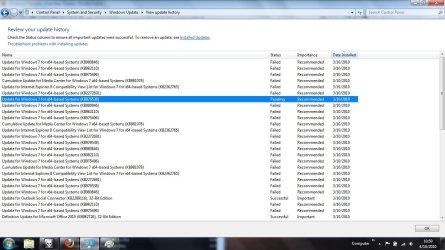
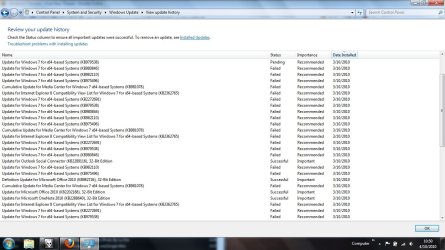
I've checked the update history, and you can view it in the attachments. As you can see it first worked perfectly, but after a day or so it just stopped working.....
 

Attachments
  • first part.jpg
    first part.jpg
    135.9 KB · Views: 27
  • second part.jpg
    second part.jpg
    139.5 KB · Views: 25

My Computer

Computer Manufacturer/Model Number
ASUS PRO64JQ
OS
Windows 7 Home Premium 64bit
CPU
i7-720QM
Memory
4GB RAM
Graphics Card(s)
ATI Mobility Radeon HD 5730 1GB
Hard Drives
500GB
Other Info
Bought September 2010

My Computer

Computer type
PC/Desktop
Computer Manufacturer/Model Number
Custom Build
OS
Windows 10 Pro x64, Arch Linux
CPU
Intel Core 2 Quad Q8200 OC'd 3.08GHz
Motherboard
Asus Rampage formula LGA775
Memory
8GB DDR2 900Mhz
Graphics Card(s)
MSI GT730 2GB GDDR5 (Kepler)
Sound Card
Supreme FX2
Monitor(s) Displays
Samsung LS22F350 LED
Screen Resolution
1080P
Hard Drives
Kingston SSDNow UV400 120GB, 500GB Hitachi, 2TB Samsung, 500GB Seagate FreeAgent, 640GB Samsung, 160GB Toshiba (Arch)
PSU
AeroCool 500W Bronze
Cooling
Cooler Master V6 + 3X fans
Keyboard
Prolink keyboard
Mouse
Logitech M705
Internet Speed
1MiB/s
Browser
Chrome Beta

My Computer

Computer type
PC/Desktop
Computer Manufacturer/Model Number
Custom Build
OS
Windows 10 Pro x64, Arch Linux
CPU
Intel Core 2 Quad Q8200 OC'd 3.08GHz
Motherboard
Asus Rampage formula LGA775
Memory
8GB DDR2 900Mhz
Graphics Card(s)
MSI GT730 2GB GDDR5 (Kepler)
Sound Card
Supreme FX2
Monitor(s) Displays
Samsung LS22F350 LED
Screen Resolution
1080P
Hard Drives
Kingston SSDNow UV400 120GB, 500GB Hitachi, 2TB Samsung, 500GB Seagate FreeAgent, 640GB Samsung, 160GB Toshiba (Arch)
PSU
AeroCool 500W Bronze
Cooling
Cooler Master V6 + 3X fans
Keyboard
Prolink keyboard
Mouse
Logitech M705
Internet Speed
1MiB/s
Browser
Chrome Beta

My Computer

Computer Manufacturer/Model Number
ASUS PRO64JQ
OS
Windows 7 Home Premium 64bit
CPU
i7-720QM
Memory
4GB RAM
Graphics Card(s)
ATI Mobility Radeon HD 5730 1GB
Hard Drives
500GB
Other Info
Bought September 2010
Install them :)
 

My Computer

Computer type
PC/Desktop
Computer Manufacturer/Model Number
Custom Build
OS
Windows 10 Pro x64, Arch Linux
CPU
Intel Core 2 Quad Q8200 OC'd 3.08GHz
Motherboard
Asus Rampage formula LGA775
Memory
8GB DDR2 900Mhz
Graphics Card(s)
MSI GT730 2GB GDDR5 (Kepler)
Sound Card
Supreme FX2
Monitor(s) Displays
Samsung LS22F350 LED
Screen Resolution
1080P
Hard Drives
Kingston SSDNow UV400 120GB, 500GB Hitachi, 2TB Samsung, 500GB Seagate FreeAgent, 640GB Samsung, 160GB Toshiba (Arch)
PSU
AeroCool 500W Bronze
Cooling
Cooler Master V6 + 3X fans
Keyboard
Prolink keyboard
Mouse
Logitech M705
Internet Speed
1MiB/s
Browser
Chrome Beta
Install them :)

Haha, it worked mate! He installed them just fine, and it were indeed those updates that failed earlier. Glad that's done, thanks! How can I rep you on this forum?

Also, this is in the wrong section but I don't want to make another topic, so:

Does anybody know how to change the font color of a partition? Because I have 2 partitions, and in one all the letters are black, and in the other they are all blue. It's annoying the hell out of me, I want to change it.
In the attachments you can see what it looks like.
 

Attachments

  • crap.JPG
    crap.JPG
    20.3 KB · Views: 505

My Computer

Computer Manufacturer/Model Number
ASUS PRO64JQ
OS
Windows 7 Home Premium 64bit
CPU
i7-720QM
Memory
4GB RAM
Graphics Card(s)
ATI Mobility Radeon HD 5730 1GB
Hard Drives
500GB
Other Info
Bought September 2010
Install them :)

Haha, it worked mate! He installed them just fine, and it were indeed those updates that failed earlier. Glad that's done, thanks! How can I rep you on this forum?

Also, this is in the wrong section but I don't want to make another topic, so:

Does anybody know how to change the font color of a partition? Because I have 2 partitions, and in one all the letters are black, and in the other they are all blue. It's annoying the hell out of me, I want to change it.
In the attachments you can see what it looks like.

Nice to see your problem was fixed :)

For the second one just enter Control Panel>Appearance and Personalization>Folder options>View

Then uncheck "Show encrypted or compressed NTFS files in color"
 

My Computer

Computer type
PC/Desktop
Computer Manufacturer/Model Number
Custom Build
OS
Windows 10 Pro x64, Arch Linux
CPU
Intel Core 2 Quad Q8200 OC'd 3.08GHz
Motherboard
Asus Rampage formula LGA775
Memory
8GB DDR2 900Mhz
Graphics Card(s)
MSI GT730 2GB GDDR5 (Kepler)
Sound Card
Supreme FX2
Monitor(s) Displays
Samsung LS22F350 LED
Screen Resolution
1080P
Hard Drives
Kingston SSDNow UV400 120GB, 500GB Hitachi, 2TB Samsung, 500GB Seagate FreeAgent, 640GB Samsung, 160GB Toshiba (Arch)
PSU
AeroCool 500W Bronze
Cooling
Cooler Master V6 + 3X fans
Keyboard
Prolink keyboard
Mouse
Logitech M705
Internet Speed
1MiB/s
Browser
Chrome Beta
Install them :)

Haha, it worked mate! He installed them just fine, and it were indeed those updates that failed earlier. Glad that's done, thanks! How can I rep you on this forum?

Also, this is in the wrong section but I don't want to make another topic, so:

Does anybody know how to change the font color of a partition? Because I have 2 partitions, and in one all the letters are black, and in the other they are all blue. It's annoying the hell out of me, I want to change it.
In the attachments you can see what it looks like.

Nice to see your problem was fixed :)

For the second one just enter Control Panel>Appearance and Personalization>Folder options>View

Then uncheck "Show encrypted or compressed NTFS files in color"

Awesome sauce, that's done now too :) Thanks! I don't have any other questions, this topic may be closed.
 

My Computer

Computer Manufacturer/Model Number
ASUS PRO64JQ
OS
Windows 7 Home Premium 64bit
CPU
i7-720QM
Memory
4GB RAM
Graphics Card(s)
ATI Mobility Radeon HD 5730 1GB
Hard Drives
500GB
Other Info
Bought September 2010
To rep any member on this forum just click on this icon located on the upper left of the post
 

Attachments

  • Untitled.png
    Untitled.png
    526 bytes · Views: 504

My Computer

Computer type
PC/Desktop
Computer Manufacturer/Model Number
Custom Build
OS
Windows 10 Pro x64, Arch Linux
CPU
Intel Core 2 Quad Q8200 OC'd 3.08GHz
Motherboard
Asus Rampage formula LGA775
Memory
8GB DDR2 900Mhz
Graphics Card(s)
MSI GT730 2GB GDDR5 (Kepler)
Sound Card
Supreme FX2
Monitor(s) Displays
Samsung LS22F350 LED
Screen Resolution
1080P
Hard Drives
Kingston SSDNow UV400 120GB, 500GB Hitachi, 2TB Samsung, 500GB Seagate FreeAgent, 640GB Samsung, 160GB Toshiba (Arch)
PSU
AeroCool 500W Bronze
Cooling
Cooler Master V6 + 3X fans
Keyboard
Prolink keyboard
Mouse
Logitech M705
Internet Speed
1MiB/s
Browser
Chrome Beta

My Computer

Computer Manufacturer/Model Number
ASUS PRO64JQ
OS
Windows 7 Home Premium 64bit
CPU
i7-720QM
Memory
4GB RAM
Graphics Card(s)
ATI Mobility Radeon HD 5730 1GB
Hard Drives
500GB
Other Info
Bought September 2010
Back
Top