Windows clock going out of time, sync errors

Pauly

An error has occured
Guru
Gold Member
Local time
12:00 AM
Messages
2,435
Location
England
Hi all, i have an issue with the clock on my machine reading the wrong time
Machine is running a newish (less than 12months) gigabyte mobo with uefi bios, i have checked the bios and the time is correct there
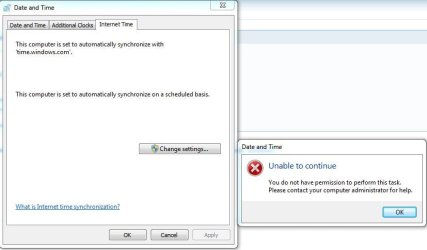
I am in the right time zone but every few days the clock will go a few minutes out of sync seemingly getting more out the more days pass, i have been into time and date settings and if i click update internet time the clock will go to the correct time but will display this
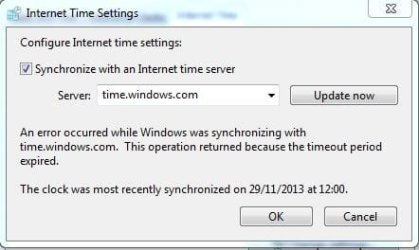
Capture.JPG
i have tried all servers and all give the same result, clock will go correct then over coming days will start to creep out of time a few minutes at a go

I would like to resolve this as it is an office machine networked to others running printer and storage shares and i am concerned if the time goes out it may give issues (already had some issues not sure if related to this)

Any thoughts or views gratefuly received
 

My Computer My Computer

Computer type
PC/Desktop
Computer Manufacturer/Model Number
Pauly Special
OS
Win7 Ultimate X64
CPU
Intel i5 3570K
Motherboard
Gigabyte Z77X-DS3H
Memory
8GB DDR3 1600
Graphics Card(s)
Onboard
Sound Card
Onboard
Screen Resolution
1280x1024
Hard Drives
Samsung 840 Evo SSD (OS)
1TB Spinner (Data)
PSU
800W Arctic
Case
Cooler Master
Cooling
3x120mm Fans
Keyboard
MS Wireless
Mouse
MS Wireless
Internet Speed
20M
Hi all, i have an issue with the clock on my machine reading the wrong time
Machine is running a newish (less than 12months) gigabyte mobo with uefi bios, i have checked the bios and the time is correct there
I am in the right time zone but every few days the clock will go a few minutes out of sync seemingly getting more out the more days pass, i have been into time and date settings and if i click update internet time the clock will go to the correct time but will display this
View attachment 295474
i have tried all servers and all give the same result, clock will go correct then over coming days will start to creep out of time a few minutes at a go

I would like to resolve this as it is an office machine networked to others running printer and storage shares and i am concerned if the time goes out it may give issues (already had some issues not sure if related to this)

Any thoughts or views gratefuly received

At the elevated command prompt (with administrator privileges), type the following command

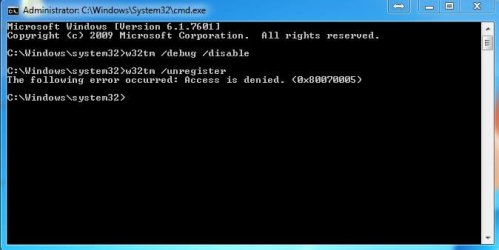
1. Type "w32tm /debug /disable" and press 'Enter' (net stop w32time gave an Error 5 Access denied response!)

2. Type "w32tm /unregister" and press 'Enter' (without using the first command the second did not work!)

you should get the response " W32Time successfully unregistered"

3. Type "w32tm /register" and press 'Enter'

you should get the response "W32Time successfully registered"

4. Type "net start w32time" and press 'Enter'

you should get the response "The windows Time Service is starting. The windows time service was started successfully"

Elevated Command Prompt Instructions;

1. Click on the Start button and in the Search programs and files box that appears directly above the Start button, type the following:

command

Don't press Enter, just let the search results populate above.

Note: If you have trouble doing this, or the next step, you can find the Command Prompt shortcut manually by clicking Start -> All Programs -> Accessories on most computers. Then skip to Step 3 below.

2. In the search results, locate the Programs section.

Under Programs you'll see one or more programs listed that contain the word command.
3. Locate the Command Prompt shortcut and right-click on it.

This will bring up Command Prompt's right-click menu. Depending on the software you have installed, and how you have certain Windows 7 settings configured, you could have as few as a dozen, or as many as a few dozen, options.

4. Click on Run as administrator.
5. Click Yes on the User Account Control window that appears.

HTH
 

My Computer My Computer

Computer type
PC/Desktop
Computer Manufacturer/Model Number
Custom Built
OS
Windows 7 Professional x64
CPU
Intel i5 quad processor
Motherboard
DP67BG
Memory
16 GB
Graphics Card(s)
Radeon HD 5770
Sound Card
Realtek High Definition Audio
Monitor(s) Displays
Samsung SyncMaster
Screen Resolution
1920X1080
Hard Drives
WD 2TB (SATA Internal)
WD 1TB (USB External)
PSU
Corsair GS800
Case
Tower (Generic)
Cooling
3 Internal Fans
Keyboard
MS Wireless
Mouse
MS Optical Wired
Internet Speed
54 mbps
Antivirus
Emsisoft
Browser
IE-Version 9, Palemoon-Version 24.2.0
2nd command gives access denied error
Capture.JPG

tried the others anyway and gives
Capture 1.JPG

have tried updating clock and works fine now :)
what do you think already unregistered somehow ???

anyway many thanks for your help hopefully problem resolved
 

My Computer My Computer

Computer type
PC/Desktop
Computer Manufacturer/Model Number
Pauly Special
OS
Win7 Ultimate X64
CPU
Intel i5 3570K
Motherboard
Gigabyte Z77X-DS3H
Memory
8GB DDR3 1600
Graphics Card(s)
Onboard
Sound Card
Onboard
Screen Resolution
1280x1024
Hard Drives
Samsung 840 Evo SSD (OS)
1TB Spinner (Data)
PSU
800W Arctic
Case
Cooler Master
Cooling
3x120mm Fans
Keyboard
MS Wireless
Mouse
MS Wireless
Internet Speed
20M
2nd command gives access denied error
View attachment 295477

tried the others anyway and gives
View attachment 295478

have tried updating clock and works fine now :)
what do you think already unregistered somehow ???

anyway many thanks for your help hopefully problem resolved

I have no idea why unpredictable things happen with Windows, but I hope the fix provides a permanent solution.
 

My Computer My Computer

Computer type
PC/Desktop
Computer Manufacturer/Model Number
Custom Built
OS
Windows 7 Professional x64
CPU
Intel i5 quad processor
Motherboard
DP67BG
Memory
16 GB
Graphics Card(s)
Radeon HD 5770
Sound Card
Realtek High Definition Audio
Monitor(s) Displays
Samsung SyncMaster
Screen Resolution
1920X1080
Hard Drives
WD 2TB (SATA Internal)
WD 1TB (USB External)
PSU
Corsair GS800
Case
Tower (Generic)
Cooling
3 Internal Fans
Keyboard
MS Wireless
Mouse
MS Optical Wired
Internet Speed
54 mbps
Antivirus
Emsisoft
Browser
IE-Version 9, Palemoon-Version 24.2.0
Ok so back with an update, unfortunately problem still persists but seems to have got worse as the date is now an issue
Clock is still going out by a few minutes here and there, I can manually change but if I go to internet time and click change settings I see this
Capture.JPG
I should add this is a single user machine with no passwords or anything
Also now with the correct date set and displaying in bottom corner of desktop when I go into a program (specifically my accounting software as this is work machine) and make an entry the date auto fills as 3 days in the past so I have to constantly change to correct date which is becoming rather annoying and then I have software spitting the dummy as it thinks I am trying to date things in the future which it doesn't like

Any ideas and thoughts would be appreciated
 

My Computer My Computer

Computer type
PC/Desktop
Computer Manufacturer/Model Number
Pauly Special
OS
Win7 Ultimate X64
CPU
Intel i5 3570K
Motherboard
Gigabyte Z77X-DS3H
Memory
8GB DDR3 1600
Graphics Card(s)
Onboard
Sound Card
Onboard
Screen Resolution
1280x1024
Hard Drives
Samsung 840 Evo SSD (OS)
1TB Spinner (Data)
PSU
800W Arctic
Case
Cooler Master
Cooling
3x120mm Fans
Keyboard
MS Wireless
Mouse
MS Wireless
Internet Speed
20M
Suggestions

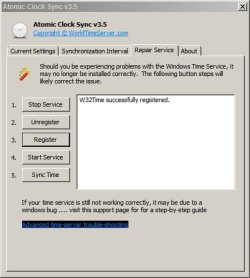
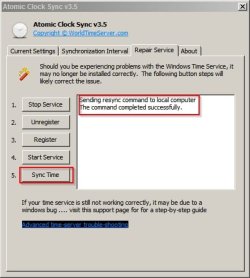
You can try Atomic Clock Sync:

Atomic Clock Sync Information from worldtimeserver.com

2014-01-09 20_31_16-Atomic Clock Sync v3.jpg

Then go through steps 1-5 in order to see if that fixes things.

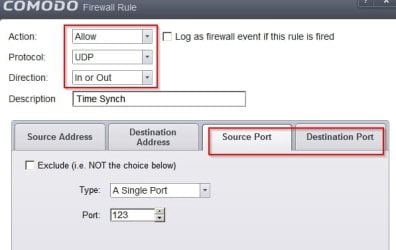
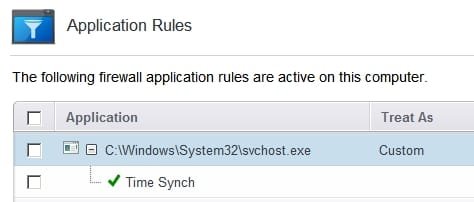
On my machine I've added a few tweaks that disable any unwanted communication with Microsoft and so have to use a different time server. I still had problems and after some research I've decided that my firewall is blocking NPT access on UDP port 123.

CFW.jpg

Created a new rule to allow the above and time synch works correctly.

Success.jpg

EDIT: Forgot to mention that I had to use Process Hacker to get the PID for the correct svchost.exe process in order to create the firewall rule.
 

Attachments

  • 2014-01-09 21_09_36-svchost.jpg
    2014-01-09 21_09_36-svchost.jpg
    18.8 KB · Views: 72
  • COMODO Advanced Settings.jpg
    COMODO Advanced Settings.jpg
    12.1 KB · Views: 71
Last edited:

My Computer My Computer

Computer type
Laptop
Computer Manufacturer/Model Number
ASUS
OS
Microsoft Windows 7 Home Premium 64-bit 7601 Multiprocessor Free Service Pack 1
CPU
AMD C-60 APU with Radeon(tm) HD Graphics
Motherboard
ASUSTeK COMPUTER INC. X501U
Memory
4.00 GB
Graphics Card(s)
AMD Radeon HD 6290 Graphics
Sound Card
(1) AMD High Definition Audio Device (2) Realtek High Defi
Screen Resolution
1366 x 768 x 32 bits (4294967296 colors) @ 60 Hz
Hard Drives
Hitachi HTS545050A7E380 SATA Disk Device
Antivirus
Comodo CIS & FW, SecureAplus App Whitelisting, Threatfire
Browser
Cyberfox 64bit, Opera 64bit, Airfox
Other Info
Spy-The-Spy, HitmanPro.Alert, Norton Connect Safe, MJRegWatcher, BitDefender TrafficLight, Voodoo Shield, Zemana AntiMalware
2nd command gives access denied error

I have a feeling you did not run a elevated command prompt. Right click cmd run as administrator.
 

My Computer My Computer

Computer type
PC/Desktop
Computer Manufacturer/Model Number
Custom Built
OS
Windows 10 Pro
CPU
AMD Ryzen 5 2400G Processor with Radeon RX Vega 11 Graphics
Motherboard
ASRock X470 Master SLI/AC AM4 AMD Promontory X470 SATA 6Gb/s
Memory
G.SKILL Ripjaws V Series 16GB (2 x 8GB) 288-Pin DDR4 SDRAM D
Graphics Card(s)
2047MB NVIDIA GeForce GTX 1060 6GB (EVGA)
Sound Card
Motherboard Built in
Monitor(s) Displays
Acer R240HY bidx 23.8-Inch IPS HDMI DVI VGA (1920 x 1080) Wi
Screen Resolution
1920 x 1080
Hard Drives
1TB Sandisk SSD PLUS (Main drive)
500 GB Seagate 7200 RPM (Games)
500 GB Western Digital 7200 RPM (Virtual Machines)
PSU
CORSAIR TX Series TX650M 650W 80+ Gold Modular Power Supply
Case
CORSAIR CARBIDE SPEC-02 Mid-Tower Gaming Case, Red LED Fan
Cooling
220mm, two 120mm, and four 60mm fans
Keyboard
Wired Dell keyboard
Mouse
Wireless Logitech mouse
Internet Speed
250mb down, 30mb up
Antivirus
Panda Cloud Antivirus
Browser
Chrome-ish x64
Other Info
Your awesome for reading this.
2nd command gives access denied error

I have a feeling you did not run a elevated command prompt. Right click cmd run as administrator.

Both of those screenshots show it was run elevated.

2nd command gives access denied error
295477-windows-clock-going-out-time-sync-errors-capture.jpg


tried the others anyway and gives
295478-windows-clock-going-out-time-sync-errors-capture-1.jpg


have tried updating clock and works fine now :)
what do you think already unregistered somehow ???

anyway many thanks for your help hopefully problem resolved
 

My Computer My Computer

Computer type
PC/Desktop
Computer Manufacturer/Model Number
Self Built
OS
Win 10 Pro x64
CPU
Intel I5-2500K @3.3GHz
Motherboard
Asrock P67 Extreme4
Memory
16GB G.Skill Ripjaws X (4x4GB)
Graphics Card(s)
EVGA GeForce 750 Ti SC 2GB
Sound Card
ASUS Xonar DG 5.1 Channels 24-bit 96KHz PCI Interface Sound
Monitor(s) Displays
auria eq2367
Screen Resolution
1920 x 1080
Hard Drives
250GB Samsung 850 EVO SSD
1TB WD Blue
1TB Hitachi
PSU
SeaSonic X 650W 80 Plus Gold
Case
Corsair Obsidian 750D
Cooling
Corsair H60, Three 140mm case fans
Keyboard
Logitech Wireless Keyboard K520
Mouse
Logitech Wireless Mouse M310
Internet Speed
Wave Broadband ~ 100 dn 5 up
Antivirus
Windows Defender, Malwarebytes Premium
Browser
Edge, IE11, Chrome
Other Info
Laptop specs: HP g7-1365dx /
CPU: AMD A6-3420M APU with Radeon(tm) HD Graphics /
RAM: Crucial 8Gb (2x4Gb) /
SSD: Crucial M4-CT128M4SSD2 ATA Device/ FW 000F /
GFX: AMD Radeon HD 6520G /
OS: Windows 10 Pro x64
Oops. :o

thanks derekimo
 

My Computer My Computer

Computer type
PC/Desktop
Computer Manufacturer/Model Number
Custom Built
OS
Windows 10 Pro
CPU
AMD Ryzen 5 2400G Processor with Radeon RX Vega 11 Graphics
Motherboard
ASRock X470 Master SLI/AC AM4 AMD Promontory X470 SATA 6Gb/s
Memory
G.SKILL Ripjaws V Series 16GB (2 x 8GB) 288-Pin DDR4 SDRAM D
Graphics Card(s)
2047MB NVIDIA GeForce GTX 1060 6GB (EVGA)
Sound Card
Motherboard Built in
Monitor(s) Displays
Acer R240HY bidx 23.8-Inch IPS HDMI DVI VGA (1920 x 1080) Wi
Screen Resolution
1920 x 1080
Hard Drives
1TB Sandisk SSD PLUS (Main drive)
500 GB Seagate 7200 RPM (Games)
500 GB Western Digital 7200 RPM (Virtual Machines)
PSU
CORSAIR TX Series TX650M 650W 80+ Gold Modular Power Supply
Case
CORSAIR CARBIDE SPEC-02 Mid-Tower Gaming Case, Red LED Fan
Cooling
220mm, two 120mm, and four 60mm fans
Keyboard
Wired Dell keyboard
Mouse
Wireless Logitech mouse
Internet Speed
250mb down, 30mb up
Antivirus
Panda Cloud Antivirus
Browser
Chrome-ish x64
Other Info
Your awesome for reading this.

My Computer My Computer

Computer type
PC/Desktop
Computer Manufacturer/Model Number
Self Built
OS
Win 10 Pro x64
CPU
Intel I5-2500K @3.3GHz
Motherboard
Asrock P67 Extreme4
Memory
16GB G.Skill Ripjaws X (4x4GB)
Graphics Card(s)
EVGA GeForce 750 Ti SC 2GB
Sound Card
ASUS Xonar DG 5.1 Channels 24-bit 96KHz PCI Interface Sound
Monitor(s) Displays
auria eq2367
Screen Resolution
1920 x 1080
Hard Drives
250GB Samsung 850 EVO SSD
1TB WD Blue
1TB Hitachi
PSU
SeaSonic X 650W 80 Plus Gold
Case
Corsair Obsidian 750D
Cooling
Corsair H60, Three 140mm case fans
Keyboard
Logitech Wireless Keyboard K520
Mouse
Logitech Wireless Mouse M310
Internet Speed
Wave Broadband ~ 100 dn 5 up
Antivirus
Windows Defender, Malwarebytes Premium
Browser
Edge, IE11, Chrome
Other Info
Laptop specs: HP g7-1365dx /
CPU: AMD A6-3420M APU with Radeon(tm) HD Graphics /
RAM: Crucial 8Gb (2x4Gb) /
SSD: Crucial M4-CT128M4SSD2 ATA Device/ FW 000F /
GFX: AMD Radeon HD 6520G /
OS: Windows 10 Pro x64
clock sync error

tried this, restarting, and changing the clock sync location, it didnt work .... help please


Microsoft Windows [Version 6.3.9600]
(c) 2013 Microsoft Corporation. All rights reserved.

C:\WINDOWS\system32>w32tm /debug /disable
Sending disable private log command to local computer ...The command completed s
uccessfully.

C:\WINDOWS\system32>w32tm /unregister
W32Time successfully unregistered.

C:\WINDOWS\system32>w32tm /register
The following error occurred: The specified service has been marked for deletion
. (0x80070430)

C:\WINDOWS\system32>w32tm /register
The following error occurred: The specified service has been marked for deletion
. (0x80070430)

C:\WINDOWS\system32>net start w32time
System error 1058 has occurred.

The service cannot be started, either because it is disabled or because it has n
o enabled devices associated with it.


C:\WINDOWS\system32>
 

My Computer My Computer

Computer type
Tablet
Computer Manufacturer/Model Number
samsung ativ
OS
windows 8
Antivirus
avg
Hi jsmcrawler, welcome to SF

You have posted in an old thread which is probably why you have received no replies, unfortunately I never resolved my issue with the clock so cant help you any further myself
I suggest starting your own new thread describing your problem in detail and hopefully someone may be able to help
 

My Computer My Computer

Computer type
PC/Desktop
Computer Manufacturer/Model Number
Pauly Special
OS
Win7 Ultimate X64
CPU
Intel i5 3570K
Motherboard
Gigabyte Z77X-DS3H
Memory
8GB DDR3 1600
Graphics Card(s)
Onboard
Sound Card
Onboard
Screen Resolution
1280x1024
Hard Drives
Samsung 840 Evo SSD (OS)
1TB Spinner (Data)
PSU
800W Arctic
Case
Cooler Master
Cooling
3x120mm Fans
Keyboard
MS Wireless
Mouse
MS Wireless
Internet Speed
20M
Did you ever try replacing the cmos battery?
 

My Computer My Computer

Computer type
PC/Desktop
Computer Manufacturer/Model Number
Custom Built
OS
Windows 10 Pro
CPU
AMD Ryzen 5 2400G Processor with Radeon RX Vega 11 Graphics
Motherboard
ASRock X470 Master SLI/AC AM4 AMD Promontory X470 SATA 6Gb/s
Memory
G.SKILL Ripjaws V Series 16GB (2 x 8GB) 288-Pin DDR4 SDRAM D
Graphics Card(s)
2047MB NVIDIA GeForce GTX 1060 6GB (EVGA)
Sound Card
Motherboard Built in
Monitor(s) Displays
Acer R240HY bidx 23.8-Inch IPS HDMI DVI VGA (1920 x 1080) Wi
Screen Resolution
1920 x 1080
Hard Drives
1TB Sandisk SSD PLUS (Main drive)
500 GB Seagate 7200 RPM (Games)
500 GB Western Digital 7200 RPM (Virtual Machines)
PSU
CORSAIR TX Series TX650M 650W 80+ Gold Modular Power Supply
Case
CORSAIR CARBIDE SPEC-02 Mid-Tower Gaming Case, Red LED Fan
Cooling
220mm, two 120mm, and four 60mm fans
Keyboard
Wired Dell keyboard
Mouse
Wireless Logitech mouse
Internet Speed
250mb down, 30mb up
Antivirus
Panda Cloud Antivirus
Browser
Chrome-ish x64
Other Info
Your awesome for reading this.
Back
Top