Solved Windows corrupted External Drive's data structure (inaccessible drive)

Acova

New member
Member
Local time
1:40 AM
Messages
57
Hi,

I have an external drive (6-7 months of servicing, around 50-60 of total plugs in).
One day I connected it to laptop and Windows suggested me to repair it because it had found some unknown nature corruptions.

At the time of such notification, the external drive was accessible and working alright. There was one direct record of some file which it reported to have problems with, but I checked it myself, and I could view it or even edit if I wanted to. So it looked fine by me, and the rest of the files were pretty much operable no less.

Still, I ended up with a conclusion that if I don't get corruptions fixed I might build up serious problems with data structure and such, so I ended up letting Windows carry out a "RECOMMENDED" fix for it. Thing is, after it reported me that the problems were fixed and the drive is healthy, it became inaccessible.

As far as I've understood, Windows had rather corrupted my drive.


Event Viewer:
From Event Viewer Log I saw how it reported me around 8000-9000 times of an unknown data structure corruption on the drive within 2-3 minutes:

General: "A corruption was discovered in the file system structure on volume S:. The exact nature of the corruption is unknown. The file system structures need to be scanned online." (Event ID: 55)

The rest are of the same type, but containt different details each (e.g. callstacks or addresses of "corruptions" it had found).

After the repairs having been made, it reported around 8-14 records where it stated:
General: "The file system structure on volume S: has now been repaired." (Event ID: 130)

I am unsure if it relates to the same drive but this ended up occurring in my event viewer as well. For extra info I include it here:
General: "The driver detected a controller error on \Device\Harddisk1\DR2." (Event ID: 11)

I think the record below is during/after the repairs for general info:
General:
"Skipped posting of 6 repair events. Repair event posting will now be resumed.
Here are the skipped posting repair events count by repair verbs:
BadFRS: 0
OrphanChildFRS: 0
BadClusters: 0
BadFreeClusters: 0
CrossLink: 0
SDEntry: 0
InvalidSecurityId: 0
IndexAttribute: 0
IndexSubtree: 0
IndexOffset: 0
IndexEntry: 0
IndexOrder: 0
Connect: 0
BreakCycle: 0
FRSAllocate: 6
Others: 0" (Event ID: 133)


I've also come across this thread:

Undo results from - Microsoft Community


Extra General Info:
I did try running manufacturer's tools in order to estimate drive's health condition - everything passed and no problems were found, not even a single of bad sectors.


Extra Observations:
There were some odd times when it would report me that the drive was in use upon its disconnection, whilst in truth, I was 100% sure I did nothing with it any more. Some time later, I learned that it was related to explorer browser and task manager. Apparently even when I had only task manager running, I could not disconnect the drive. Anyways, in order to keep it nice and safe, I always disconnect external devices via eject command as long as it is available. So I never unplug device from system until it reports it is safe to do so, or (an exception) unless I am forced to unplug with no other options left for me.


Cases of device's bad unplugs:
Also, upon plugging it to laptop, it would not always necessarily pop up in tray icon (e.g. USB icon), and would merely keep my drive running without me being able to do anything with it. If such happened, I would re-plug it, but in another port/nest for USB. Such happened around 6-7 times for its 7 months servicing to me.


Does anyone know of any tested/checked suggestions for me to safely try to at least make the drive accessible in order to retrieve data?

Thanks in advance.
 

My Computer

Computer type
PC/Desktop
OS
Windows 8.1 x64
Open Disk Management, expand the columns so we can read them and with the sniping tool take a snapshot of the hole screen.
Post it here as an attachment. Use the paper clip, browse to the file - upload.
 

My Computers

System One System Two

  • Computer type
    PC/Desktop
    Computer Manufacturer/Model Number
    custom build
    OS
    Windows 7 HP 64
    CPU
    i5 6600K - 800MHz to 4200MHz
    Motherboard
    GA-Z170-HD3P
    Memory
    4+4G GSkill DDR4 3000
    Graphics Card(s)
    IG - Intel 530
    Monitor(s) Displays
    Samsung 226BW
    Screen Resolution
    1680x1050
    Hard Drives
    (1) -1 SM951 – 128GB M.2 AHCI PCIe SSD drive for Windows 7 and Lubuntu
    (2) -1 WD SATA 3 - 1T for Data
    (3) -1 WD SATA 3 - 1T for backup
    PSU
    Thermaltake 450W TR2 gold
    Keyboard
    Old and good Chicony mechanical keyboard
    Mouse
    Logitech mX performance - 9 buttons (had to disable some)
    Internet Speed
    500Mb/s
    Browser
    Firefox 64
    Other Info
    TinyWall firewall
  • Computer type
    Laptop
    System Manufacturer/Model Number
    Asus Q550LF
    OS
    Windows 7 Pro
    CPU
    i7-4500U 800MHz to 3.0GHz
    Motherboard
    Asus Q550LF
    Memory
    (4+4)G DDR3 1600
    Graphics Card(s)
    IG intel 4400 + NVIDIA GeForce GT 745M
    Sound Card
    Realtek
    Monitor(s) Displays
    LG Display LP156WF4-SPH1
    Screen Resolution
    1920 x 1080
    Hard Drives
    BX500 120G SSD for Windows and programs +
    1T HDD for data
    Internet Speed
    500 Mb/s
    Browser
    Firefox
    Other Info
    TinyWall firewall
Create a Linux Live DVD, boot your computer to it, and then plug your drive into the computer. See if you can get your files off of it while in Linux.

You can go here to download one of the Linux Mint ISOs:

https://linuxmint.com/download.php

Create a DVD from the ISO you just downloaded, then boot to that DVD. Linux will run off of the DVD; no need to install anything.
 

My Computer

Computer type
PC/Desktop
Computer Manufacturer/Model Number
Dell
OS
Linux Mint 18.2 xfce 64-bit (VMWare host) / Windows 8.1 Pro 32-bit (VMWare guest)
CPU
Haswell
Memory
4 GB
Monitor(s) Displays
Acer 23"
Screen Resolution
1920 x 1080
Hard Drives
Two hard drives, 1TB each: One for Linux, one for my data.
Keyboard
IBM Model M
Antivirus
Sophos (Linux), Trend Micro (Windows)
Browser
Firefox, Opera
Other Info
I use Samba to share my data drive with the other computers at my house and with my guest session in VMWare Workstation Player.
Open Disk Management, expand the columns so we can read them and with the sniping tool take a snapshot of the hole screen.
Post it here as an attachment. Use the paper clip, browse to the file - upload.

I forgot to add that when I accessed the drive via Disk Management, it would deny me in my attempt. However, it would ask me an interesting question about Recycle Bin:

~ "It appears Recycle Bin on this drive is corrupted. Would you like to clear it?"

This corruption removal I did approve back then.

"The driver detected a controller error on \Device\Harddisk1\DR(3,2)." (Event ID: 11)"
This type of error occurred only two times before Windows fixed anything, after, there was nothing like it showing up any more.
 

Attachments

  • 11.png
    11.png
    103.7 KB · Views: 8

My Computer

Computer type
PC/Desktop
OS
Windows 8.1 x64
Create a Linux Live DVD, boot your computer to it, and then plug your drive into the computer. See if you can get your files off of it while in Linux.

You can go here to download one of the Linux Mint ISOs:

https://linuxmint.com/download.php

Create a DVD from the ISO you just downloaded, then boot to that DVD. Linux will run off of the DVD; no need to install anything.

I was in fact preparing USB stick with ddrescue. ( Some time ago I had to make a data retrieval, it's where I used ddrescue. Source: Best method/tool for cloning a failing HDD for Data Recovery? Solved - Page 9 - Windows 7 Help Forums )

If I don't mistake I can boot in ddrescue and check it there as well, and it will be as useful/helpful as Linux Mint, is this correct? Though I will as well try it with Linux Mint as you suggested for a 2nd attempt anyways.

One more question: in case if it asks me to correct some errors, should I let Linux do that for me?
I remember, once I was done retrieving data from failing device (I made an iso / image of it), upon trying to open the resulting output, it asked ( or not :D ) me if I wanted to fix errors. Well, after it did fix them, I could open the image I retrieved and it worked for me. But just in case, it is safe to let Linux fix problems on drive, isn't it?
 

My Computer

Computer type
PC/Desktop
OS
Windows 8.1 x64
The only reason I am suggesting that you boot to Linux is that this will give you a non-Windows way to try to get the data off of your drive. In other words, if the problem is with Windows, then you should be able to get your data from within Linux.

Not sure about correcting the errors in Linux. I don't have any experience with that.
 

My Computer

Computer type
PC/Desktop
Computer Manufacturer/Model Number
Dell
OS
Linux Mint 18.2 xfce 64-bit (VMWare host) / Windows 8.1 Pro 32-bit (VMWare guest)
CPU
Haswell
Memory
4 GB
Monitor(s) Displays
Acer 23"
Screen Resolution
1920 x 1080
Hard Drives
Two hard drives, 1TB each: One for Linux, one for my data.
Keyboard
IBM Model M
Antivirus
Sophos (Linux), Trend Micro (Windows)
Browser
Firefox, Opera
Other Info
I use Samba to share my data drive with the other computers at my house and with my guest session in VMWare Workstation Player.

My Computers

System One System Two

  • Computer type
    PC/Desktop
    Computer Manufacturer/Model Number
    custom build
    OS
    Windows 7 HP 64
    CPU
    i5 6600K - 800MHz to 4200MHz
    Motherboard
    GA-Z170-HD3P
    Memory
    4+4G GSkill DDR4 3000
    Graphics Card(s)
    IG - Intel 530
    Monitor(s) Displays
    Samsung 226BW
    Screen Resolution
    1680x1050
    Hard Drives
    (1) -1 SM951 – 128GB M.2 AHCI PCIe SSD drive for Windows 7 and Lubuntu
    (2) -1 WD SATA 3 - 1T for Data
    (3) -1 WD SATA 3 - 1T for backup
    PSU
    Thermaltake 450W TR2 gold
    Keyboard
    Old and good Chicony mechanical keyboard
    Mouse
    Logitech mX performance - 9 buttons (had to disable some)
    Internet Speed
    500Mb/s
    Browser
    Firefox 64
    Other Info
    TinyWall firewall
  • Computer type
    Laptop
    System Manufacturer/Model Number
    Asus Q550LF
    OS
    Windows 7 Pro
    CPU
    i7-4500U 800MHz to 3.0GHz
    Motherboard
    Asus Q550LF
    Memory
    (4+4)G DDR3 1600
    Graphics Card(s)
    IG intel 4400 + NVIDIA GeForce GT 745M
    Sound Card
    Realtek
    Monitor(s) Displays
    LG Display LP156WF4-SPH1
    Screen Resolution
    1920 x 1080
    Hard Drives
    BX500 120G SSD for Windows and programs +
    1T HDD for data
    Internet Speed
    500 Mb/s
    Browser
    Firefox
    Other Info
    TinyWall firewall
The only reason I am suggesting that you boot to Linux is that this will give you a non-Windows way to try to get the data off of your drive. In other words, if the problem is with Windows, then you should be able to get your data from within Linux.

Not sure about correcting the errors in Linux. I don't have any experience with that.

Yep, with the differences how Windows and Linux treat or rather welcome external drives to their systems, I thought to give a try for Linux way. Later today I will be attempting it, and once I am past it, I will share my findings, with both, ddrescue (as planned) and the suggested LinuxMint (if ddrescue didn't help).

Note: I've downloaded Cinnamon edition.


Use the WD diagnostic tool to test the drive:
Software and Firmware Downloads | WD Support

Yes, I did try them. 0 problems, smart check was passed in all senses and there were found no bad sectors.
It's probably about dirty bit somehow getting to some place and from what I understood, Windows left a flag on my drive that it is not clean or whatsoever.

Based on wrong results it had from scan/reading, it went for repairs, but how on Earth it forces the drive become inaccessible in Windows - is unclear, e.g. how can it report back to the user that the drive is healthy when it is unreadable by Windows component itself? Illogical. :mad: This rather points on the fact that this "check-up" algorithm (same as repair one) lacks of some improvements, else it would not cause more problems than necessary - or I can say so only because I am ignorant of all the details about how their such component works. Relevant suggestions for reading would be welcomed here though. :p
 

My Computer

Computer type
PC/Desktop
OS
Windows 8.1 x64
Hi, new here. In my experience, sometimes changing the interface cable helps, even the usb port for another.
 

My Computer

Computer type
PC/Desktop
Computer Manufacturer/Model Number
Custom Buil
OS
Windows 7 Professional x86 SP1
CPU
Intel Core I5 4570
Motherboard
Gigabyte B85m-D3H v.1
Memory
2Gb DDR3
Graphics Card(s)
nVidia GeForce 210
Hard Drives
Hitachi HDS721050CLA362
SAMSUNG HD321KJ
SAMSUNG HD400LJ
ST3500418AS
WDC WD3200AAJS-00B4A0
PSU
Chinese
Case
Chinese
Cooling
Oem
Internet Speed
Slow
Antivirus
Avast Free
Browser
Firefox, Chrome, and IE
Hi, new here. In my experience, sometimes changing the interface cable helps, even the usb port for another.

Hi and thanks for this bit of information. I do take into account a possibility of the cause to be exactly in how the devices carry out the communication - feeling that there might be something wrong with USB jacks or the parts that take care of communication reliability.

In fact, sometimes I get USB connection between the mob phone and laptop - reset, though I always suspected it to be phone's cause due to problems on local storage device or something that way.
 

My Computer

Computer type
PC/Desktop
OS
Windows 8.1 x64
mrjimphelps
Megahertz07

Update on the situation:

  • Made a USB with Linux Mint [Cinnamon] (I though to try OS and its looks, rather than going by ddrescue I am already familiar with)
  • I was able (as suspected) to access my drive via Linux-based OS
  • I made a full back up, including the folder filled with corruptions Windows found
  • Discovered that around 8-12 images were damaged (50-90% of their areas were grayed out)

mrjimphelps, thanks for sharing LinuxMint's download page. I've tried it, liked it but not sure if I am going to use this OS in future on usual basis.

Despite the successful operation of backing up/recovering the data, I am interested to know if there is any software available which would kinda "fix" accessibility thing of the drive for Windows. If someone knows of any or possible ways to fix this issue, your sharing is appreciated.

Regarding the time when I want to re-use my drive with messed up data structure:
1) Do I merely need to format it for it to recover from any dirty work left by Windows?

2) Also, can anyone advise about 2 TB storage use, e.g. is it preferable that I split the drive into smaller partitions or it is totally alright to keep using it as is, one big drive?
 
Last edited:

My Computer

Computer type
PC/Desktop
OS
Windows 8.1 x64
You could keep the Linux disk handy, to use for this type of situation, although you aren't using Linux as your normal OS.

In answer to your questions:

1) If you format the inaccessible drive, you can then copy your pics back to it. It will be fine after that. But be sure to do regular backups, in case this happens again.

2) I personally recommend 2 TB as a good size. 2 TB will work no matter what type of system / setup you have. However, I'm not convinced that the problems have been resolved for drives that are bigger than 2 TB. And I recommend that you keep all 2 TB of space as one big partition. In this way, all of the space is always available for everything. There is, however, one major advantage to dividing your drive into two partitions, with your OS on one and your data on the other: you can do a backup on the OS partition a few times a year, and do a backup on the data partition a lot more often than that. Doing this type of backup regimen is easy when you have separate OS and data partitions.
 

My Computer

Computer type
PC/Desktop
Computer Manufacturer/Model Number
Dell
OS
Linux Mint 18.2 xfce 64-bit (VMWare host) / Windows 8.1 Pro 32-bit (VMWare guest)
CPU
Haswell
Memory
4 GB
Monitor(s) Displays
Acer 23"
Screen Resolution
1920 x 1080
Hard Drives
Two hard drives, 1TB each: One for Linux, one for my data.
Keyboard
IBM Model M
Antivirus
Sophos (Linux), Trend Micro (Windows)
Browser
Firefox, Opera
Other Info
I use Samba to share my data drive with the other computers at my house and with my guest session in VMWare Workstation Player.
Use disk management to delete all partitions and then create a new one (2 T) and format it as NTFS.

Internal HDD are more reliable than portables, so my suggestion is to buy and install a small SDD (128G) for Windows and programs and use the actual drive for your data and use the external as a backup.
 

My Computers

System One System Two

  • Computer type
    PC/Desktop
    Computer Manufacturer/Model Number
    custom build
    OS
    Windows 7 HP 64
    CPU
    i5 6600K - 800MHz to 4200MHz
    Motherboard
    GA-Z170-HD3P
    Memory
    4+4G GSkill DDR4 3000
    Graphics Card(s)
    IG - Intel 530
    Monitor(s) Displays
    Samsung 226BW
    Screen Resolution
    1680x1050
    Hard Drives
    (1) -1 SM951 – 128GB M.2 AHCI PCIe SSD drive for Windows 7 and Lubuntu
    (2) -1 WD SATA 3 - 1T for Data
    (3) -1 WD SATA 3 - 1T for backup
    PSU
    Thermaltake 450W TR2 gold
    Keyboard
    Old and good Chicony mechanical keyboard
    Mouse
    Logitech mX performance - 9 buttons (had to disable some)
    Internet Speed
    500Mb/s
    Browser
    Firefox 64
    Other Info
    TinyWall firewall
  • Computer type
    Laptop
    System Manufacturer/Model Number
    Asus Q550LF
    OS
    Windows 7 Pro
    CPU
    i7-4500U 800MHz to 3.0GHz
    Motherboard
    Asus Q550LF
    Memory
    (4+4)G DDR3 1600
    Graphics Card(s)
    IG intel 4400 + NVIDIA GeForce GT 745M
    Sound Card
    Realtek
    Monitor(s) Displays
    LG Display LP156WF4-SPH1
    Screen Resolution
    1920 x 1080
    Hard Drives
    BX500 120G SSD for Windows and programs +
    1T HDD for data
    Internet Speed
    500 Mb/s
    Browser
    Firefox
    Other Info
    TinyWall firewall
You could keep the Linux disk handy, to use for this type of situation, although you aren't using Linux as your normal OS.

In answer to your questions:

1) If you format the inaccessible drive, you can then copy your pics back to it. It will be fine after that. But be sure to do regular backups, in case this happens again.

2) I personally recommend 2 TB as a good size. 2 TB will work no matter what type of system / setup you have. However, I'm not convinced that the problems have been resolved for drives that are bigger than 2 TB. And I recommend that you keep all 2 TB of space as one big partition. In this way, all of the space is always available for everything. There is, however, one major advantage to dividing your drive into two partitions, with your OS on one and your data on the other: you can do a backup on the OS partition a few times a year, and do a backup on the data partition a lot more often than that. Doing this type of backup regimen is easy when you have separate OS and data partitions.

mrjimphelps

When a drive gets formatted, all of its sectors get involved and thus get cleaned, as far as I can tell by my observations.

(as far as I understand) On the other hand, drive split into smaller ones can be formatted up to the range of how far it was split. Thus, it will not touch other drives but will only get involved the target one. The good side of it is that, unused sectors and tracks will remain unused and not involved, thus extending their lifetime a bit longer than the ones being used. In theory, it puts the device to the best of what it can be used, making the best of it, but it works as long as the main other components such as read and write components lasting this long. When I consider the best course of use for as large drive such as this 2 TB, it's about backing up data of no more than 300-400 GB. This means the other 1.5 TB are to be unused, possibly, a long time. Then, should I end up formatting my drive on occasional rate, I would rather prefer only one small drive getting formatted instead of the whole volume (probably it's very insignificant but I can't help myself not to think about it xD hahaha. Feeling like I should rather do something about myself having this much thinking done over this nuance instead though.. haha xD).

My goal: to use 2TB drive to the best of what it can, time wise. In few words, should the case of bad sectors arise one day, then this happens on actively used sectors which are in 1/4th of the whole drive, whilst other parts remain untouched and unused, making them effectively reliable. Thus, the device will last a long time of servicing to me. I did come across some news that the system can map bad sectors and isolate them, but considering bad sectors' occurrences, nearby sectors are likely to go into bad state as well (I might lack of extra insight into how sectors are positioned next to each other or how the drive's range is rather "split" from a point of a physical view on disk). Anyways, I suppose, I would decide to move from bad drive, to a healthier one, and worry a lot less about drive's reliability then if I had a map of isolated bad sectors in use there.

Question: wouldn't the above be a fine strategy of using 2TB drive to the given conditions? or does it appear a bit off the track / illogical at times?


...There is, however, one major advantage to dividing your drive into two partitions, with your OS on one and your data on the other: you can do a backup on the OS partition a few times a year, and do a backup on the data partition a lot more often than that. Doing this type of backup regimen is easy when you have separate OS and data partitions.

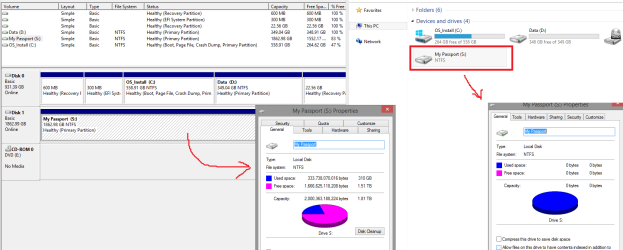
Apparently, the laptop, I am using at this moment, already had this system incorporated since the day of its arrival at my place, e.g. it has around 500gb for OS and the other ~350 gb separated to another drive. My earlier image-attachment has actually captured it. At first I did wonder why would it appear this way, but at the same time I knew there was a good reason for this (and you mentioned it just now).

In fact, the D drive from an earlier picture, hasn't been used much at all. It probably saw only up to 8 small files in its whole time. It's practically fresh, and should I need to move from C drive because of bad sectors, it won't be of a problem to make a use of D drive there afterwards. ;D

You could keep the Linux disk handy, to use for this type of situation, although you aren't using Linux as your normal OS.

LinuxMint still takes up on fair amount of space. DDRescue has already helped me once with the data recovery and if I don't mistake, it is based on Linux, therefore, it would be as useful as LinuxMint. It has pretty much all of what one needs to go by means of accessing inaccessible drive or saving data from a failing one. Its size is 500MB, whilst LinuxMint, takes from 1.8GB to 2GB.

On the other hand, the interface is nicer in LinuxMint, but it's down to everyone's own preference at this point. I will, however, keep a hold of the ISO I downloaded for the time being, as I might find it more useful for other purposes or activities. If it wasn't for your suggestion to try it, I wouldn't have it seen, at least, not in near future, but as such did happen, I experienced something new for myself ;D Thanks for this.


...Internal HDD are more reliable than portables, so my suggestion is to buy and install a small SDD (128G) for Windows and programs and use the actual drive for your data and use the external as a backup.

I agree about reliability of those types.
Your suggestion very reasonable and sounding to me.
Thanks!


------

Later, I will be investigating the problem with external drive's disconnection issue.
If I remember it right, I did come across one interesting entry in Event Viewer Logs.
I will update this thread should I find something new or relevant to problems I had described earlier (e.g. disconnecting/ejecting device not being successful upon first try - and why, or why it would not connect the device and recognise it from the first try).
 

My Computer

Computer type
PC/Desktop
OS
Windows 8.1 x64
With a 2TB drive, I would suggest dividing it into two partitions:
1) The Windows partition would be 200GB. This would provide plenty of space for everything that Windows will ever need.
2) The remaining space would be the 2nd partition. This would give you approx. 1.8TB of space for data.

By dividing the drive like this, backups will be simple; and if you ever need to reinstall Windows, your data partition will not be affected in any way, only your Windows partition.

I wouldn't worry about saving parts of the drive for future use. Windows will adequately manage bad sectors as they arise. Unless the drive is bad, you won't get very many bad sectors, so if you do what you have suggested, you will just be putting a lot of unneeded work on your plate.

Linux isn't going to take up any space on your hard drive, if you run it from the DVD, or if you run it from a flash drive. In fact, if you run it from a flash drive, you can configure it as you like, and it will remember what you have done. This is a big advantage of running Linux from a flash drive rather than from a DVD.
 

My Computer

Computer type
PC/Desktop
Computer Manufacturer/Model Number
Dell
OS
Linux Mint 18.2 xfce 64-bit (VMWare host) / Windows 8.1 Pro 32-bit (VMWare guest)
CPU
Haswell
Memory
4 GB
Monitor(s) Displays
Acer 23"
Screen Resolution
1920 x 1080
Hard Drives
Two hard drives, 1TB each: One for Linux, one for my data.
Keyboard
IBM Model M
Antivirus
Sophos (Linux), Trend Micro (Windows)
Browser
Firefox, Opera
Other Info
I use Samba to share my data drive with the other computers at my house and with my guest session in VMWare Workstation Player.
Back
Top