Solved Windows could not complete the installation

johnboy55

New member
Local time
7:59 PM
Messages
9
Hi all, I realise this situation is of my own making, but here goes. I was having issues with my emachines laptop, (i.e. it kept shutting itself down) so I thought that a factory reset may resolve things. It was after this that I realised I would need an installation disc (which I cannot find anywhere) I now get a message when switching on, "Windows could not complete the installation. To install windows on this computer, restart the installation" Yes, you all know that this is a vicious cycle. Please can anyone help?
 

My Computer

Computer type
Laptop
Computer Manufacturer/Model Number
emachines E732Z
OS
windows 7 32
Hi John,

Factory reset does NOT require an installation disc, it uses the built in recovery partition.

can get you a link, for a 32bit version, unless you want 64bit, how much RAM is installed


Roy .
 

My Computer

Computer type
PC/Desktop
Computer Manufacturer/Model Number
medionl/Aspire 6930G/acer x55a
OS
W7 home premium 32bit/W7HP 64bit/w10 tp insider ring
CPU
E5300 dual core
Motherboard
medion MS7366
Memory
3gb
Graphics Card(s)
Nvidia Geforce 7100 Nforce 630i
Monitor(s) Displays
avixc
Internet Speed
n (isp resticted to 72)
Antivirus
mse/pands
Browser
palemoon
Other Info
Belkin Fd7050 n USB using Railink RT2870 drivers, more upto date
Hi Roy, thanks for your reply. I'm not even sure what I did. I thought I was doing a factory reset, but now I'm not so sure. I can't get any further than the displayed message other than to enter the bios, even then I'm not sure what to do. It says 3gb of DDR memory
 

My Computer

Computer type
Laptop
Computer Manufacturer/Model Number
emachines E732Z
OS
windows 7 32
Hi John,

please go to your Bios - change the boot order, depending on how your going to install
(either USB or CD/DVD as the first choice)
REBOOT for changes to take place.

Please download this tool, for USB install, min size 4GB
Windows USB/DVD Download Tool - Microsoft Store

place this on your desktop and the W7 download file, link below
https://software-download.microsoft.com/db/Win7_HomePrem_SP1_English_COEM_x32.iso?t=e2b9c8ae-8284-4e17-926d-6efde4c0e186&e=1509892843&h=622a1145faede33857cd5093c98d3bc9

ITS ONLY VALID FOR 24HRS

Either burn the file to a DVD or run the tool and import the file.

now either repair or clean install
(repair will save your personal data)
Repair Install - Windows 7 Help Forums

Clean Install Windows 7 - Windows 7 Help Forums


Roy
 

My Computer

Computer type
PC/Desktop
Computer Manufacturer/Model Number
medionl/Aspire 6930G/acer x55a
OS
W7 home premium 32bit/W7HP 64bit/w10 tp insider ring
CPU
E5300 dual core
Motherboard
medion MS7366
Memory
3gb
Graphics Card(s)
Nvidia Geforce 7100 Nforce 630i
Monitor(s) Displays
avixc
Internet Speed
n (isp resticted to 72)
Antivirus
mse/pands
Browser
palemoon
Other Info
Belkin Fd7050 n USB using Railink RT2870 drivers, more upto date
Thank you so much again Roy. I'll do this in the next couple of hours and let you know how it went. :)
 

My Computer

Computer type
Laptop
Computer Manufacturer/Model Number
emachines E732Z
OS
windows 7 32
I may be doing something wrong, but I downloaded the links using a different laptop, copied them to a flash drive, chose usb HDD in the bios and tried to boot up. I have a message on screen saying "Windows could not complete the installation. To install Windows on this computer, restart the installation." Sorry to be a nuisance.:o
 

My Computer

Computer type
Laptop
Computer Manufacturer/Model Number
emachines E732Z
OS
windows 7 32
Hi John,

please go back to Bios

RESET TO DEFAULT values

reboot

Back to Bios
reset to USB as first choice
REBOOT
try install again
(which did you opt for clean or repair?)

Roy
 

My Computer

Computer type
PC/Desktop
Computer Manufacturer/Model Number
medionl/Aspire 6930G/acer x55a
OS
W7 home premium 32bit/W7HP 64bit/w10 tp insider ring
CPU
E5300 dual core
Motherboard
medion MS7366
Memory
3gb
Graphics Card(s)
Nvidia Geforce 7100 Nforce 630i
Monitor(s) Displays
avixc
Internet Speed
n (isp resticted to 72)
Antivirus
mse/pands
Browser
palemoon
Other Info
Belkin Fd7050 n USB using Railink RT2870 drivers, more upto date
Hi again, I don't get as far as an repair or clean option. When I switch the laptop on I F2 into the bios then I tried USB HDD as 1st option. Then F10 to save. The laptop then restarts itself and gets as far as "setup is starting services" That is when the windows could not complete message appears. When I click ok it starts the cycle again.
The other scenario is if the flash drive is plugged before start, I get a "Missing operating system" message in the top left corner.
 

My Computer

Computer type
Laptop
Computer Manufacturer/Model Number
emachines E732Z
OS
windows 7 32
Make sure your flash drive is properly prepared.

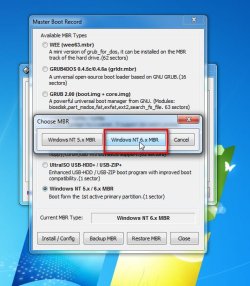
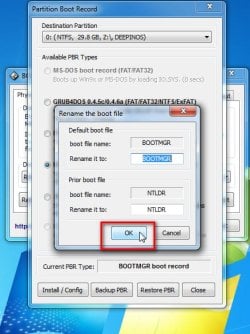
Use bootice to install NT6 MBR and PBR to the flash drive.

View attachment BootIce.zip
 

My Computers

System One System Two

  • Computer type
    PC/Desktop
    OS
    7 X64
    CPU
    i5 8400
    Motherboard
    gigabyte b365m ds3h
    Memory
    2x8gb 3200mhz
    Hard Drives
    various
    PSU
    pure power 11 400w cm
    Case
    Coolermaster
    Cooling
    cryorig m9i
  • Computer type
    PC/Desktop
    OS
    7x64
    CPU
    g5400
    Motherboard
    ga b365m ds3h
    Memory
    8gb ddr4 2400
    PSU
    xfx pro 450w
ha ha, I thank you for your reply but I think I should let you know if you haven't already realised, I'm a proper dunce when it comes to this stuff. But I'll give it a try. Thanks again
 

My Computer

Computer type
Laptop
Computer Manufacturer/Model Number
emachines E732Z
OS
windows 7 32
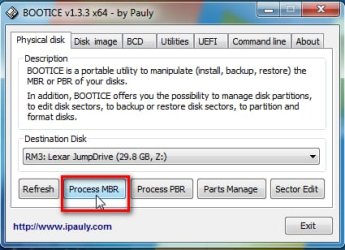
Install NT6 MBR:

Make sure to select your usb stick in the "Destination Disk" dropdown


bootice1.jpg

bootice2.jpg

bootice3.jpg
 

My Computers

System One System Two

  • Computer type
    PC/Desktop
    OS
    7 X64
    CPU
    i5 8400
    Motherboard
    gigabyte b365m ds3h
    Memory
    2x8gb 3200mhz
    Hard Drives
    various
    PSU
    pure power 11 400w cm
    Case
    Coolermaster
    Cooling
    cryorig m9i
  • Computer type
    PC/Desktop
    OS
    7x64
    CPU
    g5400
    Motherboard
    ga b365m ds3h
    Memory
    8gb ddr4 2400
    PSU
    xfx pro 450w
Install NT6 PBR:

bootice4.jpg

bootice5.jpg

bootice6.jpg
 

My Computers

System One System Two

  • Computer type
    PC/Desktop
    OS
    7 X64
    CPU
    i5 8400
    Motherboard
    gigabyte b365m ds3h
    Memory
    2x8gb 3200mhz
    Hard Drives
    various
    PSU
    pure power 11 400w cm
    Case
    Coolermaster
    Cooling
    cryorig m9i
  • Computer type
    PC/Desktop
    OS
    7x64
    CPU
    g5400
    Motherboard
    ga b365m ds3h
    Memory
    8gb ddr4 2400
    PSU
    xfx pro 450w
Hi SIW2

looks like its stuck at the repair option.

If once its shutdown and Bios is set to boot via USB.
Inserting the USB then turning the comp on it SHOULD boot from the USB

Roy
 

My Computer

Computer type
PC/Desktop
Computer Manufacturer/Model Number
medionl/Aspire 6930G/acer x55a
OS
W7 home premium 32bit/W7HP 64bit/w10 tp insider ring
CPU
E5300 dual core
Motherboard
medion MS7366
Memory
3gb
Graphics Card(s)
Nvidia Geforce 7100 Nforce 630i
Monitor(s) Displays
avixc
Internet Speed
n (isp resticted to 72)
Antivirus
mse/pands
Browser
palemoon
Other Info
Belkin Fd7050 n USB using Railink RT2870 drivers, more upto date
Many thanks. It may be tomorrow when I get to it. I have to go out for a while. :)
 

My Computer

Computer type
Laptop
Computer Manufacturer/Model Number
emachines E732Z
OS
windows 7 32
if the flash drive is plugged before start, I get a "Missing operating system" message in the top left corner.
Johnnyboy55

Sounds like defective mbr on the flash drive. Maybe the partition on the flash isn't marked active.

I suggest you do that as well.

Select "Parts Manage".

Highlight your usb drive by clicking on it ( it will only show one partition on that drive).

Click "Activate"
 

My Computers

System One System Two

  • Computer type
    PC/Desktop
    OS
    7 X64
    CPU
    i5 8400
    Motherboard
    gigabyte b365m ds3h
    Memory
    2x8gb 3200mhz
    Hard Drives
    various
    PSU
    pure power 11 400w cm
    Case
    Coolermaster
    Cooling
    cryorig m9i
  • Computer type
    PC/Desktop
    OS
    7x64
    CPU
    g5400
    Motherboard
    ga b365m ds3h
    Memory
    8gb ddr4 2400
    PSU
    xfx pro 450w
I really appreciate all the help. Thanks again.
 

My Computer

Computer type
Laptop
Computer Manufacturer/Model Number
emachines E732Z
OS
windows 7 32
Problem solved! Many, many thanks to Roy (Torchwood) & SIW2. I couldn't have done it without you! :)
 

My Computer

Computer type
Laptop
Computer Manufacturer/Model Number
emachines E732Z
OS
windows 7 32
Back
Top