Windows could not connect to SSID, general slow connectivity

redhelwar

New member
Local time
4:39 AM
Messages
7
Just bought a new ibuypower pc. Worked for a week or so. Over the past few days the crap has been hitting the fan. It started off hat when I was downloading something either from steam or the internet in general it would throttle the rest of my connection speed down to 50kbps (it also slowed my chrome browsing speed down, chopped up my voice over Teamspeak, and skyrocketed my latency on any game i was in the process ofplaying) and then it would show hat littleorange dot onthe connection monitor on the taskbar and give me the error windows was unable to connect to SSID. At hat stage I could restart a couple times and switch my Belkin wireless usb adaptor around a couple slots and it would get back to working. What's happening now is I get no connectiion on my network even Hough it says on the icon that I have full bars anni get he littl3 yellow triangle next to it. Clicking the little troubleshoot option resets my adapter goes to full bars normal and then gets he triangle and I cannot connect to anything.

overthe course this, I have tried
Reinstalling my adapter drivers
System restoring to a week ago
Reinstalling windows
Getting a new wirelessadaptor
Power cycling my pc and router
All usb ports on my pc
Checking in bios for 3.0 usb port enable
Turning off windows auto update
Connecting another network

Without result. The only thing I think would work ks if I hooked up an Ethernet cable from here to he router which would probably need be around 200ft and I would likely avoid they problem as best ican.

Error message whentrykng to browse on chrome is url cannot be found because the dns lookup failed if that means anything
Sorry for bad grammars typing from android
 

My Computer My Computer

At a glance

win7
OS
win7
Welcome to Seven Forums,

A Xirrus capture might be worth reviewing. Download, install and run Xirrus Wi-Fi Inspector so that we can see if there's any signal issue or interference.
To run Xirrus Wi-Fi Inspector, double click the Xirrus icon on your Desktop, you may use the Windows 7 snipping tool to crop or Paint by tapping the Print screen key on your keyboard, open up Paint (Click on Start>All Programs>Accessories>Paint) then choose Edit from the Menu and select Paste, then save it and please attach the file on your next post.
 

My Computer My Computer

At a glance

Win7 & Win8 64bitIntel i5
Computer Manufacturer/Model Number
Lenovo Desktop/Samsung Laptop
OS
Win7 & Win8 64bit
CPU
Intel i5
Internet Speed
Charter-20 Mbps
Antivirus
Avast
Browser
FF, IE9 and Chrome
It's connected now, i switched it to a USB 3.0 port but i'm still getting terrible download/upload speeds and I believe something is throttling it (It says I have 5 bars in the taskbar icon)...

Here is my speedtest.net result right now

http://www.speedtest.net/result/2439990224.png

and here is xirrus
http://i.imgur.com/WjYXu.png

You can see in the background that my Planetside 2 is downloading at around 50kbs. I'm paying for 25/50 from Verizon Fios. :\


Thank you for your time
 

My Computer My Computer

At a glance

win7
OS
win7
Hello? Still having this problem, I am getting extremely slow up/down/connection speed in general but the icon says 5 bars and the router is right next to it. As soon as I try any steam downloads it just slows down to 30-50kb/s and then disconnects.
 

My Computer My Computer

At a glance

win7
OS
win7
I apologize for the long delay......

It might help changing your security to WPA2 with AES encryption. If there are other wireless devices and Users that are connected to your network inform them about the changes.

Updating your router's firmware to the latest might also help.
 

My Computer My Computer

At a glance

Win7 & Win8 64bitIntel i5
Computer Manufacturer/Model Number
Lenovo Desktop/Samsung Laptop
OS
Win7 & Win8 64bit
CPU
Intel i5
Internet Speed
Charter-20 Mbps
Antivirus
Avast
Browser
FF, IE9 and Chrome
Just did both, still says connected but can't get on browser or steam or anything.. troubleshooting says nothing iis wrong
 

My Computer My Computer

At a glance

win7
OS
win7
I now have my router directly plugged into my pc and it says I am connected but still nothing please help
 

My Computer My Computer

At a glance

win7
OS
win7
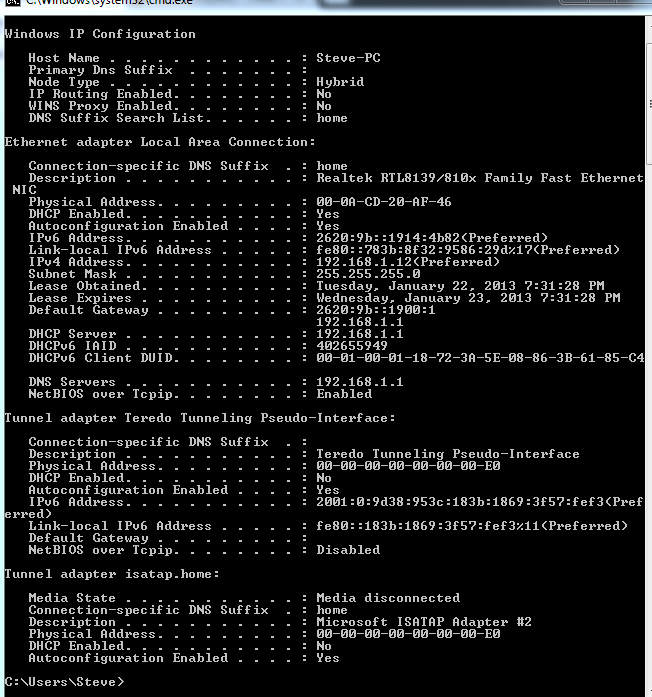
Can you please post an ipconfig /all output for review?

Also, what type of Anti-Virus or Security program are you using?
 

My Computer My Computer

At a glance

Win7 & Win8 64bitIntel i5
Computer Manufacturer/Model Number
Lenovo Desktop/Samsung Laptop
OS
Win7 & Win8 64bit
CPU
Intel i5
Internet Speed
Charter-20 Mbps
Antivirus
Avast
Browser
FF, IE9 and Chrome
3a9866192b6190efa829792fab2eb3d4.png


ESET NOD32 with Comodo free firewall
 

My Computer My Computer

At a glance

win7
OS
win7
Thanks for the output provided. I do not see any output for your wireless adapter.

Can you check your browser setting if it has proxy setting, remove if found?
How to Disable Proxy Settings | eHow.com

Restart your computer, continue tapping F8 and select Safe Mode with Networking, see if you can replicate the issue here.

If it's still a No-Go, disable you Comodo Firewall or perhaps uninstall it using this Tutorial.

Test your wired and wireless connection after then another update will be appreciated.
 

My Computer My Computer

At a glance

Win7 & Win8 64bitIntel i5
Computer Manufacturer/Model Number
Lenovo Desktop/Samsung Laptop
OS
Win7 & Win8 64bit
CPU
Intel i5
Internet Speed
Charter-20 Mbps
Antivirus
Avast
Browser
FF, IE9 and Chrome
I system restored back to two weeks ago after uninstalling comodo and trying safe mode with networking.

Works now. Thank you for your help. Will update if any thing else happens
 

My Computer My Computer

At a glance

win7
OS
win7
That's great news, thanks for the update.
 

My Computer My Computer

At a glance

Win7 & Win8 64bitIntel i5
Computer Manufacturer/Model Number
Lenovo Desktop/Samsung Laptop
OS
Win7 & Win8 64bit
CPU
Intel i5
Internet Speed
Charter-20 Mbps
Antivirus
Avast
Browser
FF, IE9 and Chrome
Back
Top