
Solved Windows could not search for new updates Code 800F0900

MikeWillms

New member
Local time
1:30 PM
Messages
4
I have seen many people helped by this site with correcting this problem. I understand the process a bit
but can't locate the needed files. Asking for your assistance with correcting this problem. Requested files are attached. Thanks

View attachment 351026
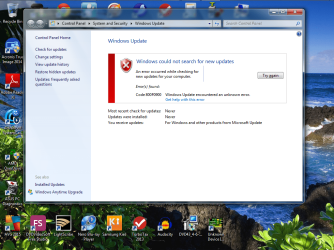
Update Error MikeWillms.png
 

My Computer My Computer

Computer type
PC/Desktop
Computer Manufacturer/Model Number
Custom build
OS
Windows 7 Home Premium 64bit
CPU
AMD Phenom II X4 970 3.50 GHz
Motherboard
M4A89GTD-PRO/USB3
Memory
4 gig DDR3
Graphics Card(s)
All-in-Wonder X1900
Hard Drives
2 500gig Hitachi
Antivirus
AVG
Browser
SeaMonkey

Please follow the Windows Update Posting Instructions and post the requested data

If the file is too large (8MB compressed), remove the older CBSPersist cab files until the final file is below the limit - you can always post them separately after zipping them. (the forum doesn't allow the upload of bare CAB files, for a number of reasons)

Please also post the C:\Windows\windowsudpate.log file


Never mind - found them!
 

My Computer My Computer

Computer type
Laptop
Computer Manufacturer/Model Number
Asus K52F or Lenovo B51-80
OS
Win 7 x64 Home Premium (and x86 VirtualBox VM)/Win10
CPU
i3 370M/i7 6500U
Motherboard
Asus/Lenovo
Memory
8GB - finally :)/8GB
Graphics Card(s)
it's an i3, dude!/dual Intel&nVidia
Sound Card
onboard
Monitor(s) Displays
15.6" built-in
Screen Resolution
1366x768/1920x1080
Hard Drives
750GB Seagate internal
Sundry external drives attached to other computers on the local network
1TB SSD on the Lenovo
PSU
n/a
Internet Speed
as much as I can get - usually on a dongle/phone, so <1MB/s
Antivirus
MSE/Defender
Browser
IE11/12/Edge/Chrome/FF(if I must)
CheckSUR found the following...
Code:
Summary:
Seconds executed: 3086
 Found 5 errors
  CBS MUM Corrupt Total count: 5
Unavailable repair files:
 servicing\packages\WUClient-SelfUpdate-Core-AdmComp~31bf3856ad364e35~amd64~en-US~7.6.7600.256.mum
 servicing\packages\WUClient-SelfUpdate-Core-CoreComp~31bf3856ad364e35~amd64~en-US~7.6.7600.256.mum
 servicing\packages\WUClient-SelfUpdate-Core-CoreComp~31bf3856ad364e35~amd64~~7.6.7600.256.mum
 servicing\packages\WUClient-SelfUpdate-Core-UIComp~31bf3856ad364e35~amd64~en-US~7.6.7600.256.mum
 servicing\packages\WUClient-SelfUpdate-Core-UIComp~31bf3856ad364e35~amd64~~7.6.7600.256.mum
 servicing\packages\WUClient-SelfUpdate-Core-AdmComp~31bf3856ad364e35~amd64~en-US~7.6.7600.256.cat
 servicing\packages\WUClient-SelfUpdate-Core-CoreComp~31bf3856ad364e35~amd64~en-US~7.6.7600.256.cat
 servicing\packages\WUClient-SelfUpdate-Core-CoreComp~31bf3856ad364e35~amd64~~7.6.7600.256.cat
 servicing\packages\WUClient-SelfUpdate-Core-UIComp~31bf3856ad364e35~amd64~en-US~7.6.7600.256.cat
 servicing\packages\WUClient-SelfUpdate-Core-UIComp~31bf3856ad364e35~amd64~~7.6.7600.256.cat

I'll post a fix protocol later.
 

My Computer My Computer

Computer type
Laptop
Computer Manufacturer/Model Number
Asus K52F or Lenovo B51-80
OS
Win 7 x64 Home Premium (and x86 VirtualBox VM)/Win10
CPU
i3 370M/i7 6500U
Motherboard
Asus/Lenovo
Memory
8GB - finally :)/8GB
Graphics Card(s)
it's an i3, dude!/dual Intel&nVidia
Sound Card
onboard
Monitor(s) Displays
15.6" built-in
Screen Resolution
1366x768/1920x1080
Hard Drives
750GB Seagate internal
Sundry external drives attached to other computers on the local network
1TB SSD on the Lenovo
PSU
n/a
Internet Speed
as much as I can get - usually on a dongle/phone, so <1MB/s
Antivirus
MSE/Defender
Browser
IE11/12/Edge/Chrome/FF(if I must)
Thank you for replying to my request for assistance, I will await your instructions.
 

My Computer My Computer

Computer type
PC/Desktop
Computer Manufacturer/Model Number
Custom build
OS
Windows 7 Home Premium 64bit
CPU
AMD Phenom II X4 970 3.50 GHz
Motherboard
M4A89GTD-PRO/USB3
Memory
4 gig DDR3
Graphics Card(s)
All-in-Wonder X1900
Hard Drives
2 500gig Hitachi
Antivirus
AVG
Browser
SeaMonkey
I've uploaded a file - mikaa.zip - to my OneDrive at Noel's OneDrive
Please download and save it.
Right-click on the downloaded file, and select Extract all…
Extract to the default location - which will create a new folder mikaa in the same place.
Open this folder - there should be one folder inside it ( Packages)

Copy the content of the Packages folder to the folder
C:\Windows\Temp\CheckSur\Servicing\Packages

Now run the CheckSUR tool again (it may take a while)

Post the new CheckSUR.log file, and the CheckSUR.persist.log file.
 

My Computer My Computer

Computer type
Laptop
Computer Manufacturer/Model Number
Asus K52F or Lenovo B51-80
OS
Win 7 x64 Home Premium (and x86 VirtualBox VM)/Win10
CPU
i3 370M/i7 6500U
Motherboard
Asus/Lenovo
Memory
8GB - finally :)/8GB
Graphics Card(s)
it's an i3, dude!/dual Intel&nVidia
Sound Card
onboard
Monitor(s) Displays
15.6" built-in
Screen Resolution
1366x768/1920x1080
Hard Drives
750GB Seagate internal
Sundry external drives attached to other computers on the local network
1TB SSD on the Lenovo
PSU
n/a
Internet Speed
as much as I can get - usually on a dongle/phone, so <1MB/s
Antivirus
MSE/Defender
Browser
IE11/12/Edge/Chrome/FF(if I must)
Downloaded the mkaa file,copied the files to Packages folder and ran the CheckSur tool again.
The new CheckSUR.log file, and the CheckSUR.persist.log file are attached.


My Computer My Computer

Computer type
PC/Desktop
Computer Manufacturer/Model Number
Custom build
OS
Windows 7 Home Premium 64bit
CPU
AMD Phenom II X4 970 3.50 GHz
Motherboard
M4A89GTD-PRO/USB3
Memory
4 gig DDR3
Graphics Card(s)
All-in-Wonder X1900
Hard Drives
2 500gig Hitachi
Antivirus
AVG
Browser
SeaMonkey
CheckSUR is happy now, at least!

Do a new Check for Updates - then attempt to install only the oldest found update.
If it goes in OK, try the rest - if not, then post back with the error code, and KB number.
 

My Computer My Computer

Computer type
Laptop
Computer Manufacturer/Model Number
Asus K52F or Lenovo B51-80
OS
Win 7 x64 Home Premium (and x86 VirtualBox VM)/Win10
CPU
i3 370M/i7 6500U
Motherboard
Asus/Lenovo
Memory
8GB - finally :)/8GB
Graphics Card(s)
it's an i3, dude!/dual Intel&nVidia
Sound Card
onboard
Monitor(s) Displays
15.6" built-in
Screen Resolution
1366x768/1920x1080
Hard Drives
750GB Seagate internal
Sundry external drives attached to other computers on the local network
1TB SSD on the Lenovo
PSU
n/a
Internet Speed
as much as I can get - usually on a dongle/phone, so <1MB/s
Antivirus
MSE/Defender
Browser
IE11/12/Edge/Chrome/FF(if I must)
Hello Noel, windows update is executing fine now. There were two updates initially, one installed successfully the other one (KB890830) failed. I retried Windows update and it installed successfully. I have successfully installed a number of updates thereafter. I really appreciate your help with this for I have been working on it for a while now. I saw the process you used to help others with this problem but could not locate the needed files. How do you acquire the needed files if the KB# of the problem update is not listed in the CheckSur log, if you don’t mind me asking? Again, thank you very much!
 

My Computer My Computer

Computer type
PC/Desktop
Computer Manufacturer/Model Number
Custom build
OS
Windows 7 Home Premium 64bit
CPU
AMD Phenom II X4 970 3.50 GHz
Motherboard
M4A89GTD-PRO/USB3
Memory
4 gig DDR3
Graphics Card(s)
All-in-Wonder X1900
Hard Drives
2 500gig Hitachi
Antivirus
AVG
Browser
SeaMonkey
It helps when you have a machine with (almost) every possible version of (almost) every Win 7 update released on it somewhere... Windows Search then becomes really useful! ;)
 

My Computer My Computer

Computer type
Laptop
Computer Manufacturer/Model Number
Asus K52F or Lenovo B51-80
OS
Win 7 x64 Home Premium (and x86 VirtualBox VM)/Win10
CPU
i3 370M/i7 6500U
Motherboard
Asus/Lenovo
Memory
8GB - finally :)/8GB
Graphics Card(s)
it's an i3, dude!/dual Intel&nVidia
Sound Card
onboard
Monitor(s) Displays
15.6" built-in
Screen Resolution
1366x768/1920x1080
Hard Drives
750GB Seagate internal
Sundry external drives attached to other computers on the local network
1TB SSD on the Lenovo
PSU
n/a
Internet Speed
as much as I can get - usually on a dongle/phone, so <1MB/s
Antivirus
MSE/Defender
Browser
IE11/12/Edge/Chrome/FF(if I must)
Back
Top