Windows couldn't play any music files although drivers working

HTHVampire

New member
Local time
8:19 AM
Messages
10
Capture_3.jpg


Capture_2.jpg


Capture.jpg


Hi guys,
here's the problems that i encountered:
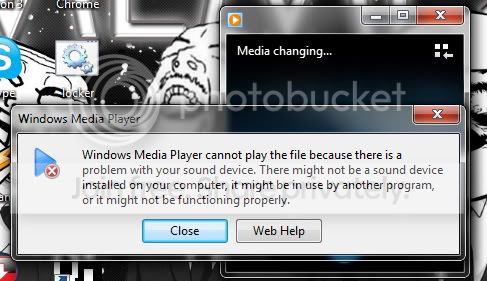
-windows couldn't play any music files...
-video files played without sound
-when adjusting the sound icon at the taskbar, there wasn't any green equalizers there

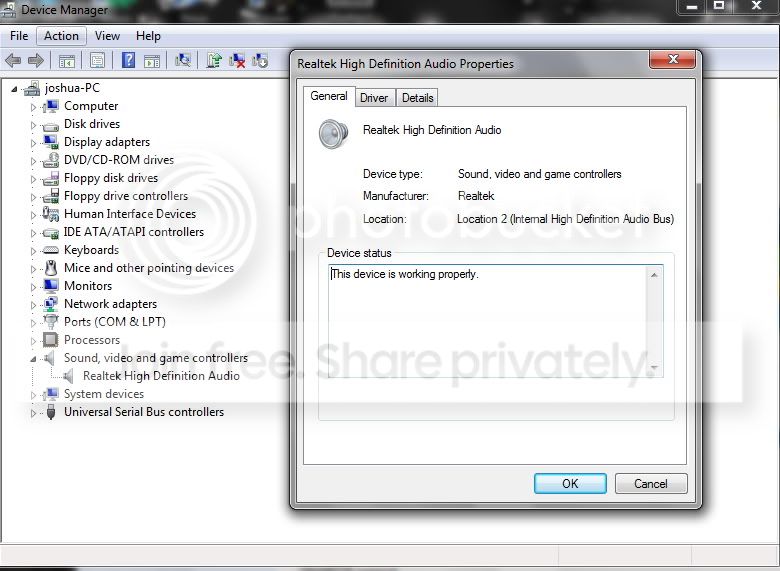
can someone figure out what problem with my audio device? i'm working on a desktop and the speaker works fine...i'm using realtek HD audio as seen in the diagram and i tried uninstall and reinstall the driver but the condition still persist...why is it so?
i appreciate for the guides!!!
 

My Computer My Computer

At a glance

windows 7 ultimate x86
OS
windows 7 ultimate x86
Try uninstalling the RealTek in the Device Manager - Right click on the entry to highlight it and then Left click "uninstall". Do not check the box to uninstall the drivers unless you want to reinstall the drivers. Then restart the PC and when Windows starts it will detect and reinstall the sound. If there was a corruption in windows for the sound this will fix it.

Another potential issue is the driver. Use the driver provided by the PC or motherboard vendor, as non-vendor drivers many times do not work or work correctly.
 

My Computer My Computer

At a glance

Windows 10 64 bitIntel i7 6700K16GB Corsair DominatorIntel CPU Graphics
Computer type
PC/Desktop
Computer Manufacturer/Model Number
My Own Build
OS
Windows 10 64 bit
CPU
Intel i7 6700K
Motherboard
ASUS ROG Maximus VIII Hero
Memory
16GB Corsair Dominator
Graphics Card(s)
Intel CPU Graphics
Sound Card
RealTek
Monitor(s) Displays
27" Dell S2719dgf
Screen Resolution
2560X1440
Hard Drives
1 TB Samsung 850 EVO SSD for Win 10 Pro
500GB Samsung 850 EVO SSD for Win 10 Insider
2 TB drive for backup
PSU
EVGA Supernova 750G2
Case
BeQuiet Silent Base 600
Cooling
Deepcool Captain 120EX
Keyboard
Microsoft Wireless 2000
Mouse
Microsoft wireless
Internet Speed
100 MB/sec (Cable)
Antivirus
Microsoft Defender and Malwarebytes
Browser
Edge/Firefox
Other Info
Cakewalk (Sonar) by BandLab and Studio One 4.1 Pro recording studio software. MOTU 896Mk3 Hybrid recording interface, Frontier Tranzport wireless control unit, Behringer X-Touch Control Surface.
Five USB connected optical drives for CD Audio production using Nero BurningROM
Hi,thanks for your suggestions..i tried to do so using the ori drivers supplied by motherboard but it wont' work...may i know that will the Microsoft UAA drivers cause this issue?since i don't see it in my driver list..
 

My Computer My Computer

At a glance

windows 7 ultimate x86
OS
windows 7 ultimate x86
Those screen shots are good, but they don't start at the begining of the tale.
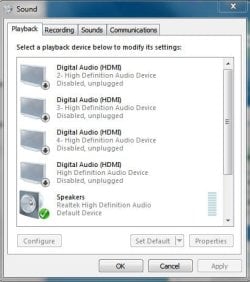
First to check, is the device and speakers you want to use set as default playback device.
Like this ?

Capture.JPG

:geek:
 

My Computer My Computer

At a glance

Windows 7 home premium x64AMD FX-4100 AM3+ 3.6GHz 12MB Black EditionCrsair vengeance 12Gb DDR3 1600MHz CL9Asus GTX 560 1GB
Computer Manufacturer/Model Number
DIY
OS
Windows 7 home premium x64
CPU
AMD FX-4100 AM3+ 3.6GHz 12MB Black Edition
Motherboard
Asus M5A97 Pro
Memory
Crsair vengeance 12Gb DDR3 1600MHz CL9
Graphics Card(s)
Asus GTX 560 1GB
Sound Card
Realtek onboard
Monitor(s) Displays
Hanns G 1680x1050 native
Hard Drives
OCZ 128Gb Petrol ssd
2x500 Gb Samsung
PSU
OCZ StealthXstream II 500W
Internet Speed
8Mb or better
hi thanks, i checked already, same as yours...what else should i check?
 

My Computer My Computer

At a glance

windows 7 ultimate x86
OS
windows 7 ultimate x86
So far so good.
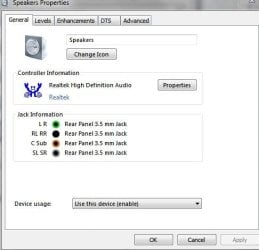
Next highlight that default device and select the properties button and you will get this screen.
Capture.JPG

Check everyting in these tabs looks ok, if you have any doubts about settings, please just post back.
 

My Computer My Computer

At a glance

Windows 7 home premium x64AMD FX-4100 AM3+ 3.6GHz 12MB Black EditionCrsair vengeance 12Gb DDR3 1600MHz CL9Asus GTX 560 1GB
Computer Manufacturer/Model Number
DIY
OS
Windows 7 home premium x64
CPU
AMD FX-4100 AM3+ 3.6GHz 12MB Black Edition
Motherboard
Asus M5A97 Pro
Memory
Crsair vengeance 12Gb DDR3 1600MHz CL9
Graphics Card(s)
Asus GTX 560 1GB
Sound Card
Realtek onboard
Monitor(s) Displays
Hanns G 1680x1050 native
Hard Drives
OCZ 128Gb Petrol ssd
2x500 Gb Samsung
PSU
OCZ StealthXstream II 500W
Internet Speed
8Mb or better
Capture_4.jpg


this is what i got...i just have my speakers plugged in.no mic...seems no problem there..:)
 

My Computer My Computer

At a glance

windows 7 ultimate x86
OS
windows 7 ultimate x86
so, what will be the root of the cause?any helps?
 

My Computer My Computer

At a glance

windows 7 ultimate x86
OS
windows 7 ultimate x86
In my case it's always the sound file itself that would give this error...
 

My Computer My Computer

At a glance

Windows 7 Ultimate x64Intel Core i7 2600k @ 4.5 Ghz6 GB kingston hyperX memory 1600 MhzASUS GTX 570 Direct CUII
Computer Manufacturer/Model Number
Me
OS
Windows 7 Ultimate x64
CPU
Intel Core i7 2600k @ 4.5 Ghz
Motherboard
MSI P67A-GD65
Memory
6 GB kingston hyperX memory 1600 Mhz
Graphics Card(s)
ASUS GTX 570 Direct CUII
Sound Card
On board
Monitor(s) Displays
Digimate 22" 16:10 1680x1050
Hard Drives
Seagate Momentus XT 250 GB
WD 500 GB Green HDD
PSU
Corsair 750W Professional
Case
Antec DF-85
Cooling
Corsair H70
Keyboard
Logitech G510
Mouse
Logitech G700
Internet Speed
D: 40 Mbps - U: 1.5 Mbps
Back
Top