
Windows Defender pops-up its window upon startup, even if disabled

galacticninja

New member
Local time
7:47 AM
Messages
19
When Windows Update prompted to restart upon installation of updates (Nov. 10, 2011), and I restarted my computer, this Windows Defender window now pops-up everytime I start my computer:
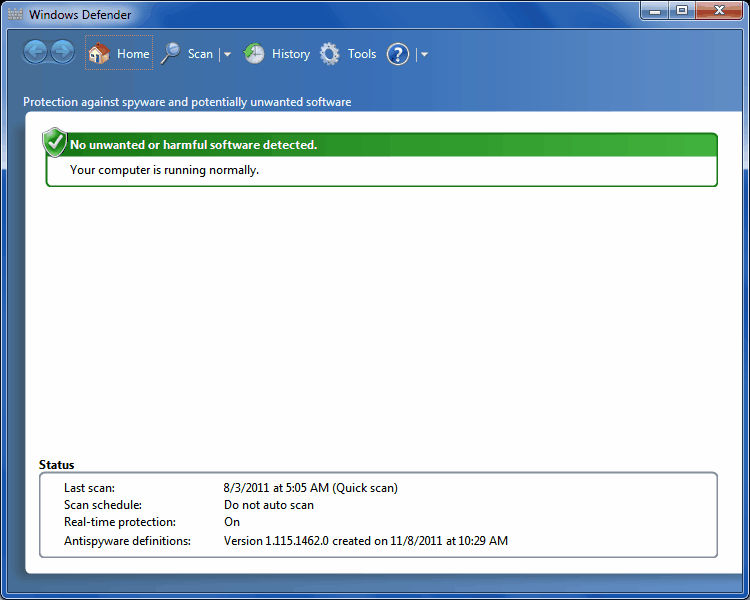
3HB3V.png


I had Windows Defender enabled for months now, when this happened.

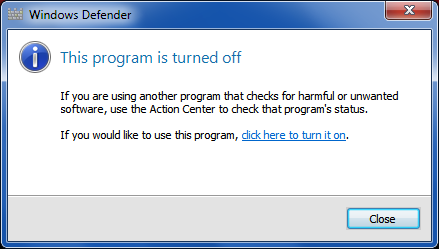
I then tried to turn off Windows Defender, but this window now pops-up instead:
3oSgZ.png


The Windows Defender window still pops-up even if it is disabled. How do I disable the Windows Defender windows from popping-up when I start my computer?

My OS is Windows 7, 64-bit.
 

My Computer My Computer

At a glance

Windows 7 Ultimate, 64-bit4 GB
OS
Windows 7 Ultimate, 64-bit
Memory
4 GB
Did you disable and stop it in "Services"?
 

My Computer My Computer

At a glance

Windows 7 Ultimate 32bit SP1Intel(R) Core(TM)2 Quad CPU @ 2.40GHz, 2400 MHz4 GBATI Radeon HD 2600 Pro
Computer type
PC/Desktop
Computer Manufacturer/Model Number
Bruce ... somewhere in his 40's
OS
Windows 7 Ultimate 32bit SP1
CPU
Intel(R) Core(TM)2 Quad CPU @ 2.40GHz, 2400 MHz
Motherboard
INTEL/D975XBX2
Memory
4 GB
Graphics Card(s)
ATI Radeon HD 2600 Pro
Monitor(s) Displays
Samsung SyncMaster 914v
Screen Resolution
1280 x 1024
Hard Drives
2/500GB each ... ST3500630AS ATA Device.
One is not connected
PSU
Rocketfish 700 W
Case
G.Skill Gigabyte Chassis
Keyboard
Standard PS/2 Keyboard
Mouse
Microsoft PS/2 Mouse
Internet Speed
DSL
Antivirus
Avira Internet Security
Browser
IE 11
Other Info
ATI HDMI Audio
Did you disable and stop it in "Services"?
Will try that, and report here later. I prefer that this be resolved while still keeping Windows Defender enabled, though.
 

My Computer My Computer

At a glance

Windows 7 Ultimate, 64-bit4 GB
OS
Windows 7 Ultimate, 64-bit
Memory
4 GB
Well, I'm confused :confused:
Do you want Windows Defender enabled or disabled? Do you use it?

What Anti-virus and Anti-spyware programs are you running on your machine?
 

My Computer My Computer

At a glance

Windows 7 Ultimate 32bit SP1Intel(R) Core(TM)2 Quad CPU @ 2.40GHz, 2400 MHz4 GBATI Radeon HD 2600 Pro
Computer type
PC/Desktop
Computer Manufacturer/Model Number
Bruce ... somewhere in his 40's
OS
Windows 7 Ultimate 32bit SP1
CPU
Intel(R) Core(TM)2 Quad CPU @ 2.40GHz, 2400 MHz
Motherboard
INTEL/D975XBX2
Memory
4 GB
Graphics Card(s)
ATI Radeon HD 2600 Pro
Monitor(s) Displays
Samsung SyncMaster 914v
Screen Resolution
1280 x 1024
Hard Drives
2/500GB each ... ST3500630AS ATA Device.
One is not connected
PSU
Rocketfish 700 W
Case
G.Skill Gigabyte Chassis
Keyboard
Standard PS/2 Keyboard
Mouse
Microsoft PS/2 Mouse
Internet Speed
DSL
Antivirus
Avira Internet Security
Browser
IE 11
Other Info
ATI HDMI Audio
Did you disable and stop it in "Services"?
Tried this. Disabled Windows Defender in services.msc, restarted the computer, but this issue still persists. This Windows Defender window still pops-up everytime I start Windows:
3oSgZ.png


I then checked services.msc and Windows Defender is still disabled.

Well, I'm confused :confused:
Do you want Windows Defender enabled or disabled? Do you use it?
I want Windows Defender enabled, and as I mentioned in my original post, I was using it for months, prior to this issue. I only want to get rid of the window that it pops-up everytime I start my computer, but not disable Windows Defender (this was not its behavior before).

This issue started happening on Nov. 10, 2011, when Windows Update prompted to restart upon installation of updates, and I restarted my computer.

Also, in case this information helps anyone in troubleshooting this issue, the filename of Windows Defender's window that pops-up (as shown in the Task Manager) is MSASCui.exe.

What Anti-virus and Anti-spyware programs are you running on your machine?
I have used Avira Antivir and avast!, which both ran fine with Windows Defender without any issues. I was using avast! for months with Windows Defender without any issues prior to this one. I also tried disabling avast!, in case it has something to do with this issue, but still to no avail.
 

My Computer My Computer

At a glance

Windows 7 Ultimate, 64-bit4 GB
OS
Windows 7 Ultimate, 64-bit
Memory
4 GB

My Computer My Computer

At a glance

Windows 7 Ultimate 32bit SP1Intel(R) Core(TM)2 Quad CPU @ 2.40GHz, 2400 MHz4 GBATI Radeon HD 2600 Pro
Computer type
PC/Desktop
Computer Manufacturer/Model Number
Bruce ... somewhere in his 40's
OS
Windows 7 Ultimate 32bit SP1
CPU
Intel(R) Core(TM)2 Quad CPU @ 2.40GHz, 2400 MHz
Motherboard
INTEL/D975XBX2
Memory
4 GB
Graphics Card(s)
ATI Radeon HD 2600 Pro
Monitor(s) Displays
Samsung SyncMaster 914v
Screen Resolution
1280 x 1024
Hard Drives
2/500GB each ... ST3500630AS ATA Device.
One is not connected
PSU
Rocketfish 700 W
Case
G.Skill Gigabyte Chassis
Keyboard
Standard PS/2 Keyboard
Mouse
Microsoft PS/2 Mouse
Internet Speed
DSL
Antivirus
Avira Internet Security
Browser
IE 11
Other Info
ATI HDMI Audio
I have fixed this issue. I checked out CCleaner's startup manager. It appears that C:\Program Files\Windows Defender\MSASCui.exe -hide was set to run on startup. (I don't know how or which software added this Startup entry.) I removed that entry with CCleaner's startup manager, and I now have Windows Defender enabled and running on startup but that window doesn't appear on startup anymore.

See if instructions here, help stop the pop-up message Windows Defender doesn't exist in my Vista - Microsoft Answers
Before I did what I mentioned above, I tried the instructions in that link. The 'regsvr32 file name' fix (fix # 3 in Error message when you run Windows Defender: "Error Code 0x800106ba" ) appears to be for Vista only, as some the DLLs there will generate an error message with regsvr32. Fix # 2 will not work as Windows Defender can not be uninstalled in Windows 7. I have already tried Fix # 1 (services.msc fix) before, and it didn't work.

Edit: Windows Defender can not be installed -> uninstalled in Windows 7 ...
 
Last edited:

My Computer My Computer

At a glance

Windows 7 Ultimate, 64-bit4 GB
OS
Windows 7 Ultimate, 64-bit
Memory
4 GB
Thanks for reporting back and I'm glad you solved the problem! :)
 

My Computer My Computer

At a glance

Windows 7 Ultimate 32bit SP1Intel(R) Core(TM)2 Quad CPU @ 2.40GHz, 2400 MHz4 GBATI Radeon HD 2600 Pro
Computer type
PC/Desktop
Computer Manufacturer/Model Number
Bruce ... somewhere in his 40's
OS
Windows 7 Ultimate 32bit SP1
CPU
Intel(R) Core(TM)2 Quad CPU @ 2.40GHz, 2400 MHz
Motherboard
INTEL/D975XBX2
Memory
4 GB
Graphics Card(s)
ATI Radeon HD 2600 Pro
Monitor(s) Displays
Samsung SyncMaster 914v
Screen Resolution
1280 x 1024
Hard Drives
2/500GB each ... ST3500630AS ATA Device.
One is not connected
PSU
Rocketfish 700 W
Case
G.Skill Gigabyte Chassis
Keyboard
Standard PS/2 Keyboard
Mouse
Microsoft PS/2 Mouse
Internet Speed
DSL
Antivirus
Avira Internet Security
Browser
IE 11
Other Info
ATI HDMI Audio
Back
Top