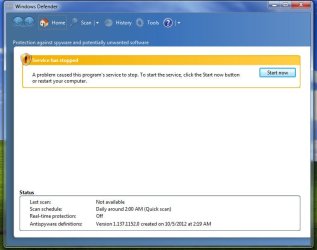
Have you Disabled the Windows Defender service?
Something you did or something on your computer is causing the WD service to be stopped causing that pop up.
If you have Microsoft Security Essentials, you are not suppose to use Defender, its included with Security Essentials.
It should work with other Anti Virus because it is not an anti virus its anti malware, which is a bit different.
My Computer
At a glance
Windows 10, Home Clean InstallIntel Core2 processsor Q8200(2.33Ghz 1333FSB)...6 gbATI Radeon 256MB HD3650
If you don't like it, then click on the start orb, type or copy/paste services.msc in the 'start search box'. Click on the 'icon', then scroll down to Windows Defender. Right click, choose Properties, then click on the dropdown box and set it to "disabled".
You will need to reboot/restart your computer.
My Computer
At a glance
Windows 7 Ultimate 32bit SP1Intel(R) Core(TM)2 Quad CPU @ 2.40GHz, 2400 MHz4 GBATI Radeon HD 2600 Pro
Computer type
PC/Desktop
Computer Manufacturer/Model Number
Bruce ... somewhere in his 40's
OS
Windows 7 Ultimate 32bit SP1
CPU
Intel(R) Core(TM)2 Quad CPU @ 2.40GHz, 2400 MHz
Motherboard
INTEL/D975XBX2
Memory
4 GB
Graphics Card(s)
ATI Radeon HD 2600 Pro
Monitor(s) Displays
Samsung SyncMaster 914v
Screen Resolution
1280 x 1024
Hard Drives
2/500GB each ... ST3500630AS ATA Device.
One is not connected
