Windows defender

iksyaj

New member
Member
Local time
1:40 AM
Messages
47
Hi,
I want to turn on windows defender but I think theres problem and I can't turn it on..
I'm using MSE and Comodo Firewall.
Should I stick to MSE and remove Comodo Firewall?
 

My Computer

Computer Manufacturer/Model Number
Toshiba Satellite L850-A937
OS
Windows 7 Home Premium 64-bit
CPU
Intel(R) Core(TM) i5-3210M CPU @ 2.50Ghz
Memory
6GB DDR3 (800Mhz)
Graphics Card(s)
AMD Radeon HD 7670M
Sound Card
Realtek High Definition Audio
Welcome
Defender is turned off by design. It is part of MSE, two for the price of one (in this case nothing) Use MSE and Malwarebytes, nothing else but a fire wall and common sense will be necessary.
 

My Computer

Computer type
PC/Desktop
Computer Manufacturer/Model Number
Dell XPS 420
OS
Windows 10, Home Clean Install
CPU
Intel Core2 processsor Q8200(2.33Ghz 1333FSB) Quad Core Tech
Motherboard
Dell
Memory
6 gb
Graphics Card(s)
ATI Radeon 256MB HD3650
Sound Card
Intergrated 7.1 Channel Audio
Monitor(s) Displays
Dell SP2009W 20"
Hard Drives
640 GB Serial ATA Hard drive
Cooling
Fan
Keyboard
Dell USB Keyboard
Mouse
Dell Premium Optical USB
Internet Speed
DSL 2.85
richc46, thanks for the fast reply..
I also use malwarebytes.. but I'm not used to it, because it is only for detecting, right? not for preventing? just like scanning.
I want to remove comodo firewall because when it alerts me and asking if to allow or block, I don't know if I should.. :)
 

My Computer

Computer Manufacturer/Model Number
Toshiba Satellite L850-A937
OS
Windows 7 Home Premium 64-bit
CPU
Intel(R) Core(TM) i5-3210M CPU @ 2.50Ghz
Memory
6GB DDR3 (800Mhz)
Graphics Card(s)
AMD Radeon HD 7670M
Sound Card
Realtek High Definition Audio
thanks also for giving me info that MSE makes the windows defender off.
 

My Computer

Computer Manufacturer/Model Number
Toshiba Satellite L850-A937
OS
Windows 7 Home Premium 64-bit
CPU
Intel(R) Core(TM) i5-3210M CPU @ 2.50Ghz
Memory
6GB DDR3 (800Mhz)
Graphics Card(s)
AMD Radeon HD 7670M
Sound Card
Realtek High Definition Audio
The free version of malwarebytes, should be run once a week. If it finds malware it will tell you or actually remove depending on the circumstances and type of malware.
As I said in my opening post, I would remove Comondo and use the Windows Firewall. Each of these can be set to allow certain actions and not to allow others. You can ask us for help on that. If you do not set them up to allow or block they will ask if you will allow.
Trust me, the forum members are here to serve you. Any question about blocking etc just ask. If you get a notice should you allow or block, just block and then ask us. You can always allow it later if you want it.
 

My Computer

Computer type
PC/Desktop
Computer Manufacturer/Model Number
Dell XPS 420
OS
Windows 10, Home Clean Install
CPU
Intel Core2 processsor Q8200(2.33Ghz 1333FSB) Quad Core Tech
Motherboard
Dell
Memory
6 gb
Graphics Card(s)
ATI Radeon 256MB HD3650
Sound Card
Intergrated 7.1 Channel Audio
Monitor(s) Displays
Dell SP2009W 20"
Hard Drives
640 GB Serial ATA Hard drive
Cooling
Fan
Keyboard
Dell USB Keyboard
Mouse
Dell Premium Optical USB
Internet Speed
DSL 2.85
Malwarebytes is a good program to have and should be run on a regular basis. No, it will not prevent infection, but it will detect and remove infections.

MSE has real time protection, it runs in the background and detects any viruses/malware.

Comodo is just doing it's job by letting you know what's accessing the web. You can check the "remember my answer" box and it will no longer alert you to that particular program accessing the web. You may have to adjust your settings.

Comodo has a lot of settings, if you choose to run it I'd suggest you d/l this and read it.

http://personalfirewall.comodo.com/Comodo_Internet_Security_User_Guide.pdf

Also, there are several threads that you can peruse and find some info on Comodo.

http://www.sevenforums.com/security-news/79401-latest-version-comodo-firewall-released.html
 

My Computer

Computer type
PC/Desktop
Computer Manufacturer/Model Number
Dell Hell oh Well
OS
Win 7 32 Home Premium, Win 7 64 Pro, Win 8.1, Win 10
CPU
Intel Core 2 Duo 2.93GHz
Memory
Not much with my ADHD
Graphics Card(s)
ATI Radeon HD 4350
Monitor(s) Displays
24" HDTV/Monitor
Screen Resolution
Blurry after a Scotch or 2
Hard Drives
1 HDD 250 GB, 1 HDD 1 TB, 3 - 1 TB Externals
Case
Don't get on my case...man :D
Cooling
I have an Air Conditioner & Diet Pepsi
Keyboard
Saitek Cyborg
Mouse
10 yr old MS optical mouse that still works
Internet Speed
Never fast enough
Antivirus
Various
Browser
Various
The free version of malwarebytes, should be run once a week. If it finds malware it will tell you or actually remove depending on the circumstances and type of malware.
As I said in my opening post, I would remove Comondo and use the Windows Firewall. Each of these can be set to allow certain actions and not to allow others. You can ask us for help on that. If you do not set them up to allow or block they will ask if you will allow.
Trust me, the forum members are here to serve you. Any question about blocking etc just ask. If you get a notice should you allow or block, just block and then ask us. You can always allow it later if you want it.
Thanks again!:D
Maybe not to serve me but to guide me. :)
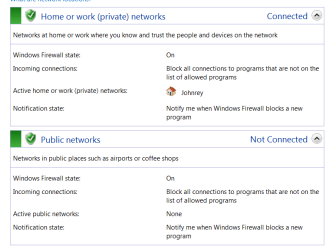
Well I'm interested in that windows firewall. I checked mine to see if its on.
Is this setting ok?
windows firewall.PNG

Malwarebytes is a good program to have and should be run on a regular basis. No, it will not prevent infection, but it will detect and remove infections.

MSE has real time protection, it runs in the background and detects any viruses/malware.

Comodo is just doing it's job by letting you know what's accessing the web. You can check the "remember my answer" box and it will no longer alert you to that particular program accessing the web. You may have to adjust your settings.

Comodo has a lot of settings, if you choose to run it I'd suggest you d/l this and read it.

http://personalfirewall.comodo.com/Comodo_Internet_Security_User_Guide.pdf

Also, there are several threads that you can peruse and find some info on Comodo.

http://www.sevenforums.com/security-news/79401-latest-version-comodo-firewall-released.html
Thanks! :D
Yeah. I've done that, remember my answer.. but I'm not that good classifying if something is being asked, like files in system..
 

My Computer

Computer Manufacturer/Model Number
Toshiba Satellite L850-A937
OS
Windows 7 Home Premium 64-bit
CPU
Intel(R) Core(TM) i5-3210M CPU @ 2.50Ghz
Memory
6GB DDR3 (800Mhz)
Graphics Card(s)
AMD Radeon HD 7670M
Sound Card
Realtek High Definition Audio
Yes, looks like mine. So it should be ok.
 

My Computer

Computer type
PC/Desktop
Computer Manufacturer/Model Number
Dell XPS 420
OS
Windows 10, Home Clean Install
CPU
Intel Core2 processsor Q8200(2.33Ghz 1333FSB) Quad Core Tech
Motherboard
Dell
Memory
6 gb
Graphics Card(s)
ATI Radeon 256MB HD3650
Sound Card
Intergrated 7.1 Channel Audio
Monitor(s) Displays
Dell SP2009W 20"
Hard Drives
640 GB Serial ATA Hard drive
Cooling
Fan
Keyboard
Dell USB Keyboard
Mouse
Dell Premium Optical USB
Internet Speed
DSL 2.85
Ok thanks!
I just want to clarify, MSE & windows firewall = ON; windows defender = OFF; run malwarebytes once a week, right?
I'm gonna uninstall comodo firewall..

btw, I want to go to advance option of windows firewall but it is complicated. :D
 

My Computer

Computer Manufacturer/Model Number
Toshiba Satellite L850-A937
OS
Windows 7 Home Premium 64-bit
CPU
Intel(R) Core(TM) i5-3210M CPU @ 2.50Ghz
Memory
6GB DDR3 (800Mhz)
Graphics Card(s)
AMD Radeon HD 7670M
Sound Card
Realtek High Definition Audio
Ok thanks!
I just want to clarify, MSE & windows firewall = ON; windows defender = OFF; run malwarebytes once a week, right?
I'm gonna uninstall comodo firewall..

btw, I want to go to advance option of windows firewall but it is complicated. :D
MSE on check
firewall on check
defender no choice must be off check
MB once a week check. The acutal timing of scans is subjective. If you just come to the forum once a month would be ok.
 

My Computer

Computer type
PC/Desktop
Computer Manufacturer/Model Number
Dell XPS 420
OS
Windows 10, Home Clean Install
CPU
Intel Core2 processsor Q8200(2.33Ghz 1333FSB) Quad Core Tech
Motherboard
Dell
Memory
6 gb
Graphics Card(s)
ATI Radeon 256MB HD3650
Sound Card
Intergrated 7.1 Channel Audio
Monitor(s) Displays
Dell SP2009W 20"
Hard Drives
640 GB Serial ATA Hard drive
Cooling
Fan
Keyboard
Dell USB Keyboard
Mouse
Dell Premium Optical USB
Internet Speed
DSL 2.85
thanks!
done uninstalling comodo internet security. :)
 

My Computer

Computer Manufacturer/Model Number
Toshiba Satellite L850-A937
OS
Windows 7 Home Premium 64-bit
CPU
Intel(R) Core(TM) i5-3210M CPU @ 2.50Ghz
Memory
6GB DDR3 (800Mhz)
Graphics Card(s)
AMD Radeon HD 7670M
Sound Card
Realtek High Definition Audio
Back
Top