Windows Defender

Hi all.

I've never used Windows Defender until it came on this new Windows 7 computer. It never really appears to be doing anything unless I manually open it.

I am of the impression that the program should be running in the system tray but it's not there.

Anyhow, I did a Windows update check and there was an update for definitions for this program. Subsequently, I didn't download the update and then opened up Defender to do the update through the program itself since I was already wondering about it's functional state.

When I checked for a definitions update through the program it returned an error found notification that said "error found: 0x80240016. An unexpected problem occured while checking for updates.For information on installing or troubleshooting ubdates see Help and support."

So basically, I checked the link to help and support and it said that the program is updated through Windows update. That's fine but shouldn't I be able to update the thing through it's own interface? I mean the function is there, in the program but it just returns that error.

I'm still wondering why Windows defender doesn't show up at statup in the tray though. How do I know it's actually doing anything?

For now, I did the definitions update through windows update but I'm still wondering why the program isn't in the tray at startup and whether or not it's actually running real time protection.
 

My Computer

Computer Manufacturer/Model Number
Hewlett-Packard
OS
Windows 7 Home Premium 64bit
Memory
3.00GB
What antivirus are you running? MSE disables defender (because defender's functions are included in MSE). In any case defender runs in the background and normally its icon doesnt appear in the tray.

If you're not running MSE and want to use defender, make sure its box is checked in the MSCONFIG startup tab. Also, open defender, go to Tools-Options and select to Always show the icon in the system tray.

In any case, dont depend too much on defender for your security needs, there are much better products out there both free and paid.
 

My Computer

Computer Manufacturer/Model Number
Too many to describe...
OS
Windows 7 x64 pro/ Windows 7 x86 Pro/ XP SP3 x86
in my opinion and of most of the security systems you use you do not need to run windows defender because of con- flicks what security are you using please? mine is turned off in services.
 

My Computer

Computer Manufacturer/Model Number
packard bell IXTREME M5722
OS
Operating System : Windows 7 Home Premium Edition 6.01.7600 SP1 (x64)
CPU
Processor : Intel Core 2 Quad Q8300 @ 2500 MHz
Motherboard
Mainboard : Packard Bell (Acer EG43M )
Memory
Physical Memory :8GB Corsair4x 2GB 800MHz C5 DDR2
Graphics Card(s)
Video Card : XFX 6700 AMD
Monitor(s) Displays
Maestro 234DL - BenQ V2220 - BenQ VW2420H
Screen Resolution
Current Display :1920x1080p pixels at 60 Hz in HD LED
Hard Drives
Hard Disks : WDC (1000 GB)
Drive C: (Hard Disk) : 428 GB available on 491 GB
Drive D: (Hard Disk) : 426 GB available on 492 GB
SAMSUNG spinpoint HD103SJ 1000.2 GB
(X 2) KINGSTON SSD NOW V 30GB
PSU
XFX ProSeries 550W PSU
Case
PACKARD BELL IXTREME
Cooling
System Blower Current: 150mA Air Flow16CFM ;Akasa 90mm rear
Keyboard
Gigabyte Aivia K8100
Mouse
TRUST-Wireless Laser Mouse - Carbon edition MI-7770C
Internet Speed
TP-LINK > TL-WN951N / AV500 Gigabit Powerline Adapters
Browser
chrome dev
Other Info
EXTRA COOLING>(FAN CONTROLLER) PC Bay Cooler 3 x 40mm fans; Akasa AK-HD-BL Blue hard drive cooler 2 x 40 mm fan 4500 rpm 29.7 dBA
Bios> American Megatrends Inc.
Version : P01-A1
Date : 08/31/2009
I'm using avast! version 6, MBAM free version so it's not running in realtime protection. I have to scan manually. Spywareblaster and msvp hosts file.

I have heard that Windows Defender wasn't that good but since it comes with the os I figgered it must be OK.

After a restart, I noticed that when I opened up Defender that it said that there was a problem and it wasn't running so i had to click the enable button.It's a new computer s i don't get what's up with the thing.

Ity also came with a webroot personal security antivirus with spysweeper but i didn't install it because I don't want it conflicting with avast! and i haven't heard too many great things about it either.

I don't want to use spybot or ad-aware or anything because they arent that good these days and conflict with avast!.

If i must disable Windows defender, what is the best way to do so in a thorough and complete manner?
 

My Computer

Computer Manufacturer/Model Number
Hewlett-Packard
OS
Windows 7 Home Premium 64bit
Memory
3.00GB
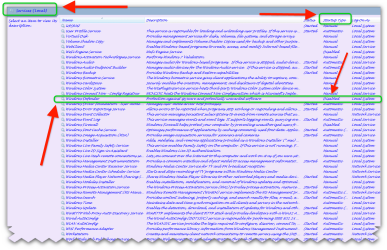
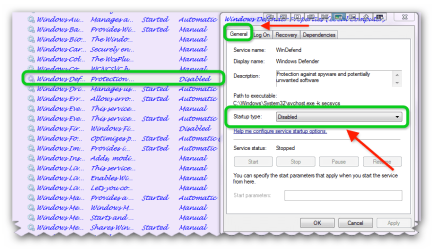
go to services and right click on windows defender and click properties and turn windows defender to DISABLED in the start up type.
 

Attachments

  • brys snap ?04 ?March ?2011 08h16m44s.png
    brys snap ?04 ?March ?2011 08h16m44s.png
    295.8 KB · Views: 41
  • brys snap ?04 ?March ?2011 08h20m20s.png
    brys snap ?04 ?March ?2011 08h20m20s.png
    131.9 KB · Views: 31

My Computer

Computer Manufacturer/Model Number
packard bell IXTREME M5722
OS
Operating System : Windows 7 Home Premium Edition 6.01.7600 SP1 (x64)
CPU
Processor : Intel Core 2 Quad Q8300 @ 2500 MHz
Motherboard
Mainboard : Packard Bell (Acer EG43M )
Memory
Physical Memory :8GB Corsair4x 2GB 800MHz C5 DDR2
Graphics Card(s)
Video Card : XFX 6700 AMD
Monitor(s) Displays
Maestro 234DL - BenQ V2220 - BenQ VW2420H
Screen Resolution
Current Display :1920x1080p pixels at 60 Hz in HD LED
Hard Drives
Hard Disks : WDC (1000 GB)
Drive C: (Hard Disk) : 428 GB available on 491 GB
Drive D: (Hard Disk) : 426 GB available on 492 GB
SAMSUNG spinpoint HD103SJ 1000.2 GB
(X 2) KINGSTON SSD NOW V 30GB
PSU
XFX ProSeries 550W PSU
Case
PACKARD BELL IXTREME
Cooling
System Blower Current: 150mA Air Flow16CFM ;Akasa 90mm rear
Keyboard
Gigabyte Aivia K8100
Mouse
TRUST-Wireless Laser Mouse - Carbon edition MI-7770C
Internet Speed
TP-LINK > TL-WN951N / AV500 Gigabit Powerline Adapters
Browser
chrome dev
Other Info
EXTRA COOLING>(FAN CONTROLLER) PC Bay Cooler 3 x 40mm fans; Akasa AK-HD-BL Blue hard drive cooler 2 x 40 mm fan 4500 rpm 29.7 dBA
Bios> American Megatrends Inc.
Version : P01-A1
Date : 08/31/2009
have you windows firewall enabled? because most security use there own have you thought of using Microsoft security essentials this is free and works ok LINK >>> http://www.microsoft.com/security_essentials/ widows defender is not required with this.

About Microsoft Security Essentials

Microsoft Security Essentials provides real-time protection for your home PC that guards against viruses, spyware, and other malicious software.

Microsoft Security Essentials is a free* download from Microsoft that is simple to install, easy to use, and always kept up to date so you can be assured your PC is protected by the latest technology. It’s easy to tell if your PC is secure — when you’re green, you’re good. It’s that simple.

Microsoft Security Essentials runs quietly and efficiently in the background so that you are free to use your Windows-based PC the way you want—without interruptions or long computer wait times.
 

My Computer

Computer Manufacturer/Model Number
packard bell IXTREME M5722
OS
Operating System : Windows 7 Home Premium Edition 6.01.7600 SP1 (x64)
CPU
Processor : Intel Core 2 Quad Q8300 @ 2500 MHz
Motherboard
Mainboard : Packard Bell (Acer EG43M )
Memory
Physical Memory :8GB Corsair4x 2GB 800MHz C5 DDR2
Graphics Card(s)
Video Card : XFX 6700 AMD
Monitor(s) Displays
Maestro 234DL - BenQ V2220 - BenQ VW2420H
Screen Resolution
Current Display :1920x1080p pixels at 60 Hz in HD LED
Hard Drives
Hard Disks : WDC (1000 GB)
Drive C: (Hard Disk) : 428 GB available on 491 GB
Drive D: (Hard Disk) : 426 GB available on 492 GB
SAMSUNG spinpoint HD103SJ 1000.2 GB
(X 2) KINGSTON SSD NOW V 30GB
PSU
XFX ProSeries 550W PSU
Case
PACKARD BELL IXTREME
Cooling
System Blower Current: 150mA Air Flow16CFM ;Akasa 90mm rear
Keyboard
Gigabyte Aivia K8100
Mouse
TRUST-Wireless Laser Mouse - Carbon edition MI-7770C
Internet Speed
TP-LINK > TL-WN951N / AV500 Gigabit Powerline Adapters
Browser
chrome dev
Other Info
EXTRA COOLING>(FAN CONTROLLER) PC Bay Cooler 3 x 40mm fans; Akasa AK-HD-BL Blue hard drive cooler 2 x 40 mm fan 4500 rpm 29.7 dBA
Bios> American Megatrends Inc.
Version : P01-A1
Date : 08/31/2009
go to services and right click on windows defender and click properties and turn windows defender to DISABLED in the start up type.

Yes, I did figure that out. I disabled Defender through the administator option in the user interface and then disabled it through services.

This Windows 7 really isn't much different than XP, i'm noticing.

Thanks.
 

My Computer

Computer Manufacturer/Model Number
Hewlett-Packard
OS
Windows 7 Home Premium 64bit
Memory
3.00GB
go to services and right click on windows defender and click properties and turn windows defender to DISABLED in the start up type.

Yes, I did figure that out. I disabled Defender through the administator option in the user interface and then disabled it through services.

This Windows 7 really isn't much different than XP, i'm noticing.

Thanks.

no problem hope you stay safe with what you choose to protect your system :)
 

My Computer

Computer Manufacturer/Model Number
packard bell IXTREME M5722
OS
Operating System : Windows 7 Home Premium Edition 6.01.7600 SP1 (x64)
CPU
Processor : Intel Core 2 Quad Q8300 @ 2500 MHz
Motherboard
Mainboard : Packard Bell (Acer EG43M )
Memory
Physical Memory :8GB Corsair4x 2GB 800MHz C5 DDR2
Graphics Card(s)
Video Card : XFX 6700 AMD
Monitor(s) Displays
Maestro 234DL - BenQ V2220 - BenQ VW2420H
Screen Resolution
Current Display :1920x1080p pixels at 60 Hz in HD LED
Hard Drives
Hard Disks : WDC (1000 GB)
Drive C: (Hard Disk) : 428 GB available on 491 GB
Drive D: (Hard Disk) : 426 GB available on 492 GB
SAMSUNG spinpoint HD103SJ 1000.2 GB
(X 2) KINGSTON SSD NOW V 30GB
PSU
XFX ProSeries 550W PSU
Case
PACKARD BELL IXTREME
Cooling
System Blower Current: 150mA Air Flow16CFM ;Akasa 90mm rear
Keyboard
Gigabyte Aivia K8100
Mouse
TRUST-Wireless Laser Mouse - Carbon edition MI-7770C
Internet Speed
TP-LINK > TL-WN951N / AV500 Gigabit Powerline Adapters
Browser
chrome dev
Other Info
EXTRA COOLING>(FAN CONTROLLER) PC Bay Cooler 3 x 40mm fans; Akasa AK-HD-BL Blue hard drive cooler 2 x 40 mm fan 4500 rpm 29.7 dBA
Bios> American Megatrends Inc.
Version : P01-A1
Date : 08/31/2009
have you windows firewall enabled? because most security use there own have you thought of using Microsoft security essentials this is free and works ok LINK >>> http://www.microsoft.com/security_essentials/ widows defender is not required with this.

About Microsoft Security Essentials

Microsoft Security Essentials provides real-time protection for your home PC that guards against viruses, spyware, and other malicious software.

Microsoft Security Essentials is a free* download from Microsoft that is simple to install, easy to use, and always kept up to date so you can be assured your PC is protected by the latest technology. It’s easy to tell if your PC is secure — when you’re green, you’re good. It’s that simple.

Microsoft Security Essentials runs quietly and efficiently in the background so that you are free to use your Windows-based PC the way you want—without interruptions or long computer wait times.


Yes, I thought about it but probably won't install that. avast! is a great anti-virus so I don't want anything conflicting with it. The only way that I'll stop using avast! is if they wrap themselves up with Google more than I'm comfortable with.
 

My Computer

Computer Manufacturer/Model Number
Hewlett-Packard
OS
Windows 7 Home Premium 64bit
Memory
3.00GB
Forgot to mention that yes, the firewall is on.Thanks for the help, btw.
 

My Computer

Computer Manufacturer/Model Number
Hewlett-Packard
OS
Windows 7 Home Premium 64bit
Memory
3.00GB
go to services and right click on windows defender and click properties and turn windows defender to DISABLED in the start up type.

Yes, I did figure that out. I disabled Defender through the administator option in the user interface and then disabled it through services.

This Windows 7 really isn't much different than XP, i'm noticing.

Thanks.

no problem hope you stay safe with what you choose to protect your system :)

Installed SUPERAntiSpyware. That seems to be the one that plays nice the best with avast! and MBAM. We shall see.......
 

My Computer

Computer Manufacturer/Model Number
Hewlett-Packard
OS
Windows 7 Home Premium 64bit
Memory
3.00GB
Back
Top