
Windows deletes wrong folder (parent directory)

oerWouter

New member
Local time
10:25 PM
Messages
2
Hi,
I experience this problem in W7 32bit:
Sometimes when I want to delete a folder, Windows doesnt delete the folder I selected, but the PARENT folder, causing a lot of data loss. I coudn't find anything about this issue on the web.

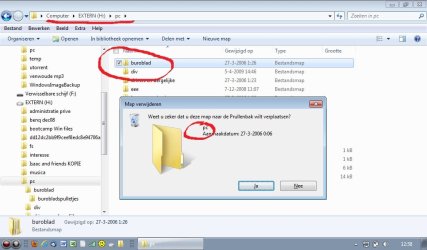
Today I accidentally removed 4 GB of data in this way! I was able to recreate the problem and make a screenshot of it.

You can see I selected a folder called "buroblad" but windows asks me if I want to delete the parent folder called "pc".

Anyone on how this happens, solutions?
 

Attachments
  • Foute map delete W7 2.jpg
    Foute map delete W7 2.jpg
    66.3 KB · Views: 149

My Computer

OS
Windows 7 32 and 64 bit
You are dealing with different conditions:

  • Item that has focus (an area or item that can have an action completed)
  • State of an item (such as selected/not selected)
  • Visual indicator of an item state (selected) but the item does not have focus

These are NOT the same as focus trumps non-focused state. Requested actions (such as DELETE) are applied to an item that has focus not the non-focus item to which you set the state (selected). To complete the action you wanted, the desired item (subfolder with state = selected) must also have focus.

To make it even more interesting, it is actually the Windows Explorer pane that receives the focus and you set the state (select) of the item within the pane on which you can apply an action (such as DELETE). In Windows Explorer the left navigation pane can have only one item selected but the right list pane can have one or more items selected.

In your example, you must have:

1. Selected (clicked on) the subfolder selection check box (in the right list pane)

  • focus is set to the list pane (right pane) and
  • state (selected) is set to your subfolder and
  • the visual indicator (check mark) shows the selected state
2. Then you moved the cursor to and clicked on the parent folder (in the left navigation pane)

  • this changed the focus and state to the parent folder in the navigation pane
  • however, the state of your previous action remained as selected in the list pane (as shown by the check mark)
3. You then requested the DELETE action

  • the requested DELETE action was applied to the item that has focus (the parent folder in the navigation pane), not to the item which you set the selected state (subfolder in list pane) as it no longer had focus
This behavior is by design. You must remain aware of what has focus not just to an item that has a visual indicator of state but does not have focus. To be safe, always click on the item (to set focus) just before applying an action.


Regards,
GEWB
 

My Computer

Computer type
PC/Desktop
Computer Manufacturer/Model Number
(7 different computers booting up to 10 systems)
OS
Linux Mint / XP / Win7 Home, Pro, Ultimate / Win8.1 / Win10
Other Info
Four desktops, two laptops, one notebook and one tablet
Thanks for your extensive answer GEWB. Theoretically your story might be right, but from the userview this is a major fault from microsoft. Users must be able to count on that the explorer works in the same way as it did in XP for these important functions. To change the behaviour so that some users suddenly loose gigabytes of data is the same as changing the function of ctr-C from copying to the shift-delete function. For experienced users like me, after years of doing these kind of actions they happen so fast that it has become automatic; I don't even look at the confirmationwindow.

I am glad for you that you use the explorer in a way that this doesn't bother you. I searched some more and found a topic on this on the microsoft forum:
It is easy to accidentally delete a parent folder in Windows 7 - Microsoft Answers


One extra comment: you wrote that I had clicked on the parent folder before hitting Delete. This is definitely not the case. I still don't know exactly how I did it, but I know that the last item I click on, will be deleted, left or right pane. This is the same in XP. It has to do with going into a folder to check the content and then moving back to the parent folder (probably with Alt-left arrow) and then hitting delete to delete the selected folder.

KR, Wouter
 
Last edited by a moderator:

My Computer

OS
Windows 7 32 and 64 bit
For experienced users like me, after years of doing these kind of actions they happen so fast that it has become automatic; I don't even look at the confirmationwindow.

I'm in full agreement with you (don't even get me started on changes to every version of Office).

I am glad for you that you use the explorer in a way that this doesn't bother you.

Actually it DOES bother me. I, too, learned the hard way about this condition when I did a SHIFT-DELETE, didn't fully read the confirmation dialog, and deleted hundreds of files in error. Took over an hour with a recovery utility to get them back.

One extra comment: you wrote that I had clicked on the parent folder before hitting Delete. This is definitely not the case. I still don't know exactly how I did it, but I know that the last item I click on, will be deleted, left or right pane.

As you had not written the exact sequence of events, I tried to reconstruct a scenario to duplicate your result. I'll play with it some more as my time permits.

Regards,
GEWB
 

My Computer

Computer type
PC/Desktop
Computer Manufacturer/Model Number
(7 different computers booting up to 10 systems)
OS
Linux Mint / XP / Win7 Home, Pro, Ultimate / Win8.1 / Win10
Other Info
Four desktops, two laptops, one notebook and one tablet
I don't get the problem here...? It's deleting the most recently clicked-on item, right? The item that has focus?
 

My Computer

Computer Manufacturer/Model Number
CreepinJesus Mk. IV
OS
Windows 7 Ultimate x64
CPU
Intel Core i5-2500 3.3GHz
Motherboard
Asus P8H67-M PRO
Memory
8GB DDR3 1333MHz
Graphics Card(s)
On-board
Sound Card
On-board
Monitor(s) Displays
Samsung SyncMaster BX2250 22.5" LED-backlit LCD
Screen Resolution
1920 * 1080
Hard Drives
OCZ Agility 3 120GB, SATA-III
PSU
Thermaltake Toughpower Grand TPG-650M
Case
Lian-Li PC-A04
Cooling
Standard fans. They blow.
Keyboard
Logitech K360
Mouse
Generic Logitech from the bargain-bin by the checkout
Internet Speed
Over 9000! ...Mbps.
Other Info
Chocolate digestives are my favourite biscuit.
The bigger problem is that too few people use SHIFT+DEL instead of just deleting the files to the recycling bin. That's your undo. I've done what the OP has done many times, but could always restore from the recycling bin.
 

My Computer

OS
Windows 7 Ultimate x64 SP1
CPU
Intel Core i7-2600
Motherboard
Gigabyte GA-P67A-UD3P-B3
Memory
12 GB Patriot Extreme DDR3-1333
Graphics Card(s)
Nvidia GTX 470
Monitor(s) Displays
Dell UltraSharp 2209WA
Hard Drives
OCZ Agility3 240 GB, WD5001AALS, WD7501AALS
PSU
OCZ ModStream 700W
Case
CoolerMaster HAF 912 Advanced
Cooling
CoolerMaster Hyper 212 Plus
It's really not a flaw in Win 7, highlite the folder you want to delete, right click the folder and do delete, the box comes up asking you if this is the folder you want to delete, click yes and it's in the recyle bin. Mistake made it's there until you empty the bin.

Edit: DeaconFrost is right Shift Delete is permenant Gone, where rt click delete goes to recycle bin and is retrievable.
 

My Computer

Computer Manufacturer/Model Number
Dell XPS 730
OS
Windows 7 Home Premium 64 bit
CPU
Intel Core 2 quad Extreme Q9770 @ 3.2 GHz
Memory
4x2 GB Muskin 1600 MHz ram
Graphics Card(s)
NVidia GTX 250
Sound Card
Soundblaster X-Fi Fatality Champion
Monitor(s) Displays
2 Dell 2007WFP Ultrascans
Screen Resolution
3360 x 1050
Hard Drives
WD Black 1TB sata, 2-WD Black 500 sata, 2-Seagate 500 Go external
PSU
1000 Watt
Cooling
air
Keyboard
MS Natrual Keyboard Pro
Mouse
Logitech Wireless Trackball
Internet Speed
DSL Elite
Check out the picture

Check out the picture.
The "pc" folder isn't the focussed one (it's grey).
The "buroblad" folder is the focussed one (it's blue).

Windows is offering to delete the non-focussed folder!
On his PC, it seems like the "check box" doesn't actually switch focus, even though the colour scheme indicates that it has!

I've tried on my PC and it works as you would expect (i.e. checking the "check box" swaps the focus).


You may need to open the "Command Prompt" and execute:
sfc /scannow
Tutorial:
SFC /SCANNOW Command - System File Checker
 
Last edited:

My Computer

Computer type
PC/Desktop
Computer Manufacturer/Model Number
n/a
OS
W7 Ultimate SP1, LM19.2 MATE, W10 Home 1703, W10 Pro 1703 VM, #All 64 bit
CPU
AMD Phenom II x6 1100T, 3.3 GHz
Motherboard
ASUS M4A88T-M/USB3 (AM3)
Memory
12GB DDR3 1333 G-Skill (4GB x 2), G-Skill (2GB x 2)
Graphics Card(s)
NVIDIA GeForce GTX 660
Sound Card
Realtek?
Monitor(s) Displays
Samsung S23B350
Screen Resolution
1920x1080
Hard Drives
WD Green 2TB (SATA), WD Green 3TB (SATA), WD Blue 4TB (SATA), WD Blue 6TB (SATA)
PSU
Cooler Master
Case
Antec GX300 Tower
Cooling
3x Antec TRICOOL 120mm Fans
Mouse
Wired Optical
Internet Speed
DSL
Antivirus
Avast
Browser
Pale Moon (64 bit)
Other Info
2018-12-27 Upgraded HDDs
2015-12-10 Upgraded case, graphics card, storage
2015-08-15 Upgraded motherboard & RAM
2015-07-15 Upgraded LM17.1 to LM17.2
I am having the same problem as oerWouter, except when Windows confirms my deletion (the box that pops up in the picture that oerWouter posted) the name the window shows is the name of the folder I am intending to delete. The process I am using is open the parent folder, right click on the folder I want to delete, select delete, click OK when Windows confirms. The reason I know that it is deleting the parent folder is because it says "Finding items in [parent folder]" after I hit OK on the window that pops up. I didn't completely follow what the solution was in this forum. Can anyone help me out?
 

My Computer

OS
Windows 7 Home Premium 64 bit
To add to my previous post...

I am also having problems when I drag the folder directly to the recycling bin. It is ridiculous! I outlined my original problem with pictures:

HOVERING OVER FOLDER (my mouse does not show up, but it is hovering over the folder named "backups" which is the folder I am intending to delete)

hovering.jpg


RIGHT-CLICKING ON FOLDER (I right-clicked on backups)

right%20clicking.jpg


CONFIRMING CORRECT FOLDER (It says that I am deleting the folder called "backups"- so far so good...)

confirm.jpg


DELETING PARENT FOLDER!:cry: (but when it starts deleting things, it deletes my whole flashdrive called "boda"! I had to take this picture really quick because I wanted to hit cancel as soon as possible, but I am very sure that it is deleting the flashdrive because the amount of data it is deleting as way more than the folder is.)

deleting.jpg
 
Last edited:

My Computer

OS
Windows 7 Home Premium 64 bit
Your pictures didn't appear

I am also having problems when I drag the folder directly to the recycling bin. It is ridiculous! I outlined my original problem with pictures:

HOVERING OVER FOLDER

hovering.jpg


RIGHT-CLICKING ON FOLDER

right%20clicking.jpg


CONFIRMING CORRECT FOLDER

confirm.jpg


DELETING PARENT FOLDER!:cry:

deleting.jpg

Your pictures didn't appear.
 

My Computer

Computer type
PC/Desktop
Computer Manufacturer/Model Number
n/a
OS
W7 Ultimate SP1, LM19.2 MATE, W10 Home 1703, W10 Pro 1703 VM, #All 64 bit
CPU
AMD Phenom II x6 1100T, 3.3 GHz
Motherboard
ASUS M4A88T-M/USB3 (AM3)
Memory
12GB DDR3 1333 G-Skill (4GB x 2), G-Skill (2GB x 2)
Graphics Card(s)
NVIDIA GeForce GTX 660
Sound Card
Realtek?
Monitor(s) Displays
Samsung S23B350
Screen Resolution
1920x1080
Hard Drives
WD Green 2TB (SATA), WD Green 3TB (SATA), WD Blue 4TB (SATA), WD Blue 6TB (SATA)
PSU
Cooler Master
Case
Antec GX300 Tower
Cooling
3x Antec TRICOOL 120mm Fans
Mouse
Wired Optical
Internet Speed
DSL
Antivirus
Avast
Browser
Pale Moon (64 bit)
Other Info
2018-12-27 Upgraded HDDs
2015-12-10 Upgraded case, graphics card, storage
2015-08-15 Upgraded motherboard & RAM
2015-07-15 Upgraded LM17.1 to LM17.2
I just had this happen to me for the second time. As others have pointed out already, when you're an experienced user you hardly even look at the confirmation dialog, you just hit DEL and then ENTER.

The worst part is that it didn't go to the Recycle Bin. Windows popped up a dialog saying that one of the files in the folder I was deleting had a filename that was too long for the Recycle Bin (that never happened on XP!). Of course I hit ENTER again to confirm, and later noticed that I had in fact deleted the parent directory of the directory I was really trying to delete.

In my case it is actually a case of user fault, poorly designed hardware, and poorly designed user interface. It turns out that what really happened was this:

I selected the folder I wanted to delete in the right pane of Explorer. Then, for some reason, I clicked the parent folder in the left pane. I then went back to the right pane and clicked the (now gray) folder that I wanted to delete. Or, so I thought. Turns out the left touchpad button on my HP ProBook doesn't really react if you hit the button left of center. But because Explorer uses the same color to indicate a "mouse-over" or hover on a previously selected, but unfocused, item as it uses to indicate a selected item, I thought I had actually clicked the folder. At this point it was really the parent folder in the left pane that was focused, because my click hadn't really "stuck" (because of the poorly designed button).

Anyway, this might help someone else trying to troubleshoot why parent directories get deleted.

-UPDATE-
So now it happened again, but I actually read the warning dialog for once, and pressed Cancel. It turns out what I wrote above is incorrect - there actually seems to be an issue with Explorer, because in the left pane the parent folder was selected, and in the right pane the folder I wanted to delete was selected. None of them were gray, they were both selected and both appeared to be focused (i.e. blue background). It wasn't until I hit the down arrow key that I could tell it was the left pane that had focus. I have no idea how it happened, and I can't recreate it. When I try, one of the panes always has it's selected item gray (unfocused) and the other one has it blue (focused). All I did was click the parent folder in the left pane, then click the folder I wanted to delete in the right pane, and hit Delete.
 
Last edited:

My Computer

OS
Windows 7 Professional 32bit
Dodgy buttons are a pain

Dodgy buttons are a pain. :(

I have this problem occasionally with my mouse.
It always makes the click noise, but sometimes Windows doesn't receive an actual click "signal".
 
Last edited:

My Computer

Computer type
PC/Desktop
Computer Manufacturer/Model Number
n/a
OS
W7 Ultimate SP1, LM19.2 MATE, W10 Home 1703, W10 Pro 1703 VM, #All 64 bit
CPU
AMD Phenom II x6 1100T, 3.3 GHz
Motherboard
ASUS M4A88T-M/USB3 (AM3)
Memory
12GB DDR3 1333 G-Skill (4GB x 2), G-Skill (2GB x 2)
Graphics Card(s)
NVIDIA GeForce GTX 660
Sound Card
Realtek?
Monitor(s) Displays
Samsung S23B350
Screen Resolution
1920x1080
Hard Drives
WD Green 2TB (SATA), WD Green 3TB (SATA), WD Blue 4TB (SATA), WD Blue 6TB (SATA)
PSU
Cooler Master
Case
Antec GX300 Tower
Cooling
3x Antec TRICOOL 120mm Fans
Mouse
Wired Optical
Internet Speed
DSL
Antivirus
Avast
Browser
Pale Moon (64 bit)
Other Info
2018-12-27 Upgraded HDDs
2015-12-10 Upgraded case, graphics card, storage
2015-08-15 Upgraded motherboard & RAM
2015-07-15 Upgraded LM17.1 to LM17.2
OMG, it happened to me once, so...I'm not alone...
 

My Computer

Computer type
PC/Desktop
OS
Microsoft Windows 10 Professional / Windows 7 Professional
CPU
Intel i5-3570
Motherboard
Lenovo Mahobay
Memory
16GB DDR3
Graphics Card(s)
AMD Radeon HD 7850 2GB
Sound Card
(1) Realtek HD Audio (2) AMD HD Audio
Monitor(s) Displays
LG LS192WS
Screen Resolution
1440 x 900 @ 32bit color
Hard Drives
(1) SUV300S37A/120G (2) ST3500413AS SATA Disk Device AHCI mode enabled.
PSU
Corsair HX620
Case
Thermaltake V4 Black Edition
Cooling
Cooler Master Hyper 212 + Artic Silver 5 on CPU/GPU
Keyboard
Dell SK-8115
Mouse
Razer Copperhead with MAPED mat (awesome!)
Internet Speed
100 Mbps up/down
Browser
Chrome
Back
Top