Windows desktop password

Jonrob

New member
Local time
4:02 AM
Messages
11
I have Apple iMac running Winwows 7 vial Parallels. My problem is that I cannot access Windows 7 as the access point, Parallels desktop, will no longer accept the password.

I have tried Apple who say it's a Parallels issue where it is suggested I might try this forum. Would appreciate any help. I don't think I set a restore point when loading Windows which I haven't yet used.
 

My Computer

Computer type
PC/Desktop
Computer Manufacturer/Model Number
Apple
OS
Windows 7 Home Premium 32bit
CPU
2.7ghz
Memory
16 gig
Browser
Safari

My Computer

Computer type
Laptop
Computer Manufacturer/Model Number
Employer provided Dell Latitude
OS
W7 Pro SP1 64bit
CPU
i7
Memory
8GB
Graphics Card(s)
Intel HD Graphics
Hard Drives
crappy SSD
Antivirus
Employer mandated Symantec Endpoint Protection
Browser
Pale Moon 64bit, IE11 64bit & Chrome 64bit
Thanks for your reply. Sorry to appear silly but by that do you mean loading my Windows 7 disc whilst looking at the Parallels desktop screen which is only showing the user name and password icons?
Thanks again
 

My Computer

Computer type
PC/Desktop
Computer Manufacturer/Model Number
Apple
OS
Windows 7 Home Premium 32bit
CPU
2.7ghz
Memory
16 gig
Browser
Safari
I never used Parallels so I'm not sure of all of the options and I cannot give you click by click instructions. A quick search of Google and YouTube did not turn up any instructions on how to boot to an ISO. This is the closest thing that I found:
Boot from installation DVD

On other virtual machine software, you can boot to an ISO image file and/or boot to the a physical CD/DVD that is in the optical drive of the host computer. In other words, you can place a CD or DVD into the real/physical optical drive on the host computer, then start the virtual machine (Parallels). You would see the option to boot to that CD or DVD (depending on the boot order settings*).

I know that there are a few members in the forums that use Parallels - let me see if I can find one or two and ask them to stop by your thread.


*the settings that tell the hardware (or in this case, the virtual hardware) which devices to try and boot from first. The boot order might be:
USB
CD\DVD
Hard Disk (for an virtual machine, this hard disk is just a large file on your real hard drive)
 

My Computer

Computer type
Laptop
Computer Manufacturer/Model Number
Employer provided Dell Latitude
OS
W7 Pro SP1 64bit
CPU
i7
Memory
8GB
Graphics Card(s)
Intel HD Graphics
Hard Drives
crappy SSD
Antivirus
Employer mandated Symantec Endpoint Protection
Browser
Pale Moon 64bit, IE11 64bit & Chrome 64bit
Thanks again. I placed Windows 7 disk into drive on Parallels desktop even without gaining access due to password problem.
Whirred a little, nothing else.
 

My Computer

Computer type
PC/Desktop
Computer Manufacturer/Model Number
Apple
OS
Windows 7 Home Premium 32bit
CPU
2.7ghz
Memory
16 gig
Browser
Safari

My Computer

Computer type
Laptop
Computer Manufacturer/Model Number
Employer provided Dell Latitude
OS
W7 Pro SP1 64bit
CPU
i7
Memory
8GB
Graphics Card(s)
Intel HD Graphics
Hard Drives
crappy SSD
Antivirus
Employer mandated Symantec Endpoint Protection
Browser
Pale Moon 64bit, IE11 64bit & Chrome 64bit
Thanks again. I am unable to take screen shot despite your kind assistance. All I have is the blue Windows 7 screen without any icons, just 'user name or password incorrect'. The bar at top of screen is Apple stuff which includes Parallel link to Parallels desktop which gets me as far as the 7 screen. The Apple dock along the lower edge of screen.
 

My Computer

Computer type
PC/Desktop
Computer Manufacturer/Model Number
Apple
OS
Windows 7 Home Premium 32bit
CPU
2.7ghz
Memory
16 gig
Browser
Safari
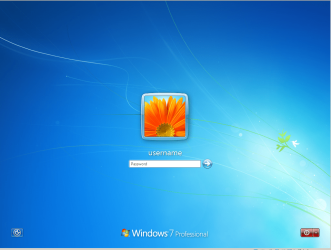
Here is a screenshot of what I see for my W7 Virtual Machine.

restart.png

Do you have a red button in the lower right corner as shown in my screenshot?

If so, click on it to restart the W7 Virtual Machine.
 

My Computer

Computer type
Laptop
Computer Manufacturer/Model Number
Employer provided Dell Latitude
OS
W7 Pro SP1 64bit
CPU
i7
Memory
8GB
Graphics Card(s)
Intel HD Graphics
Hard Drives
crappy SSD
Antivirus
Employer mandated Symantec Endpoint Protection
Browser
Pale Moon 64bit, IE11 64bit & Chrome 64bit

My Computer

Computer type
PC/Desktop
OS
Microsoft Windows 7 Home Premium 64-bit 7601 Multiprocessor Free Service Pack 1
CPU
Intel(R) Core(TM) i7-3770 CPU @ 3.40GHz
Motherboard
ASUSTeK COMPUTER INC. P8H77-M
Memory
8.00 GB
Graphics Card(s)
Intel(R) HD Graphics 4000
Sound Card
On Board
Monitor(s) Displays
Dell 24"
Screen Resolution
1920 x 1080
Hard Drives
(1) INTEL SSDSC2CT180A3 ATA Device (2) ST500DM002-1BD142 ATA Device (3) WDC WD3200AAKS-75L9A0 ATA Device (4) Generic- Compact Flash USB Device (5) Generic- MS/MS-Pro USB Device (6) Generic- SD/MMC USB Device (7) Generic- SM/xD-Picture USB
PSU
500w Corsair
Case
Cooler Master
Cooling
3 Fans
Keyboard
Logitech MK300
Mouse
Logitech WOM
Internet Speed
75Mb
Antivirus
Norton 360
Browser
Firefox, Opera, IE
Thanks a lot, there must be lots of stuff I don't even realise exists.,
 

My Computer

Computer type
PC/Desktop
Computer Manufacturer/Model Number
Apple
OS
Windows 7 Home Premium 32bit
CPU
2.7ghz
Memory
16 gig
Browser
Safari
Hi UsernameIssues
I clicked on the red button -black screen came up saying Shut down & install updates-there were 4 which proceeded. Then Windows 7 click to start appeared. I clicked, applying updates--then flashes through several screens only to return to the password required screen.
Back to square 1.
 

My Computer

Computer type
PC/Desktop
Computer Manufacturer/Model Number
Apple
OS
Windows 7 Home Premium 32bit
CPU
2.7ghz
Memory
16 gig
Browser
Safari
Can you get into the command prompt of Windows 7?
 

My Computer

Computer type
PC/Desktop
OS
Microsoft Windows 7 Home Premium 64-bit 7601 Multiprocessor Free Service Pack 1
CPU
Intel(R) Core(TM) i7-3770 CPU @ 3.40GHz
Motherboard
ASUSTeK COMPUTER INC. P8H77-M
Memory
8.00 GB
Graphics Card(s)
Intel(R) HD Graphics 4000
Sound Card
On Board
Monitor(s) Displays
Dell 24"
Screen Resolution
1920 x 1080
Hard Drives
(1) INTEL SSDSC2CT180A3 ATA Device (2) ST500DM002-1BD142 ATA Device (3) WDC WD3200AAKS-75L9A0 ATA Device (4) Generic- Compact Flash USB Device (5) Generic- MS/MS-Pro USB Device (6) Generic- SD/MMC USB Device (7) Generic- SM/xD-Picture USB
PSU
500w Corsair
Case
Cooler Master
Cooling
3 Fans
Keyboard
Logitech MK300
Mouse
Logitech WOM
Internet Speed
75Mb
Antivirus
Norton 360
Browser
Firefox, Opera, IE
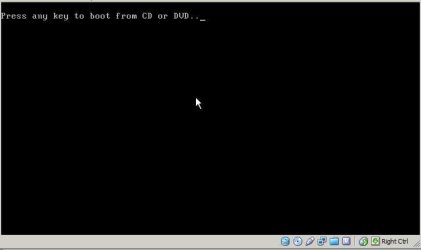
If the W7 installation DVD is in the optical drive of the host computer when the Virtual Machine restarted, then you have a chance at seeing this (press any key when you see this):

(Click on the image to enlarge.)
restart-boot-to-DVD-or-ISO.jpg

If you don't see that, then the boot order does not have the optical drive higher than the virtual hard drive. I just don't know how to tell you how to change that boot order within Parallels.*

*Edit: What version of Parallels do you have? Here is some info for version 4.

This is what I see when I restart my VM and the W7 installation ISO file is in the virtual optical drive.

(You might was to watch this at 480p and in the full screen mode.)


That takes you up to step 2 in this tutorial: http://www.sevenforums.com/tutorials/85657-password-reset.html
 

My Computer

Computer type
Laptop
Computer Manufacturer/Model Number
Employer provided Dell Latitude
OS
W7 Pro SP1 64bit
CPU
i7
Memory
8GB
Graphics Card(s)
Intel HD Graphics
Hard Drives
crappy SSD
Antivirus
Employer mandated Symantec Endpoint Protection
Browser
Pale Moon 64bit, IE11 64bit & Chrome 64bit
Can you get into the command prompt of Windows 7?
Thanks for your reply again.
Unless there is a way without password afraid not.
 

My Computer

Computer type
PC/Desktop
Computer Manufacturer/Model Number
Apple
OS
Windows 7 Home Premium 32bit
CPU
2.7ghz
Memory
16 gig
Browser
Safari
If the W7 installation DVD is in the optical drive of the host computer when the Virtual Machine restarted, then you have a chance at seeing this (press any key when you see this):

(Click on the image to enlarge.)
View attachment 259258

If you don't see that, then the boot order does not have the optical drive higher than the virtual hard drive. I just don't know how to tell you how to change that boot order within Parallels.*

*Edit: What version of Parallels do you have? Here is some info for version 4.

This is what I see when I restart my VM and the W7 installation ISO file is in the virtual optical drive.

(You might was to watch this at 480p and in the full screen mode.)


That takes you up to step 2 in this tutorial: http://www.sevenforums.com/tutorials/85657-password-reset.html


I have Parallels 7
The above did not bring up command prompt for me to click on, or if it did the screen was only up for a fraction of a second.
 

My Computer

Computer type
PC/Desktop
Computer Manufacturer/Model Number
Apple
OS
Windows 7 Home Premium 32bit
CPU
2.7ghz
Memory
16 gig
Browser
Safari
I have Parallels 7
The above did not bring up command prompt for me to click on, or if it did the screen was only up for a fraction of a second.
I'm afraid things are getting beyond me now. I do appreciate everyone's help.
 

My Computer

Computer type
PC/Desktop
Computer Manufacturer/Model Number
Apple
OS
Windows 7 Home Premium 32bit
CPU
2.7ghz
Memory
16 gig
Browser
Safari
I assume that you have been able to use the password in the past? Have you got much set up on the Windows 7 platform? If not how about considering re installing Windows 7? I see you can obtain Win 7 through the shop of Paralleles! Is this how you obtained your copy? I'm thinking that perhaps you have a copy that is time limited!
 

My Computer

Computer type
PC/Desktop
OS
Microsoft Windows 7 Home Premium 64-bit 7601 Multiprocessor Free Service Pack 1
CPU
Intel(R) Core(TM) i7-3770 CPU @ 3.40GHz
Motherboard
ASUSTeK COMPUTER INC. P8H77-M
Memory
8.00 GB
Graphics Card(s)
Intel(R) HD Graphics 4000
Sound Card
On Board
Monitor(s) Displays
Dell 24"
Screen Resolution
1920 x 1080
Hard Drives
(1) INTEL SSDSC2CT180A3 ATA Device (2) ST500DM002-1BD142 ATA Device (3) WDC WD3200AAKS-75L9A0 ATA Device (4) Generic- Compact Flash USB Device (5) Generic- MS/MS-Pro USB Device (6) Generic- SD/MMC USB Device (7) Generic- SM/xD-Picture USB
PSU
500w Corsair
Case
Cooler Master
Cooling
3 Fans
Keyboard
Logitech MK300
Mouse
Logitech WOM
Internet Speed
75Mb
Antivirus
Norton 360
Browser
Firefox, Opera, IE
I have Parallels 7
The above did not bring up command prompt for me to click on, or if it did the screen was only up for a fraction of a second.
I'm afraid things are getting beyond me now. I do appreciate everyone's help.
I understand. It can get to be a bit much.

And for anyone else that finds this thread via search engines:
I did not mean to convey that one should click on the black window shown in the video (and the still screenshot taken from that video). I moved the mouse pointer there just to highlight what i was looking at. If you ever see the info in that still screenshot, press a key to tell the system to boot from the CD or DVD.
 

My Computer

Computer type
Laptop
Computer Manufacturer/Model Number
Employer provided Dell Latitude
OS
W7 Pro SP1 64bit
CPU
i7
Memory
8GB
Graphics Card(s)
Intel HD Graphics
Hard Drives
crappy SSD
Antivirus
Employer mandated Symantec Endpoint Protection
Browser
Pale Moon 64bit, IE11 64bit & Chrome 64bit
Hi Jonrob
As we haven't heard from you for a while have you resolved the issue of the password?
 

My Computer

Computer type
PC/Desktop
OS
Microsoft Windows 7 Home Premium 64-bit 7601 Multiprocessor Free Service Pack 1
CPU
Intel(R) Core(TM) i7-3770 CPU @ 3.40GHz
Motherboard
ASUSTeK COMPUTER INC. P8H77-M
Memory
8.00 GB
Graphics Card(s)
Intel(R) HD Graphics 4000
Sound Card
On Board
Monitor(s) Displays
Dell 24"
Screen Resolution
1920 x 1080
Hard Drives
(1) INTEL SSDSC2CT180A3 ATA Device (2) ST500DM002-1BD142 ATA Device (3) WDC WD3200AAKS-75L9A0 ATA Device (4) Generic- Compact Flash USB Device (5) Generic- MS/MS-Pro USB Device (6) Generic- SD/MMC USB Device (7) Generic- SM/xD-Picture USB
PSU
500w Corsair
Case
Cooler Master
Cooling
3 Fans
Keyboard
Logitech MK300
Mouse
Logitech WOM
Internet Speed
75Mb
Antivirus
Norton 360
Browser
Firefox, Opera, IE
Back
Top