Windows detected a hard disk problem. help!

rossy87

New member
Local time
8:40 AM
Messages
34
Location
London
Have been on my PC for a few hours today and i got a windows message saying 'windows detected a hard disk problem'.

I am in the process of backing up my hard drive now.

Do i need to replace my hard drive straight away or do i have a while to gather funds?

Also this is my hard drive with Windows Vista on.

If i were to change the hard drive, can i go ahead and put the disk image onto the new hard drive and just boot up vista again? Or will vista be lost forever?

Any help will be greatly appreciated.

Many thanks in advance.

Rossy87
 

My Computer

Computer Manufacturer/Model Number
Custom Built
OS
Windows 7 Professional x64
CPU
Intel Pentium D 2.8ghz
Motherboard
MSI Cuba ms-7301
Memory
2gb DDR2 266mhz
Graphics Card(s)
ATI Radeon HD4760
Sound Card
Realtek HD Audio Onboard
Monitor(s) Displays
Samsung 19" Widescreen
Screen Resolution
1600x900
Hard Drives
Seagate 250Gb
Western Digital 320Gb External
Western Digital Caviar 500 GB
PSU
EZcool 700w PSU
Case
Coolermaster Elite 334
Cooling
Coolermaster Hyper TX3
Keyboard
Logitech G11
Mouse
Logitech Wireless Laser
Internet Speed
9.8mbps
Hi Rossy,

You would need to clone Vista to the new HD. The program you used to make the backup image will probably have a clone/disk copy feature.

If you don' have the new hd yet, you can clone it to whatever hd you are currently backing up to, then clone it to the new hd when you get it - takes space, obviously.

After you have done that:
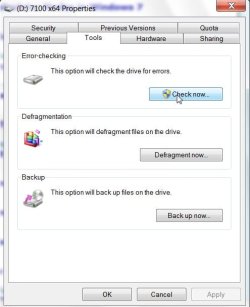
try running checkdisk:

Rt click the drive>Properties>Tools>Check Now>find and fix errors - it will need you to reboot.

Checkdisk2009-05-23_011224.jpg

Also many drive mfrs have a bootable .iso you can d/l free and it will check and attempt to fix hd errors.

Here's one for Seagate/Maxtor :

SeaTools Desktop Usage Instructions | Seagate
 

My Computers

System One System Two

  • Computer type
    PC/Desktop
    OS
    7 X64
    CPU
    i5 8400
    Motherboard
    gigabyte b365m ds3h
    Memory
    2x8gb 3200mhz
    Hard Drives
    various
    PSU
    pure power 11 400w cm
    Case
    Coolermaster
    Cooling
    cryorig m9i
  • Computer type
    PC/Desktop
    OS
    7x64
    CPU
    g5400
    Motherboard
    ga b365m ds3h
    Memory
    8gb ddr4 2400
    PSU
    xfx pro 450w

My Computer

Computer Manufacturer/Model Number
self built
OS
7600.20510 x86
CPU
P4 550 3.4 GHz HT running at 3.5 GHz
Motherboard
MSI PM8M3-V (MS-7211 v1.x) Micro-ATX mainboard
Memory
OCZ 2 GB(2x1GB) DDR400mHz running @ 414 mHz
Graphics Card(s)
HIS Radeon HD 3850 IceQ 3 Turbo HDMI Dual DL-DVI AGP
Sound Card
MOTU Traveler firewire studio interface 192 kHz 24 bit
Monitor(s) Displays
22" widescreen Acer X223W LCD, 17" Compaq P75 CRT
Screen Resolution
1680x1050 and 1280x1024
Hard Drives
SATA I x2 WD, 400 GB and 120 GB, SATA 2 WD Caviar Black 1 TB
PSU
350W generic
Case
Cybertronpc, it glows blue
Cooling
stock cpu fan, Ice-Q 3 gpu and system, many case fans
Keyboard
Logitch Classical Keyboard 200
Mouse
Logitech Mediaplay cordless
Internet Speed
1792/448 kbits/sec
Other Info
SATA II PCI fake RAID adapter, 1 GB Readyboost, original ATI Remote Wonder (even works with WMC perfectly), Logitech Rumblepad 2 game controller x2
Ok. I have got a new hard drive on its way because i would rather replace it. Plus its on the girlfriends credit card so :D.

I have created a back up using the Windows 7 backup utility which has created a file where i can restore all my files from the old hard drive.

Does this mean i can just copy the files over to the new hard drive and go ahead and boot up vista or are there hidden things that i am not taking into consideration?

Again any help is greatly appreciated.

Rossy87.
 

My Computer

Computer Manufacturer/Model Number
Custom Built
OS
Windows 7 Professional x64
CPU
Intel Pentium D 2.8ghz
Motherboard
MSI Cuba ms-7301
Memory
2gb DDR2 266mhz
Graphics Card(s)
ATI Radeon HD4760
Sound Card
Realtek HD Audio Onboard
Monitor(s) Displays
Samsung 19" Widescreen
Screen Resolution
1600x900
Hard Drives
Seagate 250Gb
Western Digital 320Gb External
Western Digital Caviar 500 GB
PSU
EZcool 700w PSU
Case
Coolermaster Elite 334
Cooling
Coolermaster Hyper TX3
Keyboard
Logitech G11
Mouse
Logitech Wireless Laser
Internet Speed
9.8mbps
You can transfer you files to the new hd, but if you want to boot windows, you will either have to install it from the proper install dvd, or clone the existing hd to the new one - just putting the backup image on the new drive won't work.

You need an app. that will clone it for you. What make of hd is your existing and new one?
 

My Computers

System One System Two

  • Computer type
    PC/Desktop
    OS
    7 X64
    CPU
    i5 8400
    Motherboard
    gigabyte b365m ds3h
    Memory
    2x8gb 3200mhz
    Hard Drives
    various
    PSU
    pure power 11 400w cm
    Case
    Coolermaster
    Cooling
    cryorig m9i
  • Computer type
    PC/Desktop
    OS
    7x64
    CPU
    g5400
    Motherboard
    ga b365m ds3h
    Memory
    8gb ddr4 2400
    PSU
    xfx pro 450w
Ok thanks for the quick reply.

My existing hdd is a 200gd Western Digital and the new one on its way is a 500gb Western Digital.

And what sort off apps would clone the hdd for me?

Sorry but this is the first time i have had to do this and i really dont want to loose any data or re-install vista.

Many thanks.
 

My Computer

Computer Manufacturer/Model Number
Custom Built
OS
Windows 7 Professional x64
CPU
Intel Pentium D 2.8ghz
Motherboard
MSI Cuba ms-7301
Memory
2gb DDR2 266mhz
Graphics Card(s)
ATI Radeon HD4760
Sound Card
Realtek HD Audio Onboard
Monitor(s) Displays
Samsung 19" Widescreen
Screen Resolution
1600x900
Hard Drives
Seagate 250Gb
Western Digital 320Gb External
Western Digital Caviar 500 GB
PSU
EZcool 700w PSU
Case
Coolermaster Elite 334
Cooling
Coolermaster Hyper TX3
Keyboard
Logitech G11
Mouse
Logitech Wireless Laser
Internet Speed
9.8mbps

My Computer

Computer Manufacturer/Model Number
Lenovo T60 TYPE 87414FU
OS
Windows 7 Profesional 32-bit (6.1, Build 7600) RTM - TechNet
CPU
Intel(R) Core(TM)2 CPU T7200 @ 2.00GHz (2 CPUs)
Memory
2gb
Graphics Card(s)
ATI Mobility Radeon X1400
Screen Resolution
1680 x 1050 (32 bit) (60Hz)
Mouse
ThinkPad UltraNav Pointing Device
Hard disk problem after Windows 7 install

I have a good hard disk, been working great under Vista Ultimate, now Windows 7 says I have an error. This is not any of my hard drives that I use a lot. So I used CHKDSK - says it's fine. Copied the few files I used off it and did a complete format. Left it empty and Windows 7 still says I have a hard disk problem. I turned off the message, but not sure why it thinks it's bad. I have 3 SATA drives and one EIDE - it's the EIDE one it says I have a problem on. Any ideas? It's now sitting there empty and Windows 7 says it's got a problem. Or is it Windows 7 that has the problem? :D
 

My Computer

OS
Windows 7
I received this warning also, on my 1Tb storage drive (not the drive Win7 is running on).

This drive 'clicks' a lot and I've always been suspicious of it. Having said that, haven't had an issue so far per se (though watching movies off it sometimes 'skipped' as it read/buffered).

I'm thinking I'll just replace it with a 1Tb Spinpoint F3 to be safe..
 

My Computer

OS
Windows 7 Home Premium
CPU
Q9400
Motherboard
Gigabyte G41 mATX
Memory
4gb DDR2
Graphics Card(s)
HD4890
Monitor(s) Displays
Dell 2405
Hard Drives
1 320Gb, 1Tb
PSU
Antec 500W NeoHE
Case
Silverstone SG01
Cooling
Shuriken Scythe
I actually replaced an EIDE drive with the SATA 320 gig that's now giving the error. It's the 2nd device on the string - the 1st - another SATA 320 where the 'c' drive is ok. I also have a 1.5tb drive on a separate channel. I think I'll completely low-level format the drive and see what happens.
 

My Computer

OS
Windows 7
"Windows detect a hard disk problem windows 7", this is what keep popping up after I upgraded to Windows 7 Ultimate. Now, I know that I do not have problem with my Hdisk because it worked fine with Xp and Vista. I addition, other people are having the same problem with Win7 please is there someone who can help me with this annoying pop up.
 

My Computer

OS
Windows 7
Go to Windows Explorer. Right click your drive.

Choose properties and then the tools tab.

Under "error-checking" click check now.


Your system may reboot and will then run the error checking program (checkdisk).

Let it finish. It could take hours.

When it finishes, reboot and see if you still have the problem.
 

My Computer

Computer type
PC/Desktop
Computer Manufacturer/Model Number
Ignatz Special; 4 speed manual gearbox; factory air conditioning; one of one
OS
Windows 7 Home Premium SP1, 64-bit
CPU
Intel Skylake i5-6600K, not overclocked
Motherboard
AsRock Z170M Extreme 4, micro ATX
Memory
8 GB HyperX DDR4-2666 (2 x 4 GB)
Graphics Card(s)
none; graphics are integrated on CPU
Sound Card
onboard: Realtek ALC1150; external: USB Behringer UF0-202
Monitor(s) Displays
Dell S2340M 23 inch IPS
Screen Resolution
1600 x 900
Hard Drives
System: Crucial MX100 series SSD, 128 GB;
Data: Samsung Spinpoint 103SJ, 1 TB;
Backup: WD Caviar Green WD30EZRX-00D8PB0, 3 TB
PSU
Rosewill SilentNight 500 watt fanless, semi-modular
Case
Antec Solo II
Cooling
Noctua NH-U12S; Noctua F12 intake, Noctua S12A exhaust
Keyboard
Microsoft 200 6JH-00001 USB
Mouse
Dell or Microsoft optical wired; USB
Antivirus
Microsoft Security Essentials and Malwarebytes Premium
Browser
Pale Moon
Other Info
All fans PWM; speeds at idle: CPU circa 500 rpm; intake circa 600 rpm; exhaust circa 600 rpm; CPU temps 27 idle and 47 C load in a warm room (27 C/81 F) when running Intel Extreme Tuning Utility stress test.
Windows detected a hard disk problem

Sorry, I should have posted this earlier. I went to Tech Support Forums for help. Go there, join up for free, and see the answers I got. I'm still on Windows 7 and I don't have the error. Here's what I started with and followed the directions. The techie there was of great help.
"The message you are seeing is due to a SMART parameter being out of normal specs. SMART values can indicate some pretty minor problems, or some pretty major problems. SMART analyzes the physical drive and has nothing to do with the windows file system, so chkdsk and formatting will not correct the kind of errors SMART is designed to detect. SMART is designed to give you enough warning to get your data safe. So yes a completely blank disk can have the physical errors that are being reported. Download MHDD or hddscan from HDDGURU: Laptop and Desktop Hard Disk Drives, Tests, Software, Firmware, Tools, Data Recovery, HDD Repair and post the results of the smart test and we'll see what you have." http://www.techsupportforum.com/har...97189-windows-detected-hard-disk-problem.html
You'll be ok.
...Michael
 

My Computer

OS
Windows 7
problems with HDs in Win 7...

Hi,
I have been having problems with my second and third Hard Drives
Since I have windows 7 At first all was well and 2 days ago I started having
wright and read errors and when i booted after a blue screen crash.
At boot win 7 had to repair lost sectors, somme time just viewing filles
in explorer made the OS crash. I finally remouved all the extra drives but the C:
and It did not crash any more.

So I taught that these 2 drives were faulty. Wrong

I google all over to get info and got all kinds of solution like by a new pc to
change the cmos baterie or a mother board problem. All Wrong.

It may be to premature tu say that I have found the problem, I will be shure in a couple of days.

So here is what I did
I went and baught a externat HD 1.5 TB and backed up every thing. I was lucky did not loose any important files.

I disconnected all drives.
And One at a time I Installed Win 7, and tested it with what I was doing to make it crash.

All Drives worked fine solo but when I added a second then I got OS to crash.
I have read so many things that I do not remember where I got this.

It seems that Windows 7 has a problem with drives from other operating systems
you know data protection!

So my last attempt seemed to work.

I connected all my drives. And with The Installation setup of windows 7, I deleted all the partitions. I created new ones on all drives and formated them and installed
the OS on the C: first drive.

tested again 3 drives 2 partition each. Now they do not have any more problems ans Win 7 does not crash any more.

So If any body has an realistic explanation I would like to know?

Now all I have to do is install all my apps again and hope that every thing is ok.

Bye, hope that I can help some other guy.

Thanks, Guy
 

My Computer

Computer Manufacturer/Model Number
asus
OS
Windows 7 Ultimate
CPU
pentium D
Motherboard
p5nd2-sli
Memory
2 GB
Graphics Card(s)
eGForce 7200 GS
Hard Drives
2 seagates (80Gb ,250GB) 1 western digital 160Gb
Sounds like you have SMART checking enabled on your motherboard and Windows is reading an SMART error. Happened to me too.

I downloaded DiskCheckup from PassMark Software - PC Benchmark and Test Software and it showed the SMART error. Rather than take a chance, I backed up the drive, reformatted it and shipped it to the MFG for a replacement.
 

My Computer

Computer Manufacturer/Model Number
Custom Built
OS
Windows 7 Pro 64-bit
CPU
AMD Phenom(tm) II X4 920
Motherboard
GA-MA78G-DS3H
Memory
8 GB DDR2-1033
Graphics Card(s)
ATI Radeon 1650
Sound Card
built-in
Monitor(s) Displays
Asus 19-inch 1680x1050, IBM 19-inch 1280x1024
Hard Drives
WD5000AAJS 500gb Boot
2x Samsung 1.5TB Data drives
Hi,
Thanks dnavarrojr, for the DiskCheckup I like It.
It reports that my 3 drives are Status:OK

Like I said time will tell. It's been 24 houres since I have recreated all partitions and formated with
the windows 7 installation. I have been installing all my applications,all is ok for now.

Before I did this clean install, those 3 drives had benn used with XP, Vista, Ubuntu.
I had upgraded the Vista ultimate to Windows 7 Beta, then Win 7 RC, then Win 7 retail.

Who knows how Win 7 deals with all these upgrades.

The question is: If I had two PCs with Win 7 installed and I decided to move one HD to the other PC.
This new PC hould have now 2 HD, Disk 0, with OS and Disk 1 as second drive.
On that HD would start to have problems write and read problems and eventually crash system.

But If I would just switch the drives they would work just fine.

Any way, I will be testing my new setup. And will report in a few days.

Thanks, Guy
 

My Computer

Computer Manufacturer/Model Number
asus
OS
Windows 7 Ultimate
CPU
pentium D
Motherboard
p5nd2-sli
Memory
2 GB
Graphics Card(s)
eGForce 7200 GS
Hard Drives
2 seagates (80Gb ,250GB) 1 western digital 160Gb
Hi,
Thanks dnavarrojr I think you were wright. I used DiskCheckup to monitor my 3 drives and the
Status:All drives OK - It stayed that was for a long time until I waqs copying 10 Gb of files to my third drive
Then the OS crashed.

DiskCheckup reported at that time thar drive 2 and 3 had failed the tempreture treshold.
Checkdisk fixed the bad writes again at reboot.

Even thought most recommend not to do this I did go in BIOS Setup and disable SMART monitoring.
Since that DiskCheckup has detected the same overheating faults on the 2 drives.
But Windows 7 did not crash.

I guess that I have the same problem you had.

Now, I have comparer the temperatures I find tht my seagates drives run 5 to 10 degres hier than my
Western Digital drives. Same for my 2 new external drives. A 1.5 TB Seagate and a Western Digital 1 TB.
But they do not crash OS.

I will give them a week to see if OS does not crash any more.

Thanks, Guy
 

My Computer

Computer Manufacturer/Model Number
asus
OS
Windows 7 Ultimate
CPU
pentium D
Motherboard
p5nd2-sli
Memory
2 GB
Graphics Card(s)
eGForce 7200 GS
Hard Drives
2 seagates (80Gb ,250GB) 1 western digital 160Gb
Hi,
Update on drives crashing Windows 7.

It did not last a week.

To isolate the problem I remouved the second and third hard drives.
and installed as second drive my new 1 TB western digital that worked fine as an external USB drive.

So I cleaned it up by backing it up to an other external HD.
After a couple of days I was almost shure that now all was ok.

But on the third day I was copying a music folder of 600 MB and it toke 30 mins.
and crashed the OS.

So I deleted all partitions on that drive and reformated. Seems ok now will see in a week.

Hope I got It now, Guy
 

My Computer

Computer Manufacturer/Model Number
asus
OS
Windows 7 Ultimate
CPU
pentium D
Motherboard
p5nd2-sli
Memory
2 GB
Graphics Card(s)
eGForce 7200 GS
Hard Drives
2 seagates (80Gb ,250GB) 1 western digital 160Gb
Sounds like you have SMART checking enabled on your motherboard and Windows is reading an SMART error. Happened to me too.

I downloaded DiskCheckup from PassMark Software - PC Benchmark and Test Software and it showed the SMART error. Rather than take a chance, I backed up the drive, reformatted it and shipped it to the MFG for a replacement.

I have a new 2TB Hitachi Deskstar and it's producing the same error as others are getting - i.e. the "Windows detected a hard disk problem" dialog.

PassMark's DiskCheckup shows a fail for the SPIN RETRY COUNT**. Does anybody know what this means - i.e. is the drive actually faulty?

** HDDscan from HDDGURU: Laptop and Desktop Hard Disk Drives, Tests, Software, Firmware, Tools, Data Recovery, HDD Repair also shows the same fail.
 

My Computer

Computer type
PC/Desktop
Computer Manufacturer/Model Number
N/A
OS
Windows 7 Professional 64-bit SP1
CPU
Intel Core i5 2500K @ 3.30GHz
Motherboard
ASRock Z68 Pro3 Gen3 (CPUSocket)
Memory
24.0GB Dual-Channel DDR3 @ 798MHz
Graphics Card(s)
MSI GT730
Sound Card
Asus Xonar
Monitor(s) Displays
Eizo CG2420
Screen Resolution
1920
Hard Drives
Crucial MX500 SSD
2 x Seagate 2TB & 2 x Seagate 4GB SATA
PSU
OCZ ModXStream 700W
Case
Zalman GS1000
Keyboard
Corsair
Mouse
Logitech
Browser
Chrome
Other Info
LG Blu-ray RW
Back
Top