
Windows detected a hard disk problem

Dzomlija

Dark Lord of the Sith
Guru
VIP
Local time
1:59 PM
Messages
1,258
Has anybody seen this error message before:
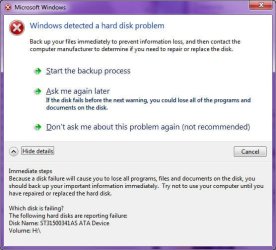
Image1.jpg

And does anyone know how to determine what the actual failure is, and what to do about it, other than the obvious (Backup the data and replace the drive).

Thing is, the drive still works (I'm currently moving important data off, just to be sure), but the retailer from which I purchased it WILL NOT exchange it under warranty while it still works, even if it is being reported as failing. They're waiting for it to give up completely.

Any suggestions?
 

My Computer

Computer type
PC/Desktop
Computer Manufacturer/Model Number
Virtual Machine
OS
Windows 7 Professional 32-bit SP1
CPU
AMD A4/A6
Motherboard
Intel Corporation 440BX Desktop Reference Platform
Memory
3.00GB EDO
Graphics Card(s)
VMware SVGA 3D
Sound Card
High Definition Audio Device
Monitor(s) Displays
Generic Non-PnP Monitor on VMware SVGA 3D
Screen Resolution
1440x900
Hard Drives
1 x 60GB VMware Virtual SATA Hard Drive ATA Device
Antivirus
Kaspersky Total Security
There are several HDD test apps available but the last time I had this message pop up I was using Vista Ultimate on my Laptop and a few days later my HDD cr*pped out completely. I think the motor burnt out or something as it would click once when turned on then...nothing.
 

My Computer

Computer Manufacturer/Model Number
Compaq Desktop
OS
Windows 7 Ultimate x64
CPU
AMD Sempron Dual Core
Memory
3GB
Graphics Card(s)
NVIDIA GeForce 6150SE nForce 430
Screen Resolution
1024x768
Hard Drives
150GB Sata
I would perform the backup (if you have extra storage available) as piece of mind, then when it goes t*ts up you can tell them "told you so".
 

My Computer

Computer Manufacturer/Model Number
Compaq Desktop
OS
Windows 7 Ultimate x64
CPU
AMD Sempron Dual Core
Memory
3GB
Graphics Card(s)
NVIDIA GeForce 6150SE nForce 430
Screen Resolution
1024x768
Hard Drives
150GB Sata
I would run chkdsk /r on the drive. If it's a sector issue it can be repaired. if it's a physical issue it cannot.
 

My Computer

Computer Manufacturer/Model Number
MSI
OS
Windows 7 Professional 64bit
CPU
Intel Celeron 2.4 GH
Memory
4 GB
Graphics Card(s)
NVidia GeForce 9800GT
Sound Card
ATI HDMI Audio
Monitor(s) Displays
Acer S231HL Dual Monitors
Hard Drives
Hitachi 300GB ATA
Maxtor 300GB USB
Cooling
Standard
Keyboard
Logitech wireless
Mouse
Logitech wireless
Internet Speed
Cable
This looks like a Seagate hdd. Run Seatools (all the tests) and see what those say. Save a copy of the results, that'll help get it replaced. You can run other generic tests too and save the results. I wouldnt go by windows meassages alone, though it makes sense to backup important data.
 

My Computer

Computer Manufacturer/Model Number
Too many to describe...
OS
Windows 7 x64 pro/ Windows 7 x86 Pro/ XP SP3 x86
That's a real calculated business move there. They probably hope that the hard drive will limp along until it goes out of warranty, then they won't have to deal with you anymore and incur no financial loses therein. Personally, I wouldn't buy anything from that retailer again.

...but the retailer from which I purchased it WILL NOT exchange it under warranty while it still works, even if it is being reported as failing. They're waiting for it to give up completely.
 

My Computer

Computer Manufacturer/Model Number
HP DV6 1330sa
OS
Windows 7 Professional 64 Bit SP1
CPU
INTEL DUAL CORE 2.1Ghz
Motherboard
N/A
Memory
4GB DDR3
Graphics Card(s)
INTEL
Sound Card
LAPTOP
Monitor(s) Displays
2
Screen Resolution
3200x1080
Hard Drives
250GB
PSU
LAPTOP
Case
LAPTOP
Cooling
LAPTOP
Keyboard
SOLID YEAR 260U
Mouse
USB
Internet Speed
20 MB/S
You are doing the proper first step, which is to back up the data. Then, run some of the OEM diag tools, such as the ones from Western Digital, if it is a Western Digital....etc. Then, if you get any failure codes, and the retailer isn't going to help you with an instant replacement, go right to the maker of the drive. If it was purchased inside of a pre-built computer, then they are your only option.
 

My Computer

OS
Windows 7 Ultimate x64 SP1
CPU
Intel Core i7-2600
Motherboard
Gigabyte GA-P67A-UD3P-B3
Memory
12 GB Patriot Extreme DDR3-1333
Graphics Card(s)
Nvidia GTX 470
Monitor(s) Displays
Dell UltraSharp 2209WA
Hard Drives
OCZ Agility3 240 GB, WD5001AALS, WD7501AALS
PSU
OCZ ModStream 700W
Case
CoolerMaster HAF 912 Advanced
Cooling
CoolerMaster Hyper 212 Plus
Thanks for all the replies guys. I'll doesnload an run the Seagate utilities a little later, as right now I have an appointment that I need to get to...
 

My Computer

Computer type
PC/Desktop
Computer Manufacturer/Model Number
Virtual Machine
OS
Windows 7 Professional 32-bit SP1
CPU
AMD A4/A6
Motherboard
Intel Corporation 440BX Desktop Reference Platform
Memory
3.00GB EDO
Graphics Card(s)
VMware SVGA 3D
Sound Card
High Definition Audio Device
Monitor(s) Displays
Generic Non-PnP Monitor on VMware SVGA 3D
Screen Resolution
1440x900
Hard Drives
1 x 60GB VMware Virtual SATA Hard Drive ATA Device
Antivirus
Kaspersky Total Security
Get the freeware version of HDTune, check the S.M.A.R.T. tab and see whats the error.
 

My Computer

Computer type
PC/Desktop
OS
Microsoft Windows 10 Professional / Windows 7 Professional
CPU
Intel i5-3570
Motherboard
Lenovo Mahobay
Memory
16GB DDR3
Graphics Card(s)
AMD Radeon HD 7850 2GB
Sound Card
(1) Realtek HD Audio (2) AMD HD Audio
Monitor(s) Displays
LG LS192WS
Screen Resolution
1440 x 900 @ 32bit color
Hard Drives
(1) SUV300S37A/120G (2) ST3500413AS SATA Disk Device AHCI mode enabled.
PSU
Corsair HX620
Case
Thermaltake V4 Black Edition
Cooling
Cooler Master Hyper 212 + Artic Silver 5 on CPU/GPU
Keyboard
Dell SK-8115
Mouse
Razer Copperhead with MAPED mat (awesome!)
Internet Speed
100 Mbps up/down
Browser
Chrome
I'd run all of the tests from Seagate and then tell the retailer ,in no uncertain terms, that the next time you need any computer parts you'll be buying them off of the internet.
 

My Computer

Computer Manufacturer/Model Number
Homebuilt
OS
W7 64bit 7600 with SP1
CPU
AMD Athlon 64 DC 4200+ 2.2Ghz
Motherboard
Biostar TForce6100
Memory
4 Gigs
Graphics Card(s)
Radeon X1650 256MB
Sound Card
onboard
Monitor(s) Displays
HP w2207h
Screen Resolution
1680x1050
Hard Drives
OS - WD 320Gig SATA
BackUp - WD 640Gig 32mg cashe SATA
PSU
Antec 500W 80+
Case
Antec
I'm just lucky the drive is still under warranty. Here's the log from SeaTools:

--------------- SeaTools for Windows v1.2.0.4 ---------------
08/11/2010 19:24:49
Model: ST31500341AS
Serial Number: 9VS22LFY
Firmware Revision: CC1H
SMART - FAIL 08/11/2010 19:24:49
SeaTools Test Code: B2DCDF45
SMART - FAIL 08/11/2010 19:25:42
SeaTools Test Code: B2DCDF45
Short DST - Started 08/11/2010 19:27:18
Short DST - FAIL 08/11/2010 19:27:34
SeaTools Test Code: B2DCDFE5
Identify - Started 08/11/2010 19:27:41
Long DST - Started 08/11/2010 19:28:43
Long DST - FAIL 08/11/2010 19:30:08
SeaTools Test Code: B2DCDFF5
Long Generic - Started 08/11/2010 19:45:05
Long Generic - FAIL 08/11/2010 19:45:39
SeaTools Test Code: B2DCDFD5
 

My Computer

Computer type
PC/Desktop
Computer Manufacturer/Model Number
Virtual Machine
OS
Windows 7 Professional 32-bit SP1
CPU
AMD A4/A6
Motherboard
Intel Corporation 440BX Desktop Reference Platform
Memory
3.00GB EDO
Graphics Card(s)
VMware SVGA 3D
Sound Card
High Definition Audio Device
Monitor(s) Displays
Generic Non-PnP Monitor on VMware SVGA 3D
Screen Resolution
1440x900
Hard Drives
1 x 60GB VMware Virtual SATA Hard Drive ATA Device
Antivirus
Kaspersky Total Security
Wow! all tests failed. RMA. Good the drive's under warranty.
 

My Computer

Computer Manufacturer/Model Number
Too many to describe...
OS
Windows 7 x64 pro/ Windows 7 x86 Pro/ XP SP3 x86
Back
Top