Windows did not detect a properly installed network adapter.

evilflyingdog

New member
Local time
5:11 AM
Messages
8
Hello.

I have a custom build PC that i finally finished a couple of nights ago but it has been acting up.
I have been to so many other forums and found no help what so ever!
My specs are
Motherboard-Gigabyte 990xa-UD3
CPU-AMD FX-6300
GPU-Radeon HD 7850-Sapphire edition
Okay so im going to get to the actual problem. I was playing some Battlefield 3 when i got bored and decided to exit the game. I wanted to know my CPU temp so i opened the program to tell me...then my PC crashed. I had to reset my computer and when it came back on i was unable to connect to the internet. There is just a red X over where it would usually tell me that i'm connected. I have re installed all drivers from both Motherboard and GPU and still no luck. I have restarted my computer many times now and still the same result. The things that i have already tried are:

going to the device manger to see my Ethernet cable, But was unable to be found

uninstalling drivers and re installing them

Checking all BIOS settings, all fine

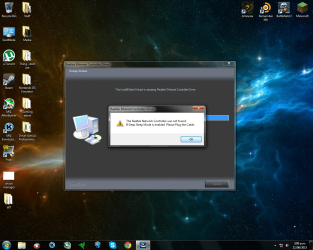
Getting the realtek Ethernet control drivers and transferring them but all it says after that is that "the realtek network controller was not found. If in deep sleep mode is enabled please plug the cable."


If anyone has had this problem before and has at lest a bit of information on how to resolve the issue please respond. I will Bow down to you for the rest of my life :cry:
 

My Computer My Computer

Computer type
PC/Desktop
Computer Manufacturer/Model Number
Custom build
OS
Windows 7
CPU
AMD FX-6300
Motherboard
Gigabyte 990xa-ud3
Memory
8GB kingston hyper x 1600
Graphics Card(s)
Radeon HD 7850-Sapphire edition
Hard Drives
500GB
Browser
Google chrome
Hi evilflyingdog welcome to SevenForums

Click on the Start :orb: button inside
2nqbqes.png
type device manager and press <ENTER> once you see device manager come up under Programs (1) inside the Start menu .

Inside device manager do you see any :warn: symbols ? If yes take a scrn shot of your device manager and upload the image .
 

My Computer My Computer

Computer Manufacturer/Model Number
Custom Built
OS
Windows 7 Ultimate 32-Bit & Windows 7 Ultimate 64-Bit
CPU
Intel Core i7 CPU 950 @ 3.07GHz
Motherboard
ASUS P6T DELUXE V2
Memory
OCZ 6GB (3 x 2GB) 240-Pin DDR3 SDRAM DDR3 1600 OCZ3X1600R2
Graphics Card(s)
ATI Radeon HD 5700 Series
Sound Card
OnBoard
Hard Drives
WD6400AACS-00M3B0 (640GB SATA )
PSU
CORSAIR 850w
Case
NZXT LEXA
Cooling
Intel Stock Heatsink Fan
Keyboard
Microsoft Wireless Laser Keyboard 7000
Mouse
Microsoft Wireless Laser Mouse 7000
Hi vistaking and thank you for your reply.
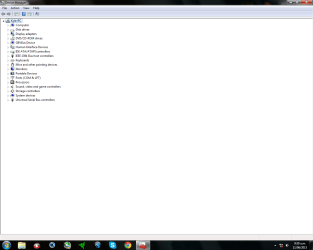
I have done what you said but i have found no symbols whats so ever?
 

My Computer My Computer

Computer type
PC/Desktop
Computer Manufacturer/Model Number
Custom build
OS
Windows 7
CPU
AMD FX-6300
Motherboard
Gigabyte 990xa-ud3
Memory
8GB kingston hyper x 1600
Graphics Card(s)
Radeon HD 7850-Sapphire edition
Hard Drives
500GB
Browser
Google chrome
divice manager.png
 

My Computer My Computer

Computer type
PC/Desktop
Computer Manufacturer/Model Number
Custom build
OS
Windows 7
CPU
AMD FX-6300
Motherboard
Gigabyte 990xa-ud3
Memory
8GB kingston hyper x 1600
Graphics Card(s)
Radeon HD 7850-Sapphire edition
Hard Drives
500GB
Browser
Google chrome
Do you see any lights where the Ethernet cable is plugged into the PC ? Have you tried a different Ethernet cable ?
 

My Computer My Computer

Computer Manufacturer/Model Number
Custom Built
OS
Windows 7 Ultimate 32-Bit & Windows 7 Ultimate 64-Bit
CPU
Intel Core i7 CPU 950 @ 3.07GHz
Motherboard
ASUS P6T DELUXE V2
Memory
OCZ 6GB (3 x 2GB) 240-Pin DDR3 SDRAM DDR3 1600 OCZ3X1600R2
Graphics Card(s)
ATI Radeon HD 5700 Series
Sound Card
OnBoard
Hard Drives
WD6400AACS-00M3B0 (640GB SATA )
PSU
CORSAIR 850w
Case
NZXT LEXA
Cooling
Intel Stock Heatsink Fan
Keyboard
Microsoft Wireless Laser Keyboard 7000
Mouse
Microsoft Wireless Laser Mouse 7000
Yes i have tried different Ethernet cables and even tried different computers from the same Ethernet cable. there was flashing lights when it was connected but no the light are not flashing.
 

My Computer My Computer

Computer type
PC/Desktop
Computer Manufacturer/Model Number
Custom build
OS
Windows 7
CPU
AMD FX-6300
Motherboard
Gigabyte 990xa-ud3
Memory
8GB kingston hyper x 1600
Graphics Card(s)
Radeon HD 7850-Sapphire edition
Hard Drives
500GB
Browser
Google chrome
In the image I do not see Networks listed . Inside the BIOS did you see anything that has NIC enabled ?
 

My Computer My Computer

Computer Manufacturer/Model Number
Custom Built
OS
Windows 7 Ultimate 32-Bit & Windows 7 Ultimate 64-Bit
CPU
Intel Core i7 CPU 950 @ 3.07GHz
Motherboard
ASUS P6T DELUXE V2
Memory
OCZ 6GB (3 x 2GB) 240-Pin DDR3 SDRAM DDR3 1600 OCZ3X1600R2
Graphics Card(s)
ATI Radeon HD 5700 Series
Sound Card
OnBoard
Hard Drives
WD6400AACS-00M3B0 (640GB SATA )
PSU
CORSAIR 850w
Case
NZXT LEXA
Cooling
Intel Stock Heatsink Fan
Keyboard
Microsoft Wireless Laser Keyboard 7000
Mouse
Microsoft Wireless Laser Mouse 7000
My BIOS is pretty simple. but i don't see anything that isn't network disabled.
 

My Computer My Computer

Computer type
PC/Desktop
Computer Manufacturer/Model Number
Custom build
OS
Windows 7
CPU
AMD FX-6300
Motherboard
Gigabyte 990xa-ud3
Memory
8GB kingston hyper x 1600
Graphics Card(s)
Radeon HD 7850-Sapphire edition
Hard Drives
500GB
Browser
Google chrome
Did you look inside Integrated Peripherals locate Onboard LAN Function and it says (Default: Enabled) if it does disable it save it then restart then go back in the bios and Enable it again .
 

My Computer My Computer

Computer Manufacturer/Model Number
Custom Built
OS
Windows 7 Ultimate 32-Bit & Windows 7 Ultimate 64-Bit
CPU
Intel Core i7 CPU 950 @ 3.07GHz
Motherboard
ASUS P6T DELUXE V2
Memory
OCZ 6GB (3 x 2GB) 240-Pin DDR3 SDRAM DDR3 1600 OCZ3X1600R2
Graphics Card(s)
ATI Radeon HD 5700 Series
Sound Card
OnBoard
Hard Drives
WD6400AACS-00M3B0 (640GB SATA )
PSU
CORSAIR 850w
Case
NZXT LEXA
Cooling
Intel Stock Heatsink Fan
Keyboard
Microsoft Wireless Laser Keyboard 7000
Mouse
Microsoft Wireless Laser Mouse 7000
Thank you for the suggestion but still no luck. I did exactly what you said and still the same problem.
 

My Computer My Computer

Computer type
PC/Desktop
Computer Manufacturer/Model Number
Custom build
OS
Windows 7
CPU
AMD FX-6300
Motherboard
Gigabyte 990xa-ud3
Memory
8GB kingston hyper x 1600
Graphics Card(s)
Radeon HD 7850-Sapphire edition
Hard Drives
500GB
Browser
Google chrome
Could be that the NIC on the motherboard went bad

Try this driver

:ar:
Download


My Computer My Computer

Computer Manufacturer/Model Number
Custom Built
OS
Windows 7 Ultimate 32-Bit & Windows 7 Ultimate 64-Bit
CPU
Intel Core i7 CPU 950 @ 3.07GHz
Motherboard
ASUS P6T DELUXE V2
Memory
OCZ 6GB (3 x 2GB) 240-Pin DDR3 SDRAM DDR3 1600 OCZ3X1600R2
Graphics Card(s)
ATI Radeon HD 5700 Series
Sound Card
OnBoard
Hard Drives
WD6400AACS-00M3B0 (640GB SATA )
PSU
CORSAIR 850w
Case
NZXT LEXA
Cooling
Intel Stock Heatsink Fan
Keyboard
Microsoft Wireless Laser Keyboard 7000
Mouse
Microsoft Wireless Laser Mouse 7000
Try this driver


Download

it's from Realtek website
 

My Computer My Computer

Computer Manufacturer/Model Number
Custom Built
OS
Windows 7 Ultimate 32-Bit & Windows 7 Ultimate 64-Bit
CPU
Intel Core i7 CPU 950 @ 3.07GHz
Motherboard
ASUS P6T DELUXE V2
Memory
OCZ 6GB (3 x 2GB) 240-Pin DDR3 SDRAM DDR3 1600 OCZ3X1600R2
Graphics Card(s)
ATI Radeon HD 5700 Series
Sound Card
OnBoard
Hard Drives
WD6400AACS-00M3B0 (640GB SATA )
PSU
CORSAIR 850w
Case
NZXT LEXA
Cooling
Intel Stock Heatsink Fan
Keyboard
Microsoft Wireless Laser Keyboard 7000
Mouse
Microsoft Wireless Laser Mouse 7000
Do you think getting a new network card will resolve the problem?
 

My Computer My Computer

Computer type
PC/Desktop
Computer Manufacturer/Model Number
Custom build
OS
Windows 7
CPU
AMD FX-6300
Motherboard
Gigabyte 990xa-ud3
Memory
8GB kingston hyper x 1600
Graphics Card(s)
Radeon HD 7850-Sapphire edition
Hard Drives
500GB
Browser
Google chrome
I was going to suggest that but first I wanted to install the drivers first . If you do go that route which will fix the issue if the drivers don't . Disable the LAN inside the bios .
 

My Computer My Computer

Computer Manufacturer/Model Number
Custom Built
OS
Windows 7 Ultimate 32-Bit & Windows 7 Ultimate 64-Bit
CPU
Intel Core i7 CPU 950 @ 3.07GHz
Motherboard
ASUS P6T DELUXE V2
Memory
OCZ 6GB (3 x 2GB) 240-Pin DDR3 SDRAM DDR3 1600 OCZ3X1600R2
Graphics Card(s)
ATI Radeon HD 5700 Series
Sound Card
OnBoard
Hard Drives
WD6400AACS-00M3B0 (640GB SATA )
PSU
CORSAIR 850w
Case
NZXT LEXA
Cooling
Intel Stock Heatsink Fan
Keyboard
Microsoft Wireless Laser Keyboard 7000
Mouse
Microsoft Wireless Laser Mouse 7000
sd.png I did the installation and this error comes up
 

My Computer My Computer

Computer type
PC/Desktop
Computer Manufacturer/Model Number
Custom build
OS
Windows 7
CPU
AMD FX-6300
Motherboard
Gigabyte 990xa-ud3
Memory
8GB kingston hyper x 1600
Graphics Card(s)
Radeon HD 7850-Sapphire edition
Hard Drives
500GB
Browser
Google chrome
Lets try this

Turn off your PC . Unplug the power cord from the back of your PC . Open up the case .
   Warning
Touch something metal in the case
remove ALL of the RAM sticks for at least 10 means . After the ten minutes are up install the RAM again . Close the case . Plug the power cable back in . Turn on the PC . Once you're inside Windows see if your internal LAN is found .

Then do these steps

:ar: Open Device Manager by:
  • Click on the :orb: button
  • Type Device Manager inside
    2nqbqes.png
    press [ENTER]

:ar: Open Network Controller properties by:
  • Double-click Network adapters to expand it
  • Double-click the Realtek Network Controller

:ar: Turn off Deep Sleep mode by:
  • Choose the Power Management tab
  • Uncheck “Allow the computer to turn off this device to save power
 

My Computer My Computer

Computer Manufacturer/Model Number
Custom Built
OS
Windows 7 Ultimate 32-Bit & Windows 7 Ultimate 64-Bit
CPU
Intel Core i7 CPU 950 @ 3.07GHz
Motherboard
ASUS P6T DELUXE V2
Memory
OCZ 6GB (3 x 2GB) 240-Pin DDR3 SDRAM DDR3 1600 OCZ3X1600R2
Graphics Card(s)
ATI Radeon HD 5700 Series
Sound Card
OnBoard
Hard Drives
WD6400AACS-00M3B0 (640GB SATA )
PSU
CORSAIR 850w
Case
NZXT LEXA
Cooling
Intel Stock Heatsink Fan
Keyboard
Microsoft Wireless Laser Keyboard 7000
Mouse
Microsoft Wireless Laser Mouse 7000
Lets try this

Turn off your PC . Unplug the power cord from the back of your PC . Open up the case .
   Warning
Touch something metal in the case
remove ALL of the RAM sticks for at least 10 means . After the ten minutes are up install the RAM again . Close the case . Plug the power cable back in . Turn on the PC . Once you're inside Windows see if your internal LAN is found .

sir in my case it did'nt found there plz help me
am having the same problem
 

My Computer My Computer

Computer type
PC/Desktop
Computer Manufacturer/Model Number
acer aspier
OS
win 7 32 bits
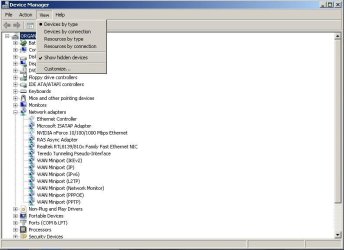
At the command prompt, type "Set devmgr_show_nonpresent_devices=1" (without quotes, not caps required). Tell me if it looks like the following, where it says "Network Card" instead of the device name/manufacturer. My onboard just went out to lunch, and the add-on would not properly detect. All it said was Ethernet Controller (as is greyed out.) Also, nothing else was listed on the list. And for some reason, I'm showing a battery that I don't have. It didn't matter what network card or drivers were placed in, I didn't get any further. I found somewhere how to put in the RAS Async adapter, of which is Required. If that is for some reason missing, windows 7 will not go any further. All active devices I had to manually key in, by looking at .inf files, and comparing them to a known functioning computer (lucky for me, the same make/model). There are still issues with my registry (can't install a dial-up or VPN), however, right now I don't need them. Using the hard-drive from the sister computer (same o/s) showed the system should function properly. I don't advise going in the registry unless you know what you are doing, and have a back-up, especially of the areas you are working in. If you need further help, let me know and I'll walk you through what I did.
 

Attachments

  • dev_mgr.jpg
    dev_mgr.jpg
    45.7 KB · Views: 0

My Computer My Computer

Computer type
PC/Desktop
OS
Windows 7 pro 32 bit, and multiple others.
Back
Top