Windows did not detect a properly installed network adapter.

Tylehhh

New member
Local time
5:55 PM
Messages
5
Okay, so I felt clustered with files on my computer and I just wanted to reset my computer and reinstall windows. So I put in the disk and reinstalled windows completely and when it finished I tried to connect to my wifi (it's working completely fine) and I get this little message "No connections are available". So I troubleshooted the problem on windows and it's telling me Install a driver for your network adapter. I watched all these videos from my phone and they're telling me to find my network adapter driver when I don't know where it is. If anyone can help, I have a Windows 7 Home Premium 64bit Custom Build pc and I also have a AMD-NVIDIA AND68B-12 driver dvd and I tried putting it in and reinstalling the drivers from there but it just led to some cmd looking page asking if I had Windows 2000, XP or some other version I don't own. Please help...
 

My Computer My Computer

Computer type
PC/Desktop
Computer Manufacturer/Model Number
Custom Build
OS
Windows 7 Home Premium 64bit
Hi Tyle,
comps can have
Network Adapter --- for Ethernet
Network Adapter --- for Wifi.

If you can use your wifi its the Ethernet driver you need.
Please go to
Device manager
You will either have to Expand Network adapters or look a problem device.

Which ever it is select it
Then RIGHT click > properties > details > scroll to hardware ids,
What is the PCI/VEN info.

Roy
 

Attachments

  • pciven.PNG
    pciven.PNG
    26.4 KB · Views: 2

My Computer My Computer

Computer type
PC/Desktop
Computer Manufacturer/Model Number
medionl/Aspire 6930G/acer x55a
OS
W7 home premium 32bit/W7HP 64bit/w10 tp insider ring
CPU
E5300 dual core
Motherboard
medion MS7366
Memory
3gb
Graphics Card(s)
Nvidia Geforce 7100 Nforce 630i
Monitor(s) Displays
avixc
Internet Speed
n (isp resticted to 72)
Antivirus
mse/pands
Browser
palemoon
Other Info
Belkin Fd7050 n USB using Railink RT2870 drivers, more upto date
There is no network adapters folder to expand in device manager.
 

My Computer My Computer

Computer type
PC/Desktop
Computer Manufacturer/Model Number
Custom Build
OS
Windows 7 Home Premium 64bit
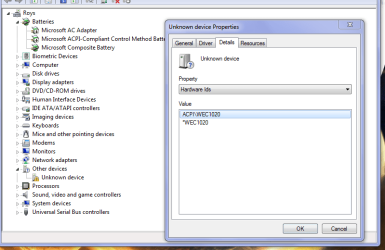
hi do you have errors in other devices section? if so then those will need drivers. post a screen shot of device manager so we can see what you are seeing. can transfer the screen shot to a working computer to post it here.
 

My Computer My Computer

Computer type
PC/Desktop
Computer Manufacturer/Model Number
dell xps 9000
OS
win 10
How do I post a picture?
 

My Computer My Computer

Computer type
PC/Desktop
Computer Manufacturer/Model Number
Custom Build
OS
Windows 7 Home Premium 64bit
I'm on my phone using this and I don't know how to add a picture.. I have no other computers
 

My Computer My Computer

Computer type
PC/Desktop
Computer Manufacturer/Model Number
Custom Build
OS
Windows 7 Home Premium 64bit
I know how to do all that stuff but I don't have a computer to do it. I'm on my phone that's the only reason I can't upload in pics.
 

My Computer My Computer

Computer type
PC/Desktop
Computer Manufacturer/Model Number
Custom Build
OS
Windows 7 Home Premium 64bit
take picture with phone and use phone to upload it to here. follow second link in post 7

what is listed under other devices in device manager?
 

My Computer My Computer

Computer type
PC/Desktop
Computer Manufacturer/Model Number
dell xps 9000
OS
win 10
since you have not listed the parts in your custom desktop computer whats the make and model of your motherboard? you should of gotten a disk with the motherboard it should have the drivers for the network adapter on it.
 

My Computer My Computer

Computer type
PC/Desktop
Computer Manufacturer/Model Number
dell xps 9000
OS
win 10
Back
Top