Windows Disk Manager doesn't show free space

d11trencin

New member
Local time
12:13 AM
Messages
4
Good day guys,
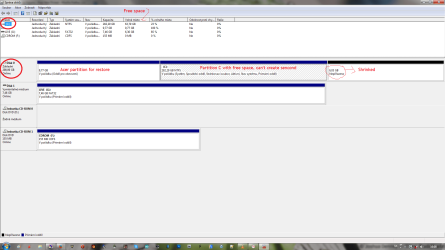
well, I was just installing Linux Fedora on my computer (I wanted a Dual-Boot with Win7) but I noticed that I don't have second partition. So I deleted some useless files (trash, games, etc.) back on Win7, and Voala, I just gained around 60GB of free space. I decided to creat new partition on disk manager. And here is the problem. It shows free space, as good as Explorer, but when it comes to that graph below, it doesn't show me free space. I shrinked it, but only gained 6GB of free space, where I can create new partition. I know it sounds complicated, but here is the picture.

I guess I'm doing somethin' wrong, what is it?
My Windows is in Czech language, but I made notes in the picture in English
 

Attachments
  • ProblemwithHDD.png
    ProblemwithHDD.png
    57.4 KB · Views: 11

My Computer

Computer type
Laptop
Computer Manufacturer/Model Number
Acer
OS
Windows 7 Ultimate 32bit
CPU
Intel Core 2 Duo
Memory
3 GB
Graphics Card(s)
Intel GMA 4500m
Antivirus
BitDefender
Browser
Firefox
Try starting over. Put the Windows partition back the way it was. Make sure everything works normally. Reboot a couple times etc.. and run some apps to make sure nothing is acting weird. Then defrag the Windows partition to move the files toward the front of the partition. That should allow you to shrink to a greater amount of free space.

Always a good idea to make backup images along the way before risking your system.

edit: by "put it back the way it was" I mean delete the 6 GB partition you made, then expand the Windows partition to the end of the free space. Then use the system for awhile as suggested to make sure nothing got broken, before defragging.

edit2: also make sure you leave enough room for page file expansion etc..
 

My Computer

Computer Manufacturer/Model Number
HP Media Center
OS
Windows 7 32 bit
CPU
AMD 5200+ dual core
Memory
2 GB
Graphics Card(s)
NVidia GeForce 6150SE 128 MB
Monitor(s) Displays
CRT
Screen Resolution
1280x1024
Hard Drives
500 GB Sata internal :

SIIG USB 3.0 docking stations w/WD Caviar Black 6 Gb/s drives
Keyboard
PS/2
Mouse
PS/2 Wheel Mouse
Other Info
SIIG USB 3.0 PCIexpress card.
I forgot to write, but I did the complete defrag (It had 9 passes) before doing this, so I guess it won't help

And yeah, I have all the images and videos on the external drive, so it's on the safe place
 

My Computer

Computer type
Laptop
Computer Manufacturer/Model Number
Acer
OS
Windows 7 Ultimate 32bit
CPU
Intel Core 2 Duo
Memory
3 GB
Graphics Card(s)
Intel GMA 4500m
Antivirus
BitDefender
Browser
Firefox
Does the defrag you are using show the non-movable files in the display? See if there's one close to the back end of the partition. If so then you're probably out of luck.
 

My Computer

Computer Manufacturer/Model Number
HP Media Center
OS
Windows 7 32 bit
CPU
AMD 5200+ dual core
Memory
2 GB
Graphics Card(s)
NVidia GeForce 6150SE 128 MB
Monitor(s) Displays
CRT
Screen Resolution
1280x1024
Hard Drives
500 GB Sata internal :

SIIG USB 3.0 docking stations w/WD Caviar Black 6 Gb/s drives
Keyboard
PS/2
Mouse
PS/2 Wheel Mouse
Other Info
SIIG USB 3.0 PCIexpress card.
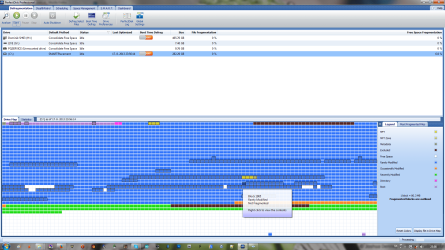
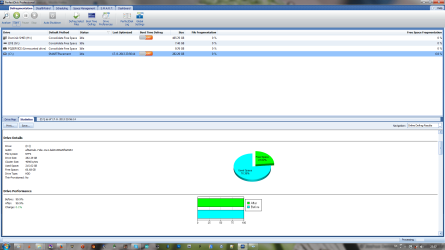
Well, I made SmartPlacement with PerfectDisk manager, after four hours it finished. The map of the HDD is on the picture.

Then, I checked Windows' disk manager. I shrinked 30GB. Another 30GB stayed on the HDD.
 

Attachments

  • SmartPlac.png
    SmartPlac.png
    80 KB · Views: 1
  • SmartPlacStatspng.png
    SmartPlacStatspng.png
    72.7 KB · Views: 1

My Computer

Computer type
Laptop
Computer Manufacturer/Model Number
Acer
OS
Windows 7 Ultimate 32bit
CPU
Intel Core 2 Duo
Memory
3 GB
Graphics Card(s)
Intel GMA 4500m
Antivirus
BitDefender
Browser
Firefox
Is there a reason you can't put Fedora in H:? Seems like cramming it into C: you are pinching things a bit. As it is it looks like C: is running with 75% space used now. Not really optimal. Also it may be easier to just do everything from the Linux installer... provided all your HD hardware is supported. The installers are tuned for slicing a piece out of an existing partition and putting Linux and a swap partition in the free space.

Last time I did Fedora was when it just split off from Red Hat. But I did recently try Mandriva OneCD. The install was as painless as I remembered from using Mandrake 9.1. But distros are a personal preference.
 

My Computer

Computer Manufacturer/Model Number
HP Media Center
OS
Windows 7 32 bit
CPU
AMD 5200+ dual core
Memory
2 GB
Graphics Card(s)
NVidia GeForce 6150SE 128 MB
Monitor(s) Displays
CRT
Screen Resolution
1280x1024
Hard Drives
500 GB Sata internal :

SIIG USB 3.0 docking stations w/WD Caviar Black 6 Gb/s drives
Keyboard
PS/2
Mouse
PS/2 Wheel Mouse
Other Info
SIIG USB 3.0 PCIexpress card.
Back
Top