Windows displaying symbols instead of legible text.

pi314

New member
Local time
5:03 PM
Messages
5
Hi there,

I have this problem with my computer after updating windows 7 (Home Premium 64bits)
After the update is installed and my computer restarted, the text are replaced with symbols, triangles, and other characters instead of legible text. This occurs as windows starts up and at the log in screen and after logging in.

I search the net for similar problems and tried the suggested remedies of sfc /scannow in command prompt and also sfc /verifyonly (this states no problems with the integrity of the system).
I also checked the location setting to be US English and this is not the issue.
And I also tried to do the following instructions found on the following link: Windows 7 Symbols Instead Of Text? but could not find \FontAssoc\....in the
[HKEY_LOCAL_MACHINE\SYSTEM\CurrentControlSet\Control\FontAssoc\Associated Charset]

Please help because the only way to get my computer back is to restore to a previous point when this happens after updating windows. I would like to avoid doing this when windows updates and restarts.

Thank you in advance.
 

My Computer My Computer

At a glance

windows 7 home premiumIntel(R) Core(TM) i5 CPU M430 @ 2.27GHz4GB
Computer Manufacturer/Model Number
Toshiba
OS
windows 7 home premium
CPU
Intel(R) Core(TM) i5 CPU M430 @ 2.27GHz
Memory
4GB
look at the second-to-last response in that thread - it may help....
<quote>
I had a similar problem today after restarting Win7 on my laptop. When I checked the fonts (Start button --> type "fonts"), I realized that all of my fonts were missing besides unicode. I transfered all of my fonts from my old laptop to my new laptop that had the problem, and everything went back to normal.
</quote>

(FWIW, my registry doesn't have the stated Key either, in Regedit)
 

My Computer My Computer

At a glance

Win 7 x64 Home Premium (and x86 VirtualBox VM...i3 370M/i7 6500U8GB - finally :)/8GBit's an i3, dude!/dual Intel&nVidia
Computer type
Laptop
Computer Manufacturer/Model Number
Asus K52F or Lenovo B51-80
OS
Win 7 x64 Home Premium (and x86 VirtualBox VM)/Win10
CPU
i3 370M/i7 6500U
Motherboard
Asus/Lenovo
Memory
8GB - finally :)/8GB
Graphics Card(s)
it's an i3, dude!/dual Intel&nVidia
Sound Card
onboard
Monitor(s) Displays
15.6" built-in
Screen Resolution
1366x768/1920x1080
Hard Drives
750GB Seagate internal
Sundry external drives attached to other computers on the local network
1TB SSD on the Lenovo
PSU
n/a
Internet Speed
as much as I can get - usually on a dongle/phone, so <1MB/s
Antivirus
MSE/Defender
Browser
IE11/12/Edge/Chrome/FF(if I must)
Fonts looked up in start button

Hello Noel,

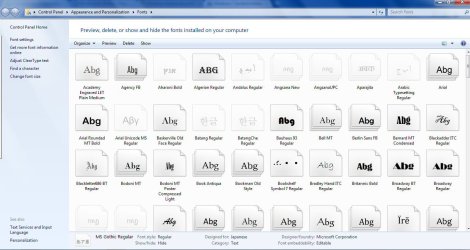
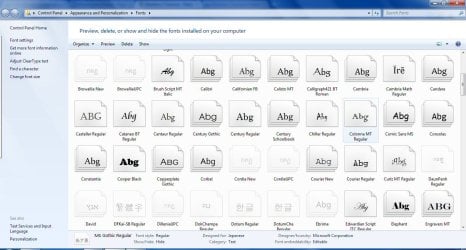
I followed the instructions on the 2nd to last reply and when I typed in 'fonts' at the start button, I have a listing of many fonts. However, I do notice many foreign characters fonts (asian, arabic and other fonts.) Also, under MS gothic font are foreign characters. I do not need the foreign characters so do I delete them one by one.

Could you provide me with instructions to copy fonts from another computer to mine if I am to do this (e.g. where to place the fonts when I copied it) Sorry for this trivial request but I am not good with computers and do not want to do something else to further make things worse.

I've also attached a couple of screen captures of the fonts I mentioned above.

Thank you again
 

Attachments

  • FontsImage1.jpg
    FontsImage1.jpg
    107.8 KB · Views: 109
  • FontsImage2.jpg
    FontsImage2.jpg
    111 KB · Views: 35
  • FontsImage3.jpg
    FontsImage3.jpg
    112 KB · Views: 41

My Computer My Computer

At a glance

windows 7 home premiumIntel(R) Core(TM) i5 CPU M430 @ 2.27GHz4GB
Computer Manufacturer/Model Number
Toshiba
OS
windows 7 home premium
CPU
Intel(R) Core(TM) i5 CPU M430 @ 2.27GHz
Memory
4GB
There is NO NEED to delete anything!
The post I directed you at said that their fonts had already been deleted, and they had to reinstall them - as far as I can see your installed fonts are correct, no NO ACTION is required.

I suspect that your System Font has been changed somehow -

Go to the Desktop, and right-click on it.
select Personalise (the bottom entry)
Select a theme (any theme - it doesn't matter for the moment which)
Then click on the Window Colour icon at the bottom of the window (2nd from the left)
This should bring up the Windows Colour and Appearance window - in the top selection-box on the left, select "Selected Items" and click Apply, then change the Font there to 'Segoe UI' (or at least change the setting, and click Apply - hopefully it'll then show something readable!)
 

My Computer My Computer

At a glance

Win 7 x64 Home Premium (and x86 VirtualBox VM...i3 370M/i7 6500U8GB - finally :)/8GBit's an i3, dude!/dual Intel&nVidia
Computer type
Laptop
Computer Manufacturer/Model Number
Asus K52F or Lenovo B51-80
OS
Win 7 x64 Home Premium (and x86 VirtualBox VM)/Win10
CPU
i3 370M/i7 6500U
Motherboard
Asus/Lenovo
Memory
8GB - finally :)/8GB
Graphics Card(s)
it's an i3, dude!/dual Intel&nVidia
Sound Card
onboard
Monitor(s) Displays
15.6" built-in
Screen Resolution
1366x768/1920x1080
Hard Drives
750GB Seagate internal
Sundry external drives attached to other computers on the local network
1TB SSD on the Lenovo
PSU
n/a
Internet Speed
as much as I can get - usually on a dongle/phone, so <1MB/s
Antivirus
MSE/Defender
Browser
IE11/12/Edge/Chrome/FF(if I must)
Not deleting fonts

Hello again,

I went through your latest instructions and realized at the end of your instructions, you mentioned that hopefully this makes it legible. These instructions are under the assumptions that I am working with a screen with illegible text (e.g. symbols, etc.)
I have already did a system restore to a point without the problem so I would not know if this had the desired effects.

I would like to find out what is causing my laptop to display these symbols whenever I either update windows or on occasions when I restart or boot up the machine.

I apologize if I did not mention this earlier. I am getting very frustrated with this issue because it has happened about 4 times now.

Please help in any way possible and thank you again.

--Phil
 

My Computer My Computer

At a glance

windows 7 home premiumIntel(R) Core(TM) i5 CPU M430 @ 2.27GHz4GB
Computer Manufacturer/Model Number
Toshiba
OS
windows 7 home premium
CPU
Intel(R) Core(TM) i5 CPU M430 @ 2.27GHz
Memory
4GB
Ah - that does make a difference :)

OK - since you managed to use System Restore to go back to a usable system, it's likely that there is one corrupted file in your WU tree that is causing the problem, and that the repeated reinstall of this results in the repeated error.
What updates are listed if you go to WU? Do NOT install any of them yet!
 

My Computer My Computer

At a glance

Win 7 x64 Home Premium (and x86 VirtualBox VM...i3 370M/i7 6500U8GB - finally :)/8GBit's an i3, dude!/dual Intel&nVidia
Computer type
Laptop
Computer Manufacturer/Model Number
Asus K52F or Lenovo B51-80
OS
Win 7 x64 Home Premium (and x86 VirtualBox VM)/Win10
CPU
i3 370M/i7 6500U
Motherboard
Asus/Lenovo
Memory
8GB - finally :)/8GB
Graphics Card(s)
it's an i3, dude!/dual Intel&nVidia
Sound Card
onboard
Monitor(s) Displays
15.6" built-in
Screen Resolution
1366x768/1920x1080
Hard Drives
750GB Seagate internal
Sundry external drives attached to other computers on the local network
1TB SSD on the Lenovo
PSU
n/a
Internet Speed
as much as I can get - usually on a dongle/phone, so <1MB/s
Antivirus
MSE/Defender
Browser
IE11/12/Edge/Chrome/FF(if I must)
WU information

I checked my windows update settings and the lists of updates already installed.
My computer is set to check for, download and install updates when available automatically so it looks like the last update was on 10/25/2011.

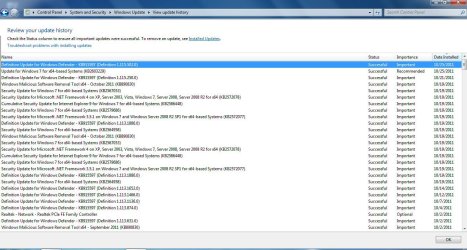
I've included a screen capture of the update listings (most recent) and just in case the capture is hard to see, I will list them below:


1) Definition Update for Windows Defender - KB915597 (Definition 1.115.502.0)

Installation date: ‎10/‎25/‎2011 4:17 PM

Installation status: Successful

Update type: Important


2) Update for Windows 7 for x64-based Systems (KB2603229)

Installation date: ‎10/‎25/‎2011 4:16 PM

Installation status: Successful

Update type: Recommended


3) Definition Update for Windows Defender - KB915597 (Definition 1.115.250.0)

Installation date: ‎10/‎21/‎2011 3:20 PM

Installation status: Successful

Update type: Important


4) Windows Malicious Software Removal Tool x64 - October 2011 (KB890830)

Installation date: ‎10/‎19/‎2011 1:38 PM

Installation status: Successful

Update type: Important


5) Security Update for Windows 7 for x64-based Systems (KB2567053)

Installation date: ‎10/‎19/‎2011 1:35 PM

Installation status: Successful

Update type: Important


END....I will list the first five for now.

If it is an update that caused this problem and the settings for WU was automatic, how do you want me to proceed. I changed the WU settings to check for updates but to ask to download and install for now.
 

Attachments

  • WU_Image1.jpg
    WU_Image1.jpg
    162.7 KB · Views: 42

My Computer My Computer

At a glance

windows 7 home premiumIntel(R) Core(TM) i5 CPU M430 @ 2.27GHz4GB
Computer Manufacturer/Model Number
Toshiba
OS
windows 7 home premium
CPU
Intel(R) Core(TM) i5 CPU M430 @ 2.27GHz
Memory
4GB

My Computer My Computer

At a glance

Win 7 x64 Home Premium (and x86 VirtualBox VM...i3 370M/i7 6500U8GB - finally :)/8GBit's an i3, dude!/dual Intel&nVidia
Computer type
Laptop
Computer Manufacturer/Model Number
Asus K52F or Lenovo B51-80
OS
Win 7 x64 Home Premium (and x86 VirtualBox VM)/Win10
CPU
i3 370M/i7 6500U
Motherboard
Asus/Lenovo
Memory
8GB - finally :)/8GB
Graphics Card(s)
it's an i3, dude!/dual Intel&nVidia
Sound Card
onboard
Monitor(s) Displays
15.6" built-in
Screen Resolution
1366x768/1920x1080
Hard Drives
750GB Seagate internal
Sundry external drives attached to other computers on the local network
1TB SSD on the Lenovo
PSU
n/a
Internet Speed
as much as I can get - usually on a dongle/phone, so <1MB/s
Antivirus
MSE/Defender
Browser
IE11/12/Edge/Chrome/FF(if I must)
Okay, I will download the software and run it.

If I need to post any issue that may result of the system ready tool, do I just start a new post in this subject forum along with log?

thanks for you help.
 

My Computer My Computer

At a glance

windows 7 home premiumIntel(R) Core(TM) i5 CPU M430 @ 2.27GHz4GB
Computer Manufacturer/Model Number
Toshiba
OS
windows 7 home premium
CPU
Intel(R) Core(TM) i5 CPU M430 @ 2.27GHz
Memory
4GB
No need for a new thread - If someone doesn't jump in. I'll ping them.
Just post the results, and attach the log.
 

My Computer My Computer

At a glance

Win 7 x64 Home Premium (and x86 VirtualBox VM...i3 370M/i7 6500U8GB - finally :)/8GBit's an i3, dude!/dual Intel&nVidia
Computer type
Laptop
Computer Manufacturer/Model Number
Asus K52F or Lenovo B51-80
OS
Win 7 x64 Home Premium (and x86 VirtualBox VM)/Win10
CPU
i3 370M/i7 6500U
Motherboard
Asus/Lenovo
Memory
8GB - finally :)/8GB
Graphics Card(s)
it's an i3, dude!/dual Intel&nVidia
Sound Card
onboard
Monitor(s) Displays
15.6" built-in
Screen Resolution
1366x768/1920x1080
Hard Drives
750GB Seagate internal
Sundry external drives attached to other computers on the local network
1TB SSD on the Lenovo
PSU
n/a
Internet Speed
as much as I can get - usually on a dongle/phone, so <1MB/s
Antivirus
MSE/Defender
Browser
IE11/12/Edge/Chrome/FF(if I must)
I've asked a CheckSUR expert to keep an eye on this thread - so hopefully you'll get a quick response (depending on his real-life work schedule)
In the meantime, please open an Elevated (Admin) Command Prompt window, and issue the following command at the prompt.
fsutil resource setautoreset true %systemdrive%\

Then reboot - it may, or may not, affect the number of pending renames - so please run another SFC and post the new log before running CheckSUR (if you haven't run CheckSUR already)
 

My Computer My Computer

At a glance

Win 7 x64 Home Premium (and x86 VirtualBox VM...i3 370M/i7 6500U8GB - finally :)/8GBit's an i3, dude!/dual Intel&nVidia
Computer type
Laptop
Computer Manufacturer/Model Number
Asus K52F or Lenovo B51-80
OS
Win 7 x64 Home Premium (and x86 VirtualBox VM)/Win10
CPU
i3 370M/i7 6500U
Motherboard
Asus/Lenovo
Memory
8GB - finally :)/8GB
Graphics Card(s)
it's an i3, dude!/dual Intel&nVidia
Sound Card
onboard
Monitor(s) Displays
15.6" built-in
Screen Resolution
1366x768/1920x1080
Hard Drives
750GB Seagate internal
Sundry external drives attached to other computers on the local network
1TB SSD on the Lenovo
PSU
n/a
Internet Speed
as much as I can get - usually on a dongle/phone, so <1MB/s
Antivirus
MSE/Defender
Browser
IE11/12/Edge/Chrome/FF(if I must)
Hi Guys,

This just happened to me, after a windows Update on 7HP.
what you can do is use explorer to actually type the location of your Fonts directory: C:\WINDOWS\FONTS or ANY directory to browse your system

The system actually knows what you are typing and will take you to any directory you type into the Explorer search bar.

I found out that I only have 3 fonts left ton my system after some kind of software change, windows update etc. Luckily, I had backed up all of my fonts and uploaded a .rar archive of all my system fonts to Google Drive.

I am now logged on to my dedicated server, downloading the fonts that I uploaded to Google.Drive, to my messed up system.

You just have to know the image for certain system folders and system locations to navigate your system with symbols.... I hope this works and is helpful for someone, including me!

Then what I did was use Remote Desktop and an FTP client to ftp into my dedicated server, and name the downloaded fonts directory, to some long character name, so that I would be able to tell what it was by the symbols. I added a bunch of capital L's to the directory name, which in turn, makes the symbols appear as a square. so LLLLLL would be converted to a bunch of squares.

Now once the download finished to my symbol system, I plan on selecting ALL of the fonts from the downloaded directory, and PASTING them into my Windows Fonts directory. Wish me luck.

I have a backup of 3,124 Fonts. if anyone would like a copy of the fonts for their safekeeping, I uploaded the .rar archive for you. They will be here:

http://www.urbanradiousa.com/downloads/WindowsFonts.rar

WOOOHOOO! Update! I just finished FTP'ing and re-installing my fonts. I AM BACK TO NORMAL. once windows installed the Fonts, the system immediately changed to the proper font and the symbols were gone!

Good luck
 

My Computer My Computer

At a glance

Windows 7 Home Premium
OS
Windows 7 Home Premium
Back
Top