Windows doesn't show yes/no tab

nemis

New member
Local time
5:01 PM
Messages
6
Hi, first, i am sorry for my english, it isn't very good. second, there's a problem and i don't know what to do :confused: lets say i want to delete something and this happens: right click on a file, press delete and file is deleted. but this problem exists only with files which were in my computer, before i installed windows. can someone tell me how to enable "confirmation tab" (i don't know how to call it :D ) by the way on one drive appeared folder named "1a47a021c2d97d68c4f8ad", which contains several strange folders. can i delete this folder? thanx for help ;)
 

My Computer

Computer Manufacturer/Model Number
Toshiba
OS
Windows 7 Ultimate x64
Hi, first, i am sorry for my english, it isn't very good. second, there's a problem and i don't know what to do :confused: lets say i want to delete something and this happens: right click on a file, press delete and file is deleted. but this problem exists only with files which were in my computer, before i installed windows. can someone tell me how to enable "confirmation tab" (i don't know how to call it :D ) by the way on one drive appeared folder named "1a47a021c2d97d68c4f8ad", which contains several strange folders. can i delete this folder? thanx for help ;)

Try this:

http://www.sevenforums.com/tutorials/60835-recycle-bin-delete-confirmation-turn-off.html

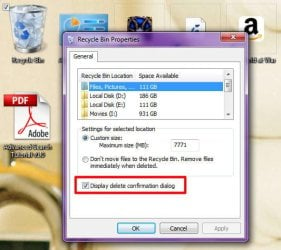
1) Right-click the Recycle Bin, then select "Properties"
2) Make sure that Display delete confirmation dialog" is checked
3) Click OK
Image1.jpg
 
Last edited by a moderator:

My Computer

Computer type
PC/Desktop
Computer Manufacturer/Model Number
Virtual Machine
OS
Windows 7 Professional 32-bit SP1
CPU
AMD A4/A6
Motherboard
Intel Corporation 440BX Desktop Reference Platform
Memory
3.00GB EDO
Graphics Card(s)
VMware SVGA 3D
Sound Card
High Definition Audio Device
Monitor(s) Displays
Generic Non-PnP Monitor on VMware SVGA 3D
Screen Resolution
1440x900
Hard Drives
1 x 60GB VMware Virtual SATA Hard Drive ATA Device
Antivirus
Kaspersky Total Security
Display delete confirmation dialog is checked, and my problem still exists :)
 

My Computer

Computer Manufacturer/Model Number
Toshiba
OS
Windows 7 Ultimate x64

My Computer

Computer type
PC/Desktop
Computer Manufacturer/Model Number
Self built custom
OS
64-bit Windows 11 Pro for Workstations
CPU
Intel i7-8700K OC'd to 5 GHz
Motherboard
ASUS ROG Maximus XI Formula Z390
Memory
64 GB (4x16GB) G.SKILL TridentZ RGB DDR4 3600 MHz
Graphics Card(s)
ASUS ROG-STRIX-GTX1080TI-O11G-GAMING
Sound Card
Integrated
Monitor(s) Displays
2 x Samsung Odyssey G7 27"
Screen Resolution
2560x1440
Hard Drives
1TB Samsung 990 PRO M.2,
4TB Samsung 990 PRO PRO M.2,
TerraMaster F8 SSD Plus NAS
PSU
Seasonic Prime Titanium 850W
Case
Thermaltake Core P3
Cooling
Corsair Hydro H115i
Keyboard
Logitech wireless K800
Mouse
Logitech MX Master 4
Internet Speed
2 Gb/s Download and 100 Mb/s Upload
Antivirus
Malwarebyte Anti-Malware Premium
Browser
Google Chrome
Other Info
Logitech Z625 speaker system,
Logitech BRIO 4K Pro webcam,
HP Color LaserJet Pro MFP M477fdn,
APC SMART-UPS RT 1000 XL - SURT1000XLI,
Galaxy S23 Plus phone
So you get no warning at all...the file just disappears? Try Brink's suggestion and post back. By the way, your English is just fine...definitely understandable.
 

My Computer

OS
Windows 7 Ultimate x64 SP1
CPU
Intel Core i7-2600
Motherboard
Gigabyte GA-P67A-UD3P-B3
Memory
12 GB Patriot Extreme DDR3-1333
Graphics Card(s)
Nvidia GTX 470
Monitor(s) Displays
Dell UltraSharp 2209WA
Hard Drives
OCZ Agility3 240 GB, WD5001AALS, WD7501AALS
PSU
OCZ ModStream 700W
Case
CoolerMaster HAF 912 Advanced
Cooling
CoolerMaster Hyper 212 Plus
Brink, that's not one.

As i understand this problem is related with system. i tried changing security settings, owner settings, user accounts (in computer management), nothing helped, so if someone knows more serious solution (no offense), pls help me :)
 

My Computer

Computer Manufacturer/Model Number
Toshiba
OS
Windows 7 Ultimate x64
Nemis,

In that case, you might do a system restore using a restore point dated before you tried to change the security settings to see if that may help.
 

My Computer

Computer type
PC/Desktop
Computer Manufacturer/Model Number
Self built custom
OS
64-bit Windows 11 Pro for Workstations
CPU
Intel i7-8700K OC'd to 5 GHz
Motherboard
ASUS ROG Maximus XI Formula Z390
Memory
64 GB (4x16GB) G.SKILL TridentZ RGB DDR4 3600 MHz
Graphics Card(s)
ASUS ROG-STRIX-GTX1080TI-O11G-GAMING
Sound Card
Integrated
Monitor(s) Displays
2 x Samsung Odyssey G7 27"
Screen Resolution
2560x1440
Hard Drives
1TB Samsung 990 PRO M.2,
4TB Samsung 990 PRO PRO M.2,
TerraMaster F8 SSD Plus NAS
PSU
Seasonic Prime Titanium 850W
Case
Thermaltake Core P3
Cooling
Corsair Hydro H115i
Keyboard
Logitech wireless K800
Mouse
Logitech MX Master 4
Internet Speed
2 Gb/s Download and 100 Mb/s Upload
Antivirus
Malwarebyte Anti-Malware Premium
Browser
Google Chrome
Other Info
Logitech Z625 speaker system,
Logitech BRIO 4K Pro webcam,
HP Color LaserJet Pro MFP M477fdn,
APC SMART-UPS RT 1000 XL - SURT1000XLI,
Galaxy S23 Plus phone
Brink,
there are no restore points, which i can use. also i don't use system restore, so it won't help.

i am losing my last hope... i know one solution but it isn't very good: as my friend said: "I smell format" :D
 

My Computer

Computer Manufacturer/Model Number
Toshiba
OS
Windows 7 Ultimate x64
Before you do that, create a new administrator account to see how it works while logged in it.

If you're lucky, you could just use the new account instead after copying over your shortcuts and files from the old user account. Afterwards, you could just delete the old account while in the new one.
 

My Computer

Computer type
PC/Desktop
Computer Manufacturer/Model Number
Self built custom
OS
64-bit Windows 11 Pro for Workstations
CPU
Intel i7-8700K OC'd to 5 GHz
Motherboard
ASUS ROG Maximus XI Formula Z390
Memory
64 GB (4x16GB) G.SKILL TridentZ RGB DDR4 3600 MHz
Graphics Card(s)
ASUS ROG-STRIX-GTX1080TI-O11G-GAMING
Sound Card
Integrated
Monitor(s) Displays
2 x Samsung Odyssey G7 27"
Screen Resolution
2560x1440
Hard Drives
1TB Samsung 990 PRO M.2,
4TB Samsung 990 PRO PRO M.2,
TerraMaster F8 SSD Plus NAS
PSU
Seasonic Prime Titanium 850W
Case
Thermaltake Core P3
Cooling
Corsair Hydro H115i
Keyboard
Logitech wireless K800
Mouse
Logitech MX Master 4
Internet Speed
2 Gb/s Download and 100 Mb/s Upload
Antivirus
Malwarebyte Anti-Malware Premium
Browser
Google Chrome
Other Info
Logitech Z625 speaker system,
Logitech BRIO 4K Pro webcam,
HP Color LaserJet Pro MFP M477fdn,
APC SMART-UPS RT 1000 XL - SURT1000XLI,
Galaxy S23 Plus phone
So i created a new administrator account, but it can't even go into drive D: where are my all files (access is denied), although a simple user can.
 

My Computer

Computer Manufacturer/Model Number
Toshiba
OS
Windows 7 Ultimate x64
Nemis,

Double check to make sure that the D: drive has it's permissions set to "Allow" "Full Control" to your user account and the "Administrators" group. Afterwards see if you may be to.
 

My Computer

Computer type
PC/Desktop
Computer Manufacturer/Model Number
Self built custom
OS
64-bit Windows 11 Pro for Workstations
CPU
Intel i7-8700K OC'd to 5 GHz
Motherboard
ASUS ROG Maximus XI Formula Z390
Memory
64 GB (4x16GB) G.SKILL TridentZ RGB DDR4 3600 MHz
Graphics Card(s)
ASUS ROG-STRIX-GTX1080TI-O11G-GAMING
Sound Card
Integrated
Monitor(s) Displays
2 x Samsung Odyssey G7 27"
Screen Resolution
2560x1440
Hard Drives
1TB Samsung 990 PRO M.2,
4TB Samsung 990 PRO PRO M.2,
TerraMaster F8 SSD Plus NAS
PSU
Seasonic Prime Titanium 850W
Case
Thermaltake Core P3
Cooling
Corsair Hydro H115i
Keyboard
Logitech wireless K800
Mouse
Logitech MX Master 4
Internet Speed
2 Gb/s Download and 100 Mb/s Upload
Antivirus
Malwarebyte Anti-Malware Premium
Browser
Google Chrome
Other Info
Logitech Z625 speaker system,
Logitech BRIO 4K Pro webcam,
HP Color LaserJet Pro MFP M477fdn,
APC SMART-UPS RT 1000 XL - SURT1000XLI,
Galaxy S23 Plus phone
I can't set full control to files, which were in drive D: before i installed windows. when i was using windows 7 x86 i had no problems, but x64 makes only trouble. could it be that something went wrong, during windows installation?
 

My Computer

Computer Manufacturer/Model Number
Toshiba
OS
Windows 7 Ultimate x64
Back
Top