Windows Easy Transfer - Transfer To & From Computers

How to Transfer Files from One Computer to Another Computer with Windows Easy Transfer

   Information
This tutorial will show you how to transfer your user files and settings from one computer to another using the Windows Easy Transfer tool.
   Note
This feature is available in Vista and Windows 7. It can also be used as a handy backup if you are thinking about installing a new build of Windows 7 on your current machine.
   Tip
This process can also be used between accounts if, for example, your old account has been acting up and you do not want to re-install and transfer your old data.
   Tip


To do this you will need to follow the steps outlined in Step 1 below, then create a new user account. Next, log into the new User account and proceed to follow Step 2 below to invoke the copy process.

Many thanks to Ztruker for testing & highlighting the above possibility.


STEP ONE

Save Transfer File from Old Computer


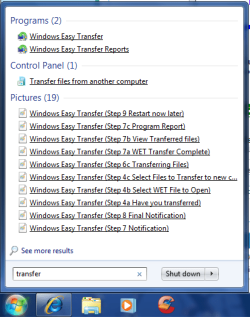
1. Open the start menu and type transfer in the search line, or navigate to All Programs, Accessories, System Tools, and click on Windows Easy Transfer.​
start menu 2.png

start menu 1.png
2. Click on Next when the application opens.
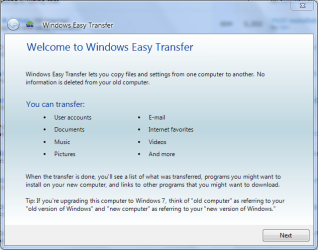
Windows Easy Transfer (Step 1).PNG
3. Choose destination to save the Transfer file and click on Next.
NOTE: Please note for the purpose of this tutorial I have selected the external hard disk or USB flash drive.
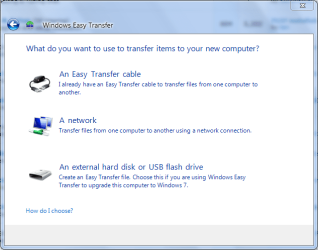
Windows Easy Transfer (Step 2 Choose Destination).PNG
4. Select This is my old computer from the list.
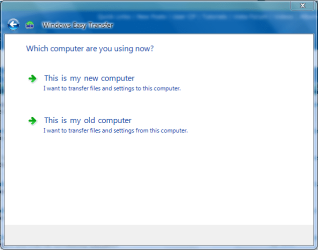
Windows Easy Transfer (Step 3 Choose Computer).PNG
5. Windows Easy Transfer will scan for files that can be transferred.
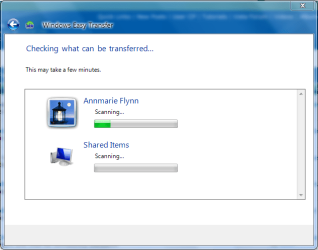
Windows Easy Transfer (Step 3a Scanning User Files).PNG
6. Select which files you wish saved suring the transfer process, then click on Next.

Windows Easy Transfer (Step 4 Select Files to Transfer).PNG


7. You will be prompted for a password in the next screen, but this is optional.
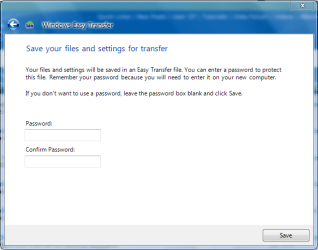
Windows Easy Transfer (Step 5 Choose a Password).PNG


8. Choose where to save your Transfer file and what to name it, then click Save.
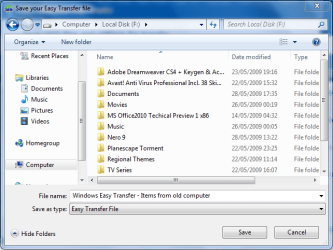
Windows Easy Transfer (Step 6 Save WET file).PNG


9. Windows will begin the saving process.
WARNING: This can take some time depending on the overall size of the data being saved.
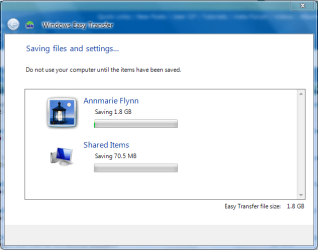
Windows Easy Transfer (Step 6a Saving WET file).PNG


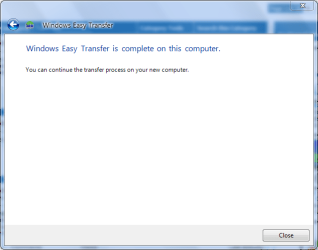
10. Windows will prompt when saving has finished.

Windows Easy Transfer (Step 6b WET Save Complete).PNG


Windows Easy Transfer (Step 7 Notification).PNG

Windows Easy Transfer (Step 8 Final Notification).PNG


STEP TWO

Transfer Files to New Computer


1. Follow steps 1, 2 & 3 in the STEP ONE section above.​


2. Select This is my new computer from the list.​
Windows Easy Transfer (Step 3 Choose Computer).PNG
3. Windows will display a notification asking if you have already saved files from your old computer, select Yes.
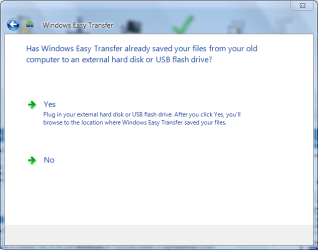
Windows Easy Transfer (Step 4a Have you transferred).PNG
4. Select the Transfer file previously saved in the STEP ONE (step 6) section and click on Open.
Windows Easy Transfer (Step 4b Select WET File to Open).PNG
5. You will be shown a selection of options that can be transferred. Choose which the options you want and click on Transfer.
Windows Easy Transfer (Step 4c Select Files to Transfer to new computer).PNG
6. Windows will start transferring user files and settings to your new computer.
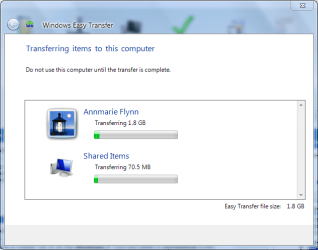
Windows Easy Transfer (Step 6c Transferring Files).PNG
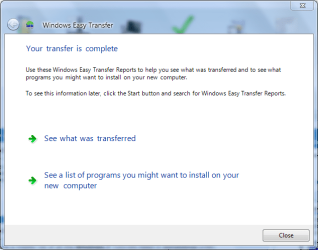
7. Once finished, Windows will give the option to view which files have been transfered....
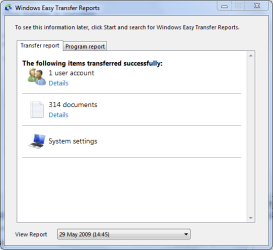
Windows Easy Transfer (Step 7b View Tranferred files).PNG
and which programs you will need to install for some settings to work correctly.
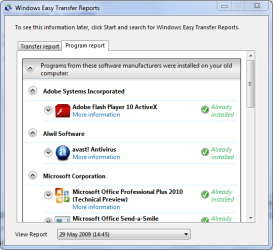
Windows Easy Transfer (Step 7c Program Report).PNG
8. You will recieve a final completion notification and asked if you wish to restart your computer.
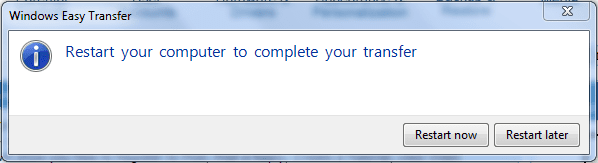
Windows Easy Transfer (Step 8 Final Notification).PNG

Windows Easy Transfer (Step 9 Restart now later).PNG
   Note
Once Windows restarts, you can now access all the files and folders that have been transferred.


Attachments
  • Windows Easy Transfer (Step 7a WET Transfer Complete).PNG
    Windows Easy Transfer (Step 7a WET Transfer Complete).PNG
    22.5 KB · Views: 47
Last edited by a moderator:
lost emails

Hi

i have just moved on to Windows 7 on a new Laptop. I carried out the easy transfer and all appeared to work until i opened Windows live mail none of me emails from Windows mail seem to have transfered i have tried importing them when i do i can see all my old email folders but they appear to be empty. thought i could go on my old PC and resend them all but Windows mail now will not open get an error message saying contacts failed to load. Wonderd if you had any ideas.

would be much appreciated if you have
 

My Computer My Computer

OS
windows 7
I cannot boot up my computer past Windows logon even in Safe Mode following re-transferring my files with Easy Transfer.

The new Windows 7 Home Premium was working perfectly until I restored by file with Easy Transfer.

I have run Disk self-tests and received two Failures.

Can anyone suggest a solution?
 

My Computer My Computer

Computer Manufacturer/Model Number
Asus/EZ Flash 2
OS
Windows 7 x 64
CPU
Intel Dual CPU 1.80GHz, 1.80 GHz
Memory
4 GB RAM, 310GB ROM
Graphics Card(s)
Nividia GeForce 9500 GT
Sound Card
High Definition Audio Device
Monitor(s) Displays
Generic PnP Monitor
Hard Drives
ACPI x 64 based PC
I cannot boot up my computer past Windows logon even in Safe Mode following re-transferring my files with Easy Transfer.

The new Windows 7 Home Premium was working perfectly until I restored by file with Easy Transfer.

I have run Disk self-tests and received two Failures.

Can anyone suggest a solution?
If you have saved restore points, you can boot to the 7 install DVD and select the restore point utility.

Cheers!
Robert
 

My Computer My Computer

OS
...
Thanks Robert. Unfortunately, there were no restore points.
It is strange that I could not use Last Known Good Configuration either. I have tried Low Resolution, and remove signature demands from drivers. There doesn't seem any alternatives left.

I have used the Wind 7 disk Repair feature and that says that there is nothing to repair.

Any more ideas, guys?
 

My Computer My Computer

Computer Manufacturer/Model Number
Asus/EZ Flash 2
OS
Windows 7 x 64
CPU
Intel Dual CPU 1.80GHz, 1.80 GHz
Memory
4 GB RAM, 310GB ROM
Graphics Card(s)
Nividia GeForce 9500 GT
Sound Card
High Definition Audio Device
Monitor(s) Displays
Generic PnP Monitor
Hard Drives
ACPI x 64 based PC
I cannot boot up my computer past Windows logon even in Safe Mode following re-transferring my files with Easy Transfer.

The new Windows 7 Home Premium was working perfectly until I restored by file with Easy Transfer.

I have run Disk self-tests and received two Failures.

Can anyone suggest a solution?

What are the failures? Any info will help.

Thanks Robert. Unfortunately, there were no restore points.
It is strange that I could not use Last Known Good Configuration either. I have tried Low Resolution, and remove signature demands from drivers. There doesn't seem any alternatives left.

I have used the Wind 7 disk Repair feature and that says that there is nothing to repair.

Any more ideas, guys?

Have you tried SFC /SCANNOW Command - System File Checker

There's always re-install.

Clean Install Windows 7

Upgrade Install with Windows 7
 

My Computer My Computer

Computer type
PC/Desktop
Computer Manufacturer/Model Number
76~2.0
OS
Windows 7 Ult x64 - SP1/ Windows 8 Pro x64
CPU
Intel Core i5-3570K 4.6GHz
Motherboard
Gigabyte GA-Z77X UD3H, f18
Memory
8GB (2X4GB) DDR3 1600 Corsair Vengeance CL8 1.5v
Graphics Card(s)
Sapphire HD 7770 Vapor-X OC 1GB DDR5
Sound Card
Onboard VIA VT2021
Monitor(s) Displays
22" LCD Dell
Screen Resolution
1680x1050
Hard Drives
Samsung 840Pro 128GB SSD,
Seagate Barracuda 500GB SATA2 7200rpm 32MB cache, Seagate Barracuda 1TB SATA2 7200rpm 32MB cache,
PSU
Corsair HX650W
Case
Cooler Master Storm Scout
Cooling
Corsair H80 2x12cm Noctua NF P12 , 2x14cm case fans
Keyboard
Logitech Wave
Mouse
CM Sentinel
Internet Speed
Dismal
Antivirus
Avast
Browser
Opera Next
Other Info
Haswell laptop: HP Envy 17t-j, i7-4700MQ, GeForce 740M 2GB DDR3, 17.3" Full HD 1920x1080, 16GB RAM, Samsung 840 Pro 128GB, 1TB Hitachi 7200 HDD,
Desktop: eSATA ports,
External eSATA Seagate 500GB SATA2 7200rpm,
External WD USB 500GB
Thanks Dave,

I have successfully clean reinstalled. Everything is running beautifully. Good sound, and perfect display which is something on a Pavilion zd8000.

Thanks everyone for your help.

God Bless
 

My Computer My Computer

Computer Manufacturer/Model Number
Asus/EZ Flash 2
OS
Windows 7 x 64
CPU
Intel Dual CPU 1.80GHz, 1.80 GHz
Memory
4 GB RAM, 310GB ROM
Graphics Card(s)
Nividia GeForce 9500 GT
Sound Card
High Definition Audio Device
Monitor(s) Displays
Generic PnP Monitor
Hard Drives
ACPI x 64 based PC
Your welcome Cheril, sometimes a clean install is the best thing you can do.

If you don't already, you should consider making image backups. You can restore in a fraction of the time it takes to install and won't have to re-setup everything.
 

My Computer My Computer

Computer type
PC/Desktop
Computer Manufacturer/Model Number
76~2.0
OS
Windows 7 Ult x64 - SP1/ Windows 8 Pro x64
CPU
Intel Core i5-3570K 4.6GHz
Motherboard
Gigabyte GA-Z77X UD3H, f18
Memory
8GB (2X4GB) DDR3 1600 Corsair Vengeance CL8 1.5v
Graphics Card(s)
Sapphire HD 7770 Vapor-X OC 1GB DDR5
Sound Card
Onboard VIA VT2021
Monitor(s) Displays
22" LCD Dell
Screen Resolution
1680x1050
Hard Drives
Samsung 840Pro 128GB SSD,
Seagate Barracuda 500GB SATA2 7200rpm 32MB cache, Seagate Barracuda 1TB SATA2 7200rpm 32MB cache,
PSU
Corsair HX650W
Case
Cooler Master Storm Scout
Cooling
Corsair H80 2x12cm Noctua NF P12 , 2x14cm case fans
Keyboard
Logitech Wave
Mouse
CM Sentinel
Internet Speed
Dismal
Antivirus
Avast
Browser
Opera Next
Other Info
Haswell laptop: HP Envy 17t-j, i7-4700MQ, GeForce 740M 2GB DDR3, 17.3" Full HD 1920x1080, 16GB RAM, Samsung 840 Pro 128GB, 1TB Hitachi 7200 HDD,
Desktop: eSATA ports,
External eSATA Seagate 500GB SATA2 7200rpm,
External WD USB 500GB
Serial cable

Many thanks for the link. It is becoming "clearer" now!
 

My Computer My Computer

OS
win 7, win xp
I just bought a HP PAvilliion Laptop and along with it the belkin easy transfer cable. Old laptop is a HP/Compaq as well. Installed the easy transfer CD that came with the Belkin cable and activated the easy transfer on the new computer. XP software on old and Win 7 on new. Got all the way to the connect part....that is when neither computer can connect to the other. There are three lights that are on the Belkin cable one on each side of the middle part signifying each computer and both are light up. A center one flashing showing it is trying to connect. Any help you can offer to get them to speak to each other other?
 

My Computer My Computer

Computer Manufacturer/Model Number
HP
OS
XP and Windows 7
CPU
AMD
Memory
4GB
Graphics Card(s)
??
Sound Card
??
Monitor(s) Displays
laptop
Hard Drives
340GB
PSU
none
Case
none
Cooling
none
I just bought a HP PAvilliion Laptop and along with it the belkin easy transfer cable. Old laptop is a HP/Compaq as well. Installed the easy transfer CD that came with the Belkin cable and activated the easy transfer on the new computer. XP software on old and Win 7 on new. Got all the way to the connect part....that is when neither computer can connect to the other. There are three lights that are on the Belkin cable one on each side of the middle part signifying each computer and both are light up. A center one flashing showing it is trying to connect. Any help you can offer to get them to speak to each other other?
Hello tscinc, and welcome to Windows Seven Forums.

The last time I checked out USB Transfer Cables, there was NO support (drivers) for Windows 7. Since you did not identify a part number for the Belkin product, I have no way of investigating its suitability for Windows 7. If you wish to add that info, perhaps even a screen shot if the Belkin CD claims to work with Windows 7, we might be able to look into this further.

The Easy Transfer Wizard will create a large file, and that can be a problem when using laptops. With a desktop, I can just open the case and temporarily connect the old hard drive and copy the file to the new hard drive. Unless your laptop has options for two hard drives, this won't work. Other options are an external USB or Firewire hard drive, good idea for backups also, or a home network.

Cheers!
Robert
 

My Computer My Computer

OS
...
Belkin which show on the package it is for Windows 7.....The one thing I did see is that it does not support 64bit to 32 bit which I think is the case here. 64 bit XP and 32 bit Windows 7. Any ideas?
I do not have a screen shot for this but the Belkin cable clearly states the Windows 7 compatability. On the side of the box it shows migration from 64 bit to 32 bit is not supported.
 
Last edited:

My Computer My Computer

Computer Manufacturer/Model Number
HP
OS
XP and Windows 7
CPU
AMD
Memory
4GB
Graphics Card(s)
??
Sound Card
??
Monitor(s) Displays
laptop
Hard Drives
340GB
PSU
none
Case
none
Cooling
none
Any chance you could update this tutorial to indicate you can also use it to transfer data and settings between accounts on the same computer? If not then maybe a new tutorial is needed, though it's identical to this one except you use two accounts instead of two computers.


This can be very handy when you are create a new account because something is messed up with the old one.

I verified this works, using the External hard drive or flash drive method.

Start with the old account. When done, log off then login to the new account instead of using a different computer.
 

My Computer My Computer

Computer type
PC/Desktop
Computer Manufacturer/Model Number
Lenovo IdeaCenter 450
OS
Windows 10 Pro X64
CPU
Intel Quad Core i7-4770 @ 3.4Ghz
Memory
16.0GB PC3-12800 DDR3 SDRAM 1600 MHz
Graphics Card(s)
Intel Integrated HD Graphics
Sound Card
Realtek HD Audio
Monitor(s) Displays
HP 22" LCD
Screen Resolution
1680 x 1050
Hard Drives
250GB Samsung EVO SATA-3 SSD
2TB Seagate ST2000DM001 SATA-2
1.5TB Seagate ST3150041AS SATA
Keyboard
Dell USB
Mouse
Lenovo USB
Internet Speed
Cable via Road Runner 3MB Upload, 30MB Download
Antivirus
Windows Defender, MBAM Pro, MBAE
Browser
Seamonkey
Other Info
UEFI/GPT
PLDS DVD-RW DH16AERSH
Excellent Idea, I'll implement ASAP :)
 

My Computer My Computer

Computer Manufacturer/Model Number
Compaq Desktop
OS
Windows 7 Ultimate x64
CPU
AMD Sempron Dual Core
Memory
3GB
Graphics Card(s)
NVIDIA GeForce 6150SE nForce 430
Screen Resolution
1024x768
Hard Drives
150GB Sata
Excellent! Looks good. Many thanks.
 

My Computer My Computer

Computer type
PC/Desktop
Computer Manufacturer/Model Number
Lenovo IdeaCenter 450
OS
Windows 10 Pro X64
CPU
Intel Quad Core i7-4770 @ 3.4Ghz
Memory
16.0GB PC3-12800 DDR3 SDRAM 1600 MHz
Graphics Card(s)
Intel Integrated HD Graphics
Sound Card
Realtek HD Audio
Monitor(s) Displays
HP 22" LCD
Screen Resolution
1680 x 1050
Hard Drives
250GB Samsung EVO SATA-3 SSD
2TB Seagate ST2000DM001 SATA-2
1.5TB Seagate ST3150041AS SATA
Keyboard
Dell USB
Mouse
Lenovo USB
Internet Speed
Cable via Road Runner 3MB Upload, 30MB Download
Antivirus
Windows Defender, MBAM Pro, MBAE
Browser
Seamonkey
Other Info
UEFI/GPT
PLDS DVD-RW DH16AERSH
Nice addition, thanks Ztruker.
 

My Computer My Computer

Computer type
PC/Desktop
Computer Manufacturer/Model Number
76~2.0
OS
Windows 7 Ult x64 - SP1/ Windows 8 Pro x64
CPU
Intel Core i5-3570K 4.6GHz
Motherboard
Gigabyte GA-Z77X UD3H, f18
Memory
8GB (2X4GB) DDR3 1600 Corsair Vengeance CL8 1.5v
Graphics Card(s)
Sapphire HD 7770 Vapor-X OC 1GB DDR5
Sound Card
Onboard VIA VT2021
Monitor(s) Displays
22" LCD Dell
Screen Resolution
1680x1050
Hard Drives
Samsung 840Pro 128GB SSD,
Seagate Barracuda 500GB SATA2 7200rpm 32MB cache, Seagate Barracuda 1TB SATA2 7200rpm 32MB cache,
PSU
Corsair HX650W
Case
Cooler Master Storm Scout
Cooling
Corsair H80 2x12cm Noctua NF P12 , 2x14cm case fans
Keyboard
Logitech Wave
Mouse
CM Sentinel
Internet Speed
Dismal
Antivirus
Avast
Browser
Opera Next
Other Info
Haswell laptop: HP Envy 17t-j, i7-4700MQ, GeForce 740M 2GB DDR3, 17.3" Full HD 1920x1080, 16GB RAM, Samsung 840 Pro 128GB, 1TB Hitachi 7200 HDD,
Desktop: eSATA ports,
External eSATA Seagate 500GB SATA2 7200rpm,
External WD USB 500GB
Really hoping that some of you experts can help out with this one!

My old XP PC has been giving me problems recently, frequent crashes and slow performance. I have, today, been out and purchased a new Windows 7 PC.

After looking at the forums I decided to use the Easy Transfer Wizard over Ethernet method. All was going well until my old PC crashed half way through the transfer. Thus I had to start over, again, my old PC died half way through.

Now I know that it is possible to mount my old internal hdd in my new PC as an additional drive. However, I was wondering if it is possible then to run the Transfer wizard from my old HDD to the new one within the same PC? I realise that I could manually copy the data and config files between drives but was hoping that the Wizard can handle this situation. Any advice would be greatly appreciated!

If you mount the old drive in the new pc, why not just run the transfer software on the old drive FROM the new pc?
Or just pull and migrate the files and folders you want to keep, just reading them off the old drive..

hope this helps?
 

My Computer My Computer

Computer Manufacturer/Model Number
Custom Built, RsPC!{Ltd.}
OS
Windows 7 Ultimate x64 & OSX 10.6
CPU
Intel Core 2 Quad Q9550 12MB 2.86 @ 5.09GHz, 1.3Vcore@87
Motherboard
ASUS P5E3 Deluxe w/ Intel X58 Chipset BIOS 0304
Memory
8Gb (4x2Gb) *Serial Sequential* Corsair XMS2 DDR-800 1.8v
Graphics Card(s)
EVGA GTX 470 @865MHz Core, 1730MHz Shader, 1855MHz Mem, >43C
Sound Card
MOTU 192HD+424+3x2408Mk3, D8B, ASUS X-Fi 24, only 96kHz :(
Monitor(s) Displays
Asus VK278Q 27" 2ms HD LED Backlit LCD Monitors
Screen Resolution
2x 1920x1080
Hard Drives
2x OCZ 60GB SSDs RAID0 - OS, (100+ GB Part-Page file)
5x Samsung SATAII 1TB RAID5 - Music,
6x WD RE2 SATAII 1Tb RAID1+0 - Storage,
4x WD Dual 64MB 2TB RAID5 - Backup
3x WD Velociraptor 600GB RAID5 - Audio Production
PSU
2x Corsair 850w, Compaq R3000 UPS Backup
Case
Built Steel/Dynamat/Neopreme Shock Mount 6U Silent Rack Case
Cooling
iXrema+2x12cm Magmas 3x20cm Case Fans 4x14cm Exhaust Fans
Keyboard
Cherry 6316 Mechanical, IBM Model M, Das Keyboard, 10key USB
Mouse
2x Logitec G500... Yes 2 :)
Internet Speed
Fiber, Dual 85Mb/s up 105 Mb/s Down
Other Info
Audio system =
Dynaudio BM6A Near Fields + BM10 Sub for Reference & monitoring
Klipschorns & Servodrive Sub for Music Playback...
Mackie D8B converted into 24ch Automated DAW controller/MIDI interface, MOTU Rig for AD/DA I/O & Professional Recording, ASUS Sound Card for Music Playback (needs upgrade!)

Boot up Time = ~30sec from Dead off Init RAID, then ~9.877-12.454sec for windows, as per B
This is great! Thanks so much!
 

My Computer My Computer

Computer Manufacturer/Model Number
Acer (modified)
OS
Windows 7 Ultimate
CPU
Intel 2 Q6600 Quad Core
Motherboard
ASUS P5G41C-M LX
Memory
4 GB
Graphics Card(s)
Nvidia GeForce 250 GTS
Monitor(s) Displays
HP w1907
Screen Resolution
1440x900
Hard Drives
560GB + 80 GB
PSU
Coolermaster 500W
Case
Coolermaster

My Computer My Computer

Computer Manufacturer/Model Number
Compaq Desktop
OS
Windows 7 Ultimate x64
CPU
AMD Sempron Dual Core
Memory
3GB
Graphics Card(s)
NVIDIA GeForce 6150SE nForce 430
Screen Resolution
1024x768
Hard Drives
150GB Sata
New computer?

I'm planning to upgrade my computer motherboard,cpu and ram I have a backup made to an external hard drive.Can I use the backup on my new setup? Should I use easy transfer ?I'm not to sure about this because there will be new drivers installed,I'm not explaining it very well can anyone see what I'm trying to do!
 
Last edited by a moderator:

My Computer My Computer

Computer Manufacturer/Model Number
Mesh Computers
OS
Windows 7 Home Premium 32bit.
Hi,

My HP's vista motherboard went bad and I bought a new HP win 7 machine. The old hard drive I mounted as a slave hard drive on the new computer. How do I transfer my files from the old salve Drive (G:) to my new hard drive (C:) IT probably really simple but i have not been able to figure it out yet.

Richard
 

My Computer My Computer

OS
Windows 7 32
Back
Top