Windows easy transfer

steveseven

New member
Local time
6:34 PM
Messages
115
I just used w.e.t. to put files on my "new" computer (same comp i had, just upgraded). where does everything that was transfered end up? theres a ton of stuff listed under program report, but i cant find anything new on my comp.
 

My Computer

OS
Windows 7
also, when backing up files using easy transfer on my "old" computer, I performed the action multiple times and it saved as 2 copies, each had different amounts of data in them, of Windows Easy Transfer - Items from old computer2. ones is a easy transfer file, and the other is a MIG01 file which wont start windows easy transfer if i click it. the easy transfer file is about 4GB, and the MIG01 is about 3GB, and when i ran easy transfer it transfered 7.1GB. so did it include the MIG01 file even tho i cant open it with windows easy share?
 

My Computer

OS
Windows 7
what does transferring a user account do to my current account?
 

My Computer

OS
Windows 7
ok, i see that files have been transferred to where they were on my old comp, but when i transferred all my pictures, some came back as (ex.) 100_1234(1). I know this is because there was already a picture with that file name, but it only did it for a few pictures. why did it only do it to some and not all?
 

My Computer

OS
Windows 7
when backing up files using easy transfer on my "old" computer, I performed the action multiple times and it saved as 2 copies, each had different amounts of data in them, of Windows Easy Transfer - Items from old computer2. ones is a easy transfer file, and the other is a MIG01 file which wont start windows easy transfer if i click it. the easy transfer file is about 4GB, and the MIG01 is about 3GB, and when i ran easy transfer it transfered 7.1GB. so did it include the MIG01 file even tho i cant open it with windows easy share?
 

My Computer

OS
Windows 7
It should restore it to the same folders as it was backed up from.

In Win 7 you have to remember that some locations are just nodes, and not actual folders, because the folders have been changed.

Do you know the folder the files were in originally? Have you done a search for them?
 

My Computer

Computer Manufacturer/Model Number
Homebuilt
OS
Windows 7 x64
CPU
i7-2600K
Motherboard
Asus P8Z77-v Pro
Memory
8 G
Graphics Card(s)
GTX 480
Sound Card
Onboard
Monitor(s) Displays
LG W2753V
Screen Resolution
1920x1080
Hard Drives
Crucial M4 128 G SSD
ya, i can find them in the results. I transferred a lot of winXP stuff and now its all mixed with win7 stuff and its extremely frustrating. is there anything I can do to sort whats from xp and whats from 7?

also, did you see my question about the 7.1GB possible 2 part transfer? whats the answer please
 

My Computer

OS
Windows 7
i feel like ripping my hair out, this is just real frustrating. I have a Libraries and Homegroup icon that randomly popped up on my desktop and they dont have a delete option. also, there was a control pannel icon that popped up with them on the desk top, but i could delete it, except if I go into my computer and search desktop its still listed there.
 

My Computer

OS
Windows 7
please someone help before I through my comp through a wall
 

My Computer

OS
Windows 7
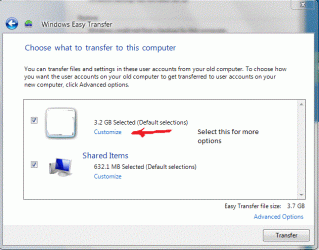
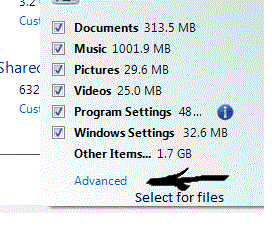
When you run Easy Transfer and restore, isn't there a custom button you can use to change the files restored and possibly their destinations? For instance, you can deselect the external drive so it won't restore everything twice.

You do know there is a Windows Easy Transfer and a Backup and Restore utility...... The .MIG file is Windows Easy Transfer. The Advanced button allows for changing user accounts.
 

Attachments

  • Transfer1.GIF
    Transfer1.GIF
    43.6 KB · Views: 16
  • Transfer2.GIF
    Transfer2.GIF
    21 KB · Views: 458

My Computer

Computer Manufacturer/Model Number
Homebuilt
OS
Windows 7 x64
CPU
i7-2600K
Motherboard
Asus P8Z77-v Pro
Memory
8 G
Graphics Card(s)
GTX 480
Sound Card
Onboard
Monitor(s) Displays
LG W2753V
Screen Resolution
1920x1080
Hard Drives
Crucial M4 128 G SSD
"When you run Easy Transfer and restore, isn't there a custom button you can use to change the files restored and possibly their destinations? For instance, you can deselect the external drive so it won't restore everything twice.

You do know there is a Windows Easy Transfer and a Backup and Restore utility...... The .MIG file is Windows Easy Transfer. The Advanced button allows for changing user accounts."


I choose the custom option to just transfer just like 10 files, but it changed my background (maybe to the one I had during the Easy Transfer from my XP) and added desktop icons and even more stuff I probably dont know about. so after that I just transferred everything over. will that make doubles of files that has already been transferred?

and if the .MIG file is Windows Easy Transfer then im guessing both individual easy transfers were transferred at the same time
 

My Computer

OS
Windows 7
and now internet explorer keeps having an alert pop up about running Adobe Flash Player. literally this happens at least 2 times before a page loads. And I have Adobe Flash Player installed, why is this happening?

and regarding the other issue on this thread, is there a way to see the difference between the xp files that were transferred and the win7 files that were already on the comp? ex. Easy Transfer transferred Skype xp files, and I already had installed Skype before Easy Transfer. I deleted the files i thought came from the Easy Transfer, but now Skype tries to log me in for like 10min and then says theres an error
 

My Computer

OS
Windows 7
If a backup moved the entire .mig file, I would assume it would leave it a .mig file.

Maybe if you restore again, it will ask if you want to overwrite a file already on the drive and you can keep track of that.

Otherwise, I really do not know.
 

My Computer

Computer Manufacturer/Model Number
Homebuilt
OS
Windows 7 x64
CPU
i7-2600K
Motherboard
Asus P8Z77-v Pro
Memory
8 G
Graphics Card(s)
GTX 480
Sound Card
Onboard
Monitor(s) Displays
LG W2753V
Screen Resolution
1920x1080
Hard Drives
Crucial M4 128 G SSD
"If a backup moved the entire .mig file, I would assume it would leave it a .mig file"

All i know is that when I made backups from my XP with Easy Transfer, the second time I went through the process on the same flashdrive it made it a .MIG file instead of an easy transfer file
 

My Computer

OS
Windows 7
and i know that if i transfer a media file thats already in the same location, the transferred file wont write over it. it will just label it video(1).wmv. will this happen for setting/program files?
 

My Computer

OS
Windows 7
Back
Top