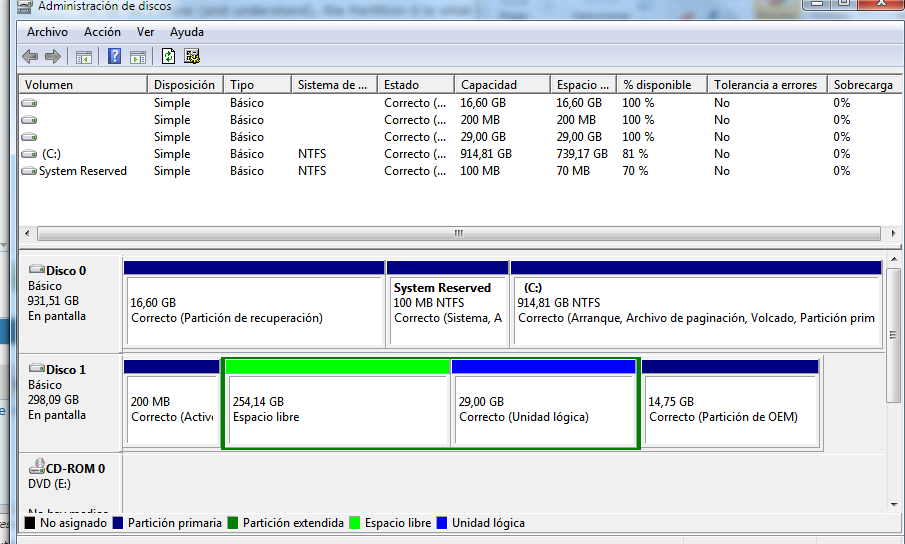
Hello everybody; I've been looking through the forum for a few hours with no help so I'm creating a new thread to expose my problem
I have a Lenovo G470 with Win7x64; wich after 2 years of use started to do everything really slow, so I tried to use the Lenovo recovery functionality wich was supposed to return everything to factory default.
After trying to use it, it threw an 'invalid partition' error or similar; and then when I tried to reboot to search the issue, it just started booting in recovery mode.
From there, I started googling around and found that maybe there was an issue with the volumes/partitions, so I entered in the diskpart list commands to see what was happening, and accidentally rebooted.
Laptop started normally, but after choosing the OS (It has this little menu where I have to select win7, it does not have another OS installed), it started to promt the 0x0000225 error.
Attempting a USB recovery, it leads me to select where I want to make the recovery, but options are
Operating System | Partition Size | Location
Windows 7 | 0 MB | (Unknown) Local Disk
Windows 7 | 29690 MB |(D: ) Lenovo
So somehow C is gonne and... empty
Then, what I was able to retrievve with
List partition:
Partition ### | Type | Size | Offset
Partition 1 | Primary | 200MB | 1024 KB
Partition 0 | Extended | 283GB | 201 KB
Partition 3 | Logical | 28GB | 254GB
Partition 2 | OEM | 14GB | 283GB
List volume
Volume ### | Ltr | Label | Fs | Type | Size | Status | Info
Volume 0 | E | | | DVD-ROM | 0B | No Media |
Volume 1 | C | | NTFS | Partition | 200MB | Healthy |
Volume 2 | D | LENOVO | NTFS | Partition | 28GB | Healthy |
Volume 4 | | LENOVO_PART | NTFS | Partition | 14MB | Healthy | Hidden
AS far as I know (and understand), the Partition 0 is what somehow is 'missing', or not linked to Partition C. Partition 3 is Volume 2, which is a partition where some drivers from lenovo are, and Partition 2 is Volume 4, which is the recovery section that seems to be working.
So, my issue is kind of how can I restore the Volume/partition union, and I think that from there onwards it should appear on the recovery section correctly allowing me to format it a needed.
Thanks in advance, and point me out if something is missing!
I have a Lenovo G470 with Win7x64; wich after 2 years of use started to do everything really slow, so I tried to use the Lenovo recovery functionality wich was supposed to return everything to factory default.
After trying to use it, it threw an 'invalid partition' error or similar; and then when I tried to reboot to search the issue, it just started booting in recovery mode.
From there, I started googling around and found that maybe there was an issue with the volumes/partitions, so I entered in the diskpart list commands to see what was happening, and accidentally rebooted.
Laptop started normally, but after choosing the OS (It has this little menu where I have to select win7, it does not have another OS installed), it started to promt the 0x0000225 error.
Attempting a USB recovery, it leads me to select where I want to make the recovery, but options are
Operating System | Partition Size | Location
Windows 7 | 0 MB | (Unknown) Local Disk
Windows 7 | 29690 MB |(D: ) Lenovo
So somehow C is gonne and... empty
Then, what I was able to retrievve with
List partition:
Partition ### | Type | Size | Offset
Partition 1 | Primary | 200MB | 1024 KB
Partition 0 | Extended | 283GB | 201 KB
Partition 3 | Logical | 28GB | 254GB
Partition 2 | OEM | 14GB | 283GB
List volume
Volume ### | Ltr | Label | Fs | Type | Size | Status | Info
Volume 0 | E | | | DVD-ROM | 0B | No Media |
Volume 1 | C | | NTFS | Partition | 200MB | Healthy |
Volume 2 | D | LENOVO | NTFS | Partition | 28GB | Healthy |
Volume 4 | | LENOVO_PART | NTFS | Partition | 14MB | Healthy | Hidden
AS far as I know (and understand), the Partition 0 is what somehow is 'missing', or not linked to Partition C. Partition 3 is Volume 2, which is a partition where some drivers from lenovo are, and Partition 2 is Volume 4, which is the recovery section that seems to be working.
So, my issue is kind of how can I restore the Volume/partition union, and I think that from there onwards it should appear on the recovery section correctly allowing me to format it a needed.
Thanks in advance, and point me out if something is missing!
My Computer
At a glance
Windows 7 64bit
- Computer type
- PC/Desktop
- OS
- Windows 7 64bit