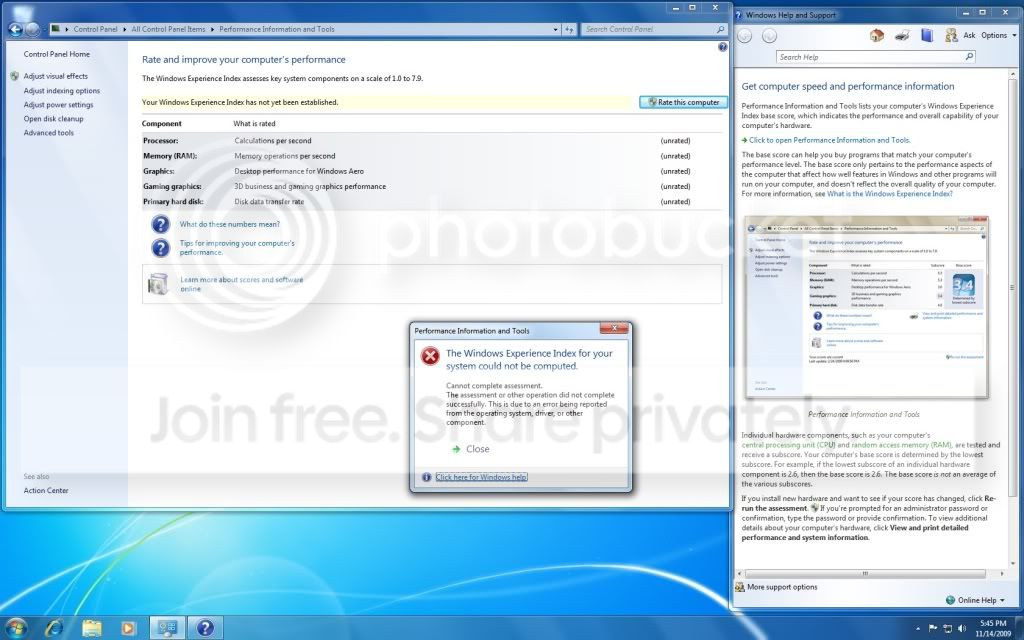
Windows experience Index could not complete

Zinic

New member
Local time
4:16 PM
Messages
38
I never had any rating to start with. So when I began testing, it went all the way through then this error popped up. What is wrong?

INdexrating.jpg
 

My Computer

Computer Manufacturer/Model Number
Zinic
OS
Windows 7 64bit
CPU
i7
Motherboard
EVGA
Memory
DDR3 6GB
Graphics Card(s)
Zinic
Sound Card
Zinic
Monitor(s) Displays
22"
Hard Drives
500gb & 640gb
PSU
Zinic
Case
Zinic
Cooling
Zinic
Keyboard
Logitech G11
Mouse
Razor DeathAdder
Internet Speed
10mg-20mg
Look in the Administrative view of Event Viewer at Computer>Manage for related errors. Resolve errors by googling.

A quick run of "sfc /scannow" will reassure that all OS files are intact and uncorrupted.

A last resort would be to run the installer from the desktop to do a Repair Install which in Win7 is an in-place Upgrade over itself.
 
Look in the Administrative view of Event Viewer at Computer>Manage for related errors. Resolve errors by googling.

A quick run of "sfc /scannow" will reassure that all OS files are intact and uncorrupted.

A last resort would be to run the installer from the desktop to do a Repair Install which in Win7 is an in-place Upgrade over itself.

Running "sfc /scannow" reviled no problems.

I checked Event Viewer and the major error I was getting is from Event ID 35 (kernal-procesor-power) I googled for solutions then this came up on another test:

"The device, Standard PS/2 Keyboard, is reporting "tv_ConfigMgrErr24". This device will not be available until the issue is resolved. The Plug and Play ID for this device is ACPI\PNP0303\4-136CDFB0-0." My G11 keyboard is all up to date but in my device manager it shows two "HID Keyboard Devices"... I only use one. I don't know how to fix this error.
 

My Computer

Computer Manufacturer/Model Number
Zinic
OS
Windows 7 64bit
CPU
i7
Motherboard
EVGA
Memory
DDR3 6GB
Graphics Card(s)
Zinic
Sound Card
Zinic
Monitor(s) Displays
22"
Hard Drives
500gb & 640gb
PSU
Zinic
Case
Zinic
Cooling
Zinic
Keyboard
Logitech G11
Mouse
Razor DeathAdder
Internet Speed
10mg-20mg
Try another keyboard to see what happens.

In Device manager, on keyboard Driver attempt to Update to find newer keyboard driver. See which keyboard is enabled. Try the other one, also looking for driver update. Google those keyboards listed to see what options/problems are known.

Was that the only repeat error in Event Viewer? Any critical?
 
Try another keyboard to see what happens.

In Device manager, on keyboard Driver attempt to Update to find newer keyboard driver. See which keyboard is enabled. Try the other one, also looking for driver update. Google those keyboards listed to see what options/problems are known.

Was that the only repeat error in Event Viewer? Any critical?
No. Nothing critical. The number of errors died down to 1 (application error). So basically everything is good to go.

Both of these Keyboard Device are enabled and in the "Device status" both are "working properly". One of them although has an extra tab labeled "Power Management".
 

My Computer

Computer Manufacturer/Model Number
Zinic
OS
Windows 7 64bit
CPU
i7
Motherboard
EVGA
Memory
DDR3 6GB
Graphics Card(s)
Zinic
Sound Card
Zinic
Monitor(s) Displays
22"
Hard Drives
500gb & 640gb
PSU
Zinic
Case
Zinic
Cooling
Zinic
Keyboard
Logitech G11
Mouse
Razor DeathAdder
Internet Speed
10mg-20mg
Did you activate first?
 

My Computer

Computer type
PC/Desktop
Computer Manufacturer/Model Number
Dell XPS 420
OS
Windows 10, Home Clean Install
CPU
Intel Core2 processsor Q8200(2.33Ghz 1333FSB) Quad Core Tech
Motherboard
Dell
Memory
6 gb
Graphics Card(s)
ATI Radeon 256MB HD3650
Sound Card
Intergrated 7.1 Channel Audio
Monitor(s) Displays
Dell SP2009W 20"
Hard Drives
640 GB Serial ATA Hard drive
Cooling
Fan
Keyboard
Dell USB Keyboard
Mouse
Dell Premium Optical USB
Internet Speed
DSL 2.85
No. I have not activated online yet. I want to make sure everything is ok first. Do I need to activate it to make this work?
 

My Computer

Computer Manufacturer/Model Number
Zinic
OS
Windows 7 64bit
CPU
i7
Motherboard
EVGA
Memory
DDR3 6GB
Graphics Card(s)
Zinic
Sound Card
Zinic
Monitor(s) Displays
22"
Hard Drives
500gb & 640gb
PSU
Zinic
Case
Zinic
Cooling
Zinic
Keyboard
Logitech G11
Mouse
Razor DeathAdder
Internet Speed
10mg-20mg
I thought that I read somewhere that you did, but not really sure. Since I was not sure I thought it best to bring the issue to the table.
Since i brought up this issue, one of the others will comment.
 

My Computer

Computer type
PC/Desktop
Computer Manufacturer/Model Number
Dell XPS 420
OS
Windows 10, Home Clean Install
CPU
Intel Core2 processsor Q8200(2.33Ghz 1333FSB) Quad Core Tech
Motherboard
Dell
Memory
6 gb
Graphics Card(s)
ATI Radeon 256MB HD3650
Sound Card
Intergrated 7.1 Channel Audio
Monitor(s) Displays
Dell SP2009W 20"
Hard Drives
640 GB Serial ATA Hard drive
Cooling
Fan
Keyboard
Dell USB Keyboard
Mouse
Dell Premium Optical USB
Internet Speed
DSL 2.85
I never had any rating to start with. So when I began testing, it went all the way through then this error popped up. What is wrong?
On our forum there are full this kind of threads -you need better search
for example:
1)http://www.sevenforums.com/performance-maintenance/23623-cant-rate-system-windows-experience.html

2)http://www.sevenforums.com/performance-maintenance/30876-windows-experiene-index-fails-win-7-a.html

3)http://www.sevenforums.com/performance-maintenance/32876-windows-experience-index-unknown-error.html

4)http://www.sevenforums.com/performance-maintenance/31804-windows-experience-index-error.html

there are more of course site:sevenforums.com/Performance-maintenance/ "Windows Experience Index" - Google Search

Quickly summary them:

If you have KIS 2010 surly this software is responsible for this issue so you have to contact with Kaspersky support for special hotfix

Another reasons:

-deffective drivers for video card,chipset,sometimes any issue with BIOS

so update BIOS,update all drivers,especially for video ard and chipset

Possibly other 3p security software can cause this issue as well
 

My Computer

Computer Manufacturer/Model Number
Custom made
OS
Windows 7 Professional x64 PL
CPU
AMD Athlon 4450e
Motherboard
Giga-Byte GA-MA69G-S3H
Memory
GoodRam DDR2 2x2048MB (FSB 800MHz)
Graphics Card(s)
nVidia GeForce 9600GT (G94-300) 1024 MB
Monitor(s) Displays
SAMSUNG SyncMaster HS2P301688
Hard Drives
Seagate ST3750330AS 750GB
PSU
Corsair 550W
Cooling
AeroCool ExtremeEngine 3T
My Windows Experience Error Message - resolution.

I never had any rating to start with. So when I began testing, it went all the way through then this error popped up. What is wrong?
On our forum there are full this kind of threads -you need better search
for example:
1)http://www.sevenforums.com/performance-maintenance/23623-cant-rate-system-windows-experience.html

2)http://www.sevenforums.com/performance-maintenance/30876-windows-experiene-index-fails-win-7-a.html

3)http://www.sevenforums.com/performance-maintenance/32876-windows-experience-index-unknown-error.html

4)http://www.sevenforums.com/performance-maintenance/31804-windows-experience-index-error.html

there are more of course site:sevenforums.com/Performance-maintenance/ "Windows Experience Index" - Google Search

Quickly summary them:

If you have KIS 2010 surly this software is responsible for this issue so you have to contact with Kaspersky support for special hotfix

Another reasons:

-deffective drivers for video card,chipset,sometimes any issue with BIOS

so update BIOS,update all drivers,especially for video ard and chipset

Possibly other 3p security software can cause this issue as well

Hi. I have KIS 2010 & don't recall having received any Kaspersky update relating to this. However, I've been wrestling with the Windows Experience Error message for the past 3 weeks - including a fresh Windows 7 Ultimate install.

Tonight, I tested again & IT WORKED!!!

The only thing I can put it down to is that over the past few days I changed my 1394a FireWire driver to the Legacy Driver - which (by the way) solved another issue I'd been experiencing with my TC Electronics Studio Konnekt 48 (audio hardware) which uses the Firewire connection to my ASUS F3SV notebook.
The Firewire fault represented itself as a video stutter/freeze on the mixer for the Studio Konnekt 48.

My suggestion is; see if your computer has Firewire/1394 & if it does, then update the Driver, Search for a driver already on your computer & select the Firewire driver with the "(Legacy)" in brackets.


Hopefully this resolves the issue for you... :)


Good luck!


- Mi.
 

My Computer

Computer Manufacturer/Model Number
ASUS F3SV
OS
Windows 7 Ultimate
CPU
T7700
Memory
2x 2Gb
Graphics Card(s)
nVidia GeForce 8600M GS
Hard Drives
Segate ST9160821AS
160Gb, 7200 RPM
I never had any rating to start with. So when I began testing, it went all the way through then this error popped up. What is wrong?
On our forum there are full this kind of threads -you need better search
for example:
1)http://www.sevenforums.com/performance-maintenance/23623-cant-rate-system-windows-experience.html

2)http://www.sevenforums.com/performance-maintenance/30876-windows-experiene-index-fails-win-7-a.html

3)http://www.sevenforums.com/performance-maintenance/32876-windows-experience-index-unknown-error.html

4)http://www.sevenforums.com/performance-maintenance/31804-windows-experience-index-error.html

there are more of course site:sevenforums.com/Performance-maintenance/ "Windows Experience Index" - Google Search

Quickly summary them:

If you have KIS 2010 surly this software is responsible for this issue so you have to contact with Kaspersky support for special hotfix

Another reasons:

-deffective drivers for video card,chipset,sometimes any issue with BIOS

so update BIOS,update all drivers,especially for video ard and chipset

Possibly other 3p security software can cause this issue as well

Hi. I have KIS 2010 & don't recall having received any Kaspersky update relating to this. However, I've been wrestling with the Windows Experience Error message for the past 3 weeks - including a fresh Windows 7 Ultimate install.

Tonight, I tested again & IT WORKED!!!

The only thing I can put it down to is that over the past few days I changed my 1394a FireWire driver to the Legacy Driver - which (by the way) solved another issue I'd been experiencing with my TC Electronics Studio Konnekt 48 (audio hardware) which uses the Firewire connection to my ASUS F3SV notebook.
The Firewire fault represented itself as a video stutter/freeze on the mixer for the Studio Konnekt 48.

My suggestion is; see if your computer has Firewire/1394 & if it does, then update the Driver, Search for a driver already on your computer & select the Firewire driver with the "(Legacy)" in brackets.


Hopefully this resolves the issue for you... :)


Good luck!


- Mi.

I have KIS 2010 (trial version) when I was trying to to my WEI Score...

I use this kind of motherboard. Newegg.com - EVGA E758-A1 3-Way SLI (x16/x16/x8) LGA 1366 Intel X58 ATX Intel Motherboard - Intel Motherboards and it has the IEEE 1394 Rear Panel Ports. Is this the FireWire? I won't be able to try this till later today, but how do I change my firewire to Legacy Driver?
 

My Computer

Computer Manufacturer/Model Number
Zinic
OS
Windows 7 64bit
CPU
i7
Motherboard
EVGA
Memory
DDR3 6GB
Graphics Card(s)
Zinic
Sound Card
Zinic
Monitor(s) Displays
22"
Hard Drives
500gb & 640gb
PSU
Zinic
Case
Zinic
Cooling
Zinic
Keyboard
Logitech G11
Mouse
Razor DeathAdder
Internet Speed
10mg-20mg
I have KIS 2010 (trial version) when I was trying to to my WEI Score...

So uninstall Kaspersky using Kaspersky Removal Tool Service messages

and replace it with another security software (full version)
 

My Computer

Computer Manufacturer/Model Number
Custom made
OS
Windows 7 Professional x64 PL
CPU
AMD Athlon 4450e
Motherboard
Giga-Byte GA-MA69G-S3H
Memory
GoodRam DDR2 2x2048MB (FSB 800MHz)
Graphics Card(s)
nVidia GeForce 9600GT (G94-300) 1024 MB
Monitor(s) Displays
SAMSUNG SyncMaster HS2P301688
Hard Drives
Seagate ST3750330AS 750GB
PSU
Corsair 550W
Cooling
AeroCool ExtremeEngine 3T
It is fixed now.
 

My Computer

Computer Manufacturer/Model Number
Zinic
OS
Windows 7 64bit
CPU
i7
Motherboard
EVGA
Memory
DDR3 6GB
Graphics Card(s)
Zinic
Sound Card
Zinic
Monitor(s) Displays
22"
Hard Drives
500gb & 640gb
PSU
Zinic
Case
Zinic
Cooling
Zinic
Keyboard
Logitech G11
Mouse
Razor DeathAdder
Internet Speed
10mg-20mg
Back
Top