Windows Explorer (back-forward issue)

h009291

New member
Local time
11:44 AM
Messages
4
I have WIN 7 and an HP Zbook 17.

I did not notice this issue previously, but has been happening with more and more frequency lately.

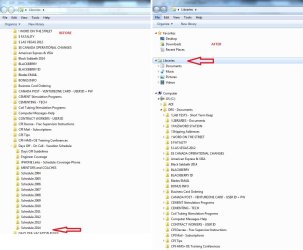
When I open Windows Explorer and start clicking on progressive sub directories, I get a few sub directories down, when suddenly The explorer side bar jumps me back up to the top (highlighting the Libraries directory). This is quite annoying as I then have to scroll back to where I was to resume where I was.

It acts just like I tap the space bar and the view shifts back up to the top of the explorer screen again. At first I thought it might be an issue with my Roller ball Logitech mouse use. But I disabled the mouse and used my keyboard mouse and have seen to do the same thing.

I have attached a screen shot of (1.) An example in the directory structure Just before it jumps back up and (2.) What the window looks like after it have popped back up to the top.

I talked to a fellow coworker who has also seen this happen in the past as well.

Any ideas what could be causing this or how you fix this annoying feature?

Thanks.
 

Attachments
  • BEFORE - AFTER.jpg
    BEFORE - AFTER.jpg
    95.5 KB · Views: 2

My Computer

Computer type
Laptop
Computer Manufacturer/Model Number
Hewlett-Packard - HP ZBook 17
OS
WIN 7
CPU
Intel(R) Core(TM) i5-4330M CPU @ 2.80GHz, 2801 Mhz, 2 Core(s
Memory
Installed Physical Memory (RAM) 16.0 GB
Graphics Card(s)
Adapter Description NVIDIA Quadro K3100M
Antivirus
Symantec
Browser
IE 8
You may be getting a vibration through the touchpad. There may be adjustments for sensitivity.

On my Toshiba Laptop the caret would move around as I typed(like as I'm typing right now.) Pressing F9 disabled the touchpad while typing. But there should also be settings to dampen sensitivity.
 

My Computer

Computer Manufacturer/Model Number
HP Media Center
OS
Windows 7 32 bit
CPU
AMD 5200+ dual core
Memory
2 GB
Graphics Card(s)
NVidia GeForce 6150SE 128 MB
Monitor(s) Displays
CRT
Screen Resolution
1280x1024
Hard Drives
500 GB Sata internal :

SIIG USB 3.0 docking stations w/WD Caviar Black 6 Gb/s drives
Keyboard
PS/2
Mouse
PS/2 Wheel Mouse
Other Info
SIIG USB 3.0 PCIexpress card.
Only thing ... I have my mouse Pad deactivated for this reason. I never use that function.
 

My Computer

Computer type
Laptop
Computer Manufacturer/Model Number
Hewlett-Packard - HP ZBook 17
OS
WIN 7
CPU
Intel(R) Core(TM) i5-4330M CPU @ 2.80GHz, 2801 Mhz, 2 Core(s
Memory
Installed Physical Memory (RAM) 16.0 GB
Graphics Card(s)
Adapter Description NVIDIA Quadro K3100M
Antivirus
Symantec
Browser
IE 8
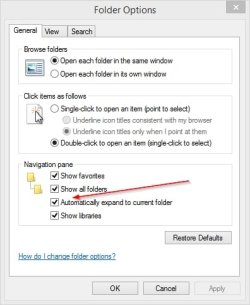
Do you have Expand to current folder checked? If yes, uncheck. If no, check it.

WinExpExpandToFollow.jpg
 

My Computer

Computer type
PC/Desktop
Computer Manufacturer/Model Number
Lenovo IdeaCenter 450
OS
Windows 10 Pro X64
CPU
Intel Quad Core i7-4770 @ 3.4Ghz
Memory
16.0GB PC3-12800 DDR3 SDRAM 1600 MHz
Graphics Card(s)
Intel Integrated HD Graphics
Sound Card
Realtek HD Audio
Monitor(s) Displays
HP 22" LCD
Screen Resolution
1680 x 1050
Hard Drives
250GB Samsung EVO SATA-3 SSD
2TB Seagate ST2000DM001 SATA-2
1.5TB Seagate ST3150041AS SATA
Keyboard
Dell USB
Mouse
Lenovo USB
Internet Speed
Cable via Road Runner 3MB Upload, 30MB Download
Antivirus
Windows Defender, MBAM Pro, MBAE
Browser
Seamonkey
Other Info
UEFI/GPT
PLDS DVD-RW DH16AERSH
On my PC:

  • If I click on the folder icon, instead of the arrow, the Navigation pane will scroll.
  • I have to wait a few seconds for Windows Explorer to "finish loading", otherwise it will just randomly scroll to some other location.
 

My Computer

Computer type
PC/Desktop
Computer Manufacturer/Model Number
n/a
OS
W7 Ultimate SP1, LM19.2 MATE, W10 Home 1703, W10 Pro 1703 VM, #All 64 bit
CPU
AMD Phenom II x6 1100T, 3.3 GHz
Motherboard
ASUS M4A88T-M/USB3 (AM3)
Memory
12GB DDR3 1333 G-Skill (4GB x 2), G-Skill (2GB x 2)
Graphics Card(s)
NVIDIA GeForce GTX 660
Sound Card
Realtek?
Monitor(s) Displays
Samsung S23B350
Screen Resolution
1920x1080
Hard Drives
WD Green 2TB (SATA), WD Green 3TB (SATA), WD Blue 4TB (SATA), WD Blue 6TB (SATA)
PSU
Cooler Master
Case
Antec GX300 Tower
Cooling
3x Antec TRICOOL 120mm Fans
Mouse
Wired Optical
Internet Speed
DSL
Antivirus
Avast
Browser
Pale Moon (64 bit)
Other Info
2018-12-27 Upgraded HDDs
2015-12-10 Upgraded case, graphics card, storage
2015-08-15 Upgraded motherboard & RAM
2015-07-15 Upgraded LM17.1 to LM17.2

My Computer

Computer type
Laptop
Computer Manufacturer/Model Number
Hewlett-Packard - HP ZBook 17
OS
WIN 7
CPU
Intel(R) Core(TM) i5-4330M CPU @ 2.80GHz, 2801 Mhz, 2 Core(s
Memory
Installed Physical Memory (RAM) 16.0 GB
Graphics Card(s)
Adapter Description NVIDIA Quadro K3100M
Antivirus
Symantec
Browser
IE 8
On my PC:

  • If I click on the folder icon, instead of the arrow, the Navigation pane will scroll.
  • I have to wait a few seconds for Windows Explorer to "finish loading", otherwise it will just randomly scroll to some other location.

I am in the habit off just clicking on the arrows besides the directories and not the icon name itself (Folders or Directories are in "Detail mode" not "icon Mode").
 

My Computer

Computer type
Laptop
Computer Manufacturer/Model Number
Hewlett-Packard - HP ZBook 17
OS
WIN 7
CPU
Intel(R) Core(TM) i5-4330M CPU @ 2.80GHz, 2801 Mhz, 2 Core(s
Memory
Installed Physical Memory (RAM) 16.0 GB
Graphics Card(s)
Adapter Description NVIDIA Quadro K3100M
Antivirus
Symantec
Browser
IE 8
On my PC:

  • If I click on the folder icon, instead of the arrow, the Navigation pane will scroll.
  • I have to wait a few seconds for Windows Explorer to "finish loading", otherwise it will just randomly scroll to some other location.

I am in the habit off just clicking on the arrows besides the directories and not the icon name itself (Folders or Directories are in "Detail mode" not "icon Mode").
I meant the icon in the Navigation pane.
 

My Computer

Computer type
PC/Desktop
Computer Manufacturer/Model Number
n/a
OS
W7 Ultimate SP1, LM19.2 MATE, W10 Home 1703, W10 Pro 1703 VM, #All 64 bit
CPU
AMD Phenom II x6 1100T, 3.3 GHz
Motherboard
ASUS M4A88T-M/USB3 (AM3)
Memory
12GB DDR3 1333 G-Skill (4GB x 2), G-Skill (2GB x 2)
Graphics Card(s)
NVIDIA GeForce GTX 660
Sound Card
Realtek?
Monitor(s) Displays
Samsung S23B350
Screen Resolution
1920x1080
Hard Drives
WD Green 2TB (SATA), WD Green 3TB (SATA), WD Blue 4TB (SATA), WD Blue 6TB (SATA)
PSU
Cooler Master
Case
Antec GX300 Tower
Cooling
3x Antec TRICOOL 120mm Fans
Mouse
Wired Optical
Internet Speed
DSL
Antivirus
Avast
Browser
Pale Moon (64 bit)
Other Info
2018-12-27 Upgraded HDDs
2015-12-10 Upgraded case, graphics card, storage
2015-08-15 Upgraded motherboard & RAM
2015-07-15 Upgraded LM17.1 to LM17.2
Back
Top