
Solved Windows Explorer crashes when trying to open certain file properties

sereneione

New member
Local time
2:45 AM
Messages
16
Hello everyone.

I have been unable to view the properties of certain files. Whenever I select the file, right-click, and select Properties, Windows Explorer crashes and restarts. The same thing happens when I try to select Properties through the Organize menu dropdown.

I found a couple of relevant threads in this forum, but they don't seem to have been resolved:

http://www.sevenforums.com/general-discussion/305358-can-t-view-properties-file.html
http://www.sevenforums.com/bsod-help-support/122991-right-click-properties-crash.html

My issue is more similar to the first thread. It is only files, not folders or drives. And it is only certain types of files; the affected file types seem to be video files in general, while all other file types seem OK, although mp3 files seem to be a mixture of both (some works and some fails).

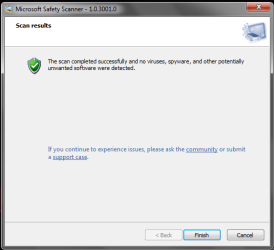
Anyway, I have tried all 4 methods provided by Sir George in the first thread. My graphic drivers are up to date, the sfc/scan came up clean (screenshot 1), the Microsoft Safety Scanner came up clean (screenshot 2), and the problem persisted after booting in safe mode, as well as after a clean boot.
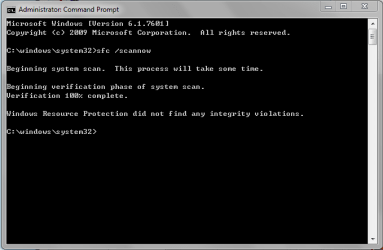
sfc.PNG

safetyscan.PNG

I have even scanned and fixed the registry using AVG PC TuneUp, turned off the Data Execution Prevention (DEP) feature, and scanned the hard drives for errors. There were no errors found from scanning the hard drives, and the problem remained.

Can anyone please provide me with further advice or instructions? Any insight would be very much appreciated.

Thanks!
 

My Computer My Computer

Computer type
Laptop
Computer Manufacturer/Model Number
Toshiba Notebook Satellite L840
OS
Windows 7 Home Premium 64-bit
CPU
Intel(R) Core(TM) i3-2350M CPU @ 2.30GHz
Memory
4.00 GB
Graphics Card(s)
AMD Radeon HD 7670M
Monitor(s) Displays
Generic PnP Monitor
Screen Resolution
1366x768 with 32 bit color depth
Keyboard
Standard PS/2 Keyboard
Mouse
Synaptics PS/2 Port TouchPad
Antivirus
Microsoft Security Essentials
Browser
Google Chrome, Internet Explorer 11
Have you tried uninstalling AVG?
What is the file association of video files (avi mpg mp4 etc.)

Mine is set for
.avi - Windows Media Player.
all .mp* - Windows Media Player

Look in Control Panel, Default Programs.
 

My Computer My Computer

Computer type
PC/Desktop
Computer Manufacturer/Model Number
Lenovo IdeaCenter 450
OS
Windows 10 Pro X64
CPU
Intel Quad Core i7-4770 @ 3.4Ghz
Memory
16.0GB PC3-12800 DDR3 SDRAM 1600 MHz
Graphics Card(s)
Intel Integrated HD Graphics
Sound Card
Realtek HD Audio
Monitor(s) Displays
HP 22" LCD
Screen Resolution
1680 x 1050
Hard Drives
250GB Samsung EVO SATA-3 SSD
2TB Seagate ST2000DM001 SATA-2
1.5TB Seagate ST3150041AS SATA
Keyboard
Dell USB
Mouse
Lenovo USB
Internet Speed
Cable via Road Runner 3MB Upload, 30MB Download
Antivirus
Windows Defender, MBAM Pro, MBAE
Browser
Seamonkey
Other Info
UEFI/GPT
PLDS DVD-RW DH16AERSH
Suggestion

This worked for me and it also helped another forum member.

See the tutorial here:

http://www.sevenforums.com/crash-lo...bleshooting-explorer-exe-crashing-issues.html

Download the Registry Fix file but before you do anything else run Registry Editor and back up the following registry key:

HKEY_LOCAL_MACHINE\SOFTWARE\Microsoft\Windows\Windows Error Reporting

Right click "Windows Error Reporting" and choose "Export" and save it somewhere handy.

Then go to START> Run

then type services.msc into the run dialog box and press ENTER

Scroll down and check that the Windows Error Reporting Service is enabled. If it isn't - enable it.

Click your downloaded "Registry Fix" file - it's file name is WER_Explorer.reg and click Merge.

Reboot.

The next time Explorer crashes check for a dump file here:

C:\Localdump

Refer to the tutorial linked above to read the instructions on how to zip the dump file and attach it to your next post.
 
Last edited:

My Computer My Computer

Computer type
Laptop
Computer Manufacturer/Model Number
ASUS
OS
Microsoft Windows 7 Home Premium 64-bit 7601 Multiprocessor Free Service Pack 1
CPU
AMD C-60 APU with Radeon(tm) HD Graphics
Motherboard
ASUSTeK COMPUTER INC. X501U
Memory
4.00 GB
Graphics Card(s)
AMD Radeon HD 6290 Graphics
Sound Card
(1) AMD High Definition Audio Device (2) Realtek High Defi
Screen Resolution
1366 x 768 x 32 bits (4294967296 colors) @ 60 Hz
Hard Drives
Hitachi HTS545050A7E380 SATA Disk Device
Antivirus
Comodo CIS & FW, SecureAplus App Whitelisting, Threatfire
Browser
Cyberfox 64bit, Opera 64bit, Airfox
Other Info
Spy-The-Spy, HitmanPro.Alert, Norton Connect Safe, MJRegWatcher, BitDefender TrafficLight, Voodoo Shield, Zemana AntiMalware
Have you tried uninstalling AVG?
What is the file association of video files (avi mpg mp4 etc.)

Mine is set for
.avi - Windows Media Player.
all .mp* - Windows Media Player

Look in Control Panel, Default Programs.

Hi Ztruker. Thanks for your reply. I have uninstalled AVG, replacing it with Microsoft Security Essentials. The problem remains.

As for the file associations, most of the video files are with GOM Player, while a select few are with Windows Media Player (.tp, .ts, etc). The mp3 files are with Windows Media Player.
 

My Computer My Computer

Computer type
Laptop
Computer Manufacturer/Model Number
Toshiba Notebook Satellite L840
OS
Windows 7 Home Premium 64-bit
CPU
Intel(R) Core(TM) i3-2350M CPU @ 2.30GHz
Memory
4.00 GB
Graphics Card(s)
AMD Radeon HD 7670M
Monitor(s) Displays
Generic PnP Monitor
Screen Resolution
1366x768 with 32 bit color depth
Keyboard
Standard PS/2 Keyboard
Mouse
Synaptics PS/2 Port TouchPad
Antivirus
Microsoft Security Essentials
Browser
Google Chrome, Internet Explorer 11
Dump File

Hello Callender. Thanks for your reply. I have followed your instructions and attached the dump file. If I didn't do it right, please let me know. Thanks again.

View attachment explorer.exe.1888.zip
 

My Computer My Computer

Computer type
Laptop
Computer Manufacturer/Model Number
Toshiba Notebook Satellite L840
OS
Windows 7 Home Premium 64-bit
CPU
Intel(R) Core(TM) i3-2350M CPU @ 2.30GHz
Memory
4.00 GB
Graphics Card(s)
AMD Radeon HD 7670M
Monitor(s) Displays
Generic PnP Monitor
Screen Resolution
1366x768 with 32 bit color depth
Keyboard
Standard PS/2 Keyboard
Mouse
Synaptics PS/2 Port TouchPad
Antivirus
Microsoft Security Essentials
Browser
Google Chrome, Internet Explorer 11
IDM

The crash dump suggests a problem with the following file:IDMShellExt64.dll

Suggestions for now include:

Navigate to that file - it should be in this folder:

C:\Program Files (x86)\Internet Download Manager

In that folder right-click the IDMShellExt64.dll and rename the IDMShellExt64.dll to IDMShellExt64.old


Log off and then back on again. See if the issue is resolved.


If it isn't - check for an updated version of IDM and if there's one available - install it.


If that doesn't work, consider uninstalling IDM followed by a reboot and also check to see that the

C:\Program Files (x86)\Internet Download Manager

folder has been removed and delete it if it still exists. If that doesn't solve the problem you can always reinstall IDM.


This isn't a guaranteed fix - just something to try.
 

My Computer My Computer

Computer type
Laptop
Computer Manufacturer/Model Number
ASUS
OS
Microsoft Windows 7 Home Premium 64-bit 7601 Multiprocessor Free Service Pack 1
CPU
AMD C-60 APU with Radeon(tm) HD Graphics
Motherboard
ASUSTeK COMPUTER INC. X501U
Memory
4.00 GB
Graphics Card(s)
AMD Radeon HD 6290 Graphics
Sound Card
(1) AMD High Definition Audio Device (2) Realtek High Defi
Screen Resolution
1366 x 768 x 32 bits (4294967296 colors) @ 60 Hz
Hard Drives
Hitachi HTS545050A7E380 SATA Disk Device
Antivirus
Comodo CIS & FW, SecureAplus App Whitelisting, Threatfire
Browser
Cyberfox 64bit, Opera 64bit, Airfox
Other Info
Spy-The-Spy, HitmanPro.Alert, Norton Connect Safe, MJRegWatcher, BitDefender TrafficLight, Voodoo Shield, Zemana AntiMalware
The crash dump suggests a problem with the following file:IDMShellExt64.dll

Suggestions for now include:

Navigate to that file - it should be in this folder:

C:\Program Files (x86)\Internet Download Manager

In that folder right-click the IDMShellExt64.dll and rename the IDMShellExt64.dll to IDMShellExt64.old


Log off and then back on again. See if the issue is resolved.


If it isn't - check for an updated version of IDM and if there's one available - install it.


If that doesn't work, consider uninstalling IDM followed by a reboot and also check to see that the

C:\Program Files (x86)\Internet Download Manager

folder has been removed and delete it if it still exists. If that doesn't solve the problem you can always reinstall IDM.


This isn't a guaranteed fix - just something to try.

Hello again.

I have changed the file from .dll to .old and rebooted. It didn't work. I have checked that IDM is of the latest version. Finally, I have uninstalled IDM and rebooted, deleted the IDM folder and rebooted again. No luck.

:(
 

My Computer My Computer

Computer type
Laptop
Computer Manufacturer/Model Number
Toshiba Notebook Satellite L840
OS
Windows 7 Home Premium 64-bit
CPU
Intel(R) Core(TM) i3-2350M CPU @ 2.30GHz
Memory
4.00 GB
Graphics Card(s)
AMD Radeon HD 7670M
Monitor(s) Displays
Generic PnP Monitor
Screen Resolution
1366x768 with 32 bit color depth
Keyboard
Standard PS/2 Keyboard
Mouse
Synaptics PS/2 Port TouchPad
Antivirus
Microsoft Security Essentials
Browser
Google Chrome, Internet Explorer 11
Tutorial

Okay so that rules out that software. You should also check your shell extensions as shown in step 1 of the tutorial and disable any that were installed by third party software (Non-Microsoft) then reboot to see if the issue remains. If everything works okay re-enable those shell extensions a few at a time until the issue is reproduced.

If there's still a problem after disabling those shell extensions start looking at software that was installed on or around the date the problem started and also check for updates for any other third party software.

If you get another new dump file you could attach it to another post just to check that it reads the same as the last one.

EDIT: If you see any new dump files including the one that was created after you removed IDM and rebooted please upload them.

In order to stop those dump files being written out - double click on that backup reg file that you made as per Post 3 and merge it.
Then delete the C:\Localdump folder.
 
Last edited:

My Computer My Computer

Computer type
Laptop
Computer Manufacturer/Model Number
ASUS
OS
Microsoft Windows 7 Home Premium 64-bit 7601 Multiprocessor Free Service Pack 1
CPU
AMD C-60 APU with Radeon(tm) HD Graphics
Motherboard
ASUSTeK COMPUTER INC. X501U
Memory
4.00 GB
Graphics Card(s)
AMD Radeon HD 6290 Graphics
Sound Card
(1) AMD High Definition Audio Device (2) Realtek High Defi
Screen Resolution
1366 x 768 x 32 bits (4294967296 colors) @ 60 Hz
Hard Drives
Hitachi HTS545050A7E380 SATA Disk Device
Antivirus
Comodo CIS & FW, SecureAplus App Whitelisting, Threatfire
Browser
Cyberfox 64bit, Opera 64bit, Airfox
Other Info
Spy-The-Spy, HitmanPro.Alert, Norton Connect Safe, MJRegWatcher, BitDefender TrafficLight, Voodoo Shield, Zemana AntiMalware
Also check

Check Folder view options and set them like this:

Choose “Organize,” “Folder and Search Options,” “View,” and then click “Launch Folder Windows in a Separate Process” to tick the checkbox followed by “Apply” and “Ok"


It might also be wise to also rebuild the Icon Cache as shown here:

http://www.sevenforums.com/tutorials/49819-icon-cache-rebuild.html
 

My Computer My Computer

Computer type
Laptop
Computer Manufacturer/Model Number
ASUS
OS
Microsoft Windows 7 Home Premium 64-bit 7601 Multiprocessor Free Service Pack 1
CPU
AMD C-60 APU with Radeon(tm) HD Graphics
Motherboard
ASUSTeK COMPUTER INC. X501U
Memory
4.00 GB
Graphics Card(s)
AMD Radeon HD 6290 Graphics
Sound Card
(1) AMD High Definition Audio Device (2) Realtek High Defi
Screen Resolution
1366 x 768 x 32 bits (4294967296 colors) @ 60 Hz
Hard Drives
Hitachi HTS545050A7E380 SATA Disk Device
Antivirus
Comodo CIS & FW, SecureAplus App Whitelisting, Threatfire
Browser
Cyberfox 64bit, Opera 64bit, Airfox
Other Info
Spy-The-Spy, HitmanPro.Alert, Norton Connect Safe, MJRegWatcher, BitDefender TrafficLight, Voodoo Shield, Zemana AntiMalware
More Dump Files

Hello Callender.

I have attached 3 dump files, in the following order:

(1) View attachment explorer.exe.2348.zip
(2) View attachment explorer.exe.2040.zip
(3) View attachment explorer.exe.2288.zip

I believe that the first dump file was created after the IDM shell extension was amended, while the second dump file was created after IDM was uninstalled. The third dump file was most probably created after IDM was re-installed.

Anyway, I have (on a previous occasion) disabled all non-Microsoft context menu handlers using ShellExView and then rebooted. The problem remained. I have also tried the "Launch Folder Windows in a Separate Process" trick to no avail.

And unfortunately, I have NO idea when the problem started. I have not opened the properties of any file for ages, and it was only by chance that I did it last week and noticed the problem for the very first time. As such, I am not sure what to look for and when.

So... I will try the icon cache rebuild and come back here with more dump files. Many thanks for your help so far.
 

My Computer My Computer

Computer type
Laptop
Computer Manufacturer/Model Number
Toshiba Notebook Satellite L840
OS
Windows 7 Home Premium 64-bit
CPU
Intel(R) Core(TM) i3-2350M CPU @ 2.30GHz
Memory
4.00 GB
Graphics Card(s)
AMD Radeon HD 7670M
Monitor(s) Displays
Generic PnP Monitor
Screen Resolution
1366x768 with 32 bit color depth
Keyboard
Standard PS/2 Keyboard
Mouse
Synaptics PS/2 Port TouchPad
Antivirus
Microsoft Security Essentials
Browser
Google Chrome, Internet Explorer 11
Crash Dumps

Okay I've looked at the crash dumps and don't see anything else that points to a specific problem. I can see that you did indeed manage to remove IDM.

Bearing in mind that I have some experience in analyzing crash dumps - I'm by no means an expert. Maybe other members will take a look at them and spot something that I might have missed?

My thoughts are as follows:

If you can make a full system image backup it would be wise to do so. Then think about trying any of the following...

Boot into Safe Mode and see if you get the same issue. If everything works in safe mode post a reply.

http://www.sevenforums.com/tutorials/69585-safe-mode.html (see Option 1)

Or try creating a new user account and use it to see if you get the same problem.

http://www.sevenforums.com/tutorials/181024-user-account-create.html

Or if the account that you are currently using isn't the Administrator Account try logging in as Administrator. Enable the Administrator Account if it's hidden by following Step 2 in this tutorial:

http://www.sevenforums.com/tutorials/507-built-administrator-account-enable-disable.html

Log into the Administrator Account and see if you get the same problem.

I still think that it's a context menu handler problem but let's see if you have any luck with any of the steps listed above.
 

My Computer My Computer

Computer type
Laptop
Computer Manufacturer/Model Number
ASUS
OS
Microsoft Windows 7 Home Premium 64-bit 7601 Multiprocessor Free Service Pack 1
CPU
AMD C-60 APU with Radeon(tm) HD Graphics
Motherboard
ASUSTeK COMPUTER INC. X501U
Memory
4.00 GB
Graphics Card(s)
AMD Radeon HD 6290 Graphics
Sound Card
(1) AMD High Definition Audio Device (2) Realtek High Defi
Screen Resolution
1366 x 768 x 32 bits (4294967296 colors) @ 60 Hz
Hard Drives
Hitachi HTS545050A7E380 SATA Disk Device
Antivirus
Comodo CIS & FW, SecureAplus App Whitelisting, Threatfire
Browser
Cyberfox 64bit, Opera 64bit, Airfox
Other Info
Spy-The-Spy, HitmanPro.Alert, Norton Connect Safe, MJRegWatcher, BitDefender TrafficLight, Voodoo Shield, Zemana AntiMalware
More More Dump Files

Hello Callender.

I've tried the icon cache rebuild, rebooting in safe mode, logging in as another user, and logging in as the administrator. Nothing works. I've also re-tried disabling all non-Microsoft context menu handlers.

(0) After disabling all non-Microsoft context menu handlers View attachment explorer.exe.5988.zip
(1) After the icon cache rebuild View attachment explorer.exe.1268.zip
(2) After rebooting in safe mode View attachment explorer.exe.1576.zip
(3) After logging in as another user View attachment explorer.exe.1044.zip
(4) After logging in as the administrator View attachment explorer.exe.3380.zip

I may try disabling all the context menu handlers, including the Microsoft ones, and see what happens. What do you think? Would this be harmful?
 

My Computer My Computer

Computer type
Laptop
Computer Manufacturer/Model Number
Toshiba Notebook Satellite L840
OS
Windows 7 Home Premium 64-bit
CPU
Intel(R) Core(TM) i3-2350M CPU @ 2.30GHz
Memory
4.00 GB
Graphics Card(s)
AMD Radeon HD 7670M
Monitor(s) Displays
Generic PnP Monitor
Screen Resolution
1366x768 with 32 bit color depth
Keyboard
Standard PS/2 Keyboard
Mouse
Synaptics PS/2 Port TouchPad
Antivirus
Microsoft Security Essentials
Browser
Google Chrome, Internet Explorer 11
Context Menu Handlers

I'd leave the Microsoft Context Menu Handlers enabled as disabling them is likely to cause more problems.

Looking again at those dumps is indicating problems with the following:

IDMShellExt64.dll
IDMNetMon64.dll
KZipShell.dll

However as one of your earlier dumps confirms that the problem still exists even after removing IDM I'd be tempted to suggest the last resorts of doing a repair install (won't fix problems with third party programs - so it would seem unlikely to work) and finally a clean install of Windows.

I have to ask if you rebooted after disabling all non-Microsoft context menu handlers?

Note: I'm no expert on repair installs as my preference is to clean install windows when needed so you might need to ask for help from other members on that.
 

My Computer My Computer

Computer type
Laptop
Computer Manufacturer/Model Number
ASUS
OS
Microsoft Windows 7 Home Premium 64-bit 7601 Multiprocessor Free Service Pack 1
CPU
AMD C-60 APU with Radeon(tm) HD Graphics
Motherboard
ASUSTeK COMPUTER INC. X501U
Memory
4.00 GB
Graphics Card(s)
AMD Radeon HD 6290 Graphics
Sound Card
(1) AMD High Definition Audio Device (2) Realtek High Defi
Screen Resolution
1366 x 768 x 32 bits (4294967296 colors) @ 60 Hz
Hard Drives
Hitachi HTS545050A7E380 SATA Disk Device
Antivirus
Comodo CIS & FW, SecureAplus App Whitelisting, Threatfire
Browser
Cyberfox 64bit, Opera 64bit, Airfox
Other Info
Spy-The-Spy, HitmanPro.Alert, Norton Connect Safe, MJRegWatcher, BitDefender TrafficLight, Voodoo Shield, Zemana AntiMalware
Hello Callender.

I'd like to avoid repair and clean installs too, simply because I haven't got a Windows 7 installation disk, which, from what I understand, is what you need for both.

Anyway, you mentioned this time that the crash dumps indicated problems with IDMShellExt64.dll, IDMNetMon64.dll and KZipShell.dll. Since we know that IDM is not the issue, through the process of elimination, that leaves KZip. KZip is a ZIP software that I had installed sometime last year, to unzip specific files which could not be unzipped by JZip, my main ZIP software.

So, long story cut short, I uninstalled it, rebooted, and... voila. The problem is gone. Whew!

Thank you so much for your help. Thanks for analysing the crash dumps for me. I don't know how to, although I would like to learn. I need a software to read the files though, and multiple attempts to install the Microsoft SDK program failed for me. Do you have a recommendation?

Once again, thanks a lot Callender. Really appreciated it.
 

My Computer My Computer

Computer type
Laptop
Computer Manufacturer/Model Number
Toshiba Notebook Satellite L840
OS
Windows 7 Home Premium 64-bit
CPU
Intel(R) Core(TM) i3-2350M CPU @ 2.30GHz
Memory
4.00 GB
Graphics Card(s)
AMD Radeon HD 7670M
Monitor(s) Displays
Generic PnP Monitor
Screen Resolution
1366x768 with 32 bit color depth
Keyboard
Standard PS/2 Keyboard
Mouse
Synaptics PS/2 Port TouchPad
Antivirus
Microsoft Security Essentials
Browser
Google Chrome, Internet Explorer 11
Crash Dumps

Well great news! I'm glad that it's fixed. I was going to suggest removing Kzip but figured that if you'd already disabled the Kzip context menu menu handler then it couldn't be the likely cause.

I have installed Windows SDK but don't actually remember the correct procedure. I do remember that I had problems installing it. It took two attempts.

http://www.sevenforums.com/tutorial...up-shutdown-sleep-hibernate-reboot-trace.html

The installation procedure is shown in the above link but ignore everything down the page after the line under the first two screenshots. I seem to remember having to relocate the Symbols package as there was a problem with the default location.

If you want to take a look at the dumps you can also use an online service:

Instant Online Crash Analysis

Upload the zipped dump file and wait a few seconds to see the report.

On another note you should really go through the steps that I mentioned in Post #8 of this thread to fix your registry to prevent crash dumps for explorer.exe from being written out.

As for future repairs - it's usually pretty easy to make a system image backup that you can restore.

It is also possible to download the ISO for your version of Windows 7 and burn it to USB just in case you ever need it.

http://www.sevenforums.com/tutorials/3413-repair-install.html
 

My Computer My Computer

Computer type
Laptop
Computer Manufacturer/Model Number
ASUS
OS
Microsoft Windows 7 Home Premium 64-bit 7601 Multiprocessor Free Service Pack 1
CPU
AMD C-60 APU with Radeon(tm) HD Graphics
Motherboard
ASUSTeK COMPUTER INC. X501U
Memory
4.00 GB
Graphics Card(s)
AMD Radeon HD 6290 Graphics
Sound Card
(1) AMD High Definition Audio Device (2) Realtek High Defi
Screen Resolution
1366 x 768 x 32 bits (4294967296 colors) @ 60 Hz
Hard Drives
Hitachi HTS545050A7E380 SATA Disk Device
Antivirus
Comodo CIS & FW, SecureAplus App Whitelisting, Threatfire
Browser
Cyberfox 64bit, Opera 64bit, Airfox
Other Info
Spy-The-Spy, HitmanPro.Alert, Norton Connect Safe, MJRegWatcher, BitDefender TrafficLight, Voodoo Shield, Zemana AntiMalware
Hello hello Callender.

I can't install Windows SDK; I've tried it multiple times. No idea why, so I've given up. But thanks for the link to the online service. And, I've followed your registry instructions in Post #8.

Once again, thanks!
 

My Computer My Computer

Computer type
Laptop
Computer Manufacturer/Model Number
Toshiba Notebook Satellite L840
OS
Windows 7 Home Premium 64-bit
CPU
Intel(R) Core(TM) i3-2350M CPU @ 2.30GHz
Memory
4.00 GB
Graphics Card(s)
AMD Radeon HD 7670M
Monitor(s) Displays
Generic PnP Monitor
Screen Resolution
1366x768 with 32 bit color depth
Keyboard
Standard PS/2 Keyboard
Mouse
Synaptics PS/2 Port TouchPad
Antivirus
Microsoft Security Essentials
Browser
Google Chrome, Internet Explorer 11
This is an antique thread with current relevance. The tutorial referred to above advises getting something called ShellExView. The latest update to it appears to have been made a little over a year ago as I write this. Probably appropriate for an old topic describing a problem on an operating system that is no longer in active support. In any case, this handy little tool listed a bunch of extensions, most of which were from Microsoft, a few of which were from products I've had on my system for a long time, and one was associated with a bit of hardware (an NVidia video card) I installed just a couple of weeks ago. My symptoms were that if I tried to pop up the context menu on a drive in the left panel (tree view of drives & directories) of Windows Explorer, Windows Explorer would generate an error & close. I never got as far as seeing the context menu so I never managed to get to the drive properties, which was my destination & apparently was the point at which most other people experienced their problems. My problem occurred at an earlier step compared to what I'm seeing others were experiencing. Before I came here for help, I went to the trouble of doing a chkdsk on all of my partitions & that didn't cure the issue. Anyway, I got ShellExView. ShellExView was showing me several shell extensions associated with NVidia. I thought hmmmmmm....... I thought 1+1=2 in most number systems we like to use. I thought these things are probably not anything I'm ever going to use. I don't intend to ever download updated drivers for the card. It's working now & it's fine. Let's see what happens if I just disable the handful of extensions that are identified as coming from NVidia. Yeah, I know, not very scientific, I should have tried one at a time. But I'm lazy. And like I said, I'm not interested in fiddling with anything to do with NVidia settings beyond the video resolution, which isn't something I would set from a context menu. There's a new NVidia tool in Control Panel for that.


Guess what? There's a happy ending to this story. Disabling the NVidia extensions restored my Windows Explorer functionality. Didn't have to reboot. Didn't run SFC /SCANNOW. Didn't even log off the user. Just disabled the NVidia extension in ShellExView. Poof. Magic. Problem solved.


Thank you for the advice. Thank you for the pointer to the handy tool. May we all get many more years of use out of this non-supported operating system. It serves its purpose & as long as it continues to do so, I see no reason for getting on W10 or whatever follows on after that.
 

My Computer My Computer

Computer type
PC/Desktop
Computer Manufacturer/Model Number
ASUS (assembled myself)
OS
Windows 7 Professional 64-bit
CPU
Intel Core i7-4790K Quad CPU @ 4.00 GHz
Motherboard
ASUS Z97-AR, Intel Z97 Express chipset, ATX form factor
Memory
2x4G DDR3 1600MHz DIMMs
Graphics Card(s)
Intel HD Graphics 4600 on mobo; NVidia GeForce GT 710 PCI-E
Sound Card
Realtek High Definition Audio, integrated on mobo
Monitor(s) Displays
Dell SE2417HGX, 20.5"x11.5" viewable area; 32" Toshiba HDTV
Screen Resolution
1920 x 1080 @ 60 Hz, 32-bit color depth
Hard Drives
Western Digital 500G SATA
Seagate 150G SATA
2 x Seagate 6T SATA
2 x Seagate 18T SATA
PSU
EVGA 500B (500 Watts)
Case
NZXT H230 mid-tower
Cooling
CPU fan, PSU fan, 2 case fans, NVidia fan
Keyboard
Perixx 513H
Mouse
Touch pad integrated into keyboard
Internet Speed
Intel Ethernet Conn(2)I218-V, on mobo, ISP=cableTV 400Mbps
Antivirus
Comodo
Browser
Firefox
Other Info
Ext'l DVD rec: LG HL-DT-ST DVDRAM GP10NB20 USB
Monitor conn to VideoPort via HDMI-to-VideoPort adap
Realtek ALC892 8-channel High Definition Audio CODEC featuring Crystal Sound 2
Audio conn to surr recv via 25' optical S/PDIF TOSLINK audio cable
SYSINFO: 11 NIC ports but only 1 actively conn via DHCP to ISP
ISP bundled w/ cable TV+cell, claims 400Mbps,
but really 50 million bytes/sec
ShellExView still works great one Windows 10 too. Great tool as you said.

Glad you got it fixed. Thanks for posting it, could definitely help someone in the future.
 

My Computer My Computer

Computer type
PC/Desktop
Computer Manufacturer/Model Number
Lenovo IdeaCenter 450
OS
Windows 10 Pro X64
CPU
Intel Quad Core i7-4770 @ 3.4Ghz
Memory
16.0GB PC3-12800 DDR3 SDRAM 1600 MHz
Graphics Card(s)
Intel Integrated HD Graphics
Sound Card
Realtek HD Audio
Monitor(s) Displays
HP 22" LCD
Screen Resolution
1680 x 1050
Hard Drives
250GB Samsung EVO SATA-3 SSD
2TB Seagate ST2000DM001 SATA-2
1.5TB Seagate ST3150041AS SATA
Keyboard
Dell USB
Mouse
Lenovo USB
Internet Speed
Cable via Road Runner 3MB Upload, 30MB Download
Antivirus
Windows Defender, MBAM Pro, MBAE
Browser
Seamonkey
Other Info
UEFI/GPT
PLDS DVD-RW DH16AERSH
Back
Top