Windows Explorer customization

Usjes

New member
Local time
4:01 PM
Messages
4
Hi,

I've just started using Win7 and would like to apply customizations similar to what I use in XP. Specifically:
1. I change my display settings in XP such that the window colour is changed from the default 'white' to 'gray'. => Most window backgrounds such as a microsoft word page or windows explorer background which would be white by default display as grey instead. I have found a similar setting in themes in Win7, however this seems to take effect for all programs EXCEPT window explorer. Why is this ? How do I fix it so that I can alter the background of a windows explorer window in Win7?
2. In XP, if I set the Explorer Bar in Windows Explorer to 'Folders', the explorer left hand pane shows the folders hierarchy and it TRACKS the Address Bar, ie if I type the address C:\Users\data then the explorer bar will show the folders down to the C:\Users\data folder. In Win7 I just see 'Favourites', 'Libraries','Computer' etc. I can MANUALLY click down from 'Computer' to any folder and the Address Bar will track as I open folders but the tracking doesn't work the other way around. So is there any way I can get XP-like behaviour ?

Thanks,

Usjes
 

My Computer

OS
Windows 7 Professional
regarding 1.
I don't know how you managed to do it for programs, but I know how to do it for windows in Windows Explorer:
right-click on the desktop, click 'personalize'
at the bottom of the menu, click the second icon--'window color'
under the 'item' menu select 'window' - and then select the color you want
click 'apply', and, if your version of Windows is like mine, you won't see the change apply immediately after it asks you to 'please wait' and fades to grayscale (which you will with most of the changes made to items on that list), but if you click into or out of a subfolder, you'll see that the background has indeed changed.
 

My Computer

Computer type
PC/Desktop
Computer Manufacturer/Model Number
custom
OS
Windows 7 Home Premium 32bit
CPU
AMD Athlon II X2 250 Processor 3.00 GHz
Motherboard
Gigabyte
Memory
2Gb DDR2
Graphics Card(s)
onboard
Sound Card
onboard
Monitor(s) Displays
Viewsonic VA2448m-LED 23.6" LED
Screen Resolution
1920 x 1080
Hard Drives
internal: 1.5 TB Samsung Spinpoint
external: Samsung 2TB USB3.0; 1.5TB Samsung G3 Station
PSU
350w
Case
CoolerMaster
Keyboard
Microsoft Desktop 800
Mouse
Microsoft Desktop 800
Internet Speed
1Mbps
Antivirus
MSE
Browser
Firefox
Other Info
3.4 rating on the "Windows Experience Index"
regarding 2.
in Windows Explorer go to 'tools' and then 'folder options'
at the bottom of that 'general' tab it should say 'Navagation pane' and have two tick boxes -- tick those and see if you get the behavior you want.

is this what you're talking about?
 

My Computer

Computer type
PC/Desktop
Computer Manufacturer/Model Number
custom
OS
Windows 7 Home Premium 32bit
CPU
AMD Athlon II X2 250 Processor 3.00 GHz
Motherboard
Gigabyte
Memory
2Gb DDR2
Graphics Card(s)
onboard
Sound Card
onboard
Monitor(s) Displays
Viewsonic VA2448m-LED 23.6" LED
Screen Resolution
1920 x 1080
Hard Drives
internal: 1.5 TB Samsung Spinpoint
external: Samsung 2TB USB3.0; 1.5TB Samsung G3 Station
PSU
350w
Case
CoolerMaster
Keyboard
Microsoft Desktop 800
Mouse
Microsoft Desktop 800
Internet Speed
1Mbps
Antivirus
MSE
Browser
Firefox
Other Info
3.4 rating on the "Windows Experience Index"
Thanks for your replies Lykho, your suggestion solves item 2. however I still cant get the Windows Explorer background colour to display as anything other than white. The method you suggest is what I was already using. From the 'Item' dropdown I have select 'Application Background' and 'Window' and set the colour to gray for both of them, I think it is probably the 'Application backgound' which applies to other programs like Word etc. but none of the items seems to change the Windows explorer background for me.

Usjes.
 

My Computer

OS
Windows 7 Professional

My Computer

Computer Manufacturer/Model Number
Averatec 6130HS-20
OS
Windows 7 Professional 32-bit (6.1, Build 7600)
CPU
Intel(R) Pentium(R) 4 3.00 GHz HT
Memory
2.0 GB
Graphics Card(s)
ATI Mobility Radeon 9600 64MB
Sound Card
Realtek AC'97 Audio
Screen Resolution
1280 x 800
Hard Drives
Seagate 96023A 60GB 7200RPM -
Seagate FreeAgentDesktop 250GB
Cooling
20 Inch Box Fan
Mouse
Targus PAWM10 Wireless Optical Laptop Mouse
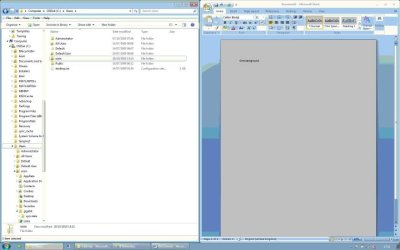
Thanks for the suggestion Greg S, that is the type of effect I am trying to achieve but I really dont want to have to install a 3rd party program to do it. For reference the attached jpg shows what I am trying to achieve. On the right is a MS Word doc whose background has been successfully set to grey whereas the Windows Explorer background on the left remains stubbornly white.
Lhyko, can you confirm that you have managed to change the background which appears white in the attached jpg to some other colour?

Thanks

Usjes.
 

Attachments

  • Win7.jpg
    Win7.jpg
    37.1 KB · Views: 76

My Computer

OS
Windows 7 Professional
Lhyko, can you confirm that you have managed to change the background which appears white in the attached jpg to some other colour?

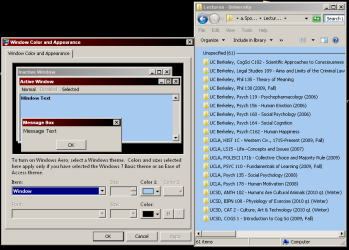
yes. following the method I outlined earlier it works fine for me (I'm using the 'classic' theme on the Home Premium 32bit version, so for all I know there could be some problem doing it on the version or theme you have--note the "colors selected here apply only..." message in the screenshot)
 

Attachments

  • excolbluwin.png
    excolbluwin.png
    21.2 KB · Views: 49

My Computer

Computer type
PC/Desktop
Computer Manufacturer/Model Number
custom
OS
Windows 7 Home Premium 32bit
CPU
AMD Athlon II X2 250 Processor 3.00 GHz
Motherboard
Gigabyte
Memory
2Gb DDR2
Graphics Card(s)
onboard
Sound Card
onboard
Monitor(s) Displays
Viewsonic VA2448m-LED 23.6" LED
Screen Resolution
1920 x 1080
Hard Drives
internal: 1.5 TB Samsung Spinpoint
external: Samsung 2TB USB3.0; 1.5TB Samsung G3 Station
PSU
350w
Case
CoolerMaster
Keyboard
Microsoft Desktop 800
Mouse
Microsoft Desktop 800
Internet Speed
1Mbps
Antivirus
MSE
Browser
Firefox
Other Info
3.4 rating on the "Windows Experience Index"
regarding 1.
I don't know how you managed to do it for programs, but I know how to do it for windows in Windows Explorer:
right-click on the desktop, click 'personalize'
at the bottom of the menu, click the second icon--'window color'
under the 'item' menu select 'window' - and then select the color you want
click 'apply', and, if your version of Windows is like mine, you won't see the change apply immediately after it asks you to 'please wait' and fades to grayscale (which you will with most of the changes made to items on that list), but if you click into or out of a subfolder, you'll see that the background has indeed changed.


Lykho this doesn't seem to work with normal "Window color style" except "Windows Classic" as i tried on mine Windows but it had no effect with normal windows color style except classic...i want to know is there a way to do this without any 3rd party apps because then it slow down explorer & there always a black background flashing while opening explorer or any window...i've tried 3-4 apps including "FOLDER BACKGROUND CHANGER by Kishen Bagaria" all does the same...the changes i made following the step here as mentioned by Lykho takes effect in all other pop-up windows,MS Word but not in explorer... :geek:
 

My Computer

Computer Manufacturer/Model Number
Acer Aspire 4530
OS
windows 7 Ultimate x86
CPU
AMD Athlon x2 QL60 1900Mhz 1 MB L2 cache
Motherboard
Acer Grasmoor
Memory
2GB DDR2
Graphics Card(s)
nVidia GeForce 9100M G
Sound Card
Onboard
Monitor(s) Displays
14.1"
Screen Resolution
1280*800
Hard Drives
160 GB
PSU
Onboard
Case
Onboard
Cooling
Onboard
Keyboard
Standard laptop keyboard
Mouse
Touchpad & external iball usb mouse
Internet Speed
its slower then SNAIL
Hello Usjes if you are interested in using a Windows Classic theme so you can change the background color of explorer I have reproduced 16 of the old XP classic themes Here (Post #313).
PS: Follow the simple installation instructions and the theme should change after a few seconds. After that you can modify the chosen theme to your liking windows and will save it as an unsaved theme, right click on it, save as theme and give it a name
 

My Computer

Computer type
PC/Desktop
Computer Manufacturer/Model Number
My own abomination, I call it the Money Pit
OS
Windows 10 Pro x 2/Windows 11 Home
CPU
Intel i7 2600K @ 3.40 GHz
Motherboard
ASUS Sabertooth P67
Memory
Corsair Vengeance 16GB DDR3 1600MHz CL8 Dual Channel Kit
Graphics Card(s)
EVGA GeForce RTX 3080 XC3 ULTRA GAMING 10GB GDDR6X
Sound Card
Onboard Realtek or Nvidia High Definition Audio (HDMI)
Monitor(s) Displays
Samsung JS7000 50" SUHD TV or Samsung 27" FHD 60Hz 8ms GTG V
Screen Resolution
1920 x 1080
Hard Drives
1 x Samsung 870 EVO 250 GB SSD (Windows 10 Pro), 1 x Samsung 850 EVO 250 GB SSD (Windows 10 Pro)
PSU
Corsair AX860 - 860W Modular Power Supply
Case
Phanteks Enthoo Luxe Full Tower Case - Black
Cooling
CORSAIR Hydro Series H150i PRO RGB 360mm Liquid CPU Cooler
Keyboard
Logitech K830 Illuminated Living-Room Keyboard
Mouse
Logitech MX Anywhere 2S Wireless Mouse
Internet Speed
100 Mbps
Antivirus
ESET Internet Security
Browser
Latest Version Of Firefox & Microsoft Edge Chromium Stable
Other Info
LG Super Multi Blue Internal Blu-ray Disk Rewriter - BH10LS30
6x2 HDMI Switcher (6 inputs, 2 outputs) so I can send the output of my Cable Box, Roku, or any my 4 computers to either my TV or Monitor separately or simultaneously.
Back
Top