Windows Explorer Folder Preview Thumbnails - XP style?

Jangofett

Banned
Local time
10:23 AM
Messages
3
I keep hearing (MS?) people saying that if you move to win7 your only option to deal with any gripes you might have with it s way of doing things, is to just cope with them.

Well now, aint that some way to spoil your customers!

Heres what.

I ve got folders with images and I do a lot of sorting and moving around and when I used XP I could see little fancy tumbnail previews of the images inside the folder, ON the folder icon.

Windows 7 does this too but in an inept, I-need-to-be-different-for-differents-sake kinda way.

Now, why the heck would MS want to go changin stuff around that aint needin no changin around I wonder.

Then I wonder if theres somewhere I can change this around to a practical setting but soon realize theres no such setting anywhere.

... hence I ve arrived here.

Is there a hack/tool/whatever around someplace that will let me fix Windows Explorer tomake it useful to me once again?
 

My Computer

Computer Manufacturer/Model Number
Homebuilt
OS
Win7Ultimate x64
CPU
Q6600 2.4GHz
Motherboard
GA-P43-ES3G (rev. 1.0)
Memory
A-DATA DDR2 (all I know ^^)
Graphics Card(s)
XFX HD5770 1GB DDR5
Sound Card
Built-in
Monitor(s) Displays
1xNokia 21" CRT, 1xHitachi 21" CRT Dual-head Extended dsktop
Hard Drives
Samsung HD160JJ 150GB (System drive)
Hitachi Deskstar HDT722516DLA380 160GB
PSU
Cheiftech 400W
Case
Cheiftech
Cooling
Default
I keep hearing (MS?) people saying that if you move to win7 your only option to deal with any gripes you might have with it s way of doing things, is to just cope with them.

Well now, aint that some way to spoil your customers!

Heres what.

I ve got folders with images and I do a lot of sorting and moving around and when I used XP I could see little fancy tumbnail previews of the images inside the folder, ON the folder icon.

Windows 7 does this too but in an inept, I-need-to-be-different-for-differents-sake kinda way.

Now, why the heck would MS want to go changin stuff around that aint needin no changin around I wonder.

Then I wonder if theres somewhere I can change this around to a practical setting but soon realize theres no such setting anywhere.

... hence I ve arrived here.

Is there a hack/tool/whatever around someplace that will let me fix Windows Explorer tomake it useful to me once again?

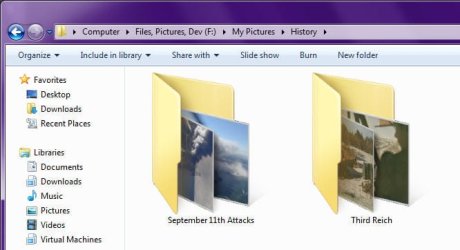
What's wrong with the way Windows 7 folders display their pictures?
Image1.jpg

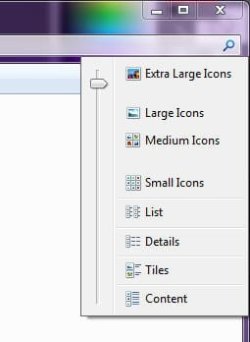
I've actually found that it works pretty well when I have my thumbnails set somewhere between "Large Icons" and "Extra Large Icons":
Image2.jpg
 

My Computer

Computer type
PC/Desktop
Computer Manufacturer/Model Number
Virtual Machine
OS
Windows 7 Professional 32-bit SP1
CPU
AMD A4/A6
Motherboard
Intel Corporation 440BX Desktop Reference Platform
Memory
3.00GB EDO
Graphics Card(s)
VMware SVGA 3D
Sound Card
High Definition Audio Device
Monitor(s) Displays
Generic Non-PnP Monitor on VMware SVGA 3D
Screen Resolution
1440x900
Hard Drives
1 x 60GB VMware Virtual SATA Hard Drive ATA Device
Antivirus
Kaspersky Total Security
What's wrong with the way Windows 7 folders display their pictures?


The answer to that is in your own picture.

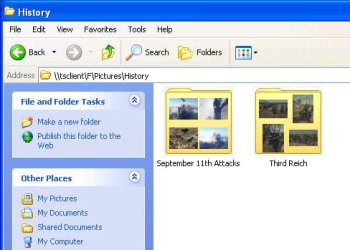
I need unobscured folder preview thumnails and the flat, 2D quad thumb folder preview.

The Win7 way of doing this is just looks over functionality and will most likely have me move back to XP rather than going 3rd party software for something that was already in the OS before.

I cant beleive M$ scrapped such a useful feature just like that. The XP implmentation really ought to have been a legacy function, costing M$ only the slightest of efforts.
 

My Computer

Computer Manufacturer/Model Number
Homebuilt
OS
Win7Ultimate x64
CPU
Q6600 2.4GHz
Motherboard
GA-P43-ES3G (rev. 1.0)
Memory
A-DATA DDR2 (all I know ^^)
Graphics Card(s)
XFX HD5770 1GB DDR5
Sound Card
Built-in
Monitor(s) Displays
1xNokia 21" CRT, 1xHitachi 21" CRT Dual-head Extended dsktop
Hard Drives
Samsung HD160JJ 150GB (System drive)
Hitachi Deskstar HDT722516DLA380 160GB
PSU
Cheiftech 400W
Case
Cheiftech
Cooling
Default
What's wrong with the way Windows 7 folders display their pictures?


The answer to that is in your own picture.

I need unobscured folder preview thumnails and the flat, 2D quad thumb folder preview.

The Win7 way of doing this is just looks over functionality and will most likely have me move back to XP rather than going 3rd party software for something that was already in the OS before.

I cant beleive M$ scrapped such a useful feature just like that. The XP implmentation really ought to have been a legacy function, costing M$ only the slightest of efforts.

Image3.jpg
Windows XP Folder Thumbnails

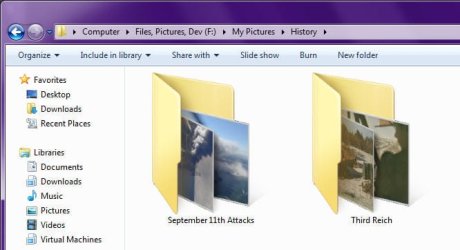
Image1.jpg
Windows 7 Folder Thumbnails​

For picture management, I don't really see much difference between Windows XP and Windows 7 methods of displaying folder thumbnails, with the exception that on Windows XP, the images displayed are more cramped and harder to see than on Windows 7.

In either case, really, would it not simply be easier to just go into the relevant folder and not have to squint your eyes at thumbnails that are less than 48x48 pixels? Just set your Thumbnail Size to "Extra Large Icons" or somewhere inbetween.

But if I might make a suggestion, you might want to consider using Microsoft Windows Live Essentials 2011 or ACDSee Photo Manager 12 for picture managements. I myself used ACDSee on Windows XP, but since I've been using Vista and later Windows 7, I adopted Windows Live Photo Gallery, which is easier to use.

When used together, Windows Explorer Search and Windows Live Photo Gallery make the best picture management tools I have seen. And my Pictures folder currently contains 173,814 Files across 2,764 Folders...
 

My Computer

Computer type
PC/Desktop
Computer Manufacturer/Model Number
Virtual Machine
OS
Windows 7 Professional 32-bit SP1
CPU
AMD A4/A6
Motherboard
Intel Corporation 440BX Desktop Reference Platform
Memory
3.00GB EDO
Graphics Card(s)
VMware SVGA 3D
Sound Card
High Definition Audio Device
Monitor(s) Displays
Generic Non-PnP Monitor on VMware SVGA 3D
Screen Resolution
1440x900
Hard Drives
1 x 60GB VMware Virtual SATA Hard Drive ATA Device
Antivirus
Kaspersky Total Security
...with the exception that on Windows XP, the images displayed are more cramped and harder to see than on Windows 7.

I would ve settled for a 'No, theres no way to change it...', yknow?

Dude, stop downplaying it. The win7 folder tumbnail preview is botched, it s right there for everyone to see. If it suits your needs, fine but stop telling me the sky is green ok.

Furthermore, I specifically said I m not interested in any additional software to get around it.

Also, in that same screen space you d get 6 folders with quad thumbs showing in XP as compared to only two in win7. That is if you bother to disable the side panel in XP of course.

Blowing up the win7 folders in size like that just to get no additional benefit is just lol. Despite how cheap screen realestate has become today, I ll pretend I never read that suggestion.
 

My Computer

Computer Manufacturer/Model Number
Homebuilt
OS
Win7Ultimate x64
CPU
Q6600 2.4GHz
Motherboard
GA-P43-ES3G (rev. 1.0)
Memory
A-DATA DDR2 (all I know ^^)
Graphics Card(s)
XFX HD5770 1GB DDR5
Sound Card
Built-in
Monitor(s) Displays
1xNokia 21" CRT, 1xHitachi 21" CRT Dual-head Extended dsktop
Hard Drives
Samsung HD160JJ 150GB (System drive)
Hitachi Deskstar HDT722516DLA380 160GB
PSU
Cheiftech 400W
Case
Cheiftech
Cooling
Default
Tell me why did you bother with Win 7 if you want to turn it into a glorified edition of an almost obsolete OS

If you are so concerned then return to your beloved XP, and let us carry on looking to the future,
 

My Computer

Computer Manufacturer/Model Number
Home build.
OS
Vista Ultimate 32 bit, Win 7 Pro 32 bit, Win 7 Pro 64 bit
CPU
Intel i5 CPU 750 @ 2.67 GHZ, OC 3.7 GHZ
Motherboard
Asus P7P55D
Memory
4 Gig
Graphics Card(s)
Nvidia GeForce GTS450
Monitor(s) Displays
Acer 24"
Screen Resolution
1440 x 900
Hard Drives
1000 GIG
1000 GIG
PSU
650
Case
Antec Nine Hundred Two
Internet Speed
14 MB (APPROX)
...with the exception that on Windows XP, the images displayed are more cramped and harder to see than on Windows 7.

I would ve settled for a 'No, theres no way to change it...', yknow?

Dude, stop downplaying it. The win7 folder tumbnail preview is botched, it s right there for everyone to see. If it suits your needs, fine but stop telling me the sky is green ok.

Furthermore, I specifically said I m not interested in any additional software to get around it.

Also, in that same screen space you d get 6 folders with quad thumbs showing in XP as compared to only two in win7. That is if you bother to disable the side panel in XP of course.

Blowing up the win7 folders in size like that just to get no additional benefit is just lol. Despite how cheap screen realestate has become today, I ll pretend I never read that suggestion.

No need to get your wand in a twist. I was only trying to help. Perhaps my advice would be of service to others who are reading this thread.

But you did ask for a solution:

Is there a hack/tool/whatever around someplace that will let me fix Windows Explorer tomake it useful to me once again?

You asked for a TOOL or WHATEVER to make it useful again - hence I suggested Windows Live Photo Gallery to be used together with Windows Explorer.

You also wrote, in a later post:
The Win7 way of doing this is just looks over functionality and will most likely have me move back to XP rather than going 3rd party software for something that was already in the OS before.

Windows Live Essentials is NOT 3rd Party software. It's a Microsoft program suite that was originally bundled together as part of Vista, but became a standalone optional download for Windows 7 in order to allow for more frequent updates.
 

My Computer

Computer type
PC/Desktop
Computer Manufacturer/Model Number
Virtual Machine
OS
Windows 7 Professional 32-bit SP1
CPU
AMD A4/A6
Motherboard
Intel Corporation 440BX Desktop Reference Platform
Memory
3.00GB EDO
Graphics Card(s)
VMware SVGA 3D
Sound Card
High Definition Audio Device
Monitor(s) Displays
Generic Non-PnP Monitor on VMware SVGA 3D
Screen Resolution
1440x900
Hard Drives
1 x 60GB VMware Virtual SATA Hard Drive ATA Device
Antivirus
Kaspersky Total Security
Also, if you have multiple images in a folder and you want just 1 image as the folder preview you can copy and paste an image (will appear as (2) or .copy) and rename it folder.jpg

Capture.PNG


OS
 

My Computer

Computer Manufacturer/Model Number
Compaq Desktop
OS
Windows 7 Ultimate x64
CPU
AMD Sempron Dual Core
Memory
3GB
Graphics Card(s)
NVIDIA GeForce 6150SE nForce 430
Screen Resolution
1024x768
Hard Drives
150GB Sata
that last way is how i like to do it.
but if you have a landscape framed pic instead of the vertical portrait pic. then a quarter of the pic is obstructed by the folder flap.
what i hate about it is that the angled view is visually unpleasing to how i want to look at a photo... even in thumbnail form.
the flat, 2d view on the folder was the better way. its irritating that going to that way is not even an option in 7.
 

My Computer

OS
7
Windows Live Essentials is NOT 3rd Party software. It's a Microsoft program suite that was originally bundled together as part of Vista, but became a standalone optional download for Windows 7 in order to allow for more frequent updates.

I think it was more of an anti-trust issue. I haven't seen any evidence of frequent updates.
 

My Computer

Computer type
Laptop
Computer Manufacturer/Model Number
Hewlett-Packard/G62-107SA Notebook
OS
Microsoft Windows 7 Home Premium 64-bit Service Pack 1
CPU
Intel(R) Core(TM) i3 CPU M 330 @ 2.13GHz
Motherboard
Hewlett-Packard 1425
Memory
8 GB DDR3
Graphics Card(s)
Intel(R) HD Graphics
Sound Card
Realtek High Definition Audio
Monitor(s) Displays
Builtin
Screen Resolution
1366 x 768 x 32 bits (4294967296 colors) @ 60 Hz
Hard Drives
250 GB SATA Hard Disk Drive 7200 rpm
2TB Seagate GoFlex USB 2 Drive
1TB Iomega Prestige USB 2 Drive
1.5TB Iomega Prestige USB 2 Drive (Samsung)
2TB WD MyBook Live NAS.
Mouse
Logitech Anywhere MX
Internet Speed
152 Mbs download 10 Mbs upload
Antivirus
Norton 360
Browser
Chrome
No, there is no way to make it look like XP does. So, that's that. If you care to entertain other options that might make it more pleasing to you, others have provided several in here. Or, you could research some other options for yourself that are more suited to your taste if you don't think any of these suffice.
 

My Computer

OS
XP / Win7 x64 Pro
CPU
Intel Quad-Core Q9450 @ 3.2GHz
Motherboard
Asus P5-E
Memory
2x2GB GSkill DDR2
Graphics Card(s)
NVIDIA GeForce 8600 GTS (EVGA)
Monitor(s) Displays
Dell 2408WFP
Screen Resolution
1920x1200
Back
Top