Solved "Windows Explorer has stopped Working"

crgibson

New member
Member
VIP
Local time
5:41 PM
Messages
145
Location
Southern Oregon
I just started having "Windows Explorer has stopped Working" show each time I right click any drive or folder in the left hand column of explorer. Attached snip from event viewer doesn't tell ME what to do, if anything.

I have run SFC /Scannow a couple of time but nothing shows as needing repair or replacement.

Thanks for any help.
 

Attachments

  • Event 1000.PNG
    Event 1000.PNG
    12.2 KB · Views: 16

My Computer

Computer type
PC/Desktop
Computer Manufacturer/Model Number
Custom
OS
Win 7 HP 64bit w/SP1
CPU
AMD Athlon 64 X2 5200+
Motherboard
Gigabyte Technology Co., Ltd. GA-MA770-UD3 (Socket M2)
Memory
6.0GB Dual-Channel DDR2 @ 387MHz (5-5-5-18)
Graphics Card(s)
Acer AL1906 @ 1280x1024 512MB GeForce 9500 GT (XFX Pine Grou
Sound Card
Realtek High Definition Audio
Monitor(s) Displays
Acer Generic PnP Monitor
Hard Drives
Crucial 128 gig M4 SSD
Seagate Backup 5T
Seagate GoFlex 2T
WDC WD1600JS-00NCB1 USB 1500 Gig
Seagate Backup 3T
Keyboard
Logitech HID-Compliant Keyboard
Mouse
PS/2 Compatible Mouse
Internet Speed
Cable broadband (up to 50Mbps)
Other Info
Nightly runs of Super AntiSpyware, CCleaner and Malware Anti-Malware and System Restore.
If you haven't already done so, run a full scan with your updated anti-virus suite to rule out malware. Since no anti-malware product is 100% effective 100% of the time, it wouldn't hurt to run a couple more on-demand scans just to double check your primary product. These free utilities are recommended.

Malwarebytes

ESET Online Scanner

HitmanPro

SuperAntispyware

Another possibility is that sometimes a "Windows Explorer has stopped working" error message can be traced back to an application conflict. I'd suggest trying a clean boot (AKA clean startup) to see if some problematic app can be isolated.

http://www.sevenforums.com/tutorial...ation-conflicts-performing-clean-startup.html
 

My Computer

Computer type
Laptop
Computer Manufacturer/Model Number
Sony Vaio VPCEB47GM Laptop
OS
Win 7 Pro 64-bit
CPU
Intel i5 2.4 Ghz
Memory
8GB DDR3
Graphics Card(s)
Intel HD 3000
Sound Card
IDT High Definition
Monitor(s) Displays
15.6 WGXA Anti-Glare LED
Screen Resolution
1280x800
Hard Drives
640Gb 7200rpm
Antivirus
MSE
Browser
Opera (primary) with IE9 backup
Looks like you are affected by a virus..try to run your anti-virus. Hope it will do the needful!
 

My Computer

OS
Windows 8
marsmimar - adelejukerberg

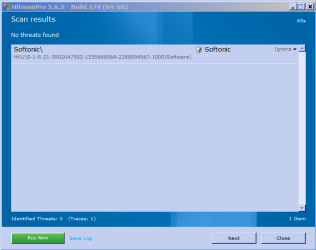
Thanks for your replys. Malwarebytes and SuperAntispyware run on a schedule each night. Nothing found. Just finished doing a Clean Startup but nothing has changed. ESET Online found nothing but HitmanPro found 1 Traces (see attached).

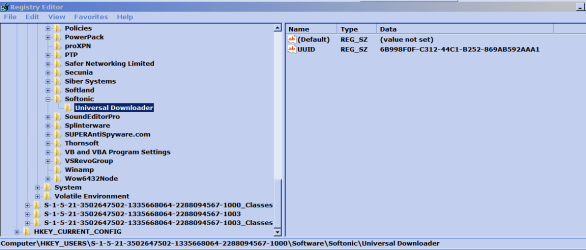
I went to the registry and found that this is a downloader. See attached.

Question: what do I do about it?

Thanks for the help.
 

Attachments

  • Softonic.PNG
    Softonic.PNG
    14.3 KB · Views: 10
  • Registry.PNG
    Registry.PNG
    18.1 KB · Views: 9

My Computer

Computer type
PC/Desktop
Computer Manufacturer/Model Number
Custom
OS
Win 7 HP 64bit w/SP1
CPU
AMD Athlon 64 X2 5200+
Motherboard
Gigabyte Technology Co., Ltd. GA-MA770-UD3 (Socket M2)
Memory
6.0GB Dual-Channel DDR2 @ 387MHz (5-5-5-18)
Graphics Card(s)
Acer AL1906 @ 1280x1024 512MB GeForce 9500 GT (XFX Pine Grou
Sound Card
Realtek High Definition Audio
Monitor(s) Displays
Acer Generic PnP Monitor
Hard Drives
Crucial 128 gig M4 SSD
Seagate Backup 5T
Seagate GoFlex 2T
WDC WD1600JS-00NCB1 USB 1500 Gig
Seagate Backup 3T
Keyboard
Logitech HID-Compliant Keyboard
Mouse
PS/2 Compatible Mouse
Internet Speed
Cable broadband (up to 50Mbps)
Other Info
Nightly runs of Super AntiSpyware, CCleaner and Malware Anti-Malware and System Restore.
I'm guessing that you've visited the Softonic website before and downloaded some programs or apps. If so, Softonic installed its downloader to make those downloads easier/faster. You can either leave the downloader as is or uninstall it. If you ever revisit Softonic and download other programs, the downloader will be reinstalled.

Here are a few more things to try to solve this problem:

Windows Explorer Has Stopped Working Fix

If all else fails you might consider a repair install. It should fix your Windows 7 and preserve your user accounts, data, programs, system drivers, etc.

http://www.sevenforums.com/tutorials/3413-repair-install.html
 

My Computer

Computer type
Laptop
Computer Manufacturer/Model Number
Sony Vaio VPCEB47GM Laptop
OS
Win 7 Pro 64-bit
CPU
Intel i5 2.4 Ghz
Memory
8GB DDR3
Graphics Card(s)
Intel HD 3000
Sound Card
IDT High Definition
Monitor(s) Displays
15.6 WGXA Anti-Glare LED
Screen Resolution
1280x800
Hard Drives
640Gb 7200rpm
Antivirus
MSE
Browser
Opera (primary) with IE9 backup
marsmimar - Thanks for your suggestions. I tried "Windows Explorer Has Stopped Working Fix" (some of them
more than once) but nothing has helped. I will try the repair install next, but will have to wait for few days. Will post a reply with results.

Thanks again.
 

My Computer

Computer type
PC/Desktop
Computer Manufacturer/Model Number
Custom
OS
Win 7 HP 64bit w/SP1
CPU
AMD Athlon 64 X2 5200+
Motherboard
Gigabyte Technology Co., Ltd. GA-MA770-UD3 (Socket M2)
Memory
6.0GB Dual-Channel DDR2 @ 387MHz (5-5-5-18)
Graphics Card(s)
Acer AL1906 @ 1280x1024 512MB GeForce 9500 GT (XFX Pine Grou
Sound Card
Realtek High Definition Audio
Monitor(s) Displays
Acer Generic PnP Monitor
Hard Drives
Crucial 128 gig M4 SSD
Seagate Backup 5T
Seagate GoFlex 2T
WDC WD1600JS-00NCB1 USB 1500 Gig
Seagate Backup 3T
Keyboard
Logitech HID-Compliant Keyboard
Mouse
PS/2 Compatible Mouse
Internet Speed
Cable broadband (up to 50Mbps)
Other Info
Nightly runs of Super AntiSpyware, CCleaner and Malware Anti-Malware and System Restore.
PROBLEM SOLVED!!!!!!!!!!

Before doing a repair install I tried a few things. I remember installing the new SpyBot 2 the day before I starting the problem.

It turns out that if you go to Start Center/Advanced Tools/Settings/System Integration and click on uninstall Windows Explorer integration it solves the "Windows Explorer Has Stopped Working" problem.

Hope this helps someone else with this problem.:):):):)
 

My Computer

Computer type
PC/Desktop
Computer Manufacturer/Model Number
Custom
OS
Win 7 HP 64bit w/SP1
CPU
AMD Athlon 64 X2 5200+
Motherboard
Gigabyte Technology Co., Ltd. GA-MA770-UD3 (Socket M2)
Memory
6.0GB Dual-Channel DDR2 @ 387MHz (5-5-5-18)
Graphics Card(s)
Acer AL1906 @ 1280x1024 512MB GeForce 9500 GT (XFX Pine Grou
Sound Card
Realtek High Definition Audio
Monitor(s) Displays
Acer Generic PnP Monitor
Hard Drives
Crucial 128 gig M4 SSD
Seagate Backup 5T
Seagate GoFlex 2T
WDC WD1600JS-00NCB1 USB 1500 Gig
Seagate Backup 3T
Keyboard
Logitech HID-Compliant Keyboard
Mouse
PS/2 Compatible Mouse
Internet Speed
Cable broadband (up to 50Mbps)
Other Info
Nightly runs of Super AntiSpyware, CCleaner and Malware Anti-Malware and System Restore.
Excellent detective work! Thanks for posting the fix. :thumbsup:
 

My Computer

Computer type
Laptop
Computer Manufacturer/Model Number
Sony Vaio VPCEB47GM Laptop
OS
Win 7 Pro 64-bit
CPU
Intel i5 2.4 Ghz
Memory
8GB DDR3
Graphics Card(s)
Intel HD 3000
Sound Card
IDT High Definition
Monitor(s) Displays
15.6 WGXA Anti-Glare LED
Screen Resolution
1280x800
Hard Drives
640Gb 7200rpm
Antivirus
MSE
Browser
Opera (primary) with IE9 backup
Back
Top