Solved Windows Explorer help needed

cr2

New member
Local time
7:27 PM
Messages
3
In win xp clicking on a folder on the left side opened its sub folders on the left and right. Is there a way to make windows explorer work like this in win 7? As it is set up now, I either have to hunt and click the little arrow next to the folder on the left, or double click the folder on the right to open its sub folders.
 

My Computer

Computer Manufacturer/Model Number
HP laptop
OS
windows 7 home premium 64 bit
CPU
forgot
Motherboard
I don't know
Memory
8gb
Graphics Card(s)
ati mobility
Monitor(s) Displays
17
Hard Drives
dual 500 gb
PSU
I don't know
Case
laptop
Cooling
fan

My Computer

Computer type
PC/Desktop
Computer Manufacturer/Model Number
Self built custom
OS
64-bit Windows 11 Pro for Workstations
CPU
Intel i7-8700K OC'd to 5 GHz
Motherboard
ASUS ROG Maximus XI Formula Z390
Memory
64 GB (4x16GB) G.SKILL TridentZ RGB DDR4 3600 MHz
Graphics Card(s)
ASUS ROG-STRIX-GTX1080TI-O11G-GAMING
Sound Card
Integrated
Monitor(s) Displays
2 x Samsung Odyssey G7 27"
Screen Resolution
2560x1440
Hard Drives
1TB Samsung 990 PRO M.2,
4TB Samsung 990 PRO PRO M.2,
TerraMaster F8 SSD Plus NAS
PSU
Seasonic Prime Titanium 850W
Case
Thermaltake Core P3
Cooling
Corsair Hydro H115i
Keyboard
Logitech wireless K800
Mouse
Logitech MX Master 4
Internet Speed
2 Gb/s Download and 100 Mb/s Upload
Antivirus
Malwarebyte Anti-Malware Premium
Browser
Google Chrome
Other Info
Logitech Z625 speaker system,
Logitech BRIO 4K Pro webcam,
HP Color LaserJet Pro MFP M477fdn,
APC SMART-UPS RT 1000 XL - SURT1000XLI,
Galaxy S23 Plus phone
Hi Shawn,

Thanks for the welcome and information. Unfortunately, I have tried all 4 options and restarted the pc twice, and the folders on the left still do not expand with one click. Are there any settings anywhere else that might prevent this from working?

Thanks,
Charlie
 

My Computer

Computer Manufacturer/Model Number
HP laptop
OS
windows 7 home premium 64 bit
CPU
forgot
Motherboard
I don't know
Memory
8gb
Graphics Card(s)
ati mobility
Monitor(s) Displays
17
Hard Drives
dual 500 gb
PSU
I don't know
Case
laptop
Cooling
fan
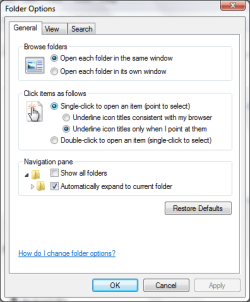
You'll need to either click on the arrow to the left of the folder or double click on the folder to expand the folder in the navigation pane.
white outlined arrow = unexpanded
black arrow = expanded
The automatic expand option is only for when you open the folders from within the main window to have it also expand to that folder in the navigation pane automatically.
 
Last edited:

My Computer

Computer type
PC/Desktop
Computer Manufacturer/Model Number
Self built custom
OS
64-bit Windows 11 Pro for Workstations
CPU
Intel i7-8700K OC'd to 5 GHz
Motherboard
ASUS ROG Maximus XI Formula Z390
Memory
64 GB (4x16GB) G.SKILL TridentZ RGB DDR4 3600 MHz
Graphics Card(s)
ASUS ROG-STRIX-GTX1080TI-O11G-GAMING
Sound Card
Integrated
Monitor(s) Displays
2 x Samsung Odyssey G7 27"
Screen Resolution
2560x1440
Hard Drives
1TB Samsung 990 PRO M.2,
4TB Samsung 990 PRO PRO M.2,
TerraMaster F8 SSD Plus NAS
PSU
Seasonic Prime Titanium 850W
Case
Thermaltake Core P3
Cooling
Corsair Hydro H115i
Keyboard
Logitech wireless K800
Mouse
Logitech MX Master 4
Internet Speed
2 Gb/s Download and 100 Mb/s Upload
Antivirus
Malwarebyte Anti-Malware Premium
Browser
Google Chrome
Other Info
Logitech Z625 speaker system,
Logitech BRIO 4K Pro webcam,
HP Color LaserJet Pro MFP M477fdn,
APC SMART-UPS RT 1000 XL - SURT1000XLI,
Galaxy S23 Plus phone
So the short answer to my initial question was/is 'no.' I consider this much less convenient that the way it worked in XP. Thanks anyway for trying to help.
 

My Computer

Computer Manufacturer/Model Number
HP laptop
OS
windows 7 home premium 64 bit
CPU
forgot
Motherboard
I don't know
Memory
8gb
Graphics Card(s)
ati mobility
Monitor(s) Displays
17
Hard Drives
dual 500 gb
PSU
I don't know
Case
laptop
Cooling
fan
if you double click the folder on the left, it will expand the sub-folders underneath on the left and also show the sub-folders on the right... its not a single click but is a double click really that much less convenient?

otherwise, yes, they removed that feature starting with Vista I believe
 

My Computer

Computer Manufacturer/Model Number
Self Built
OS
Windows 7 Home Premium x64
CPU
AMD Phenom II X4 955 Black Edition
Motherboard
ASUS M4A79XTD EVO
Memory
Kingston 4GB DDR3 1333
Graphics Card(s)
PNY GeForce 210 1GB DDR2 PCIe 2.0
Sound Card
Integrated Audio
Monitor(s) Displays
LG W2286L HDMI LED monitor
Screen Resolution
1680 x 1050
Hard Drives
500GB WD 7200rpm SATA (OS)
500GB WD 7200rpm SATA
250GB Seagate 7200rpm SATA
PSU
Rosewill RG700-S12 700W
Case
Rosewill Blackbone ATX Mid Tower
Cooling
COOLER MASTER Hyper N520, 3 case fans (front, back, side)
Keyboard
Basic
Mouse
Basic
Internet Speed
Cable
Other Info
Laptop - Toshiba Satellite P755, Intel i3 2.1GHz, 640GB HDD, 6GB RAM, Intel HD Video, 1366x768 Resolution, Windows 7 Home Premium x64
if you double click the folder on the left, it will expand the sub-folders underneath on the left and also show the sub-folders on the right... its not a single click but is a double click really that much less convenient?

otherwise, yes, they removed that feature starting with Vista I believe

Thanks, didn't know that - I really think I should explore W7 a bit more. ;)
 

My Computer

Computer Manufacturer/Model Number
Compaq desktop
OS
Windows 7 x64 SP1
CPU
Athlon II x2 215
Memory
4.0 GB
Graphics Card(s)
Onboard
Sound Card
Creative SB X-Fi Titanium HD (nice)
Monitor(s) Displays
24" Dell LCD
Screen Resolution
1900 x 1200
Hard Drives
320 GB, 500 GB and 750 GB 7200 rpm
PSU
430w
Keyboard
USB
Mouse
USB
Internet Speed
approx 10 Mbps
You can set W7 to open with a single click for everything including executables.

screenshot037.png

Except apparently the right pane of explorer:o
 
Last edited:

My Computer

Computer type
Laptop
Computer Manufacturer/Model Number
Hewlett-Packard/G62-107SA Notebook
OS
Microsoft Windows 7 Home Premium 64-bit Service Pack 1
CPU
Intel(R) Core(TM) i3 CPU M 330 @ 2.13GHz
Motherboard
Hewlett-Packard 1425
Memory
8 GB DDR3
Graphics Card(s)
Intel(R) HD Graphics
Sound Card
Realtek High Definition Audio
Monitor(s) Displays
Builtin
Screen Resolution
1366 x 768 x 32 bits (4294967296 colors) @ 60 Hz
Hard Drives
250 GB SATA Hard Disk Drive 7200 rpm
2TB Seagate GoFlex USB 2 Drive
1TB Iomega Prestige USB 2 Drive
1.5TB Iomega Prestige USB 2 Drive (Samsung)
2TB WD MyBook Live NAS.
Mouse
Logitech Anywhere MX
Internet Speed
152 Mbs download 10 Mbs upload
Antivirus
Norton 360
Browser
Chrome
Back
Top