Windows explorer is not responding

mostafa1989

New member
Local time
11:20 AM
Messages
8
Helo
Dear Reader
I have big problem with transfering file between two external storages (phon & hard drive) on my laptop!
Whenever i try too transfer them, after a while i get and Error > WINDOWS EXPLORER IS NOT RESPONDING and after that this progeram reastart and distroy my operation!
From my point of view ,exept this one, evry thing is ok on my pc !
In additoin too that ,i read all comments about this issue in this website and i do somthing but i couldent fix it untill now.
I need your help :) tell me what should i exactully do !
Thank you very much
 

Attachments

My Computer

Computer type
Laptop
Computer Manufacturer/Model Number
Sony vaio
OS
Windows 7 Ultimate x64
CPU
core i7
Memory
4
Antivirus
nod 32

My Computer

Computer type
PC/Desktop
Computer Manufacturer/Model Number
Custom Build
OS
Windows 7 Ultimate 64-bit
CPU
Intel G3420 3.2GHZ Dual Core
Motherboard
Gigabyte H87-HD3
Memory
Kingson 8GB 1600mhz
Graphics Card(s)
MSI R7970 TF 3GD5/OC BE
Monitor(s) Displays
21" LG & "19 Vertical Samsung
Hard Drives
120GB SSD - Boot
1TB WD
350GB External
2TB External (Wireless)
PSU
Corsair CX 500 modular
Case
Zalman Z11 Plus (modified)
Cooling
Corsair H55, 2x 120mm SP Corsair, 1x 140 Coolermaster
Keyboard
Corsair K50
Mouse
CSL Gaming
Internet Speed
164Mbps
Antivirus
Avast, Malwarebytes
Browser
Google Chrome, IE, Firefox
An error was detected on device \Device\Harddisk1\DR2 during a paging operation.

Please follow the steps here: http://www.sevenforums.com/tutorials/433-disk-check.html

Let me know how it goes.

I cannot add much to the thread,

But I believe that DR in the error was detected on device stands for a portable/removable device. DR=device removable. Not the internal Hard Drive. I could be wrong though, hope someone can confirm this.

You may have programs running at startup that is causing this issue. Please see this tutorial to temporary disable them one by one and see if the issue is resolved:

http://www.sevenforums.com/tutorial...ation-conflicts-performing-clean-startup.html
 

My Computer

Computer type
PC/Desktop
Computer Manufacturer/Model Number
Custom Built
OS
Windows 10 Pro
CPU
AMD Ryzen 5 2400G Processor with Radeon RX Vega 11 Graphics
Motherboard
ASRock X470 Master SLI/AC AM4 AMD Promontory X470 SATA 6Gb/s
Memory
G.SKILL Ripjaws V Series 16GB (2 x 8GB) 288-Pin DDR4 SDRAM D
Graphics Card(s)
2047MB NVIDIA GeForce GTX 1060 6GB (EVGA)
Sound Card
Motherboard Built in
Monitor(s) Displays
Acer R240HY bidx 23.8-Inch IPS HDMI DVI VGA (1920 x 1080) Wi
Screen Resolution
1920 x 1080
Hard Drives
1TB Sandisk SSD PLUS (Main drive)
500 GB Seagate 7200 RPM (Games)
500 GB Western Digital 7200 RPM (Virtual Machines)
PSU
CORSAIR TX Series TX650M 650W 80+ Gold Modular Power Supply
Case
CORSAIR CARBIDE SPEC-02 Mid-Tower Gaming Case, Red LED Fan
Cooling
220mm, two 120mm, and four 60mm fans
Keyboard
Wired Dell keyboard
Mouse
Wireless Logitech mouse
Internet Speed
250mb down, 30mb up
Antivirus
Panda Cloud Antivirus
Browser
Chrome-ish x64
Other Info
Your awesome for reading this.
An error was detected on device \Device\Harddisk1\DR2 during a paging operation.

Please follow the steps here: http://www.sevenforums.com/tutorials/433-disk-check.html

Let me know how it goes.

I cannot add much to the thread,

But I believe that DR in the error was detected on device stands for a portable/removable device. DR=device removable. Not the internal Hard Drive. I could be wrong though, hope someone can confirm this.

You may have programs running at startup that is causing this issue. Please see this tutorial to temporary disable them one by one and see if the issue is resolved:

http://www.sevenforums.com/tutorial...ation-conflicts-performing-clean-startup.html

Good spot!
 

My Computer

Computer type
PC/Desktop
Computer Manufacturer/Model Number
Custom Build
OS
Windows 7 Ultimate 64-bit
CPU
Intel G3420 3.2GHZ Dual Core
Motherboard
Gigabyte H87-HD3
Memory
Kingson 8GB 1600mhz
Graphics Card(s)
MSI R7970 TF 3GD5/OC BE
Monitor(s) Displays
21" LG & "19 Vertical Samsung
Hard Drives
120GB SSD - Boot
1TB WD
350GB External
2TB External (Wireless)
PSU
Corsair CX 500 modular
Case
Zalman Z11 Plus (modified)
Cooling
Corsair H55, 2x 120mm SP Corsair, 1x 140 Coolermaster
Keyboard
Corsair K50
Mouse
CSL Gaming
Internet Speed
164Mbps
Antivirus
Avast, Malwarebytes
Browser
Google Chrome, IE, Firefox
I follow the disk check and seems everythings working without any problem!
whats the next step ?
 
Last edited:

My Computer

Computer type
Laptop
Computer Manufacturer/Model Number
Sony vaio
OS
Windows 7 Ultimate x64
CPU
core i7
Memory
4
Antivirus
nod 32
Guys ...
 

My Computer

Computer type
Laptop
Computer Manufacturer/Model Number
Sony vaio
OS
Windows 7 Ultimate x64
CPU
core i7
Memory
4
Antivirus
nod 32

My Computer

Computer type
PC/Desktop
Computer Manufacturer/Model Number
Custom Build
OS
Windows 7 Ultimate 64-bit
CPU
Intel G3420 3.2GHZ Dual Core
Motherboard
Gigabyte H87-HD3
Memory
Kingson 8GB 1600mhz
Graphics Card(s)
MSI R7970 TF 3GD5/OC BE
Monitor(s) Displays
21" LG & "19 Vertical Samsung
Hard Drives
120GB SSD - Boot
1TB WD
350GB External
2TB External (Wireless)
PSU
Corsair CX 500 modular
Case
Zalman Z11 Plus (modified)
Cooling
Corsair H55, 2x 120mm SP Corsair, 1x 140 Coolermaster
Keyboard
Corsair K50
Mouse
CSL Gaming
Internet Speed
164Mbps
Antivirus
Avast, Malwarebytes
Browser
Google Chrome, IE, Firefox
yes i did but my problem still continues...
seems its not related to a background program or service... and now i choose Normal Startup again ..!
 

My Computer

Computer type
Laptop
Computer Manufacturer/Model Number
Sony vaio
OS
Windows 7 Ultimate x64
CPU
core i7
Memory
4
Antivirus
nod 32
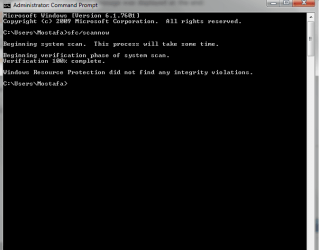
Please Run sfc /scan now using option 2 in this tutorial: SFC /SCANNOW Command - System File Checker

Please post back the results.
Please indicate what message was displayed at the end:

Windows found no integrity violations

OR

Corrupt files were found, and windows was unable to fix them.

OR

Corrupt files were found, and windows successfully repaired them
 

My Computer

Computer type
PC/Desktop
Computer Manufacturer/Model Number
Custom Built
OS
Windows 10 Pro
CPU
AMD Ryzen 5 2400G Processor with Radeon RX Vega 11 Graphics
Motherboard
ASRock X470 Master SLI/AC AM4 AMD Promontory X470 SATA 6Gb/s
Memory
G.SKILL Ripjaws V Series 16GB (2 x 8GB) 288-Pin DDR4 SDRAM D
Graphics Card(s)
2047MB NVIDIA GeForce GTX 1060 6GB (EVGA)
Sound Card
Motherboard Built in
Monitor(s) Displays
Acer R240HY bidx 23.8-Inch IPS HDMI DVI VGA (1920 x 1080) Wi
Screen Resolution
1920 x 1080
Hard Drives
1TB Sandisk SSD PLUS (Main drive)
500 GB Seagate 7200 RPM (Games)
500 GB Western Digital 7200 RPM (Virtual Machines)
PSU
CORSAIR TX Series TX650M 650W 80+ Gold Modular Power Supply
Case
CORSAIR CARBIDE SPEC-02 Mid-Tower Gaming Case, Red LED Fan
Cooling
220mm, two 120mm, and four 60mm fans
Keyboard
Wired Dell keyboard
Mouse
Wireless Logitech mouse
Internet Speed
250mb down, 30mb up
Antivirus
Panda Cloud Antivirus
Browser
Chrome-ish x64
Other Info
Your awesome for reading this.
Andrew

i get>> Windose resource did not find any integrity violations .
 

Attachments

  • report.png
    report.png
    34 KB · Views: 8

My Computer

Computer type
Laptop
Computer Manufacturer/Model Number
Sony vaio
OS
Windows 7 Ultimate x64
CPU
core i7
Memory
4
Antivirus
nod 32
Strange, and you stated you disabled all programs at startup and the issue still occurred?

It could be that your phones transfer limit is to slow or something and causes the crash. Some phones can cause crashing of internet explorer. If your phone has an sd card i suggest getting a sd card reader and using that way to copy files to and from your pc to phone. You will most likely find it does not crash then.

Some phones just do not like large amounts of data being copied to them for some odd reason.
 

My Computer

Computer type
PC/Desktop
Computer Manufacturer/Model Number
Custom Built
OS
Windows 10 Pro
CPU
AMD Ryzen 5 2400G Processor with Radeon RX Vega 11 Graphics
Motherboard
ASRock X470 Master SLI/AC AM4 AMD Promontory X470 SATA 6Gb/s
Memory
G.SKILL Ripjaws V Series 16GB (2 x 8GB) 288-Pin DDR4 SDRAM D
Graphics Card(s)
2047MB NVIDIA GeForce GTX 1060 6GB (EVGA)
Sound Card
Motherboard Built in
Monitor(s) Displays
Acer R240HY bidx 23.8-Inch IPS HDMI DVI VGA (1920 x 1080) Wi
Screen Resolution
1920 x 1080
Hard Drives
1TB Sandisk SSD PLUS (Main drive)
500 GB Seagate 7200 RPM (Games)
500 GB Western Digital 7200 RPM (Virtual Machines)
PSU
CORSAIR TX Series TX650M 650W 80+ Gold Modular Power Supply
Case
CORSAIR CARBIDE SPEC-02 Mid-Tower Gaming Case, Red LED Fan
Cooling
220mm, two 120mm, and four 60mm fans
Keyboard
Wired Dell keyboard
Mouse
Wireless Logitech mouse
Internet Speed
250mb down, 30mb up
Antivirus
Panda Cloud Antivirus
Browser
Chrome-ish x64
Other Info
Your awesome for reading this.
Yes i disabled all programs at startup and the issue still occurred ....
i have an Iphon that i need to transfer my Pictures and videos to evacuate the storage too use it again ... and as you no unfortunately there is no sd card too using that...
but you know what ? there is somthing here that i have a flash memory too , transfering files between my flash and my HardDrive happening without any problem !
i thing somthing wrong is in my files that i want to transfer ! what do you think ?
 

My Computer

Computer type
Laptop
Computer Manufacturer/Model Number
Sony vaio
OS
Windows 7 Ultimate x64
CPU
core i7
Memory
4
Antivirus
nod 32
That could certainly be the case.

Do you have itunes installed?

Idevices are picky with that stuff.
 

My Computer

Computer type
PC/Desktop
Computer Manufacturer/Model Number
Custom Built
OS
Windows 10 Pro
CPU
AMD Ryzen 5 2400G Processor with Radeon RX Vega 11 Graphics
Motherboard
ASRock X470 Master SLI/AC AM4 AMD Promontory X470 SATA 6Gb/s
Memory
G.SKILL Ripjaws V Series 16GB (2 x 8GB) 288-Pin DDR4 SDRAM D
Graphics Card(s)
2047MB NVIDIA GeForce GTX 1060 6GB (EVGA)
Sound Card
Motherboard Built in
Monitor(s) Displays
Acer R240HY bidx 23.8-Inch IPS HDMI DVI VGA (1920 x 1080) Wi
Screen Resolution
1920 x 1080
Hard Drives
1TB Sandisk SSD PLUS (Main drive)
500 GB Seagate 7200 RPM (Games)
500 GB Western Digital 7200 RPM (Virtual Machines)
PSU
CORSAIR TX Series TX650M 650W 80+ Gold Modular Power Supply
Case
CORSAIR CARBIDE SPEC-02 Mid-Tower Gaming Case, Red LED Fan
Cooling
220mm, two 120mm, and four 60mm fans
Keyboard
Wired Dell keyboard
Mouse
Wireless Logitech mouse
Internet Speed
250mb down, 30mb up
Antivirus
Panda Cloud Antivirus
Browser
Chrome-ish x64
Other Info
Your awesome for reading this.
ofcours i have
 

My Computer

Computer type
Laptop
Computer Manufacturer/Model Number
Sony vaio
OS
Windows 7 Ultimate x64
CPU
core i7
Memory
4
Antivirus
nod 32
Another option is to wipe the iphone and resync. Might resolve any issues. Also make sure itunes and the iphone are up to date.
 

My Computer

Computer type
PC/Desktop
Computer Manufacturer/Model Number
Custom Built
OS
Windows 10 Pro
CPU
AMD Ryzen 5 2400G Processor with Radeon RX Vega 11 Graphics
Motherboard
ASRock X470 Master SLI/AC AM4 AMD Promontory X470 SATA 6Gb/s
Memory
G.SKILL Ripjaws V Series 16GB (2 x 8GB) 288-Pin DDR4 SDRAM D
Graphics Card(s)
2047MB NVIDIA GeForce GTX 1060 6GB (EVGA)
Sound Card
Motherboard Built in
Monitor(s) Displays
Acer R240HY bidx 23.8-Inch IPS HDMI DVI VGA (1920 x 1080) Wi
Screen Resolution
1920 x 1080
Hard Drives
1TB Sandisk SSD PLUS (Main drive)
500 GB Seagate 7200 RPM (Games)
500 GB Western Digital 7200 RPM (Virtual Machines)
PSU
CORSAIR TX Series TX650M 650W 80+ Gold Modular Power Supply
Case
CORSAIR CARBIDE SPEC-02 Mid-Tower Gaming Case, Red LED Fan
Cooling
220mm, two 120mm, and four 60mm fans
Keyboard
Wired Dell keyboard
Mouse
Wireless Logitech mouse
Internet Speed
250mb down, 30mb up
Antivirus
Panda Cloud Antivirus
Browser
Chrome-ish x64
Other Info
Your awesome for reading this.
andrew
i take a picture from that file , what is this ? (in red circel )
 

Attachments

  • fv.png
    fv.png
    212.7 KB · Views: 0

My Computer

Computer type
Laptop
Computer Manufacturer/Model Number
Sony vaio
OS
Windows 7 Ultimate x64
CPU
core i7
Memory
4
Antivirus
nod 32
looks like an icon file. you can delete it
 

My Computer

Computer type
PC/Desktop
Computer Manufacturer/Model Number
Custom Built
OS
Windows 10 Pro
CPU
AMD Ryzen 5 2400G Processor with Radeon RX Vega 11 Graphics
Motherboard
ASRock X470 Master SLI/AC AM4 AMD Promontory X470 SATA 6Gb/s
Memory
G.SKILL Ripjaws V Series 16GB (2 x 8GB) 288-Pin DDR4 SDRAM D
Graphics Card(s)
2047MB NVIDIA GeForce GTX 1060 6GB (EVGA)
Sound Card
Motherboard Built in
Monitor(s) Displays
Acer R240HY bidx 23.8-Inch IPS HDMI DVI VGA (1920 x 1080) Wi
Screen Resolution
1920 x 1080
Hard Drives
1TB Sandisk SSD PLUS (Main drive)
500 GB Seagate 7200 RPM (Games)
500 GB Western Digital 7200 RPM (Virtual Machines)
PSU
CORSAIR TX Series TX650M 650W 80+ Gold Modular Power Supply
Case
CORSAIR CARBIDE SPEC-02 Mid-Tower Gaming Case, Red LED Fan
Cooling
220mm, two 120mm, and four 60mm fans
Keyboard
Wired Dell keyboard
Mouse
Wireless Logitech mouse
Internet Speed
250mb down, 30mb up
Antivirus
Panda Cloud Antivirus
Browser
Chrome-ish x64
Other Info
Your awesome for reading this.
Back
Top