
Windows Explorer Issue

dschachm

New member
Local time
10:02 PM
Messages
24
If i open up My computer, network, or control panel, i get a black screen on the right, favorites, libraries, home group and computer on the left bar. The address bar at the top has a green bar that movies slowly from right to left, by i can't click on computer to list the drives. Same thing thing for Network browsing. If i select control panel, nothing is displayed except "adjust your computer settings" can anyone help?
 

My Computer

Computer Manufacturer/Model Number
Dell XPS 420
OS
windows 7 (7057)
CPU
Intel Core 2 Quad [email protected] GHz
Motherboard
Intel X38
Memory
4.00 GB
Graphics Card(s)
Nvidea GeForce 9500GT
Sound Card
High Definition Audio Controller
Monitor(s) Displays
Dell SE198WFP
Screen Resolution
1440 x 900 x 59 hertz
Hard Drives
WDC WD3200AAKS-75B3A0 298.09 GB
Seagate FreeAgent Pro 465.76 GB
What video card and drivers are you running? Did you do any funny 'patching' to the OS? Maybe try to remove a certain watermark? Hmm..? :)
 

My Computer

Computer type
PC/Desktop
Computer Manufacturer/Model Number
Custom Build/Mod
OS
Windows 7 Home Premium x64
CPU
Intel QX9650 Extreme 4.0 GHz
Motherboard
ASUS Rampage Extreme Rev2
Memory
8GB (4x2) Corsair Dominator DDR3
Graphics Card(s)
2x Radeon R390X [8GB]
Sound Card
SupremeFX X-Fi
Monitor(s) Displays
Dell 2408WFP 26" Panel
Screen Resolution
1920x1200
Hard Drives
4x WD 2TB (8TB+ Total)
2x Crucial SSD 128GB (RAID-0)
1x LG Blu-ray read/write
1x Phillips LightScribe DVD read/write
PSU
Corsair HX1000
Case
CoolerMaster - Cosmos S
Cooling
Custom Liquid - 320mm rad w/ 3x 80mm fans, CPU/NB/SB Blocks
Keyboard
Logitech Illuminater Pro
Mouse
Logitech
Internet Speed
Fractional T1 - 125Mbps
Antivirus
ESET Security Suite / Microsoft Security Essentials
Browser
Cyberfox Intel x64
Other Info
OC'd to 5.0GHz @ 44c under full load
No funny Patching, video card is nvidia geforce 9500 and seems to be running fine with movies and other stuff. The watermark is still there, didn't run the patch. Thanks though.
 

My Computer

Computer Manufacturer/Model Number
Dell XPS 420
OS
windows 7 (7057)
CPU
Intel Core 2 Quad [email protected] GHz
Motherboard
Intel X38
Memory
4.00 GB
Graphics Card(s)
Nvidea GeForce 9500GT
Sound Card
High Definition Audio Controller
Monitor(s) Displays
Dell SE198WFP
Screen Resolution
1440 x 900 x 59 hertz
Hard Drives
WDC WD3200AAKS-75B3A0 298.09 GB
Seagate FreeAgent Pro 465.76 GB
take a screenshot of how it looks (press ALT + print screen together on keyboard) and then paste the image in Paint and save as a jpg and upload here to see what it looks like :)
 

My Computer

OS
Windows 7 Ultimate 64-Bit
CPU
Intel i5 2500k
Motherboard
Gigabyte GA-Z68AP-D3
Memory
Corsair Vengeance 8gb DDR3 RAM
Graphics Card(s)
GeForce GTX 560
Sound Card
Creative X-Fi XtremeMusic
Monitor(s) Displays
Samsung SyncMaster P2450
Screen Resolution
1920x1080
Hard Drives
2 x 500gb Samsung Spinpoint
1 x 1TB Samsung Spinpoint
1 x 1.5TB Seagate Barracuda
PSU
Seasonic M12 700W
Case
Antec Twelve Hundred
Keyboard
Logitech K120
Mouse
Logitech G400
Internet Speed
50mbit Cable (Virgin Media)
I think i might have fixed it. I uninstalled system mechanic firewall and antivirus, and ran windows update (there was an update to ie8) and since then it seems to be running better. i wonder if it was system mechanic that was causing the issue. thanks.
 

My Computer

Computer Manufacturer/Model Number
Dell XPS 420
OS
windows 7 (7057)
CPU
Intel Core 2 Quad [email protected] GHz
Motherboard
Intel X38
Memory
4.00 GB
Graphics Card(s)
Nvidea GeForce 9500GT
Sound Card
High Definition Audio Controller
Monitor(s) Displays
Dell SE198WFP
Screen Resolution
1440 x 900 x 59 hertz
Hard Drives
WDC WD3200AAKS-75B3A0 298.09 GB
Seagate FreeAgent Pro 465.76 GB
I thought wrong. i am still having the same issue. can't see my drives or anything else when i click my computer.
 

My Computer

Computer Manufacturer/Model Number
Dell XPS 420
OS
windows 7 (7057)
CPU
Intel Core 2 Quad [email protected] GHz
Motherboard
Intel X38
Memory
4.00 GB
Graphics Card(s)
Nvidea GeForce 9500GT
Sound Card
High Definition Audio Controller
Monitor(s) Displays
Dell SE198WFP
Screen Resolution
1440 x 900 x 59 hertz
Hard Drives
WDC WD3200AAKS-75B3A0 298.09 GB
Seagate FreeAgent Pro 465.76 GB
Have you tried using the management console to look at the drives?
 

My Computer

Computer type
PC/Desktop
Computer Manufacturer/Model Number
Custom Build/Mod
OS
Windows 7 Home Premium x64
CPU
Intel QX9650 Extreme 4.0 GHz
Motherboard
ASUS Rampage Extreme Rev2
Memory
8GB (4x2) Corsair Dominator DDR3
Graphics Card(s)
2x Radeon R390X [8GB]
Sound Card
SupremeFX X-Fi
Monitor(s) Displays
Dell 2408WFP 26" Panel
Screen Resolution
1920x1200
Hard Drives
4x WD 2TB (8TB+ Total)
2x Crucial SSD 128GB (RAID-0)
1x LG Blu-ray read/write
1x Phillips LightScribe DVD read/write
PSU
Corsair HX1000
Case
CoolerMaster - Cosmos S
Cooling
Custom Liquid - 320mm rad w/ 3x 80mm fans, CPU/NB/SB Blocks
Keyboard
Logitech Illuminater Pro
Mouse
Logitech
Internet Speed
Fractional T1 - 125Mbps
Antivirus
ESET Security Suite / Microsoft Security Essentials
Browser
Cyberfox Intel x64
Other Info
OC'd to 5.0GHz @ 44c under full load
Hi dschachm, Fill in your system specs,people need to see what they are before they can help you.
 

My Computer

Computer Manufacturer/Model Number
Self Build 64bit
OS
Vista Ult64, Win7600
CPU
Intel Core 2 Quad Q6600 @ 2400 MHz 64bit OS
Motherboard
Asus P5E3 Deluxe WiFi @p 64 bit OS
Memory
4096 MB DDR3-SDRAM
Graphics Card(s)
ATI Radeon HD 3870 Series x2 Crossfired
Sound Card
Realtek on board
Monitor(s) Displays
Samsung SyncMaster - 23 inches
Screen Resolution
1680x1050 pixels at 60 Hz in True Colors
Hard Drives
Hitachi (250 GB)/Samsung 750 GB. /Barracuda 160 GB.
My Book 1 TB external..
PSU
Cooler Master 1000w
Case
Cooler Master Cosmos 1000.
Cooling
Fans and fresh air,
Keyboard
Wireless
Mouse
Wireless
Internet Speed
Never fast enough
Other Info
I use a Magnum.
how?
 

My Computer

Computer Manufacturer/Model Number
Dell XPS 420
OS
windows 7 (7057)
CPU
Intel Core 2 Quad [email protected] GHz
Motherboard
Intel X38
Memory
4.00 GB
Graphics Card(s)
Nvidea GeForce 9500GT
Sound Card
High Definition Audio Controller
Monitor(s) Displays
Dell SE198WFP
Screen Resolution
1440 x 900 x 59 hertz
Hard Drives
WDC WD3200AAKS-75B3A0 298.09 GB
Seagate FreeAgent Pro 465.76 GB
My Computer

OS
Windows 7 64-bit
CPU
Intel i7 920 @ 4GHz
Motherboard
Asus P6T Deluxe V2
Memory
6Gb
Graphics Card(s)
nVidia GTX 285
Sound Card
X-Fi Extreme Audio PCIe
Screen Resolution
1900x1200
What version of Win7 are you using? x86 or x64
Where did you download this version?
reason I ask you say you still have a "WATERMARK".
The watermark is still there, didn't run the patch
 
Click on the user cp at the top of the page, and you can fill them in from there.:)
 

My Computer

Computer Manufacturer/Model Number
Self Build 64bit
OS
Vista Ult64, Win7600
CPU
Intel Core 2 Quad Q6600 @ 2400 MHz 64bit OS
Motherboard
Asus P5E3 Deluxe WiFi @p 64 bit OS
Memory
4096 MB DDR3-SDRAM
Graphics Card(s)
ATI Radeon HD 3870 Series x2 Crossfired
Sound Card
Realtek on board
Monitor(s) Displays
Samsung SyncMaster - 23 inches
Screen Resolution
1680x1050 pixels at 60 Hz in True Colors
Hard Drives
Hitachi (250 GB)/Samsung 750 GB. /Barracuda 160 GB.
My Book 1 TB external..
PSU
Cooler Master 1000w
Case
Cooler Master Cosmos 1000.
Cooling
Fans and fresh air,
Keyboard
Wireless
Mouse
Wireless
Internet Speed
Never fast enough
Other Info
I use a Magnum.
How is that?
 

My Computer

Computer Manufacturer/Model Number
Dell XPS 420
OS
windows 7 (7057)
CPU
Intel Core 2 Quad [email protected] GHz
Motherboard
Intel X38
Memory
4.00 GB
Graphics Card(s)
Nvidea GeForce 9500GT
Sound Card
High Definition Audio Controller
Monitor(s) Displays
Dell SE198WFP
Screen Resolution
1440 x 900 x 59 hertz
Hard Drives
WDC WD3200AAKS-75B3A0 298.09 GB
Seagate FreeAgent Pro 465.76 GB
I think it is fixed again. I have a feeling it was the antivirus program delaying the drives from showing. I was using System Mechanic, and removed that, then installed Norton's Internet Security beta, and i had the same problem. I uninstalled that, and now i am using Avast, and it seems OK.
 

My Computer

Computer Manufacturer/Model Number
Dell XPS 420
OS
windows 7 (7057)
CPU
Intel Core 2 Quad [email protected] GHz
Motherboard
Intel X38
Memory
4.00 GB
Graphics Card(s)
Nvidea GeForce 9500GT
Sound Card
High Definition Audio Controller
Monitor(s) Displays
Dell SE198WFP
Screen Resolution
1440 x 900 x 59 hertz
Hard Drives
WDC WD3200AAKS-75B3A0 298.09 GB
Seagate FreeAgent Pro 465.76 GB
Well that is good news .
 

My Computer

Computer Manufacturer/Model Number
Self Build 64bit
OS
Vista Ult64, Win7600
CPU
Intel Core 2 Quad Q6600 @ 2400 MHz 64bit OS
Motherboard
Asus P5E3 Deluxe WiFi @p 64 bit OS
Memory
4096 MB DDR3-SDRAM
Graphics Card(s)
ATI Radeon HD 3870 Series x2 Crossfired
Sound Card
Realtek on board
Monitor(s) Displays
Samsung SyncMaster - 23 inches
Screen Resolution
1680x1050 pixels at 60 Hz in True Colors
Hard Drives
Hitachi (250 GB)/Samsung 750 GB. /Barracuda 160 GB.
My Book 1 TB external..
PSU
Cooler Master 1000w
Case
Cooler Master Cosmos 1000.
Cooling
Fans and fresh air,
Keyboard
Wireless
Mouse
Wireless
Internet Speed
Never fast enough
Other Info
I use a Magnum.
I have a very similar problem.

When I open explorer it sometimes Sometimes Windows Explorer gets stuck and it refuses to show all of my devices.
I took a screen shot of the problem.Take a look at

Windows 7 windows explorer problem. on Flickr - Photo Sharing!

There are two copies of explorer open. The first I opened is expanded to full screen. Only the C drive is visible. There is nothing I can do to persuade explorer to show me the other devices. The green bar moves very slowly compared to the working explorer page and the icons are constantly moving.

However I can right click on the C drive and "open in new window". Most of the time, as shown, I get a new explorer and all the other devices are shown properly. I have not found a sure fire way of getting aound the problem. Closing all explorers and starting again and clicking lots of buttons eventually clears it.

I've got an Nividia 9500GT card. 4gb ram, 1tb hard drive, e8400 dual core processor, gigabyte board. Windows 7 clean install.

Dominic
 

My Computer

OS
windows 7
i wonder if it has to do with the graphics card. i have the same one. I just upgraded to 7127 so i will let you know if i still see a problem.
 

My Computer

Computer Manufacturer/Model Number
Dell XPS 420
OS
windows 7 (7057)
CPU
Intel Core 2 Quad [email protected] GHz
Motherboard
Intel X38
Memory
4.00 GB
Graphics Card(s)
Nvidea GeForce 9500GT
Sound Card
High Definition Audio Controller
Monitor(s) Displays
Dell SE198WFP
Screen Resolution
1440 x 900 x 59 hertz
Hard Drives
WDC WD3200AAKS-75B3A0 298.09 GB
Seagate FreeAgent Pro 465.76 GB
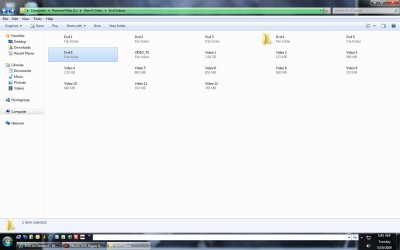
Here is my screen. It drives me crazy. i just updated the driver for the video card, so lets see.
 

Attachments

  • Untitled-1.jpg
    Untitled-1.jpg
    137 KB · Views: 103

My Computer

Computer Manufacturer/Model Number
Dell XPS 420
OS
windows 7 (7057)
CPU
Intel Core 2 Quad [email protected] GHz
Motherboard
Intel X38
Memory
4.00 GB
Graphics Card(s)
Nvidea GeForce 9500GT
Sound Card
High Definition Audio Controller
Monitor(s) Displays
Dell SE198WFP
Screen Resolution
1440 x 900 x 59 hertz
Hard Drives
WDC WD3200AAKS-75B3A0 298.09 GB
Seagate FreeAgent Pro 465.76 GB
I'm using 32bit Windows 7. I noticed that you had the same graphics card which is why I mentioned it. I cant see how that would knock out the drives though! I'm using Avast too.

My C drive is a 100GB primary partition. I noticed that sometimes when I drag files to or from the E drive, a 900GB secondary partition on my hard drive that it gets its knickers in a twist afterwards and refuses to see the D drive again. Refresh usually lets it see the drive again.

I think its just one of the (remarkably few, so far!) foibles of a trial OS.

Dominic
 

My Computer

OS
windows 7
Yeah, i did an upgrade to 7127 and i am still having the same issue. If i do some video editing, or copying, then i have the issue. here is another pic, and i also noticed that the desktop doesn't refresh when i am having this issue.
 

Attachments

  • Untitled-1.jpg
    Untitled-1.jpg
    89.7 KB · Views: 32

My Computer

Computer Manufacturer/Model Number
Dell XPS 420
OS
windows 7 (7057)
CPU
Intel Core 2 Quad [email protected] GHz
Motherboard
Intel X38
Memory
4.00 GB
Graphics Card(s)
Nvidea GeForce 9500GT
Sound Card
High Definition Audio Controller
Monitor(s) Displays
Dell SE198WFP
Screen Resolution
1440 x 900 x 59 hertz
Hard Drives
WDC WD3200AAKS-75B3A0 298.09 GB
Seagate FreeAgent Pro 465.76 GB
Back
Top