Windows Explorer (My Computer) opens/pops-up every startup

llij

New member
Local time
10:15 AM
Messages
9
Bought Lenovo Y480-Windows 7 just days ago and installed 3DS Max, Cad, Adobe CS6, Microsoft 2010. To counter the problem for whatever spyware, I installed Microsoft Security Essential, CCleaner and I have McAfee. But I think the problem occurred when I installed Adobe CS6. Just so you know, I've tried everything -- Tried "regedit", tried "msconfig", I tried placing missing symbols -- I called my I.T. friend. Windows Explorer/My Computer pops-out every time I open my laptop. Is this a bug from the new Adobe? :huh:
 

My Computer

OS
Windows 7 32/64
Download and run this utility:

Autoruns for Windows

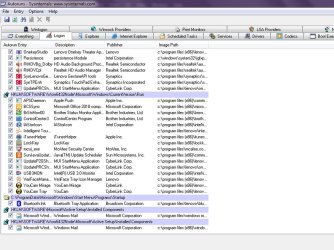
Go to the Logon tab and post either a screenshot of the entries in there or save it to a text file and paste that here.
 

My Computer

OS
XP / Win7 x64 Pro
CPU
Intel Quad-Core Q9450 @ 3.2GHz
Motherboard
Asus P5-E
Memory
2x2GB GSkill DDR2
Graphics Card(s)
NVIDIA GeForce 8600 GTS (EVGA)
Monitor(s) Displays
Dell 2408WFP
Screen Resolution
1920x1200
Here you go sir!

1.jpg

2.jpg
 

My Computer

OS
Windows 7 32/64
Hm, nothing in there appears to stand out as something that would launch an explorer window upon startup. What makes you think it's Adobe CS6?
 

My Computer

OS
XP / Win7 x64 Pro
CPU
Intel Quad-Core Q9450 @ 3.2GHz
Motherboard
Asus P5-E
Memory
2x2GB GSkill DDR2
Graphics Card(s)
NVIDIA GeForce 8600 GTS (EVGA)
Monitor(s) Displays
Dell 2408WFP
Screen Resolution
1920x1200
Because this problem occurred after I installed Adobe CS6. :(
 

My Computer

OS
Windows 7 32/64
Are you absolutely certain it only started after CS6 was installed? If so, you could try a system restore to a time previous to the CS6 install and see if that fixes it.
 

My Computer

OS
XP / Win7 x64 Pro
CPU
Intel Quad-Core Q9450 @ 3.2GHz
Motherboard
Asus P5-E
Memory
2x2GB GSkill DDR2
Graphics Card(s)
NVIDIA GeForce 8600 GTS (EVGA)
Monitor(s) Displays
Dell 2408WFP
Screen Resolution
1920x1200
Could it possibly be connected with the fact that there are two AV progs installed MSE and McAfee. Would there not be a conflict there? McAfee has caused loads of problems recently as Google will confirm. I would uninstall it . MSE is so much better than McAfee anyway IMHO
 

My Computer

Computer type
PC/Desktop
OS
Microsoft Windows 7 Home Premium 64-bit 7601 Multiprocessor Free Service Pack 1
CPU
Intel(R) Core(TM) i7-3770 CPU @ 3.40GHz
Motherboard
ASUSTeK COMPUTER INC. P8H77-M
Memory
8.00 GB
Graphics Card(s)
Intel(R) HD Graphics 4000
Sound Card
On Board
Monitor(s) Displays
Dell 24"
Screen Resolution
1920 x 1080
Hard Drives
(1) INTEL SSDSC2CT180A3 ATA Device (2) ST500DM002-1BD142 ATA Device (3) WDC WD3200AAKS-75L9A0 ATA Device (4) Generic- Compact Flash USB Device (5) Generic- MS/MS-Pro USB Device (6) Generic- SD/MMC USB Device (7) Generic- SM/xD-Picture USB
PSU
500w Corsair
Case
Cooler Master
Cooling
3 Fans
Keyboard
Logitech MK300
Mouse
Logitech WOM
Internet Speed
75Mb
Antivirus
Norton 360
Browser
Firefox, Opera, IE
Could it possibly be connected with the fact that there are two AV progs installed WSE and McAfee.

Hm.. I bought my Lenovo with a McAfee installed already. My friend told me to install WSE when I told him about windows explorer problem, unfortunately didn't solve the problem. Now I'm confuse if I have to restore this to factory settings. It's so hard to re-install everything again. :shock:
 

My Computer

OS
Windows 7 32/64
have you tried a system restore as advised above?
You say "It's so hard to re-install everything again" Why is it so hard. Do you not have the installation discs?
"My friend told me to install WSE when I told him about windows explorer problem,"
He should have told you to uninstall Mc Afee first!
 

My Computer

Computer type
PC/Desktop
OS
Microsoft Windows 7 Home Premium 64-bit 7601 Multiprocessor Free Service Pack 1
CPU
Intel(R) Core(TM) i7-3770 CPU @ 3.40GHz
Motherboard
ASUSTeK COMPUTER INC. P8H77-M
Memory
8.00 GB
Graphics Card(s)
Intel(R) HD Graphics 4000
Sound Card
On Board
Monitor(s) Displays
Dell 24"
Screen Resolution
1920 x 1080
Hard Drives
(1) INTEL SSDSC2CT180A3 ATA Device (2) ST500DM002-1BD142 ATA Device (3) WDC WD3200AAKS-75L9A0 ATA Device (4) Generic- Compact Flash USB Device (5) Generic- MS/MS-Pro USB Device (6) Generic- SD/MMC USB Device (7) Generic- SM/xD-Picture USB
PSU
500w Corsair
Case
Cooler Master
Cooling
3 Fans
Keyboard
Logitech MK300
Mouse
Logitech WOM
Internet Speed
75Mb
Antivirus
Norton 360
Browser
Firefox, Opera, IE
Not all the discs are with me and some drivers are really hard to find, not with the help from an IT friend. You see I'm a little stupid when it comes to these things. I thought this problem could be solved just a google away.

Anyway, still open to the last resort.
 

My Computer

OS
Windows 7 32/64
A system restore to the time previous to your CS6 install won't delete everything on the system. It will only remove whatever programs were installed after the restore point. This is different than a system restore to factory settings.

http://www.sevenforums.com/tutorials/700-system-restore.html

Section 8 shows where you can select which point in time you'd like to restore.
 

My Computer

OS
XP / Win7 x64 Pro
CPU
Intel Quad-Core Q9450 @ 3.2GHz
Motherboard
Asus P5-E
Memory
2x2GB GSkill DDR2
Graphics Card(s)
NVIDIA GeForce 8600 GTS (EVGA)
Monitor(s) Displays
Dell 2408WFP
Screen Resolution
1920x1200

My Computer

Computer type
PC/Desktop
OS
Microsoft Windows 7 Home Premium 64-bit 7601 Multiprocessor Free Service Pack 1
CPU
Intel(R) Core(TM) i7-3770 CPU @ 3.40GHz
Motherboard
ASUSTeK COMPUTER INC. P8H77-M
Memory
8.00 GB
Graphics Card(s)
Intel(R) HD Graphics 4000
Sound Card
On Board
Monitor(s) Displays
Dell 24"
Screen Resolution
1920 x 1080
Hard Drives
(1) INTEL SSDSC2CT180A3 ATA Device (2) ST500DM002-1BD142 ATA Device (3) WDC WD3200AAKS-75L9A0 ATA Device (4) Generic- Compact Flash USB Device (5) Generic- MS/MS-Pro USB Device (6) Generic- SD/MMC USB Device (7) Generic- SM/xD-Picture USB
PSU
500w Corsair
Case
Cooler Master
Cooling
3 Fans
Keyboard
Logitech MK300
Mouse
Logitech WOM
Internet Speed
75Mb
Antivirus
Norton 360
Browser
Firefox, Opera, IE
The question above leads me to ask whether some of these programs were downloaded/acquired from a source other than the actual supplier? If so, where?
 

My Computer

OS
XP / Win7 x64 Pro
CPU
Intel Quad-Core Q9450 @ 3.2GHz
Motherboard
Asus P5-E
Memory
2x2GB GSkill DDR2
Graphics Card(s)
NVIDIA GeForce 8600 GTS (EVGA)
Monitor(s) Displays
Dell 2408WFP
Screen Resolution
1920x1200
The question above leads me to ask whether some of these programs were downloaded/acquired from a source other than the actual supplier? If so, where?

My company bought the software. There should be no problem if it's original. The drivers can be found online. I guess system restore is the last resort. Thanks for the link.
 

My Computer

OS
Windows 7 32/64
I too am having this exact same problem on a two-week old Lenovo (U310).
However, I believe I was having this issue with it right out of the box. It wasn't till recently it was really starting to get on my nerves and I wanted it gone. The Googled information on the web has been useless... then I read this thread. So now I'm thinking it might be a Lenovo quirk. I too have installed Adobe CS (v.4 tho), Office10, and a loads of other stuff for school. All I want the computer to do is start up with a windowless desktop
 

My Computer

Computer Manufacturer/Model Number
Lenovo U310
OS
win 7 home 64bit
CPU
core i5
Motherboard
stock
Memory
4GB
Graphics Card(s)
stock
Sound Card
stock
Monitor(s) Displays
stock
Screen Resolution
not great
Hard Drives
500gb + 32gb solid state
Case
aluminum
Cooling
air
Keyboard
QWERTY
Mouse
touchpad
Internet Speed
Fast at home, slow at school
EDIT: Just realised that the Auto Runs prog should have found the WE if it were there. Still worth an extra look perhaps?

Original post:
I have now replicated this problem on my system!
To stop this happening try this:
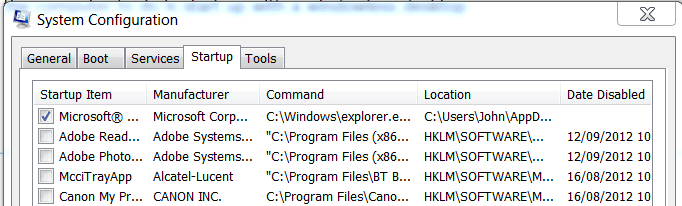
Press start button and in the search box type msconfig. Click the msconfig.exe entry at the top of the window. Click Start Up Tag in the Window that opens and look for the Windows Explorer entry. See screenshot.

Strat Up.PNG

If it is checked uncheck it. Click Apply and OK. You may have to restart Windows for it to take effect. If you want to remove the entry for Windows Explorer completely from the System Configuration follow Brinks tutorial here:
http://www.sevenforums.com/tutorials/1401-startup-programs-change.html
 
Last edited:

My Computer

Computer type
PC/Desktop
OS
Microsoft Windows 7 Home Premium 64-bit 7601 Multiprocessor Free Service Pack 1
CPU
Intel(R) Core(TM) i7-3770 CPU @ 3.40GHz
Motherboard
ASUSTeK COMPUTER INC. P8H77-M
Memory
8.00 GB
Graphics Card(s)
Intel(R) HD Graphics 4000
Sound Card
On Board
Monitor(s) Displays
Dell 24"
Screen Resolution
1920 x 1080
Hard Drives
(1) INTEL SSDSC2CT180A3 ATA Device (2) ST500DM002-1BD142 ATA Device (3) WDC WD3200AAKS-75L9A0 ATA Device (4) Generic- Compact Flash USB Device (5) Generic- MS/MS-Pro USB Device (6) Generic- SD/MMC USB Device (7) Generic- SM/xD-Picture USB
PSU
500w Corsair
Case
Cooler Master
Cooling
3 Fans
Keyboard
Logitech MK300
Mouse
Logitech WOM
Internet Speed
75Mb
Antivirus
Norton 360
Browser
Firefox, Opera, IE
Have found another very recent thread on this subject. it seems as if Adobe could be the problem. The thread is a bit long but two items took my eye one is this from severedsolo :
Try this;
Open Windows Explorer,
Press the Alt key and click Tools>Folder Options
Under the "View" tab, make sure that "Restore previous logon folders at startup" is unchecked.

The other one ininvolves the registry. You will find it looking through the thread which is here:
http://www.sevenforums.com/general-...s-explorer-libraries-opens-every-startup.html
If you use that one make sure you do a backup of the registry first.
 

My Computer

Computer type
PC/Desktop
OS
Microsoft Windows 7 Home Premium 64-bit 7601 Multiprocessor Free Service Pack 1
CPU
Intel(R) Core(TM) i7-3770 CPU @ 3.40GHz
Motherboard
ASUSTeK COMPUTER INC. P8H77-M
Memory
8.00 GB
Graphics Card(s)
Intel(R) HD Graphics 4000
Sound Card
On Board
Monitor(s) Displays
Dell 24"
Screen Resolution
1920 x 1080
Hard Drives
(1) INTEL SSDSC2CT180A3 ATA Device (2) ST500DM002-1BD142 ATA Device (3) WDC WD3200AAKS-75L9A0 ATA Device (4) Generic- Compact Flash USB Device (5) Generic- MS/MS-Pro USB Device (6) Generic- SD/MMC USB Device (7) Generic- SM/xD-Picture USB
PSU
500w Corsair
Case
Cooler Master
Cooling
3 Fans
Keyboard
Logitech MK300
Mouse
Logitech WOM
Internet Speed
75Mb
Antivirus
Norton 360
Browser
Firefox, Opera, IE
Yep, I mentioned earlier that I've tried everything -- not even system restore can stop the folder from showing. And I have to reformat my laptop just to make sure which software is causing the problem. Cs6. Anyway, maybe a lower version would be more compatible.
 

My Computer

OS
Windows 7 32/64
So now I'm thinking it might be a Lenovo quirk.

I thought so too. I've read other forums having the same problem with Lenovo. Quite dissappointing.
 

My Computer

OS
Windows 7 32/64
I Found a Solution

Hi everyone,
I too own a Lenovo and have had the same problem for over 6 months now since I bought it. Today I finally got tired of "My Computer" opening every time I start my computer. I google searched for a wile and found something that worked for me. I downloaded a program called Combofix and ran it. After it was complete I rebooted my computer and to my surprise if fixed my problem the "My Computer" window did not open. It's a free program here is the Link ComboFix Download Don't ask me how or why it fixed the problem because I have no ideal I am not that computer literate. I hope it works for everyone with a Lenovo or any computer like it worked for me.
 

My Computer

OS
Windows 7 Ultimate x64
Back
Top