Windows Explorer Navigational drop "feature"

James Colbert

New member
Guru
Local time
9:37 PM
Messages
1,127
Location
Ellesmere Island
Something that has bothered me since I installed Win7 is the way WE handles folder navigation. When one clicks on the arrow next to a folder (left pane), often, the folder drops to the bottom of the left pane. And often, there is a short delay before it does so.

This irritates me to no end. I'll click on a an arrow, the sub folders drop out, I go to click on the desired folder, but suddenly the entire tree drops to bring the parent folder (whose arrow I clicked) to the bottom of the pane, leaving me to click on the wrong folder.

Does anyone find this useful in anyway? My first thought is "what were they thinking???"

At any rate, is there a hack available for this? I can live with it if I have to (as I have learned to live with Full Row Selection), but I'd really rather not.

Thanks for any ideas.

James
 

My Computer

OS
Win7U 64 RTM
CPU
Q9550
Motherboard
GA-EP45-UD3R
Memory
8GB Gskill
Graphics Card(s)
ASUS|EAH4850/HTDI/1GD3/A
Sound Card
xfi Plat
Monitor(s) Displays
Dell 2405fpw
Screen Resolution
1920x1200
Hard Drives
Seagate & WD sata Drives
PSU
Antec
Case
Antec
Keyboard
MS Natural Ergonomic 4000
Mouse
Logitech MX610 USB Cordless
James,
Don't quite understand the problem because I've been unable to duplicate the problem.

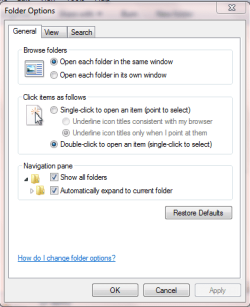
Suggest you set the Folder options shown in the attached snapshot.


I more suspect your problem is caused by other software running in the background. If you are running more than one anti-virus software then 100% remove all except for one of them.

My personal advice on av software is to 100% delete all of them and install Microsoft Security Essentials.
 

My Computer

Computer Manufacturer/Model Number
Toshiba Satellite S875D-S7239 laptop
OS
MS Windows 7 Ultimate SP1 64-bit
CPU
AMD A10-4600M
Motherboard
AMD Pumori (Socket FT1)
Memory
6.00 GB Dual-Channel DDR3 @ 798MHz (11-11-12-28)
Graphics Card(s)
AMD Radeon HD 7660G
Sound Card
High Definition Audio Device
Monitor(s) Displays
Generic PnP Monitor (1600x900@60Hz)
Screen Resolution
1600x900@60Hz
Hard Drives
SSD 119GB Corsair CSSD-V128GB2 ATA Device
Keyboard
Standard PS/2 Keyboard
Mouse
HP Wireless Optical Mobile Mouse Model FHA-3410
Internet Speed
What the local pub, local coffee shop offers.
Other Info
Optical Drive:MATSHITA BD-CMB UJ160B ATA Device


Also have an Asus ha1002xp netbook with Win 7 Ultimate installed.
OK I goofed.

Here's the snapshot:
 

Attachments

  • folderoptions.PNG
    folderoptions.PNG
    14.8 KB · Views: 4

My Computer

Computer Manufacturer/Model Number
Toshiba Satellite S875D-S7239 laptop
OS
MS Windows 7 Ultimate SP1 64-bit
CPU
AMD A10-4600M
Motherboard
AMD Pumori (Socket FT1)
Memory
6.00 GB Dual-Channel DDR3 @ 798MHz (11-11-12-28)
Graphics Card(s)
AMD Radeon HD 7660G
Sound Card
High Definition Audio Device
Monitor(s) Displays
Generic PnP Monitor (1600x900@60Hz)
Screen Resolution
1600x900@60Hz
Hard Drives
SSD 119GB Corsair CSSD-V128GB2 ATA Device
Keyboard
Standard PS/2 Keyboard
Mouse
HP Wireless Optical Mobile Mouse Model FHA-3410
Internet Speed
What the local pub, local coffee shop offers.
Other Info
Optical Drive:MATSHITA BD-CMB UJ160B ATA Device


Also have an Asus ha1002xp netbook with Win 7 Ultimate installed.
James,
Don't quite understand the problem because I've been unable to duplicate the problem.

Suggest you set the Folder options shown in the attached snapshot.


I more suspect your problem is caused by other software running in the background. If you are running more than one anti-virus software then 100% remove all except for one of them.

My personal advice on av software is to 100% delete all of them and install Microsoft Security Essentials.

Hi, Karlsnooks. Thanks for your comments. This issue is actually what MS believes is a 'feature', and has been in existence since the beta. Also, my folder options are set as your screenshot shows (with the exception of "Show all folders"), and this event occurs regardless of what the Navigation Pane settings are.

Here are 2 screenshots to demonstrate the issue:

WE_PreDrop.JPG
WE_PostDrop.JPG


The event can be duplicated in the following manner (I'll use my folder names to illustrate):

1) In WE, with a drive expanded, click on the folder Utilities (note that Utilities has sub-folders. Also note that Utilities is not near the bottom of the WE window)

2) Now, click on the arrow next to Utilities to reveal the sub-folders.

See the folder drop all the way to the bottom of the WE window. Very irritating. Strangely, this will only happen per folder the 1st time you do it in any given WE session. Repeating it (in the same session) will not result in the drop down (for the same folder, but will happen for other folders). Open a new WE, however, and it will happen again (for that same folder and others, first time only).

If this does not occur on your machine, I'd be very surprised. As I said, this was discussed at length in the beta groups, as many were quite irritated by it. It seemed to affect both 64 & 32 bit versions. I think it would take some sort of reg hack to correct it.

This explanation may seem convoluted, but if you follow the steps above, you should be able to dupe it. I don't know what they were thinking, but I can see no purpose for it.

Thanks,
James
 
Last edited by a moderator:

My Computer

OS
Win7U 64 RTM
CPU
Q9550
Motherboard
GA-EP45-UD3R
Memory
8GB Gskill
Graphics Card(s)
ASUS|EAH4850/HTDI/1GD3/A
Sound Card
xfi Plat
Monitor(s) Displays
Dell 2405fpw
Screen Resolution
1920x1200
Hard Drives
Seagate & WD sata Drives
PSU
Antec
Case
Antec
Keyboard
MS Natural Ergonomic 4000
Mouse
Logitech MX610 USB Cordless
James,
Click on your "Utilities" folder in the left-hand tree pane rather than on the folder listing in the right-hand pane.
 

My Computer

Computer Manufacturer/Model Number
Toshiba Satellite S875D-S7239 laptop
OS
MS Windows 7 Ultimate SP1 64-bit
CPU
AMD A10-4600M
Motherboard
AMD Pumori (Socket FT1)
Memory
6.00 GB Dual-Channel DDR3 @ 798MHz (11-11-12-28)
Graphics Card(s)
AMD Radeon HD 7660G
Sound Card
High Definition Audio Device
Monitor(s) Displays
Generic PnP Monitor (1600x900@60Hz)
Screen Resolution
1600x900@60Hz
Hard Drives
SSD 119GB Corsair CSSD-V128GB2 ATA Device
Keyboard
Standard PS/2 Keyboard
Mouse
HP Wireless Optical Mobile Mouse Model FHA-3410
Internet Speed
What the local pub, local coffee shop offers.
Other Info
Optical Drive:MATSHITA BD-CMB UJ160B ATA Device


Also have an Asus ha1002xp netbook with Win 7 Ultimate installed.
James,
Click on your "Utilities" folder in the left-hand tree pane rather than on the folder listing in the right-hand pane.

I did. I always use the folder (left) pane to navigate.

Edit: I would welcome being proved wrong here, but I don't believe this issue will be resolved by changing settings or taking a different tack. I think this one will be sovled only by some kind of registry hack. MS stated this was by design.

Edit2:
My OP and 2nd post may seem contradictory. The fact is that the drop down occurs via the steps mentioned in both posts. I hope I'm not muddying the waters here... :)

Thanks.
 

My Computer

OS
Win7U 64 RTM
CPU
Q9550
Motherboard
GA-EP45-UD3R
Memory
8GB Gskill
Graphics Card(s)
ASUS|EAH4850/HTDI/1GD3/A
Sound Card
xfi Plat
Monitor(s) Displays
Dell 2405fpw
Screen Resolution
1920x1200
Hard Drives
Seagate & WD sata Drives
PSU
Antec
Case
Antec
Keyboard
MS Natural Ergonomic 4000
Mouse
Logitech MX610 USB Cordless
James,
I'll have to give up because I cannot duplicate your problem using the settings I posted and using the left-hand pane. Only by using the right-hand pane can I duplicate your problem.

Perhaps someone else has a better understanding.
 

My Computer

Computer Manufacturer/Model Number
Toshiba Satellite S875D-S7239 laptop
OS
MS Windows 7 Ultimate SP1 64-bit
CPU
AMD A10-4600M
Motherboard
AMD Pumori (Socket FT1)
Memory
6.00 GB Dual-Channel DDR3 @ 798MHz (11-11-12-28)
Graphics Card(s)
AMD Radeon HD 7660G
Sound Card
High Definition Audio Device
Monitor(s) Displays
Generic PnP Monitor (1600x900@60Hz)
Screen Resolution
1600x900@60Hz
Hard Drives
SSD 119GB Corsair CSSD-V128GB2 ATA Device
Keyboard
Standard PS/2 Keyboard
Mouse
HP Wireless Optical Mobile Mouse Model FHA-3410
Internet Speed
What the local pub, local coffee shop offers.
Other Info
Optical Drive:MATSHITA BD-CMB UJ160B ATA Device


Also have an Asus ha1002xp netbook with Win 7 Ultimate installed.
James,
I'll have to give up because I cannot duplicate your problem using the settings I posted and using the left-hand pane. Only by using the right-hand pane can I duplicate your problem.

Perhaps someone else has a better understanding.

Thanks, Karl, for your efforts.

James
 

My Computer

OS
Win7U 64 RTM
CPU
Q9550
Motherboard
GA-EP45-UD3R
Memory
8GB Gskill
Graphics Card(s)
ASUS|EAH4850/HTDI/1GD3/A
Sound Card
xfi Plat
Monitor(s) Displays
Dell 2405fpw
Screen Resolution
1920x1200
Hard Drives
Seagate & WD sata Drives
PSU
Antec
Case
Antec
Keyboard
MS Natural Ergonomic 4000
Mouse
Logitech MX610 USB Cordless
I think I see what the OP is saying. If you first navigate to a folder, then click ON the folder, then click the arrow next to the folder you have highlighted Windows seems to move the folder down a couple of rows for some reason. Odd behavior, but hardly a show stopper, or you are getting a much bigger change than I am.

It looks to me like a cosmetic bug, as I cannot think of any way it would be by design. Even the MS UI designers aren't that obtuse. However, it isn't really an issue for me, as I don't navigate that way at all.
 

My Computer

OS
CommonOS (Linux Distro)
I think I see what the OP is saying. If you first navigate to a folder, then click ON the folder, then click the arrow next to the folder you have highlighted Windows seems to move the folder down a couple of rows for some reason. Odd behavior, but hardly a show stopper, or you are getting a much bigger change than I am.

It looks to me like a cosmetic bug, as I cannot think of any way it would be by design. Even the MS UI designers aren't that obtuse. However, it isn't really an issue for me, as I don't navigate that way at all.


Tried it, and that's exactly what happens. Guess the only solution for now is to click the arrow directly instead.
 

My Computer

Computer Manufacturer/Model Number
Asus G73SW-XN2
OS
Windows 2000 5.0 Build 2195
CPU
Intel Core i7-2630QM@2GHz(2.9GHz Turbo Boost) [Sandy Bridge]
Motherboard
Asus G73SW (Intel HM65 Chipset)
Memory
Kingston DDR3 1333 16GB (4GBx4)
Graphics Card(s)
nVidia GTX 460m 1.5GB
Sound Card
EAX Advanced HD 5.0, THX TruStudio
Monitor(s) Displays
17.3 in. primary & 23 in. secondary
Screen Resolution
1920x1080
Hard Drives
Seagate Momentus XT (SATA II) 500 GB @ 7200 RPM
Hitachi (SATA II) 500GB @ 7200 RPM

Non Raid because ASUS was crappy to choose an HM65 Chipset
Keyboard
Built-in 102-Key Backlit Keyboard
Other Info
It's a Laptop.
This behavior has been discussed numerous times. Search Google and you find hundreds of threads here and other places. Half of the people are irritated by this, others - such as myself - can't even reproduce it. In any case, there is no solution or workaround or anything. If you - just like me - can't see the problem, great. If you see it and are irritated by it - you'll have to learn to live with it.
 

My Computer

Computer Manufacturer/Model Number
Dell Inspiron 530
OS
Windows 7 Ultimate (x64)
CPU
Q6600
Memory
8 GB
Graphics Card(s)
ATI Radeon HD 2600 XT
Monitor(s) Displays
Samsung Syncmaster P2450
Screen Resolution
1920x1080
Hard Drives
Samsung HD103UJ
Samsung HD501LJ
Internet Speed
25 Mb/s
I think I see what the OP is saying. If you first navigate to a folder, then click ON the folder, then click the arrow next to the folder you have highlighted Windows seems to move the folder down a couple of rows for some reason. Odd behavior, but hardly a show stopper, or you are getting a much bigger change than I am.

It looks to me like a cosmetic bug, as I cannot think of any way it would be by design. Even the MS UI designers aren't that obtuse. However, it isn't really an issue for me, as I don't navigate that way at all.

Show stopper? No, but I am indeed experiencing a much bigger drop than you describe. For instance, if an expanded partition is near the top of the left pane with one of the top folders selected and I click on the arrow, the selected folder drops almost to the bottom of the window. Also, you would be surprised at what gets designated as by design or won't fix.

James
 

My Computer

OS
Win7U 64 RTM
CPU
Q9550
Motherboard
GA-EP45-UD3R
Memory
8GB Gskill
Graphics Card(s)
ASUS|EAH4850/HTDI/1GD3/A
Sound Card
xfi Plat
Monitor(s) Displays
Dell 2405fpw
Screen Resolution
1920x1200
Hard Drives
Seagate & WD sata Drives
PSU
Antec
Case
Antec
Keyboard
MS Natural Ergonomic 4000
Mouse
Logitech MX610 USB Cordless
I think I see what the OP is saying. If you first navigate to a folder, then click ON the folder, then click the arrow next to the folder you have highlighted Windows seems to move the folder down a couple of rows for some reason. Odd behavior, but hardly a show stopper, or you are getting a much bigger change than I am.

It looks to me like a cosmetic bug, as I cannot think of any way it would be by design. Even the MS UI designers aren't that obtuse. However, it isn't really an issue for me, as I don't navigate that way at all.


Tried it, and that's exactly what happens. Guess the only solution for now is to click the arrow directly instead.

Good workaround. If it works consistently here, I'll train myself to work that way.

Thanks,
James
 

My Computer

OS
Win7U 64 RTM
CPU
Q9550
Motherboard
GA-EP45-UD3R
Memory
8GB Gskill
Graphics Card(s)
ASUS|EAH4850/HTDI/1GD3/A
Sound Card
xfi Plat
Monitor(s) Displays
Dell 2405fpw
Screen Resolution
1920x1200
Hard Drives
Seagate & WD sata Drives
PSU
Antec
Case
Antec
Keyboard
MS Natural Ergonomic 4000
Mouse
Logitech MX610 USB Cordless
Back
Top