windows explorer on windows 7 shortcut problem

mccraithdo

New member
Local time
3:19 AM
Messages
1
I
1) go to all programs and find Windows Explorer
2) I right click on it and send it to the desktop to create a shortcut
3) when I click on the shortcut it says "The file does not have a program associated with it for performing this action. Please install a program...."

If I run Windows Explorer by right clicking on the START button, it runs fine.

How can I get the shortcut to work
 

My Computer

Computer Manufacturer/Model Number
HP
OS
Windows 7
Type the name of the program in search. When it appears on top of the start menu, click on that and try to send. That is the way I do it and it always works.
 

My Computer

Computer type
PC/Desktop
Computer Manufacturer/Model Number
Dell XPS 420
OS
Windows 10, Home Clean Install
CPU
Intel Core2 processsor Q8200(2.33Ghz 1333FSB) Quad Core Tech
Motherboard
Dell
Memory
6 gb
Graphics Card(s)
ATI Radeon 256MB HD3650
Sound Card
Intergrated 7.1 Channel Audio
Monitor(s) Displays
Dell SP2009W 20"
Hard Drives
640 GB Serial ATA Hard drive
Cooling
Fan
Keyboard
Dell USB Keyboard
Mouse
Dell Premium Optical USB
Internet Speed
DSL 2.85
mccraithdo, welcome to the forums.

I just tried the right click-send to desktop and it worked OK; it open Explorer in Libraries. One thing you can do is to check the properties of the shortcut and make sure the target and start in lines look like this,

explorershortcut.png

The extra switches after explorer.exe are so that it opens Computer instead (old habits die hard, been using it like that with a Logitech keyboard forever; yeah I know that Start=E does the same, but is a holdover from using just a single key).
 

My Computer

Computer type
PC/Desktop
Computer Manufacturer/Model Number
Me
OS
Win 7 Ultimate x64
CPU
FX-8350 @ 4.6 GHz so far
Motherboard
Asus M5A97 EVO
Memory
ADATA XPG V1 Series Black 8GB DDR3 1600
Graphics Card(s)
Sapphire R9 270x Dual-X
Sound Card
Xonar DGX w/ Corsair Vengence 1300
Monitor(s) Displays
Acer S232HL Abid
Screen Resolution
1920x1080
Hard Drives
120 GB OCZ Vertex 3
500 GB Seagate 7200.12
PSU
Antec Earthwatts 650W Green
Case
Antec Three Hundred
Cooling
Cooler Master 212 EVO
Keyboard
Logitech G510
Mouse
Logitech G500s
Internet Speed
35000/3000
I must be missing something. Is explorer.exe not already running?
 

My Computer

Computer Manufacturer/Model Number
Homebuilt
OS
Windows 7 x64
CPU
i7-2600K
Motherboard
Asus P8Z77-v Pro
Memory
8 G
Graphics Card(s)
GTX 480
Sound Card
Onboard
Monitor(s) Displays
LG W2753V
Screen Resolution
1920x1080
Hard Drives
Crucial M4 128 G SSD
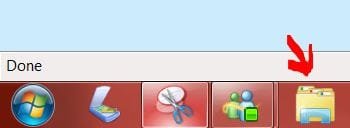
Mccraithdo, Unless I'm mistaking your problem you can solve it this way. When you open Windows Explorer the Icon will appear on your Task-bar to the right of the Start Button. Just right click on the Win Explorer Icon and select Pin to Task Bar; this action will leave the Icon in place which can allow you to open program at any time. In addition, once the Icon is fixed to the Task Bar you can grab the Icon with your mouse and pull slightly upwards and it will expand and reveal all recent viewed files for ease of access. This applies to any program. Hope this solves your problem.
 

Attachments

  • Windows Explorer.JPG
    Windows Explorer.JPG
    13 KB · Views: 7

My Computer

OS
Windows 7
Back
Top