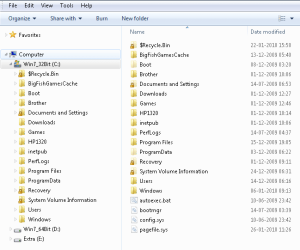
Windows Explorer panes

jeh

New member
Member
Local time
3:54 PM
Messages
35
Location
Hobart, Tasmania
I've just bought a new PC with Win 7 Pro installed. Its Windows Explorer insists on only showing one pane (plus the optional preview pane). Under all earlier versions of Windows Win Exp had a 'Folders' icon on its toolbar, to the right of 'Help', letting users toggle between one and two pane views. I would have used this every day for the past 14 or 15 years. Now it's vanished. Is this loss another Win 7 "feature" or is there a hidden switch someplace (in plain sight?)

TIA John
 

My Computer

OS
Win 7 Pro
I cannot recall that feature in XP (?). But it is a whle since I used XP. There was an alternative called explore2 or something similar, which could do it..

But do you mean the computer folder view in one pane, with the folders and files showing in the other? That an still be arranged through the options.
 

My Computer

Computer Manufacturer/Model Number
Three desktops and one laptop with good specs..
OS
Vista and now 7 in 32 and 64 bit.
Thanks davehc, that's exactly what I mean. A folder tree in the left pane with one folder selected and the contents of that folder displayed in the right pane. The latter stays put while the left pane is scanned, making dragging and dropping (particularly to external devices) very easy.
You say this can be arranged trhough options - I've not been able to find any. BTW I'm using an account with Administrator privileges..
 

My Computer

OS
Win 7 Pro
As a default, you can set it like this:
Right click Windows explorer and select properties.Change, under the shortcut tab, the Target, to, for example, this %windir%\explorer.exe /e, /n, C:\

This page will give you info on these functions:
Windows Explorer Command-Line Options

C: in my case, is my main HD with Windows 7 installed. The keys I have shown, open this at root, with the panes.
But, I think more to the point in your case, having done the above, you should select, in Windows explorer, Tools - Folder options, and then "Automatically expand to current folder".
It also occurs to me that, if you are still on the "learning curve" with 7, you may need the old bar menu: Again, select "Organise" -Layout, and you will see an option "Menu Bar"
 

My Computer

Computer Manufacturer/Model Number
Three desktops and one laptop with good specs..
OS
Vista and now 7 in 32 and 64 bit.
Thanks again. Interesting. Adding the two command line switches made no difference. The Windows Explorer Command-Line options link you gave specifically warns "This article refers to a different version of Windows than the one you're using" and doesn't include Win 7 in its OS list. I have the menu bar displayed - the 'Folders' button displayed on it in earlier Windows versions just isn't showing in my Win 7. Obviously there is some subtle (perhaps not so subtle) difference between your installation and mine.

There's another difference between what I'm seeing now and the Win Explorer I'm used to. In both XP and Vista the left pane shows, by a small symbol, whether a folder has any sub-folders. Clicking on that symbol opens the sub-folder tree while leaving the parent folder's relationship to other folders still visible. I'm not seeing that at all in Win 7. Is the latter the new expected behaviour?
 

My Computer

OS
Win 7 Pro
The link also adds: "Content in this article may not be relevant to you."
At leasdt, in my case, using Windows 7 32 or 64Bit, it does, in fact, work.
Here are my three pictures. 1. shows my options in properties: 2. shows the >Tools Folder options
: The last shows what I see on a default opening:

No1.png

N02.png

No3.png
 

My Computer

Computer Manufacturer/Model Number
Three desktops and one laptop with good specs..
OS
Vista and now 7 in 32 and 64 bit.
I know the Icon you are talking about and windows 7 doesn't have it. Not that I can find anyway. If you click the Organize button in the upper left, then go to Layout and remove the check mark next to "Navigation Pane". It should do the same thing and leave you with just the one pane.
 

My Computer

Computer type
PC/Desktop
Computer Manufacturer/Model Number
Home Built
OS
Windows 10 Education 64 bit
CPU
AMD Phenom II X4 980 Black Edition Deneb 3.7GHz
Motherboard
Asus M4N68T-M V2 µATX Motherboard
Memory
8GB 4GBx2 Kingston PC10600 DDR3 1333 Memory
Graphics Card(s)
Zotac NVIDIA Geforce GT640 2 Gig DDR3 PCIe
Sound Card
VIA VT1708s High Definition Audio 8-channel Onboard
Monitor(s) Displays
22" LG E2242 1080p and 2 19" I-INC AG191D
Screen Resolution
1280x1024 - 1920x1080 - 1280x1024
Hard Drives
Crucial M100 256 GB SSD and 500 GB WD Blue SATA
PSU
Thermaltake TR 620
Case
Power Up Black ATX Mid-Tower Case
Cooling
Stock heatsink and fan
Keyboard
Logitech Wireless K350 Wave
Mouse
Logitech Wireless M570 Trackman Wheel
Internet Speed
80 Mbps Down 30 Mbps Up
Antivirus
Windows Defender
Browser
Internet Explorer 11
Other Info
HP DVD1040e Lightscribe - External USB2
Thanks davehc and alphanumeric. The problem has gone away after I shut the machine down overnight. When I booted this afternoon Win Explorer behaved entirely normally, two panes as required. Nothing that I could do yesterday would persuade it to behave this way, hence my plea for help. I've no idea how it may have got, and stayed, confused yesterday.

Cheers John
 

My Computer

OS
Win 7 Pro
Back
Top