
windows explorer problems

jerguy1928

New member
Local time
4:20 AM
Messages
16
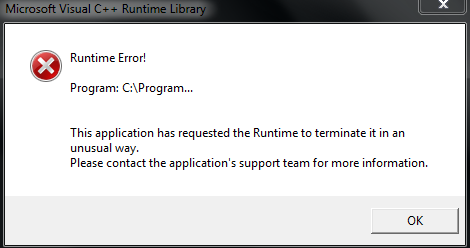
I recently got a nasty virus on my computer and i believe i have gotten rid of it, but my computer is left in a state right now where my program shortcuts in the taskbar and start menu say that the item has either been moved or deleted, the desktop background no longer works and is just solid black, and my computer will not load https sites. Also when booting into windows 7 i get this message below.

Thanks in advance for any help provided.
9b5sA.png
 
Last edited by a moderator:

My Computer

Computer Manufacturer/Model Number
Toshiba Satellite P750
OS
Windows 7 Home Premium 64 bit
CPU
Intel Core i7 2670QM
Motherboard
Toshiba PEQAA
Memory
6 GB 1333 MHz DDR3 PC3-10700
Graphics Card(s)
Intel(R) HD Graphics Family, NVIDIA GeForce GT 540M
Sound Card
Realtek audio
Monitor(s) Displays
Generic PnP Monitor (made by LG TV)
Screen Resolution
1366x768
Hard Drives
TOSHIBA MK6475GSX (640 GB , 5400 RPM)
I recently got a nasty virus on my computer and i believe i have gotten rid of it, but my computer is left in a state right now where my program shortcuts in the taskbar and start menu say that the item has either been moved or deleted, the desktop background no longer works and is just solid black, and my computer will not load https sites. Also when booting into windows 7 i get this message below.

Thanks in advance for any help provided.

9b5sA.png

The issues you are experencing would most likely be associated with the infection. What makes you think they are not? Please post back with some details.
 

My Computer

Computer type
PC/Desktop
Computer Manufacturer/Model Number
Custom Built
OS
Windows 7 Professional x64
CPU
Intel i5 quad processor
Motherboard
DP67BG
Memory
16 GB
Graphics Card(s)
Radeon HD 5770
Sound Card
Realtek High Definition Audio
Monitor(s) Displays
Samsung SyncMaster
Screen Resolution
1920X1080
Hard Drives
WD 2TB (SATA Internal)
WD 1TB (USB External)
PSU
Corsair GS800
Case
Tower (Generic)
Cooling
3 Internal Fans
Keyboard
MS Wireless
Mouse
MS Optical Wired
Internet Speed
54 mbps
Antivirus
Emsisoft
Browser
IE-Version 9, Palemoon-Version 24.2.0
I recently got a nasty virus on my computer and i believe i have gotten rid of it, but my computer is left in a state right now where my program shortcuts in the taskbar and start menu say that the item has either been moved or deleted, the desktop background no longer works and is just solid black, and my computer will not load https sites. Also when booting into windows 7 i get this message below.

Thanks in advance for any help provided.

9b5sA.png

The issues you are experencing would most likely be associated with the infection. What makes you think they are not? Please post back with some details.
I agree with you i believe they are. I guess I wasn't too clear with my intentions, I apologise. My question is, is there a way i can get my system back to a properly working state without having to reinstall, unfortunately i do not have a recovery image, i only have a factory image.
 

My Computer

Computer Manufacturer/Model Number
Toshiba Satellite P750
OS
Windows 7 Home Premium 64 bit
CPU
Intel Core i7 2670QM
Motherboard
Toshiba PEQAA
Memory
6 GB 1333 MHz DDR3 PC3-10700
Graphics Card(s)
Intel(R) HD Graphics Family, NVIDIA GeForce GT 540M
Sound Card
Realtek audio
Monitor(s) Displays
Generic PnP Monitor (made by LG TV)
Screen Resolution
1366x768
Hard Drives
TOSHIBA MK6475GSX (640 GB , 5400 RPM)
I recently got a nasty virus on my computer and i believe i have gotten rid of it, but my computer is left in a state right now where my program shortcuts in the taskbar and start menu say that the item has either been moved or deleted, the desktop background no longer works and is just solid black, and my computer will not load https sites. Also when booting into windows 7 i get this message below.

Thanks in advance for any help provided.

9b5sA.png

The issues you are experencing would most likely be associated with the infection. What makes you think they are not? Please post back with some details.
I agree with you i believe they are. I guess I wasn't too clear with my intentions, I apologise. My question is, is there a way i can get my system back to a properly working state without having to reinstall, unfortunately i do not have a recovery image, i only have a factory image.

You could try to diagnose the problem and maybe find the cause,but the time involved may not be worth it. If it were my computer, and I hadn't made a recent image, I would go with a clean install. See below for details;

http://www.sevenforums.com/tutorials/219487-clean-reinstall-factory-oem-windows-7-a.html

You can use the factory image supplied with the computer, but usually it will have unnecessary bloatware.
 

My Computer

Computer type
PC/Desktop
Computer Manufacturer/Model Number
Custom Built
OS
Windows 7 Professional x64
CPU
Intel i5 quad processor
Motherboard
DP67BG
Memory
16 GB
Graphics Card(s)
Radeon HD 5770
Sound Card
Realtek High Definition Audio
Monitor(s) Displays
Samsung SyncMaster
Screen Resolution
1920X1080
Hard Drives
WD 2TB (SATA Internal)
WD 1TB (USB External)
PSU
Corsair GS800
Case
Tower (Generic)
Cooling
3 Internal Fans
Keyboard
MS Wireless
Mouse
MS Optical Wired
Internet Speed
54 mbps
Antivirus
Emsisoft
Browser
IE-Version 9, Palemoon-Version 24.2.0
Back
Top