
You are using an out of date browser. It may not display this or other websites correctly.
You should upgrade or use an alternative browser.
You should upgrade or use an alternative browser.
Windows Explorer Properties window background color
- Thread starter napalme
- Start date


mitchell65
New member
You could wait forever and a day to find another member using this theme, I would suggest your best bet is to go onto the deviantart Forum
My Computer
- Computer type
- PC/Desktop
- OS
- Microsoft Windows 7 Home Premium 64-bit 7601 Multiprocessor Free Service Pack 1
- CPU
- Intel(R) Core(TM) i7-3770 CPU @ 3.40GHz
- Motherboard
- ASUSTeK COMPUTER INC. P8H77-M
- Memory
- 8.00 GB
- Graphics Card(s)
- Intel(R) HD Graphics 4000
- Sound Card
- On Board
- Monitor(s) Displays
- Dell 24"
- Screen Resolution
- 1920 x 1080
- Hard Drives
- (1) INTEL SSDSC2CT180A3 ATA Device (2) ST500DM002-1BD142 ATA Device (3) WDC WD3200AAKS-75L9A0 ATA Device (4) Generic- Compact Flash USB Device (5) Generic- MS/MS-Pro USB Device (6) Generic- SD/MMC USB Device (7) Generic- SM/xD-Picture USB
- PSU
- 500w Corsair
- Case
- Cooler Master
- Cooling
- 3 Fans
- Keyboard
- Logitech MK300
- Mouse
- Logitech WOM
- Internet Speed
- 75Mb
- Antivirus
- Norton 360
- Browser
- Firefox, Opera, IE

Bongo
Jerry ☮ 1956-2019 R.I.P.
Welcome to the Seven Forums
That would be image #905 in the Ashtray.msstyles if you are using a resource hacker.
If you are using Windows Style Builder it would be at Lists, Menus & Tabs > Tab > Pane
Jerry
That would be image #905 in the Ashtray.msstyles if you are using a resource hacker.
If you are using Windows Style Builder it would be at Lists, Menus & Tabs > Tab > Pane
Jerry
My Computer
- Computer type
- Laptop
- Computer Manufacturer/Model Number
- Sager NP9170
- OS
- Win 7 Pro x64 / Win 10 Pro
- CPU
- Intel(R) Core(TM) i7-3630QM CPU @ 2.40GHz
- Motherboard
- CLEVO P170EM
- Memory
- 12 GB
- Graphics Card(s)
- (1) Intel(R) HD Graphics 4000 (2) NVIDIA GeForce GTX 675M
- Sound Card
- (1) Realtek High Definition Audio (2) Intel(R) Display Aud
- Monitor(s) Displays
- 17.3
- Screen Resolution
- 1920x1080
- Hard Drives
- (1) Samsung 860 EVO 500GB(OS) (1) Samsung 860 EVO 500GB(Data)
- Keyboard
- Backlite
- Antivirus
- MSE, Malwarebytes Pro
- Browser
- Firefox
- Other Info
- DESKTOP: Custom-built.
OS: Win 10 Pro x64.
CASE: Rosewill R5.
CPU: Intel I5 4670K CPU @ 3.40GHz.
CPU COOLER: Cool Master Hyper 212 EVO.
MOTHERBOARD: Asus Z87-A.
MEMORY: Kingston HyperX 2x4 GB.
GPU: Nvidia Geforce 650 TI.
PSU: Corsair TX750.
DRIVES: (1) Samsung 840 120 GB SSD (2) Western Digital blue 500 GB 7200 RPM.
Bongo
Jerry ☮ 1956-2019 R.I.P.
Sorry for late reply,
I gave you the wrong image # it is #906 sorry.
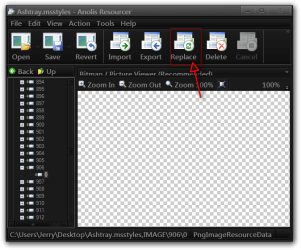
I have a hard time with resource hacker so I sometimes use Anolis Resourcer - Resource Hacker Software - Anolis
You cannot edit a theme when in use, Switch to a new theme then logoff/logon then do the following.
#1
Open the Ashtray.msstyles
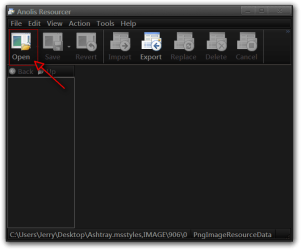
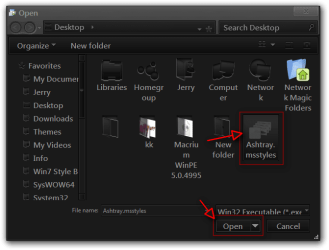
#2
Click the + at "IMAGE" and scroll down to 906 click on + click on 0 then click on Export and Save the image to your desktop.

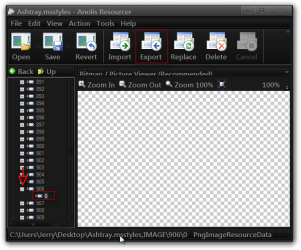
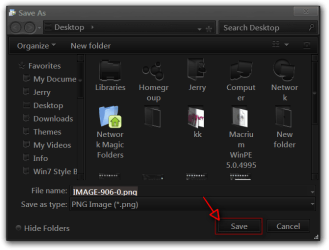
#3
Edit the image with image editor (Gimp, Paint.net, Photoshop) it a 1px x 1px image.
#4
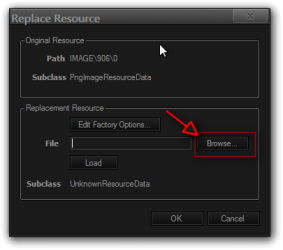
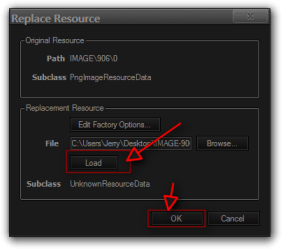
Click on Replace then Browse in the open window make sure it is set to PngImage (*.png click on the image you edited on click Open, then click Load then OK.

#5
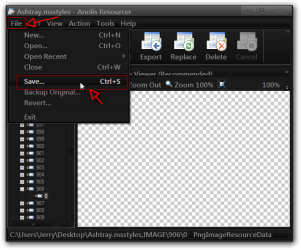
File > Save
Jerry
I gave you the wrong image # it is #906 sorry.
I have a hard time with resource hacker so I sometimes use Anolis Resourcer - Resource Hacker Software - Anolis
You cannot edit a theme when in use, Switch to a new theme then logoff/logon then do the following.
#1
Open the Ashtray.msstyles
#2
Click the + at "IMAGE" and scroll down to 906 click on + click on 0 then click on Export and Save the image to your desktop.
#3
Edit the image with image editor (Gimp, Paint.net, Photoshop) it a 1px x 1px image.
#4
Click on Replace then Browse in the open window make sure it is set to PngImage (*.png click on the image you edited on click Open, then click Load then OK.
#5
File > Save
Jerry
My Computer
- Computer type
- Laptop
- Computer Manufacturer/Model Number
- Sager NP9170
- OS
- Win 7 Pro x64 / Win 10 Pro
- CPU
- Intel(R) Core(TM) i7-3630QM CPU @ 2.40GHz
- Motherboard
- CLEVO P170EM
- Memory
- 12 GB
- Graphics Card(s)
- (1) Intel(R) HD Graphics 4000 (2) NVIDIA GeForce GTX 675M
- Sound Card
- (1) Realtek High Definition Audio (2) Intel(R) Display Aud
- Monitor(s) Displays
- 17.3
- Screen Resolution
- 1920x1080
- Hard Drives
- (1) Samsung 860 EVO 500GB(OS) (1) Samsung 860 EVO 500GB(Data)
- Keyboard
- Backlite
- Antivirus
- MSE, Malwarebytes Pro
- Browser
- Firefox
- Other Info
- DESKTOP: Custom-built.
OS: Win 10 Pro x64.
CASE: Rosewill R5.
CPU: Intel I5 4670K CPU @ 3.40GHz.
CPU COOLER: Cool Master Hyper 212 EVO.
MOTHERBOARD: Asus Z87-A.
MEMORY: Kingston HyperX 2x4 GB.
GPU: Nvidia Geforce 650 TI.
PSU: Corsair TX750.
DRIVES: (1) Samsung 840 120 GB SSD (2) Western Digital blue 500 GB 7200 RPM.