Windows Explorer Proplem

MartinJames

New member
Local time
4:54 PM
Messages
4
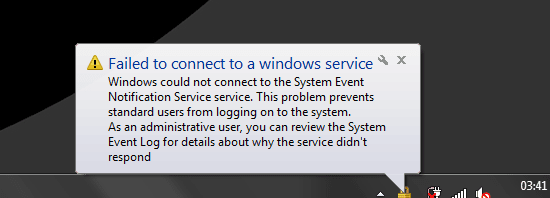
Hello, The main proplem is my laptop is keep lagging and freezing after 1-2 hours of opeing it , Plus Taking too long in "welcome"

some times this message show up "photo attached"
 

Attachments

  • ؛قخحمثة.PNG
    ؛قخحمثة.PNG
    7.6 KB · Views: 13

My Computer

Computer type
Laptop
Computer Manufacturer/Model Number
Dell
OS
windows 7 32-bit
CPU
Inter(R) Celeron
Memory
1.00 GB
Graphics Card(s)
Intel HD graphics card
Hard Drives
250 GB
Antivirus
N/A
Browser
Firefox
What model Dell laptop do you have? How long have you had it?

1GB of memory is very very small and even with a 32-bit Windows would likely have a severe performance impact.

Have you considered adding more memory if the laptop supports it? If it does support more than 1GB this is probably the most reasonable and best price/performance no-brainer investment you can make to try and speed EVERYTHING up. This isn't going to turn your very likely old Celeron machine into a screamer, but it will likely provide a significant performance improvement from what it does today.
 

My Computer

Computer type
PC/Desktop
Computer Manufacturer/Model Number
Home-built, two systems (1) and (2)
OS
Windows 7 Pro x64 (1), Win7 Pro X64 (2)
CPU
i5-3350p 3.1Ghz/6MB-cache (1); E8400 3.0Ghz/6MB-cache (2)
Motherboard
ASUS P8Z77-V Pro (1); ASUS P5Q3 (2)
Memory
8GB PC3-12800 DDR3 (1); 4GB PC3-10600 DDR3 (2)
Graphics Card(s)
ATI HD7750 (1), (see TV cards); ATI R7 250 (2)
Sound Card
Realtek ALC892 HD Audio (1); Realtek ALC1200 HD Audio (2)
Monitor(s) Displays
Eizo HD2441W LCD, Eizo S2433W (1); Eizo 24" S2433W (2)
Screen Resolution
1920x1200, 1920x1200 (1); 1920x1200 (2)
Hard Drives
(1) 1TB SATA-II (7200RPM), 2x2TB SATA-III (7200RPM), 250GB SATA-III (10000RPM) for OS; 2x2TB external USB 3.0

(2) 320GB SATA-II (7200RPM), 750GB SATA-II (7200RPM), 150GB SATA-II (10000RPM) for OS; 2TB external USB 3.0
PSU
Nesteq ECS-6001 600W (1); Nesteq ECS-5001 500W (2)
Case
Acousti-Case 360 (1) and (2)
Cooling
Noctua NH-U12P SE2 for CPU, 2x120mm case fans (1) and (2)
Keyboard
IBM PS/2 (1) and (2)
Mouse
Logitech MX Revolution wireless (1); Microsoft wired (2)
Internet Speed
100mbps down / 10mbps up
Antivirus
Microsoft Security Essentials; Malwarebyte Anti-Malware Pro
Browser
Firefox
Other Info
Ceton InfiniTV 4-tuner cablecard-enabled TV card as well as Hauppauge HVR-2250 OTA/ATSC 2-tuner TV card in (1), running under Win7 WMC
Perform a clean start:

Launch System Configuration (msconfig)

Services tab:
tickYe_b.png Hide all Microsoft services
Press the [Disable all] button​

Startup tab:
Press the [Disable all] button

Enable the items below if present in the startup list
tickYe_b.png Touchpad and you have customized the features, otherwise leave it disabled.
tickYe_b.png Anti-Virus program (not all AVs are started this way)​

Press the [Ok] button​

Restart your machine. Better?
 

My Computer

Computer type
Laptop
Computer Manufacturer/Model Number
HP Pavilion dv6-6c10us
OS
x64 (6.3.9600) Win8.1 Pro & soon dual boot x64 (6.1.7601) Win7_SP1 HomePrem
CPU
AMD A6-3420M APU with Radeon(tm) HD Graphics
Motherboard
Hewlett-Packard 1805
Memory
6.00 GB
Graphics Card(s)
AMD Radeon(TM) HD 6520G
Sound Card
(1) AMD High Definition Audio Device (2) IDT High Definiti
Monitor(s) Displays
HP W2072a 20" LCD (1600 x 900) @ 60 Hz
Screen Resolution
1366 x 768 x 32 bits (4294967296 colors) @ 60 Hz
Hard Drives
ST640LM0 00 HM641JI SATA Disk Device
Keyboard
Logitech k520 wireless KB
Mouse
Logitech m320 wireless mouse (bundled with KB)
Internet Speed
15/5 | 54 MB Wireless 'n'
Antivirus
Realtime: Defender or Avast | On-demand: Malwarebytes, ESET
Browser
IE 11 on Win8, IE 10 on win 7
Other Info
Media: [Gimp, Audacity, VLC] || Comm: [WEmail 2012, Skype] || Productivity: [OpenOffice,| Textpad] || Utils: [Sysinternals, cCleaner, Speccy, Defraggler]
Dell inspiron N5050 Made in china , bought it 3 years ago, and no i dont think of adding memory to it since i use it for important work only , no other use for it .


i will try the clean start you told me Slartybart , Thanks i will tell you results soon

Regards
 

My Computer

Computer type
Laptop
Computer Manufacturer/Model Number
Dell
OS
windows 7 32-bit
CPU
Inter(R) Celeron
Memory
1.00 GB
Graphics Card(s)
Intel HD graphics card
Hard Drives
250 GB
Antivirus
N/A
Browser
Firefox
Perform a clean start:

Launch System Configuration (msconfig)

Services tab:
View attachment 349734 Hide all Microsoft services
Press the [Disable all] button​
Startup tab:
Press the [Disable all] button

Enable the items below if present in the startup list
View attachment 349734 Touchpad and you have customized the features, otherwise leave it disabled.
View attachment 349734 Anti-Virus program (not all AVs are started this way)​
Press the [Ok] button​
Restart your machine. Better?

OH MY GOD

it got worse , now taking more time in Please wait.. and welcome .. also freezing
 

My Computer

Computer type
Laptop
Computer Manufacturer/Model Number
Dell
OS
windows 7 32-bit
CPU
Inter(R) Celeron
Memory
1.00 GB
Graphics Card(s)
Intel HD graphics card
Hard Drives
250 GB
Antivirus
N/A
Browser
Firefox
Dell inspiron N5050 Made in china , bought it 3 years ago, and no i dont think of adding memory to it since i use it for important work only , no other use for it .
Well, aside from why it's "freezing" regularly, even when it's operating properly it's apparently also not performing adequately to meet your important work needs, which is why you're asking for ideas and suggestions.

So, the N5050 has two memory slots, and the absolute bare minimum memory that the machine is configured with is 1GB... which is your machine's story. As I said, 1GB is really inadequate for "decent" performance with 4GB really being the minimum Win7 system spec in my opinion. Since you are running 32-bit Windows 4GB is actually the maximum your system can support anyway. In theory, running 64-bit Windows on the machine could support up to 8GB max (as 2x4GB) of PC3-1333 memory.

However GREATLY IMPROVED PERFORMANCE (at a modest cost) can be achieved even with your 32-bit Windows environment by simply increasing your memory from 1GB to just about anything.

So honestly, I'd suggest investing either (a) $43 for an additional 2GB to install in the second memory slot, or (b) $78 for one 4GB card to replace your existing 1GB card (remember, 32-bit Windows can only support 4GB of memory). Or, you could even go for 2 of the 2GB cards (for the two slots), as running 2x2GB in "dual memory mode" is somewhat faster than running 1x4GB in "single memory mode".

But really, for just a little investment in added memory you're going to get the best possible bang for the buck in performance improvement. I'm not suggesting upgrading to a a newer/faster hard drive or SSD which is much more costly. Nor am I suggesting you get another machine. I'm just suggesting investing $43 or $78 or $84 in added memory, anticipating you'll genuinely get your money's worth.

I really think this will help.

NOTE: your 320GB is also at the low-end of specs I've seen for the N5050. It's possible your drive might be quite full, and/or in need of a cleanup (deleting all TEMP stuff to free up space, and also to run a DEFRAG possibly). If the drive is just a low-end performing drive, it's hurting you even worse than your 1GB of memory is, because Windows is using the very slow drive to "page" virtual memory in and out of the disk that it doesn't have true "real" physical memory for.

 

My Computer

Computer type
PC/Desktop
Computer Manufacturer/Model Number
Home-built, two systems (1) and (2)
OS
Windows 7 Pro x64 (1), Win7 Pro X64 (2)
CPU
i5-3350p 3.1Ghz/6MB-cache (1); E8400 3.0Ghz/6MB-cache (2)
Motherboard
ASUS P8Z77-V Pro (1); ASUS P5Q3 (2)
Memory
8GB PC3-12800 DDR3 (1); 4GB PC3-10600 DDR3 (2)
Graphics Card(s)
ATI HD7750 (1), (see TV cards); ATI R7 250 (2)
Sound Card
Realtek ALC892 HD Audio (1); Realtek ALC1200 HD Audio (2)
Monitor(s) Displays
Eizo HD2441W LCD, Eizo S2433W (1); Eizo 24" S2433W (2)
Screen Resolution
1920x1200, 1920x1200 (1); 1920x1200 (2)
Hard Drives
(1) 1TB SATA-II (7200RPM), 2x2TB SATA-III (7200RPM), 250GB SATA-III (10000RPM) for OS; 2x2TB external USB 3.0

(2) 320GB SATA-II (7200RPM), 750GB SATA-II (7200RPM), 150GB SATA-II (10000RPM) for OS; 2TB external USB 3.0
PSU
Nesteq ECS-6001 600W (1); Nesteq ECS-5001 500W (2)
Case
Acousti-Case 360 (1) and (2)
Cooling
Noctua NH-U12P SE2 for CPU, 2x120mm case fans (1) and (2)
Keyboard
IBM PS/2 (1) and (2)
Mouse
Logitech MX Revolution wireless (1); Microsoft wired (2)
Internet Speed
100mbps down / 10mbps up
Antivirus
Microsoft Security Essentials; Malwarebyte Anti-Malware Pro
Browser
Firefox
Other Info
Ceton InfiniTV 4-tuner cablecard-enabled TV card as well as Hauppauge HVR-2250 OTA/ATSC 2-tuner TV card in (1), running under Win7 WMC
OH MY GOD
it got worse , now taking more time in Please wait.. and welcome .. also freezing
You did hide all MS services , right?

No worries, launch msconfig again and enable all on services, leave the startup items off.

restart and ????
 

My Computer

Computer type
Laptop
Computer Manufacturer/Model Number
HP Pavilion dv6-6c10us
OS
x64 (6.3.9600) Win8.1 Pro & soon dual boot x64 (6.1.7601) Win7_SP1 HomePrem
CPU
AMD A6-3420M APU with Radeon(tm) HD Graphics
Motherboard
Hewlett-Packard 1805
Memory
6.00 GB
Graphics Card(s)
AMD Radeon(TM) HD 6520G
Sound Card
(1) AMD High Definition Audio Device (2) IDT High Definiti
Monitor(s) Displays
HP W2072a 20" LCD (1600 x 900) @ 60 Hz
Screen Resolution
1366 x 768 x 32 bits (4294967296 colors) @ 60 Hz
Hard Drives
ST640LM0 00 HM641JI SATA Disk Device
Keyboard
Logitech k520 wireless KB
Mouse
Logitech m320 wireless mouse (bundled with KB)
Internet Speed
15/5 | 54 MB Wireless 'n'
Antivirus
Realtime: Defender or Avast | On-demand: Malwarebytes, ESET
Browser
IE 11 on Win8, IE 10 on win 7
Other Info
Media: [Gimp, Audacity, VLC] || Comm: [WEmail 2012, Skype] || Productivity: [OpenOffice,| Textpad] || Utils: [Sysinternals, cCleaner, Speccy, Defraggler]
AdwCleaner by Xplode:
Run the following steps in the General Changelog Team tutorial:

Malware is often difficult to erradicate - it is even more difficult if more than one path is taken on different sites.

As you have posted the issue here on SevenForums, also post any logs here on SevenForums - not on the General Changelog Team (GCT) site. SevenForums members might ask you to launch other on-demand scanners that are not familiar to GCT.

When your system is clean of malware, launch AdwCleaner a final time and click the Uninstall button.
 

My Computer

Computer type
Laptop
Computer Manufacturer/Model Number
HP Pavilion dv6-6c10us
OS
x64 (6.3.9600) Win8.1 Pro & soon dual boot x64 (6.1.7601) Win7_SP1 HomePrem
CPU
AMD A6-3420M APU with Radeon(tm) HD Graphics
Motherboard
Hewlett-Packard 1805
Memory
6.00 GB
Graphics Card(s)
AMD Radeon(TM) HD 6520G
Sound Card
(1) AMD High Definition Audio Device (2) IDT High Definiti
Monitor(s) Displays
HP W2072a 20" LCD (1600 x 900) @ 60 Hz
Screen Resolution
1366 x 768 x 32 bits (4294967296 colors) @ 60 Hz
Hard Drives
ST640LM0 00 HM641JI SATA Disk Device
Keyboard
Logitech k520 wireless KB
Mouse
Logitech m320 wireless mouse (bundled with KB)
Internet Speed
15/5 | 54 MB Wireless 'n'
Antivirus
Realtime: Defender or Avast | On-demand: Malwarebytes, ESET
Browser
IE 11 on Win8, IE 10 on win 7
Other Info
Media: [Gimp, Audacity, VLC] || Comm: [WEmail 2012, Skype] || Productivity: [OpenOffice,| Textpad] || Utils: [Sysinternals, cCleaner, Speccy, Defraggler]
Back
Top