Windows Explorer search shows blank details

cake247

New member
Local time
1:25 PM
Messages
8
Judging from a previous thread on this topic, it unfortunately doesn't sound like there's anything I can do to fix this. I figured I'd try posting a new thread anyway, though. I'm having the same problem described here:

Windows Explorer won't show file details in search

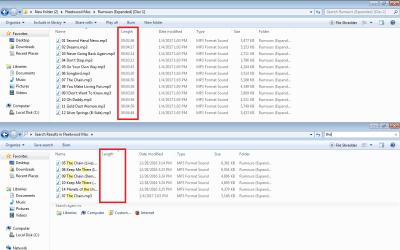
I have a folder with a bunch of music in it. I have the view set to "Details" with "length" being the detail I'm concerned with. When I'm navigating the sub-folders, it will show the lengths of the songs in the details column just fine. But when I search the folder, the results show the "length" field as blank all the way down the list.

I just recently upgraded from Vista which allowed me to see the length details when I searched a folder. Why the heck would they get rid of that for Windows 7? Is there some sort of tweaking I can do to restore this function or is the only answer to use a third party file searching utility? If so, can you refer me to a simple free one? I'm using Windows 7 Home Premium 32-bit.
 

Attachments

  • length-search.png
    length-search.png
    41.6 KB · Views: 4
Last edited:

My Computer My Computer

At a glance

Windows 7 Home Premium 32-bit
Computer type
Laptop
Computer Manufacturer/Model Number
Dell
OS
Windows 7 Home Premium 32-bit
I just checked on my computer & my music files do show the Length. I am using Home Premium 64 bit, but I doubt that is the issue.
 

My Computer My Computer

At a glance

Windows 7 Home Premium 64 bit sp1Intel i5 3570 3.4Ghz Ivy Bridge SKT 1155 quad...G-Skill Rip Jaws 16Gb (8x2) DDR3 -1600 PC3 12...Gigabyte NVIDIA GT610 1Gb DDR3 810/1200 PCI-E...
Computer type
PC/Desktop
Computer Manufacturer/Model Number
Self built using existing case
OS
Windows 7 Home Premium 64 bit sp1
CPU
Intel i5 3570 3.4Ghz Ivy Bridge SKT 1155 quad core
Motherboard
Gigabyte Z77-HD3 SKT 1155 2xSata 3, 4x USB 3.0
Memory
G-Skill Rip Jaws 16Gb (8x2) DDR3 -1600 PC3 12800 CL 10 red
Graphics Card(s)
Gigabyte NVIDIA GT610 1Gb DDR3 810/1200 PCI-E 2.0 Silent
Sound Card
NVIDIA High Definition & Realtech High Definition Audio
Monitor(s) Displays
2 x Philips 226V4L 16:9 aspect ratio
Screen Resolution
1920 x 1080 HD
Hard Drives
Samsung 840 Pro 256gb SSD, SATA 3.
Hitachi Touro Portable 1tb, USB 3.0 HDD used for image b/ups.
PSU
Corsair VS450
Case
Codeng
Cooling
PSU fan & CPU fan
Keyboard
Logitech
Mouse
Logitech Wireless trackball M570
Internet Speed
Wireless 3G. 3mg down & 550kb up.
Antivirus
Bitdefender Internet Security 2020
Browser
Opera (Current Version) & Firefox
Other Info
MS Office 2013 Pro. Davis weather station software. MGE Nova 600 avr UPS.
I just checked on my computer & my music files do show the Length. I am using Home Premium 64 bit, but I doubt that is the issue.

OK, the response in the old thread led me to believe this was just a limitation of Windows 7. So there's something wrong with the search function? Strange thing is I have another computer with Windows 7 Starter and it also has this problem when searching.
 

My Computer My Computer

At a glance

Windows 7 Home Premium 32-bit
Computer type
Laptop
Computer Manufacturer/Model Number
Dell
OS
Windows 7 Home Premium 32-bit
Just bumping this thread in case someone else has some advice. What could be the problem here?
 

My Computer My Computer

At a glance

Windows 7 Home Premium 32-bit
Computer type
Laptop
Computer Manufacturer/Model Number
Dell
OS
Windows 7 Home Premium 32-bit
It possible Windows Starter may not show running time as Starter is a cut down minimum spec Operating System, designed for low cost installation by some computer manufacturers.
 

My Computer My Computer

At a glance

Windows 7 Home Premium 64 bit sp1Intel i5 3570 3.4Ghz Ivy Bridge SKT 1155 quad...G-Skill Rip Jaws 16Gb (8x2) DDR3 -1600 PC3 12...Gigabyte NVIDIA GT610 1Gb DDR3 810/1200 PCI-E...
Computer type
PC/Desktop
Computer Manufacturer/Model Number
Self built using existing case
OS
Windows 7 Home Premium 64 bit sp1
CPU
Intel i5 3570 3.4Ghz Ivy Bridge SKT 1155 quad core
Motherboard
Gigabyte Z77-HD3 SKT 1155 2xSata 3, 4x USB 3.0
Memory
G-Skill Rip Jaws 16Gb (8x2) DDR3 -1600 PC3 12800 CL 10 red
Graphics Card(s)
Gigabyte NVIDIA GT610 1Gb DDR3 810/1200 PCI-E 2.0 Silent
Sound Card
NVIDIA High Definition & Realtech High Definition Audio
Monitor(s) Displays
2 x Philips 226V4L 16:9 aspect ratio
Screen Resolution
1920 x 1080 HD
Hard Drives
Samsung 840 Pro 256gb SSD, SATA 3.
Hitachi Touro Portable 1tb, USB 3.0 HDD used for image b/ups.
PSU
Corsair VS450
Case
Codeng
Cooling
PSU fan & CPU fan
Keyboard
Logitech
Mouse
Logitech Wireless trackball M570
Internet Speed
Wireless 3G. 3mg down & 550kb up.
Antivirus
Bitdefender Internet Security 2020
Browser
Opera (Current Version) & Firefox
Other Info
MS Office 2013 Pro. Davis weather station software. MGE Nova 600 avr UPS.
It possible Windows Starter may not show running time as Starter is a cut down minimum spec Operating System, designed for low cost installation by some computer manufacturers.

Well, the other computer with this same problem has Windows Home Premium. I checked on another computer with Windows Home Premium and it works just fine. So there must be something wrong with that computer. Any ideas on what could be causing this? There must be some kind of solution if it works on one Windows Home Premium computer and not the other. Again, the problem is restricted to the details shown after doing a search. As you can see in the screen shots in my first post, it shows "length" when I'm viewing the folders. It's only when I search the folder that the "length" field goes blank.
 

My Computer My Computer

At a glance

Windows 7 Home Premium 32-bit
Computer type
Laptop
Computer Manufacturer/Model Number
Dell
OS
Windows 7 Home Premium 32-bit
Is it Microsoft Cep or an issue with system index catalog?

I don't think you were alone. I have seen this fields missing or not working in Explorer. Only shows up in details view.

Mine were:
  1. File Type field missing from results pane of one subfolder only. Unable to select Sort By:File Type because the field was empty or missing from results pane.
  2. Sort By: Date Field only gave partially sorted results, with many results still being displayed in the wrong order.


I kinda assumed it was Microsoft Customer Experience Program that had altered the behavior of the machine. Unperturbed I carried on ...

Then, I noticed in Event Viewer that events associated with the gatherer/system index catalog started appearing. I think this might have been Event 3036: Source Search. The solution is to rebuild the searcher index.

So, question: Do you see Event 3036 from the Event Viewer logs?

Anyway, the good news is that the problem with the blank details seems to have vanished.
 

My Computer My Computer

At a glance

Windows 7 x64, Vista x64, 8.1 smartphoneIntel E8400 65W 64-bitDDR2 2 x 2GB, 1GB x 2XFX Radeon HD5750
Computer type
PC/Desktop
OS
Windows 7 x64, Vista x64, 8.1 smartphone
CPU
Intel E8400 65W 64-bit
Motherboard
Gigabyte EP45-UD3LR
Memory
DDR2 2 x 2GB, 1GB x 2
Graphics Card(s)
XFX Radeon HD5750
Sound Card
AMD High Definition Audio; Realtek High Definition Audio

Monitor(s) Displays
iiyama prolite X2377HDS
Screen Resolution
1920 x 1080
Hard Drives
500GB 7200 rpm Seagate ST3500413AS 16MB, 500GB 5400 rpm Toshiba MQ02ABF050H 32MB, 200GB 7200 rpm Seagate ST3200820AS 8MB, 2TB 7200 rpm Western Digital WD20EZRX 64MB
PSU
Enermax Liberty Modular
Case
Antec P193 Midi Tower
Keyboard
Mionix ZIBAL 60
Mouse
Razer USB 2.0 Diamondback Mouse or Huion Graphics Tablet
Browser
Internet Explorer, Lunascape, Firefox, Opera, Avast Safezone
So, question: Do you see Event 3036 from the Event Viewer logs?

Anyway, the good news is that the problem with the blank details seems to have vanished.

Yes, I do see this. I'll try rebuilding the search index tonight and see if that fixes it. Thanks!
 

My Computer My Computer

At a glance

Windows 7 Home Premium 32-bit
Computer type
Laptop
Computer Manufacturer/Model Number
Dell
OS
Windows 7 Home Premium 32-bit
Back
Top