windows explorer search

Herm61

New member
Member
VIP
Local time
2:46 PM
Messages
199
Location
virginia beach
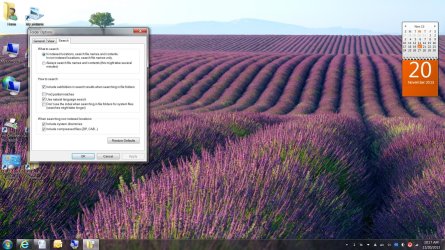
What am I doing wrong? I am using windows explorer to search for *.cpl and get no results.. I am trying to delete from my control panel FYI below are my search options.
Untitled.jpg
 

My Computer

Computer Manufacturer/Model Number
HP Pavilion p7xt series)
OS
Windows 7 Home Premium (x64) Service Pack 1
CPU
3.30 gigahertz Intel Core i3-2120
Motherboard
PEGATRON CORPORATION 2AC2 2.00
Memory
128 kilobyte primary memory cache
Graphics Card(s)
enbedded Intel(R) HD Graphics
Sound Card
Realtek High Definition Audio
Monitor(s) Displays
DELL E193FP [Monitor] (19.1"vis
Hard Drives
6052 Megabytes Usable Installed Memory
PSU
?
Case
desktop
Cooling
?
Do you have indexing enabled on the system drive? I notice it only says to search indexed locations. Try checking all locations and see if you get hits.

Unless I have to search contents I prefer Everything Search. It gets the info right from the MFTs. Extremely fast. It doesn't tie up the HD doing indexing.
 

My Computer

Computer Manufacturer/Model Number
HP Media Center
OS
Windows 7 32 bit
CPU
AMD 5200+ dual core
Memory
2 GB
Graphics Card(s)
NVidia GeForce 6150SE 128 MB
Monitor(s) Displays
CRT
Screen Resolution
1280x1024
Hard Drives
500 GB Sata internal :

SIIG USB 3.0 docking stations w/WD Caviar Black 6 Gb/s drives
Keyboard
PS/2
Mouse
PS/2 Wheel Mouse
Other Info
SIIG USB 3.0 PCIexpress card.
I tried your suggestion and turned off indexing but still get no hits. I checked that *.cpl was spelled correctly.
 

My Computer

Computer Manufacturer/Model Number
HP Pavilion p7xt series)
OS
Windows 7 Home Premium (x64) Service Pack 1
CPU
3.30 gigahertz Intel Core i3-2120
Motherboard
PEGATRON CORPORATION 2AC2 2.00
Memory
128 kilobyte primary memory cache
Graphics Card(s)
enbedded Intel(R) HD Graphics
Sound Card
Realtek High Definition Audio
Monitor(s) Displays
DELL E193FP [Monitor] (19.1"vis
Hard Drives
6052 Megabytes Usable Installed Memory
PSU
?
Case
desktop
Cooling
?
What is the root of the search? On my system if it's Dedktop it doesn't show any results for *.cpl. If it's C:\ it does. I have All Subfolders selected as option. I'm on W8 here so the placement of options may be a bit different. But there should be an option to search all subfolders.

I think you may be happier using Everything Search. Before I started using Everything Search I was using Locate32. But about the only time I use Explorer folder search is to show only the files in the current folder I want. For example *.ahk for Autohotkey scripts.

The only other thing I can think of is if Show Hidden Files and Folders is not enabled in Folder Options. It doesn't seem to make a difference in W8... and least not in this case. But it may in Windows 7.
 

My Computer

Computer Manufacturer/Model Number
HP Media Center
OS
Windows 7 32 bit
CPU
AMD 5200+ dual core
Memory
2 GB
Graphics Card(s)
NVidia GeForce 6150SE 128 MB
Monitor(s) Displays
CRT
Screen Resolution
1280x1024
Hard Drives
500 GB Sata internal :

SIIG USB 3.0 docking stations w/WD Caviar Black 6 Gb/s drives
Keyboard
PS/2
Mouse
PS/2 Wheel Mouse
Other Info
SIIG USB 3.0 PCIexpress card.
What am I doing wrong? I am using windows explorer to search for *.cpl and get no results.. I am trying to delete from my control panel FYI below are my search options.

View attachment 294272

I use Agent Ransack for searches and find it superior to the built-in search function. You can download it free from the following site;

http://www.mythicsoft.com/agentransack/

There are others who prefer using the built-in search function. It's your computer, so you choose what works best for you.
 

My Computer

Computer type
PC/Desktop
Computer Manufacturer/Model Number
Custom Built
OS
Windows 7 Professional x64
CPU
Intel i5 quad processor
Motherboard
DP67BG
Memory
16 GB
Graphics Card(s)
Radeon HD 5770
Sound Card
Realtek High Definition Audio
Monitor(s) Displays
Samsung SyncMaster
Screen Resolution
1920X1080
Hard Drives
WD 2TB (SATA Internal)
WD 1TB (USB External)
PSU
Corsair GS800
Case
Tower (Generic)
Cooling
3 Internal Fans
Keyboard
MS Wireless
Mouse
MS Optical Wired
Internet Speed
54 mbps
Antivirus
Emsisoft
Browser
IE-Version 9, Palemoon-Version 24.2.0
Just for grins I've enabled indexing on W8. I'll assume they have improved it. I'll let it run unless I see some performance hit from using it. I can still use Everything Search at the same time.
 

My Computer

Computer Manufacturer/Model Number
HP Media Center
OS
Windows 7 32 bit
CPU
AMD 5200+ dual core
Memory
2 GB
Graphics Card(s)
NVidia GeForce 6150SE 128 MB
Monitor(s) Displays
CRT
Screen Resolution
1280x1024
Hard Drives
500 GB Sata internal :

SIIG USB 3.0 docking stations w/WD Caviar Black 6 Gb/s drives
Keyboard
PS/2
Mouse
PS/2 Wheel Mouse
Other Info
SIIG USB 3.0 PCIexpress card.
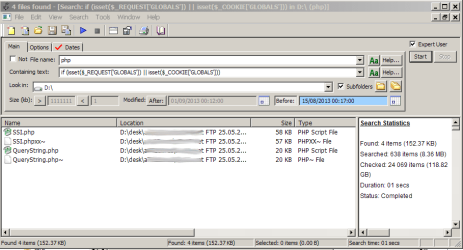
Am assuming you search from Windows Explorer, and selected where you want to search?
As an experiment, try extension:cpl

And am also recommending (and using) Agent Ransack, as posted above by Sir George. Am using that one for any important\detailed search.

Good luck.
 

My Computer

Computer type
Laptop
Computer Manufacturer/Model Number
Dell \ Lenovo\ HP \ Toshiba
OS
W7, W8.1
Antivirus
MSE, Malwarebytes
Browser
FF
How is Agent RansacK? Any superlative feature? I downloaded it in the past but I didn't use it extensively. Just curious what stands out about it to make both of you enthusiastic.
 

My Computer

Computer Manufacturer/Model Number
HP Media Center
OS
Windows 7 32 bit
CPU
AMD 5200+ dual core
Memory
2 GB
Graphics Card(s)
NVidia GeForce 6150SE 128 MB
Monitor(s) Displays
CRT
Screen Resolution
1280x1024
Hard Drives
500 GB Sata internal :

SIIG USB 3.0 docking stations w/WD Caviar Black 6 Gb/s drives
Keyboard
PS/2
Mouse
PS/2 Wheel Mouse
Other Info
SIIG USB 3.0 PCIexpress card.

My Computer

Computer type
PC/Desktop
Computer Manufacturer/Model Number
Custom Built
OS
Windows 7 Professional x64
CPU
Intel i5 quad processor
Motherboard
DP67BG
Memory
16 GB
Graphics Card(s)
Radeon HD 5770
Sound Card
Realtek High Definition Audio
Monitor(s) Displays
Samsung SyncMaster
Screen Resolution
1920X1080
Hard Drives
WD 2TB (SATA Internal)
WD 1TB (USB External)
PSU
Corsair GS800
Case
Tower (Generic)
Cooling
3 Internal Fans
Keyboard
MS Wireless
Mouse
MS Optical Wired
Internet Speed
54 mbps
Antivirus
Emsisoft
Browser
IE-Version 9, Palemoon-Version 24.2.0
what stands out about it to make both of you enthusiastic
It finds stuff :O) wherever it's hidden. Always, easily, 100% reliable results, quick to set up parameters, no false positives etc.
Strongly prefer it to W7 search for certain things.
 

Attachments

  • find.PNG
    find.PNG
    22.5 KB · Views: 2

My Computer

Computer type
Laptop
Computer Manufacturer/Model Number
Dell \ Lenovo\ HP \ Toshiba
OS
W7, W8.1
Antivirus
MSE, Malwarebytes
Browser
FF
@4wd downloading x64 version now. :)
 

My Computer

Computer Manufacturer/Model Number
HP Media Center
OS
Windows 7 32 bit
CPU
AMD 5200+ dual core
Memory
2 GB
Graphics Card(s)
NVidia GeForce 6150SE 128 MB
Monitor(s) Displays
CRT
Screen Resolution
1280x1024
Hard Drives
500 GB Sata internal :

SIIG USB 3.0 docking stations w/WD Caviar Black 6 Gb/s drives
Keyboard
PS/2
Mouse
PS/2 Wheel Mouse
Other Info
SIIG USB 3.0 PCIexpress card.
What is the root of the search? On my system if it's Dedktop it doesn't show any results for *.cpl. If it's C:\ it does. I have All Subfolders selected as option. I'm on W8 here so the placement of options may be a bit different. But there should be an option to search all subfolders.

I think you may be happier using Everything Search. Before I started using Everything Search I was using Locate32. But about the only time I use Explorer folder search is to show only the files in the current folder I want. For example *.ahk for Autohotkey scripts.

The only other thing I can think of is if Show Hidden Files and Folders is not enabled in Folder Options. It doesn't seem to make a difference in W8... and least not in this case. But it may in Windows 7.

Please tell me how to use “everything search”. The root of my windows explorer search is C. Show hidden files is enabled.
 

My Computer

Computer Manufacturer/Model Number
HP Pavilion p7xt series)
OS
Windows 7 Home Premium (x64) Service Pack 1
CPU
3.30 gigahertz Intel Core i3-2120
Motherboard
PEGATRON CORPORATION 2AC2 2.00
Memory
128 kilobyte primary memory cache
Graphics Card(s)
enbedded Intel(R) HD Graphics
Sound Card
Realtek High Definition Audio
Monitor(s) Displays
DELL E193FP [Monitor] (19.1"vis
Hard Drives
6052 Megabytes Usable Installed Memory
PSU
?
Case
desktop
Cooling
?
Everything Search

Just run it. In Options I recommend setting it to "start when Windows starts." Also if you don't show all Tray Icons you should probably set it to display icon and show notifications so you can click the Icon. Or you can select a hotkey to bring up the search page. Type in the search page. See the help for details such as keywords for folders etc.. It does not search file contents. For that you may want to use SearchMyFiles, Agent Ransack or fgrep from Linux for Windows.

I recommend using the latest stable Everything. I tried the beta but it would stop working on occasion until I deleted the database.
 

My Computer

Computer Manufacturer/Model Number
HP Media Center
OS
Windows 7 32 bit
CPU
AMD 5200+ dual core
Memory
2 GB
Graphics Card(s)
NVidia GeForce 6150SE 128 MB
Monitor(s) Displays
CRT
Screen Resolution
1280x1024
Hard Drives
500 GB Sata internal :

SIIG USB 3.0 docking stations w/WD Caviar Black 6 Gb/s drives
Keyboard
PS/2
Mouse
PS/2 Wheel Mouse
Other Info
SIIG USB 3.0 PCIexpress card.
Everything Search

Just run it. In Options I recommend setting it to "start when Windows starts." Also if you don't show all Tray Icons you should probably set it to display icon and show notifications so you can click the Icon. Or you can select a hotkey to bring up the search page. Type in the search page. See the help for details such as keywords for folders etc.. It does not search file contents. For that you may want to use SearchMyFiles, Agent Ransack or fgrep from Linux for Windows.

I recommend using the latest stable Everything. I tried the beta but it would stop working on occasion until I deleted the database.

I don’t know what you are talking about so I googled search everything and discovered downloadeable software entitled “everything”.
 

My Computer

Computer Manufacturer/Model Number
HP Pavilion p7xt series)
OS
Windows 7 Home Premium (x64) Service Pack 1
CPU
3.30 gigahertz Intel Core i3-2120
Motherboard
PEGATRON CORPORATION 2AC2 2.00
Memory
128 kilobyte primary memory cache
Graphics Card(s)
enbedded Intel(R) HD Graphics
Sound Card
Realtek High Definition Audio
Monitor(s) Displays
DELL E193FP [Monitor] (19.1"vis
Hard Drives
6052 Megabytes Usable Installed Memory
PSU
?
Case
desktop
Cooling
?
Click the blue words.

Thats a link.
 

My Computer

Computer type
PC/Desktop
Computer Manufacturer/Model Number
Custom Built
OS
Windows 10 Pro
CPU
AMD Ryzen 5 2400G Processor with Radeon RX Vega 11 Graphics
Motherboard
ASRock X470 Master SLI/AC AM4 AMD Promontory X470 SATA 6Gb/s
Memory
G.SKILL Ripjaws V Series 16GB (2 x 8GB) 288-Pin DDR4 SDRAM D
Graphics Card(s)
2047MB NVIDIA GeForce GTX 1060 6GB (EVGA)
Sound Card
Motherboard Built in
Monitor(s) Displays
Acer R240HY bidx 23.8-Inch IPS HDMI DVI VGA (1920 x 1080) Wi
Screen Resolution
1920 x 1080
Hard Drives
1TB Sandisk SSD PLUS (Main drive)
500 GB Seagate 7200 RPM (Games)
500 GB Western Digital 7200 RPM (Virtual Machines)
PSU
CORSAIR TX Series TX650M 650W 80+ Gold Modular Power Supply
Case
CORSAIR CARBIDE SPEC-02 Mid-Tower Gaming Case, Red LED Fan
Cooling
220mm, two 120mm, and four 60mm fans
Keyboard
Wired Dell keyboard
Mouse
Wireless Logitech mouse
Internet Speed
250mb down, 30mb up
Antivirus
Panda Cloud Antivirus
Browser
Chrome-ish x64
Other Info
Your awesome for reading this.
I know what a link is but there is not one in your message JUST ANSWER MY QUESTION.
 

My Computer

Computer Manufacturer/Model Number
HP Pavilion p7xt series)
OS
Windows 7 Home Premium (x64) Service Pack 1
CPU
3.30 gigahertz Intel Core i3-2120
Motherboard
PEGATRON CORPORATION 2AC2 2.00
Memory
128 kilobyte primary memory cache
Graphics Card(s)
enbedded Intel(R) HD Graphics
Sound Card
Realtek High Definition Audio
Monitor(s) Displays
DELL E193FP [Monitor] (19.1"vis
Hard Drives
6052 Megabytes Usable Installed Memory
PSU
?
Case
desktop
Cooling
?
Click the blue words.

Thats a link.

Just a "heads-up", the link isn't working and trying to go to "Voidtools.com" in both IE and Chrome times out with a "This Page Can't be Displayed" message.
 

My Computer

Computer type
PC/Desktop
Computer Manufacturer/Model Number
Custom Built
OS
Windows 7 Professional x64
CPU
Intel i5 quad processor
Motherboard
DP67BG
Memory
16 GB
Graphics Card(s)
Radeon HD 5770
Sound Card
Realtek High Definition Audio
Monitor(s) Displays
Samsung SyncMaster
Screen Resolution
1920X1080
Hard Drives
WD 2TB (SATA Internal)
WD 1TB (USB External)
PSU
Corsair GS800
Case
Tower (Generic)
Cooling
3 Internal Fans
Keyboard
MS Wireless
Mouse
MS Optical Wired
Internet Speed
54 mbps
Antivirus
Emsisoft
Browser
IE-Version 9, Palemoon-Version 24.2.0
@Herm61

There is no reason to shout or get nasty. We aren't paid to help you. So calm down. And there was a link, see post 13

@Sir George

Link worked for me when I clicked it, it doesn't right now like you said.
 

My Computer

Computer type
PC/Desktop
Computer Manufacturer/Model Number
Custom Built
OS
Windows 10 Pro
CPU
AMD Ryzen 5 2400G Processor with Radeon RX Vega 11 Graphics
Motherboard
ASRock X470 Master SLI/AC AM4 AMD Promontory X470 SATA 6Gb/s
Memory
G.SKILL Ripjaws V Series 16GB (2 x 8GB) 288-Pin DDR4 SDRAM D
Graphics Card(s)
2047MB NVIDIA GeForce GTX 1060 6GB (EVGA)
Sound Card
Motherboard Built in
Monitor(s) Displays
Acer R240HY bidx 23.8-Inch IPS HDMI DVI VGA (1920 x 1080) Wi
Screen Resolution
1920 x 1080
Hard Drives
1TB Sandisk SSD PLUS (Main drive)
500 GB Seagate 7200 RPM (Games)
500 GB Western Digital 7200 RPM (Virtual Machines)
PSU
CORSAIR TX Series TX650M 650W 80+ Gold Modular Power Supply
Case
CORSAIR CARBIDE SPEC-02 Mid-Tower Gaming Case, Red LED Fan
Cooling
220mm, two 120mm, and four 60mm fans
Keyboard
Wired Dell keyboard
Mouse
Wireless Logitech mouse
Internet Speed
250mb down, 30mb up
Antivirus
Panda Cloud Antivirus
Browser
Chrome-ish x64
Other Info
Your awesome for reading this.
JUST ANSWER MY QUESTION
Always nice to read such friendly & cordial messages after one has spent time trying to help people.
 

My Computer

Computer type
Laptop
Computer Manufacturer/Model Number
Dell \ Lenovo\ HP \ Toshiba
OS
W7, W8.1
Antivirus
MSE, Malwarebytes
Browser
FF
@Herm61

There is no reason to shout or get nasty. We aren't paid to help you. So calm down. And there was a link, see post 13

@Sir George

Link worked for me when I clicked it, it doesn't right now like you said.

I finally figured out that you were talking about 3d party software and not Windows Explorer and I downloaded it.
 

My Computer

Computer Manufacturer/Model Number
HP Pavilion p7xt series)
OS
Windows 7 Home Premium (x64) Service Pack 1
CPU
3.30 gigahertz Intel Core i3-2120
Motherboard
PEGATRON CORPORATION 2AC2 2.00
Memory
128 kilobyte primary memory cache
Graphics Card(s)
enbedded Intel(R) HD Graphics
Sound Card
Realtek High Definition Audio
Monitor(s) Displays
DELL E193FP [Monitor] (19.1"vis
Hard Drives
6052 Megabytes Usable Installed Memory
PSU
?
Case
desktop
Cooling
?
Back
Top