
Windows Explorer Startpath

Wonko

New member
Local time
4:53 PM
Messages
6
Location
Munich, Germany
Hi community,

great source of knowledge in here.

I have a little problem which i can't figure out.
I have removed the libraries and favorites from the Windows Explorer.
From now, i can't open the Windows Explorer from the contxt menu of the Start Button.
I think it points to the library, which is gone.

Does someone know, how i can fix the code?

Thank for your reply.

Sincerely

Wonko
 

My Computer

OS
Windows 7 x64 Ultimate / Windows XP Pro x86
CPU
Q9650 / E7400
Motherboard
DFI P45 T2RS Plus / DFI GF9400 T2RS
Memory
4*4GB GSkill / 2*2GB GSkill (all certified)
Graphics Card(s)
GTX285 / onboard
Sound Card
onboard / onboard
Monitor(s) Displays
Dell UltraSharp 2709W
Screen Resolution
1920*1200
Hard Drives
System drives are SDDs (Vertex / Super Talent)
PSU
Enermax Revolution 850W / Enermax LibertyEco 400W
Case
Lian Li A77A / Lian Li PC-A05NB
Cooling
Water / Air
Keyboard
Logitech
Mouse
Logitech Gx9
Internet Speed
Down 50Mbit / Up 10Mbit
Other Info
Left side of Spacer "/" System One, other side System Two
Sorry properties is not available there, i checked it out.
Do you mean the normal Windows Explorer shortcut? Yes there it works, but not in the context menu of the Startbutton.
 

My Computer

OS
Windows 7 x64 Ultimate / Windows XP Pro x86
CPU
Q9650 / E7400
Motherboard
DFI P45 T2RS Plus / DFI GF9400 T2RS
Memory
4*4GB GSkill / 2*2GB GSkill (all certified)
Graphics Card(s)
GTX285 / onboard
Sound Card
onboard / onboard
Monitor(s) Displays
Dell UltraSharp 2709W
Screen Resolution
1920*1200
Hard Drives
System drives are SDDs (Vertex / Super Talent)
PSU
Enermax Revolution 850W / Enermax LibertyEco 400W
Case
Lian Li A77A / Lian Li PC-A05NB
Cooling
Water / Air
Keyboard
Logitech
Mouse
Logitech Gx9
Internet Speed
Down 50Mbit / Up 10Mbit
Other Info
Left side of Spacer "/" System One, other side System Two
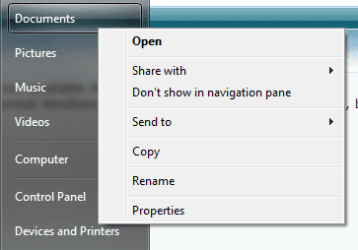
Here's a picture:
Untitled.png

Is that the path that you want to change?
 

My Computer

Computer Manufacturer/Model Number
Vostro
OS
Windows 7 Ultimate (SP1)
CPU
AMD Sempron 3600+
Graphics Card(s)
ATI Radeon Xpress 1150
Screen Resolution
1200 x 800
Hard Drives
WD Scorpio Blue 500 GB
I mean this button:


(From Windows Server 2008 R2, have only german Windows, want no irritation)
 

My Computer

OS
Windows 7 x64 Ultimate / Windows XP Pro x86
CPU
Q9650 / E7400
Motherboard
DFI P45 T2RS Plus / DFI GF9400 T2RS
Memory
4*4GB GSkill / 2*2GB GSkill (all certified)
Graphics Card(s)
GTX285 / onboard
Sound Card
onboard / onboard
Monitor(s) Displays
Dell UltraSharp 2709W
Screen Resolution
1920*1200
Hard Drives
System drives are SDDs (Vertex / Super Talent)
PSU
Enermax Revolution 850W / Enermax LibertyEco 400W
Case
Lian Li A77A / Lian Li PC-A05NB
Cooling
Water / Air
Keyboard
Logitech
Mouse
Logitech Gx9
Internet Speed
Down 50Mbit / Up 10Mbit
Other Info
Left side of Spacer "/" System One, other side System Two

My Computer

Computer Manufacturer/Model Number
Vostro
OS
Windows 7 Ultimate (SP1)
CPU
AMD Sempron 3600+
Graphics Card(s)
ATI Radeon Xpress 1150
Screen Resolution
1200 x 800
Hard Drives
WD Scorpio Blue 500 GB
If you delete the libraries there is no longer anything to edit in the context menu of the start button. It is just empty and wont open explorer either. Just pin explorer to the task bar. Or have you a special reason for wanting to use the start button context menu?

Wenn man die "Libraries" entfernt gibt es nichts mehr in der Startbutton Kontextmenu zu editieren. Es ist einfach leer und wird Explorer gar nicht öffnen. Warum nicht Explorer auf der Taskbar pinnen? Oder gibt es ein bestimmten Grund es vom Startbutton benutzen zu wollen?

Regards....Mike Connor
 

My Computer

OS
Several, including Windows 7 x64 Ultimate

My Computer

Computer Manufacturer/Model Number
Vostro
OS
Windows 7 Ultimate (SP1)
CPU
AMD Sempron 3600+
Graphics Card(s)
ATI Radeon Xpress 1150
Screen Resolution
1200 x 800
Hard Drives
WD Scorpio Blue 500 GB
Indeed, it seems it is always empty by design. I tried it on another machine with default settings and it is empty there as well. I thought it might have to do with deleting the libraries but obviously it doesn't.

Regards....Mike Connor
 

My Computer

OS
Several, including Windows 7 x64 Ultimate
Mh, thats awfully from Microsoft. :(

Thanks for your assistance. :)
 

My Computer

OS
Windows 7 x64 Ultimate / Windows XP Pro x86
CPU
Q9650 / E7400
Motherboard
DFI P45 T2RS Plus / DFI GF9400 T2RS
Memory
4*4GB GSkill / 2*2GB GSkill (all certified)
Graphics Card(s)
GTX285 / onboard
Sound Card
onboard / onboard
Monitor(s) Displays
Dell UltraSharp 2709W
Screen Resolution
1920*1200
Hard Drives
System drives are SDDs (Vertex / Super Talent)
PSU
Enermax Revolution 850W / Enermax LibertyEco 400W
Case
Lian Li A77A / Lian Li PC-A05NB
Cooling
Water / Air
Keyboard
Logitech
Mouse
Logitech Gx9
Internet Speed
Down 50Mbit / Up 10Mbit
Other Info
Left side of Spacer "/" System One, other side System Two
Mh, thats awfully from Microsoft. :(

Thanks for your assistance. :)

You're welcome. Sorry we couldn't come to a better solution
 

My Computer

Computer Manufacturer/Model Number
Vostro
OS
Windows 7 Ultimate (SP1)
CPU
AMD Sempron 3600+
Graphics Card(s)
ATI Radeon Xpress 1150
Screen Resolution
1200 x 800
Hard Drives
WD Scorpio Blue 500 GB
Back
Top