Windows Explorer

JackNaylorPE

New member
Member
VIP
Local time
4:56 PM
Messages
159
Is there any way to set Windows Explorer (Win7 - 64) to default to the same view every time it's opened. I don't want to see libraries, I don't want to see documents, I don't want to see desktop .... I just wanna see:

C:\
D:\
E:\

I opened Explorer before my browser. Since then and thru the entire typing of the message, I have watched a green line slowly progress across the screen above the menu bar (File / Edit / etc). It starts out at a decent pace and then slows till it gets to the "X" and then goes into "drunken snail pace".

Used to use PowerDesk but since they dropped the pop up toolbar (last called "Coolbar") I'm down on them ... any Powerdesk like suggestions as alternatives ?

Note rebooting solves the problem....for a while.
 
Last edited:

My Computer

Computer Manufacturer/Model Number
Home Built
OS
Windows 7 - 64 bit
CPU
i7 920
Motherboard
Asus Rampage II Extreme
Memory
Mushkin 998692
Graphics Card(s)
GTX 295 FTW Edition 1792MB
Sound Card
Sounblaster Xi Fi Extreme
Monitor(s) Displays
Dekk U2410
Hard Drives
Seagate 7200.12
PSU
Antec SG-850
Case
Antec 1200
Cooling
Prolimatech Megashadow
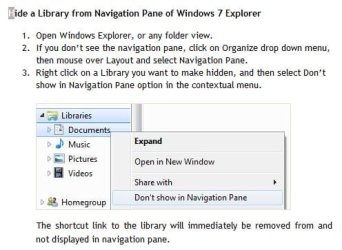
Right click on a Library you want to make hidden, and then select Don’t show in Navigation Pane option in the contextual menu.

lib - 2009-11-13.jpg

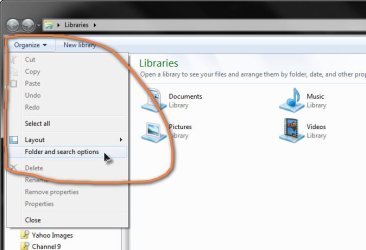
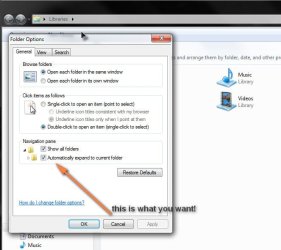
You'll then have to set things up as you like it.

1-2009-11-13.jpg
2-2009-11-13.jpg


Super-User also offers a reg patch if you want to go down that course.
 

My Computer

Computer Manufacturer/Model Number
AMD Athlon 64 3200+, Lenovo G560 i3
OS
Windows 7 Ultimate, Ubuntu
Motherboard
Gigabyte K8T8000
Memory
DDR 2Gb (!)
Graphics Card(s)
6600GT
Monitor(s) Displays
MultiMonitor (2) LCD
Hard Drives
Old Seagate 75
Big Western Digital
Samsung 500Gb pulled out of an external drive and installed
Ext: Maxtor (Firewire), 1Gb Lacie (Samsung)
Mouse
Logitech MX620 Cordless

My Computer

Computer type
PC/Desktop
Computer Manufacturer/Model Number
Self built custom
OS
64-bit Windows 11 Pro for Workstations
CPU
Intel i7-8700K OC'd to 5 GHz
Motherboard
ASUS ROG Maximus XI Formula Z390
Memory
64 GB (4x16GB) G.SKILL TridentZ RGB DDR4 3600 MHz
Graphics Card(s)
ASUS ROG-STRIX-GTX1080TI-O11G-GAMING
Sound Card
Integrated
Monitor(s) Displays
2 x Samsung Odyssey G7 27"
Screen Resolution
2560x1440
Hard Drives
1TB Samsung 990 PRO M.2,
4TB Samsung 990 PRO PRO M.2,
TerraMaster F8 SSD Plus NAS
PSU
Seasonic Prime Titanium 850W
Case
Thermaltake Core P3
Cooling
Corsair Hydro H115i
Keyboard
Logitech wireless K800
Mouse
Logitech MX Master 4
Internet Speed
2 Gb/s Download and 100 Mb/s Upload
Antivirus
Malwarebyte Anti-Malware Premium
Browser
Google Chrome
Other Info
Logitech Z625 speaker system,
Logitech BRIO 4K Pro webcam,
HP Color LaserJet Pro MFP M477fdn,
APC SMART-UPS RT 1000 XL - SURT1000XLI,
Galaxy S23 Plus phone
Hello Jack,

You might see if this may be able to help you with Windows Explorer. It seems like you want it to open like Computer instead.

http://www.sevenforums.com/tutorials/2863-windows-explorer-taskbar-icon-change-open-target.html

Hope this helps,
Shawn

Shawn:

Looks like "I'm Green" ..... [Fifth Element Movie Reference] .... Muchos Grassyass !

On a related note.....each time I open Windoze Exploder, I see this progress bar across the top of the window. The more I open and close and navigate around, this bar (which restarts at every new window opening) takes slower and slower to finish, eventually necessitating a reboot to return to normal.
 

My Computer

Computer Manufacturer/Model Number
Home Built
OS
Windows 7 - 64 bit
CPU
i7 920
Motherboard
Asus Rampage II Extreme
Memory
Mushkin 998692
Graphics Card(s)
GTX 295 FTW Edition 1792MB
Sound Card
Sounblaster Xi Fi Extreme
Monitor(s) Displays
Dekk U2410
Hard Drives
Seagate 7200.12
PSU
Antec SG-850
Case
Antec 1200
Cooling
Prolimatech Megashadow
You're welcome Jack.

Do these windows have a lot of images or videos in them? If so, you might see if turning off thumbnail previews may help.
 

My Computer

Computer type
PC/Desktop
Computer Manufacturer/Model Number
Self built custom
OS
64-bit Windows 11 Pro for Workstations
CPU
Intel i7-8700K OC'd to 5 GHz
Motherboard
ASUS ROG Maximus XI Formula Z390
Memory
64 GB (4x16GB) G.SKILL TridentZ RGB DDR4 3600 MHz
Graphics Card(s)
ASUS ROG-STRIX-GTX1080TI-O11G-GAMING
Sound Card
Integrated
Monitor(s) Displays
2 x Samsung Odyssey G7 27"
Screen Resolution
2560x1440
Hard Drives
1TB Samsung 990 PRO M.2,
4TB Samsung 990 PRO PRO M.2,
TerraMaster F8 SSD Plus NAS
PSU
Seasonic Prime Titanium 850W
Case
Thermaltake Core P3
Cooling
Corsair Hydro H115i
Keyboard
Logitech wireless K800
Mouse
Logitech MX Master 4
Internet Speed
2 Gb/s Download and 100 Mb/s Upload
Antivirus
Malwarebyte Anti-Malware Premium
Browser
Google Chrome
Other Info
Logitech Z625 speaker system,
Logitech BRIO 4K Pro webcam,
HP Color LaserJet Pro MFP M477fdn,
APC SMART-UPS RT 1000 XL - SURT1000XLI,
Galaxy S23 Plus phone
Nope .... I prefer a "details" view for all but control panel.
 

My Computer

Computer Manufacturer/Model Number
Home Built
OS
Windows 7 - 64 bit
CPU
i7 920
Motherboard
Asus Rampage II Extreme
Memory
Mushkin 998692
Graphics Card(s)
GTX 295 FTW Edition 1792MB
Sound Card
Sounblaster Xi Fi Extreme
Monitor(s) Displays
Dekk U2410
Hard Drives
Seagate 7200.12
PSU
Antec SG-850
Case
Antec 1200
Cooling
Prolimatech Megashadow
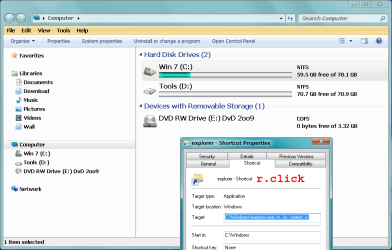
Try this way
right click on explorer then
add the selected blue text then apply.
 

Attachments

  • ExP.png
    ExP.png
    30.1 KB · Views: 35

My Computer

Computer type
PC/Desktop
Computer Manufacturer/Model Number
696
OS
7 Ultimate x64 sp1
CPU
Intel i5-4690K
Motherboard
GA Z97X Gaming 5
Memory
16Gb HyperX fury
Graphics Card(s)
R9-270x 2Gb
Sound Card
On Board
Monitor(s) Displays
2443NW
Screen Resolution
1920x1200
Hard Drives
WD5000 -
WD5001 -
WD1002
PSU
Cft-650-14cs
Case
Very Big Case
Cooling
stock
Keyboard
G11
Mouse
Logitech
Internet Speed
Adsl
Browser
FF
Other Info
RWD
Back
Top