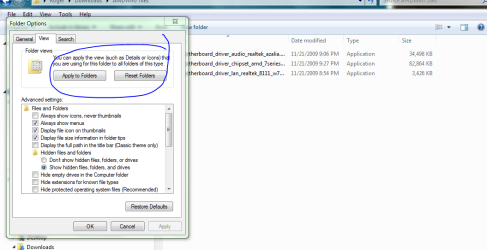
In Windows Explorer (XP) we use to be able to choose for instance, “view in list mode” and then go to folder options and “Apply to all Folders”… That was cool as I like all folders displayed in list mode as the default.
I can’t find that function in Win 7. I open a folder, choose list view and <F5> to save the setting and they stick for that folder. But it doesn’t apply the same view settings to sub-folders.
Is there anyway to set list as the default for all?
Thanks-
I can’t find that function in Win 7. I open a folder, choose list view and <F5> to save the setting and they stick for that folder. But it doesn’t apply the same view settings to sub-folders.
Is there anyway to set list as the default for all?
Thanks-
My Computer
- Computer Manufacturer/Model Number
- Home Grown
- OS
- Windows 7 Ultimate (64)
- CPU
- i7-2600K
- Motherboard
- Asus P8P67-M Pro
- Memory
- G.SKILL Ripjaws X Series 8GB (2 x 4GB)
- Graphics Card(s)
- ATI 5750
- Sound Card
- On-Board
- Monitor(s) Displays
- LG W2486L
- Screen Resolution
- 1920X1080
- Hard Drives
- Intel X-25M 80 Gig SSD | Intel X-25M 160 Gig SSD | WD Black 500MB - External eSata
- PSU
- Zalman ZM770-XT 770 Watts
- Case
- Antec 180 mini
- Cooling
- Cooler Master V8
- Internet Speed
- 15MB - Cable
- Other Info
- Sissy OC - 4.6 @ 1.3175 24/7 | 18' Idle - 55' Load