Windows Fails to Start Multiple Times. Err Codes: 0x1f and 0x490 etc

hallandoates

New member
Local time
3:50 AM
Messages
11
Location
Little Rock, AR
Hi!

I hope yall are doing well and that you can possibly help me figure what is wrong with my computer and help me fix it!

I have an Acer Aspire that I purchased in July. Over the past month, it has failed to start multiple times. It does this when I leave my computer on for a while...the screen will just go black. And I have to do a hard power off. Only to open it up and do the Windows Restore or whatever it is called. It has done this also upon starting the computer after I've shut it down the usual way. It doesn't do this every time. But I'd say 2 out of 3.

I have chosen the advanced restore options (restore the computer to a previous point in time). Picked a date that was listed and then it was restored.

Only to continue "failed to start" processes over and over again. I'm not going to try right, but If I were to shut down and reboot right now...I am almost certain it would do it again. It has literally done this around 15 times.

It has given me a couple of different reason:
Last week it said: Root Cause Found: Unspecified changes to system configuration might have caused the problem. Repair Action: System Restore
Result: Failed Error Code: 0x1f

Yesterday, it failed to start again and gave me the following error codes:
0x1f (again) AND System Files Integrity Check & Repair- Failed: error code: 0x490

How can I go about addressing and fixing this issue?

Your help will be greatly appreciated! Thanks in advance
 
Last edited:

My Computer My Computer

At a glance

Windows 7 Home Premium 64bitB950 @ 2.10GHz3.85 GB (usable)
Computer type
Laptop
Computer Manufacturer/Model Number
Acer Aspire 5750 Series
OS
Windows 7 Home Premium 64bit
CPU
B950 @ 2.10GHz
Memory
3.85 GB (usable)
Antivirus
Microsoft Security Essentials
Browser
Chrome
Boot into the Win7 DVD or System Repair Disk to run a few Startup Repairs to see if it finds anything to repair.

If not then from the bootable recovery Options list run System Restore to the earliest Restore point to see if you can get before the problem.

If not boot into Command Line option to run SFC /SCANNOW Command

Run a full Malwarebytes scan in Safe Mode if necessary, or use a bootable AV as shown in Troubleshooting Windows 7 Failure to Start which has every other possible step to clear up boot problems with Win7.
 
Hi Greg!
Thank you so much for your reply. Here is where I am:

You said:
"Boot into the Win7 DVD or System Repair Disk to run a few Startup Repairs to see if it finds anything to repair."
Unfortunately, I don't have the dvd or the system repair disk

"If not then from the bootable recovery Options list run System Restore to the earliest Restore point to see if you can get before the problem.
I have done this literally at least 12 times. It is the only way I can get my windows to boot. However, it is only a temporary fix. If I leave my computer idle for a couple of hours (without shutting it) it goes to black screen. If I shut down or restart my computer, windows fails to start again and thus repeating the same cycle and I end up restoring to another earliest point.

"If not boot into Command Line option to run SFC /SCANNOW Command"
I am not sure what this is, but I guess I'll try it

"Run a full Malwarebytes scan in Safe Mode if necessary, or use a bootable AV as shown in Troubleshooting Windows 7 Failure to Start which has every other possible step to clear up boot problems with Win7."
Is this a service I'll need to pay for? I guess I need a little remedial help here
---
One thing that I forgot to mention, that sadly is looking like it probably has something to do with it- a while back- like early Sept (wayyy before I started having Windows Boot problems) I edited my registry.

I did so because I needed the ability to export high resolution images that I create in Powerpoint. I edited the registry to allow me to export images in 300 dpi and save them as png, jpg etc

I did save a back up of my default registry, that I can restore- if needed.

I am hoping that this issue is not related - as I really really need to continue to have the ability to export high res images from ppt.

I am beginning to get really upset and frustrated because my computer is pretty new (I bought it in July) and I can't figure out how to solve the problem. I have a home based business and this laptop is my livelihood.

Any additional help will be greatly appreciated.

Thanks again
 

My Computer My Computer

At a glance

Windows 7 Home Premium 64bitB950 @ 2.10GHz3.85 GB (usable)
Computer type
Laptop
Computer Manufacturer/Model Number
Acer Aspire 5750 Series
OS
Windows 7 Home Premium 64bit
CPU
B950 @ 2.10GHz
Memory
3.85 GB (usable)
Antivirus
Microsoft Security Essentials
Browser
Chrome
Instead of getting upset why don't you read the links then you won't have to ask questions that are answered by them. This process requires the utmost thoroughness that misses nothing.

The Win7 DVD is provided in Step 6 of Troubleshooting Windows 7 Failure to Start.

The Malwarebytes link provides a free download.

You don't say if you used your earliest System Restore point.

An inexperienced user editing the Registry without backing up a Restore Point (that's still available) or System image first is reckless. Run SFC, then if necessary the Repair Install, as a last resort before running
Acer Support: Restoring a system to factory load or reinstalling.

But if you're running the original Acer preinstall it is a corrupt installation to begin with, so you should strongly consider a Clean Reinstall - Factory OEM Windows 7 with our help.
 
Thank you for your response. I am going back through everything now and will post with what I find.

Also,
I did use my earliest restore points.

And I did back up my registry with a restore point prior to editing it. I have it if I need to use it.

I am running the original Acer pre-install.

Thanks again.
 

My Computer My Computer

At a glance

Windows 7 Home Premium 64bitB950 @ 2.10GHz3.85 GB (usable)
Computer type
Laptop
Computer Manufacturer/Model Number
Acer Aspire 5750 Series
OS
Windows 7 Home Premium 64bit
CPU
B950 @ 2.10GHz
Memory
3.85 GB (usable)
Antivirus
Microsoft Security Essentials
Browser
Chrome
Update: I'm so sorry I must have been out of it when I first read your instructions last week!

I just logged into safe mode with networking and I am running a full Malwarebytes scan right now. It detected 16 objects so far. Will keep you posted. Thanks again so much for your help!!!!!!!! Can't tell you how much I appreciate it
 

My Computer My Computer

At a glance

Windows 7 Home Premium 64bitB950 @ 2.10GHz3.85 GB (usable)
Computer type
Laptop
Computer Manufacturer/Model Number
Acer Aspire 5750 Series
OS
Windows 7 Home Premium 64bit
CPU
B950 @ 2.10GHz
Memory
3.85 GB (usable)
Antivirus
Microsoft Security Essentials
Browser
Chrome
Will do. How long do these full scan usually take? 1-2+ hours? Thank God for my iPhone & of course for Greg!!
 
Last edited:

My Computer My Computer

At a glance

Windows 7 Home Premium 64bitB950 @ 2.10GHz3.85 GB (usable)
Computer type
Laptop
Computer Manufacturer/Model Number
Acer Aspire 5750 Series
OS
Windows 7 Home Premium 64bit
CPU
B950 @ 2.10GHz
Memory
3.85 GB (usable)
Antivirus
Microsoft Security Essentials
Browser
Chrome
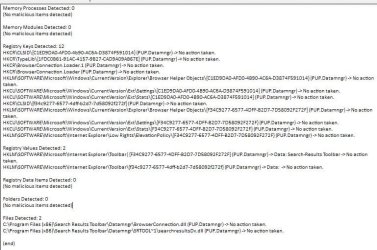
Ok it finished scanning. Here is a snip of the results. What do suggest be my next course of action? malwarebytes objects.JPG

If you can't read that screen shot...I can copy and paste it. : )
 

My Computer My Computer

At a glance

Windows 7 Home Premium 64bitB950 @ 2.10GHz3.85 GB (usable)
Computer type
Laptop
Computer Manufacturer/Model Number
Acer Aspire 5750 Series
OS
Windows 7 Home Premium 64bit
CPU
B950 @ 2.10GHz
Memory
3.85 GB (usable)
Antivirus
Microsoft Security Essentials
Browser
Chrome
It says No Action Taken. Run it again and Clean up what it finds, after uninstalling Datamngr and Results toolbar spyware. Then run SUPERAntiSpyware.com - Downloads and clean up whatever it finds.

I would also run Windows Defender Offline from boot disk or bootable flash stick to confirm there is no deeper infection hiding in System files.

Then run Startup Repair a few times from Win7 DVD provided to see what it reports. If nothing go back to earliest Restore Point. If that fails run SFC /SCANNOW Run in Command Prompt at Boot
 
Ok...I removed all of the objects found & restarted. Windows failed to start again so I booted into safe mode with networking again. I uninstalled Results toolbar but couldn't find Datamnger. So, I'm about to run superantispyware : )
 

My Computer My Computer

At a glance

Windows 7 Home Premium 64bitB950 @ 2.10GHz3.85 GB (usable)
Computer type
Laptop
Computer Manufacturer/Model Number
Acer Aspire 5750 Series
OS
Windows 7 Home Premium 64bit
CPU
B950 @ 2.10GHz
Memory
3.85 GB (usable)
Antivirus
Microsoft Security Essentials
Browser
Chrome
It's probably easier and it certainly is a much better install to Clean Reinstall - Factory OEM Windows 7 after rescuiing your files including ones which need backing up per the tutorial for program data, bookmarks, etc.

The steps to rescue your files are in Step 10 of Troubleshooting Windows 7 Failure to Start.

Since it's a specialty of the forums we will help you get a perfect reinstall so you can enjoy Win7 native performance without the bloatware.
 
just finished Super Anti Spyware- removed several threats and Windows didn't fail whenever I restarted the computer!!! Woo Hoo!!!!

I am about to read your instructions to run Windows Defender Offline. Once that is done...will I be finished?

you are awesome!!!!!!!!!!!!
 

My Computer My Computer

At a glance

Windows 7 Home Premium 64bitB950 @ 2.10GHz3.85 GB (usable)
Computer type
Laptop
Computer Manufacturer/Model Number
Acer Aspire 5750 Series
OS
Windows 7 Home Premium 64bit
CPU
B950 @ 2.10GHz
Memory
3.85 GB (usable)
Antivirus
Microsoft Security Essentials
Browser
Chrome
ok- I missed your last response. Let me read through it. : )
 

My Computer My Computer

At a glance

Windows 7 Home Premium 64bitB950 @ 2.10GHz3.85 GB (usable)
Computer type
Laptop
Computer Manufacturer/Model Number
Acer Aspire 5750 Series
OS
Windows 7 Home Premium 64bit
CPU
B950 @ 2.10GHz
Memory
3.85 GB (usable)
Antivirus
Microsoft Security Essentials
Browser
Chrome
Back
Top