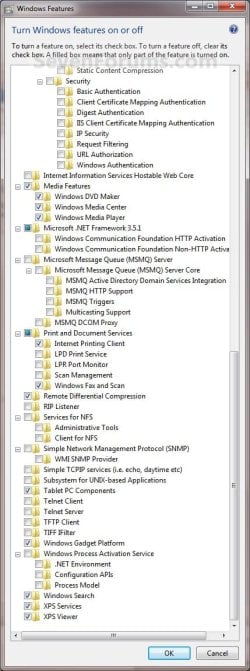
Windows Features - Turn On or Off

How to Turn Windows 7 Features On or Off


   Information
Some programs and features included with Windows 7 must be turned on before you can use them. Certain other features are turned on by default. This will show you how to turn the features you select on or off.
   Note
New Windows Features to Turn On or Off in Windows 7:
  • Games - Internet Games
  • Internet Explorer 9
  • Internet Information Services - FTP Server
  • Internet Information Services Hostable Web Core
  • Media Features
  • Microsoft .NET Framework 3.51
  • Services for NFS (Network File System)
  • Subsystem for UNIX-based Applications
  • TIFF IFilter
  • Windows Gadget Platform
  • Windows Search
  • XPS Services
  • XPS Viewer
   Tip

  • A blue box indicates that you have the main feature selected and turned on, but not all of the subfeatures under the expanded main feature are checked.
  • If the box is checked for the main feature, then it means that all of the subfeatures under the expanded main feature are checked and turned on as well.
If Windows Features is empty, then see:

The "Windows Features" dialog box is empty in Windows 7 or Windows Vista, or you receive an error message that includes the following code when you try to use Windows Update: "0x80073712"

   Warning
Turning off a feature does not uninstall the feature, and it does not reduce the amount of hard disk space used by the Windows 7 feature. The features remain stored on your hard disk so you can turn them back on if you want to later.


Here's How:
1. Do step 2 or 3 below.

2. Open the Start Menu, type Windows Features in the search box, and press Enter.
A) Go to step 4.
OR

3. Open the Control Panel (icons view), and click on the Programs and Features icon.
A) In the left pane, click on the Turn Windows features on or off link. (See screenshot below)
Step1.jpg
B) Go to step 4.
4. If prompted by UAC, click on Yes to approve.

5. If open, you can close the Programs and Features window now. (See screenshot above)

6. To Turn On a Windows Feature
A) Check the selected feature. (See screenshots below step 8)
NOTE: Some Windows features are grouped together in folders, and some folders contain subfolders with additional features. If a check box is partially checked or is dimmed, then some of the items inside the folder are turned on and some are turned off. To expand and view the contents of a folder, double-click it. Hovering the mouse pointer over a folder will give you a pop-up desciption of the feature.
7. To Turn Off a Windows Feature
A) Uncheck the selected feature. (See screenshots below step 8)
8. When done, click on OK. (See screenshots below)
NOTE: These are the default settings in Windows Features.
Features-1.jpgFeatures-2.jpg
9. After turning on or off a feature, you may be prompted to restart the computer.
That's it,
Shawn


Last edited:
Oh well, can't have everything :p
 

My Computer

Computer type
PC/Desktop
Computer Manufacturer/Model Number
Custom Build
OS
Windows 7 Ultimate x64 SP1
CPU
AMD Phenom 2 1090T
Motherboard
Gigabyte GA-890FXA-UD5
Memory
2x8GB Kingston HyperX Fury Black 1600Mhz Unganged
Graphics Card(s)
MSI GTX 970 Gaming 4G
Sound Card
Realtek On-Board HD 7.1 Audio / Logitech G35
Monitor(s) Displays
3xAcer GD245HQ
Screen Resolution
1920x1080
Hard Drives
Samsung 850 Pro 512GB SSD - OS /
WD Caviar Black SATA 3 - 1 TBx2 - Dynamic RAID 0 /
WD Caviar Green SATA 2 - 640GBx2 - Dynamic RAID 0 /
WD Caviar Green SATA 2 - 640GB - Internal Backup /
Seagate Barracude SATA 3 - 3TB - External Backup/ Sync
PSU
HighPower 1000W
Case
Cooler Master HAF 932
Cooling
Noctua NH-D14
Keyboard
Logitech G19
Mouse
Logitech G500
Internet Speed
100/4 Mbit Cable (100GB quota)
Antivirus
ZoneAlarm Extreme Security / MBAM Pro / MBAE Free / SAS Free
Browser
IE 11 - Firefox - Chrome
Other Info
Logitech F710/ G27/ G940/ Z5500 // TrackIR 5 // Nvidia 3D Surround Vision
It would be helpful if some of you would post your lists of the 'features' you turned off.
 

My Computer

Computer type
PC/Desktop
Computer Manufacturer/Model Number
My build
OS
Win7 Ultimate SP1
CPU
Intel Core i5 9400 Coffee Lake 14nm
Motherboard
Asus Prime H310M-E R2.0 (LGA1151)
Memory
16G DDR4
Graphics Card(s)
NVidia GeForce GTX 960
Sound Card
Realtek High Definition Audio (mobo)
Monitor(s) Displays
Asus PA248 24" 16:10 format
Screen Resolution
1920x1200@59Hz
Hard Drives
1863GB Seagate ST2000DM
3726GB Seagate ST4000DM
1863GB Seagate ST2000DM
6TB Seagate
465GB NVMe Samsung SSD 970
PSU
750G2
Case
Tower
Cooling
Standard
Keyboard
USB
Mouse
USB
Internet Speed
920Mbs/480Mbs
Antivirus
Malwarebytes
Browser
Firefox
How can I remove the option to check to box in the windows features on and off for the games. I have followed the guide and everything looks good but if one were to go back in to the windows features and check the games check box again all the games get re-installed and the registry key repopulate. So I would like to remove the ability to even have the option to check the box next to games by removing it altogether.
 

My Computer

Computer type
Laptop
OS
Win 10 64 bit enterprise
How can I remove the option to check to box in the windows features on and off for the games. I have followed the guide and everything looks good but if one were to go back in to the windows features and check the games check box again all the games get re-installed and the registry key repopulate. So I would like to remove the ability to even have the option to check the box next to games by removing it altogether.

Hello Alucracker, and welcome to Seven Forums. :)

If you like, you could disable Windows Features to prevent being able to even open Windows Features.

http://www.sevenforums.com/tutorials/5462-windows-features-enable-disable.html
 

My Computer

Computer type
PC/Desktop
Computer Manufacturer/Model Number
Self built custom
OS
64-bit Windows 11 Pro for Workstations
CPU
Intel i7-8700K OC'd to 5 GHz
Motherboard
ASUS ROG Maximus XI Formula Z390
Memory
64 GB (4x16GB) G.SKILL TridentZ RGB DDR4 3600 MHz
Graphics Card(s)
ASUS ROG-STRIX-GTX1080TI-O11G-GAMING
Sound Card
Integrated
Monitor(s) Displays
2 x Samsung Odyssey G7 27"
Screen Resolution
2560x1440
Hard Drives
1TB Samsung 990 PRO M.2,
4TB Samsung 990 PRO PRO M.2,
TerraMaster F8 SSD Plus NAS
PSU
Seasonic Prime Titanium 850W
Case
Thermaltake Core P3
Cooling
Corsair Hydro H115i
Keyboard
Logitech wireless K800
Mouse
Logitech MX Master 4
Internet Speed
2 Gb/s Download and 100 Mb/s Upload
Antivirus
Malwarebyte Anti-Malware Premium
Browser
Google Chrome
Other Info
Logitech Z625 speaker system,
Logitech BRIO 4K Pro webcam,
HP Color LaserJet Pro MFP M477fdn,
APC SMART-UPS RT 1000 XL - SURT1000XLI,
Galaxy S23 Plus phone
That is all and well but the users that are using the computer have admin privileges due to certain programs they use that require the user to be admin not just run as admin. Is there anyway to to just nuke the option in windows feature altogether. If not the link you provided will have to work.

Thank Brink for you speedy reply.
 

My Computer

Computer type
Laptop
OS
Win 10 64 bit enterprise
I'm not aware of a way to disable specific items in Windows Features.

The only problem is that any administrator can enable or disable Windows Features at will.
 

My Computer

Computer type
PC/Desktop
Computer Manufacturer/Model Number
Self built custom
OS
64-bit Windows 11 Pro for Workstations
CPU
Intel i7-8700K OC'd to 5 GHz
Motherboard
ASUS ROG Maximus XI Formula Z390
Memory
64 GB (4x16GB) G.SKILL TridentZ RGB DDR4 3600 MHz
Graphics Card(s)
ASUS ROG-STRIX-GTX1080TI-O11G-GAMING
Sound Card
Integrated
Monitor(s) Displays
2 x Samsung Odyssey G7 27"
Screen Resolution
2560x1440
Hard Drives
1TB Samsung 990 PRO M.2,
4TB Samsung 990 PRO PRO M.2,
TerraMaster F8 SSD Plus NAS
PSU
Seasonic Prime Titanium 850W
Case
Thermaltake Core P3
Cooling
Corsair Hydro H115i
Keyboard
Logitech wireless K800
Mouse
Logitech MX Master 4
Internet Speed
2 Gb/s Download and 100 Mb/s Upload
Antivirus
Malwarebyte Anti-Malware Premium
Browser
Google Chrome
Other Info
Logitech Z625 speaker system,
Logitech BRIO 4K Pro webcam,
HP Color LaserJet Pro MFP M477fdn,
APC SMART-UPS RT 1000 XL - SURT1000XLI,
Galaxy S23 Plus phone
Back
Top