Windows Firewall Authorization Driver - not present, not working, etc

boweasel

New member
Power User
Local time
2:58 AM
Messages
678
64 bit Windows 7 Compaq Presario CQ60. Cannot start Windows firewall. Get error 1068 - the dependency service or group failed to start.

The Base Filtering Engine is running, but a trip to Device Manager, view hidden devices shows Windows Firewall Authorization Driver with a yellow exclamation point. Double clicking on it tells me that 'This device is not present, is not working properly, or does not have all its drivers installed (Code 24)'.

I have searched and have found nothing more helpful than 'reformat and reinstall', or delete the driver and reboot (I have also found forum problems associated with this last one, so I'm loathe to try it).

Anyone have any advice on this?
 

My Computer

Computer type
Laptop
OS
Windows 7 home premium 64 bit
CPU
AMD K10
Motherboard
Hewlett-Packard 1444 (Socket S1G4)
Memory
3.00GB Dual-Channel DDR3 @ 532MHz
Graphics Card(s)
ATI AMD M880G with ATI Mobility Radeon HD 4250 (HP)
Sound Card
Realtek
Screen Resolution
1366 x 768
Hard Drives
465GB Western Digital
Antivirus
MSE
Are you running Norton, McAfee or any other Anti-Virus package that includes it's own firewall?

Also, have you looked in 'Services' to see if it's disabled? Type services.msc in the start search bar, then click on the icon. Scroll down to Windows Firewall, right click and choose properties.
 

My Computer

Computer type
PC/Desktop
Computer Manufacturer/Model Number
Bruce ... somewhere in his 40's
OS
Windows 7 Ultimate 32bit SP1
CPU
Intel(R) Core(TM)2 Quad CPU @ 2.40GHz, 2400 MHz
Motherboard
INTEL/D975XBX2
Memory
4 GB
Graphics Card(s)
ATI Radeon HD 2600 Pro
Monitor(s) Displays
Samsung SyncMaster 914v
Screen Resolution
1280 x 1024
Hard Drives
2/500GB each ... ST3500630AS ATA Device.
One is not connected
PSU
Rocketfish 700 W
Case
G.Skill Gigabyte Chassis
Keyboard
Standard PS/2 Keyboard
Mouse
Microsoft PS/2 Mouse
Internet Speed
DSL
Antivirus
Avira Internet Security
Browser
IE 11
Other Info
ATI HDMI Audio
Are you running Norton, McAfee or any other Anti-Virus package that includes it's own firewall?
Apparently this laptop did, at one time, have Norton, but the folder is empty. I can find no other anti-virus on it
Also, have you looked in 'Services' to see if it's disabled? Type services.msc in the start search bar, then click on the icon. Scroll down to Windows Firewall, right click and choose properties.
One of the first thing I checked. It's set to Automatic.
 

My Computer

Computer type
Laptop
OS
Windows 7 home premium 64 bit
CPU
AMD K10
Motherboard
Hewlett-Packard 1444 (Socket S1G4)
Memory
3.00GB Dual-Channel DDR3 @ 532MHz
Graphics Card(s)
ATI AMD M880G with ATI Mobility Radeon HD 4250 (HP)
Sound Card
Realtek
Screen Resolution
1366 x 768
Hard Drives
465GB Western Digital
Antivirus
MSE

My Computer

Computer type
PC/Desktop
Computer Manufacturer/Model Number
Bruce ... somewhere in his 40's
OS
Windows 7 Ultimate 32bit SP1
CPU
Intel(R) Core(TM)2 Quad CPU @ 2.40GHz, 2400 MHz
Motherboard
INTEL/D975XBX2
Memory
4 GB
Graphics Card(s)
ATI Radeon HD 2600 Pro
Monitor(s) Displays
Samsung SyncMaster 914v
Screen Resolution
1280 x 1024
Hard Drives
2/500GB each ... ST3500630AS ATA Device.
One is not connected
PSU
Rocketfish 700 W
Case
G.Skill Gigabyte Chassis
Keyboard
Standard PS/2 Keyboard
Mouse
Microsoft PS/2 Mouse
Internet Speed
DSL
Antivirus
Avira Internet Security
Browser
IE 11
Other Info
ATI HDMI Audio
Results of screen317's Security Check version 0.99.18
Windows 7 (UAC is enabled)
Internet Explorer 8
``````````````````````````````
Antivirus/Firewall Check:

WMI entry may not exist for antivirus; attempting automatic update.
```````````````````````````````
Anti-malware/Other Utilities Check:

Malwarebytes' Anti-Malware
Java(TM) 6 Update 24
Out of date Java installed!
Adobe Flash Player
````````````````````````````````
Process Check:
objlist.exe by Laurent

``````````End of Log````````````
 

My Computer

Computer type
Laptop
OS
Windows 7 home premium 64 bit
CPU
AMD K10
Motherboard
Hewlett-Packard 1444 (Socket S1G4)
Memory
3.00GB Dual-Channel DDR3 @ 532MHz
Graphics Card(s)
ATI AMD M880G with ATI Mobility Radeon HD 4250 (HP)
Sound Card
Realtek
Screen Resolution
1366 x 768
Hard Drives
465GB Western Digital
Antivirus
MSE
gee i know everybpdy's busy, but i downloaded and ran that pgm, and posted the info hours ago (within minutes of being asked for it). i rather assumed that when somebody asked you to post the results of a scan, they're not going to bolt before the assisstee gets a chance to post it.
 

My Computer

Computer type
Laptop
OS
Windows 7 home premium 64 bit
CPU
AMD K10
Motherboard
Hewlett-Packard 1444 (Socket S1G4)
Memory
3.00GB Dual-Channel DDR3 @ 532MHz
Graphics Card(s)
ATI AMD M880G with ATI Mobility Radeon HD 4250 (HP)
Sound Card
Realtek
Screen Resolution
1366 x 768
Hard Drives
465GB Western Digital
Antivirus
MSE
Ooo!! ... I work on many formums (for free), I just got back to this one, sorry for the delay.

You apparently don't have a 'working' Anti-virus on this machine. Download
Microsoft Security Essentials Virus, Spyware & Malware Protection | Microsoft Security Essentials

Your Java is out of date. Older versions have vulnerabilities that malware can use to infect your system. Please follow these steps to remove older version Java components and update.
Updating Java:
  • Download the latest version of Java Runtime Environment (JRE) 6.
  • Scroll down to where it says "Java Runtime Environment (JRE) 6u27 allows end-users to run Java applications".
  • Click the "Download" button to the right.
  • Check the box that says: "Accept License Agreement".
  • The page will refresh.
  • Click on the link to download Windows Offline Installation with or without Multi-language and save to your desktop.
  • Close any programs you may have running - especially your web browser.
  • Go to Start > Control Panel double-click on Add/Remove programs and remove all older versions of Java.
  • Check any item with Java Runtime Environment (JRE or J2SE) in the name.
  • Click the Remove or Change/Remove button.
  • Repeat as many times as necessary to remove each Java versions.
  • Reboot your computer once all Java components are removed.
  • Then from your desktop double-click on jre-6u27-windows-i586-p.exe to install the newest version.

Now, let me(us) know what is going on, if anything different.
 

My Computer

Computer type
PC/Desktop
Computer Manufacturer/Model Number
Bruce ... somewhere in his 40's
OS
Windows 7 Ultimate 32bit SP1
CPU
Intel(R) Core(TM)2 Quad CPU @ 2.40GHz, 2400 MHz
Motherboard
INTEL/D975XBX2
Memory
4 GB
Graphics Card(s)
ATI Radeon HD 2600 Pro
Monitor(s) Displays
Samsung SyncMaster 914v
Screen Resolution
1280 x 1024
Hard Drives
2/500GB each ... ST3500630AS ATA Device.
One is not connected
PSU
Rocketfish 700 W
Case
G.Skill Gigabyte Chassis
Keyboard
Standard PS/2 Keyboard
Mouse
Microsoft PS/2 Mouse
Internet Speed
DSL
Antivirus
Avira Internet Security
Browser
IE 11
Other Info
ATI HDMI Audio
Ooo!! ... I work on many formums (for free), I just got back to this one, sorry for the delay.
No, let me apologize... When you sent me the link and wanted me to post it I naively assumed I had someone's immediate attention, and I know that's not always possible.
You apparently don't have a 'working' Anti-virus on this machine. Download
Microsoft Security Essentials Virus, Spyware & Malware Protection | Microsoft Security Essentials
Am working on getting Norton back. It should free from our ISP, and I'm not sure if we were already using Norton's firewall, and if the use of that firewall somehow incapacitated the Windows Firewall (or at least the Windows Firewall Authorization Driver dependency)
Your Java is out of date. Older versions have vulnerabilities that malware can use to infect your system. Please follow these steps to remove older version Java components and update.


Updating Java:
  • Download the latest version of Java Runtime Environment (JRE) 6.
  • Scroll down to where it says "Java Runtime Environment (JRE) 6u27 allows end-users to run Java applications".
  • Click the "Download" button to the right.
  • Check the box that says: "Accept License Agreement".
  • The page will refresh.
  • Click on the link to download Windows Offline Installation with or without Multi-language and save to your desktop.
  • Close any programs you may have running - especially your web browser.
  • Go to Start > Control Panel double-click on Add/Remove programs and remove all older versions of Java.
  • Check any item with Java Runtime Environment (JRE or J2SE) in the name.
  • Click the Remove or Change/Remove button.
  • Repeat as many times as necessary to remove each Java versions.
  • Reboot your computer once all Java components are removed.
  • Then from your desktop double-click on jre-6u27-windows-i586-p.exe to install the newest version.
Now, let me(us) know what is going on, if anything different.

Whew....
  • Went to the link. So far so good
  • There's alotta Javas on that page, but I could not find "Java Runtime Environment (JRE) 6u27 allows end-users to run Java applications" on the page (even did a 'find' on the text allows - only found one instance of the word in some Floating Point Updater)
  • So I updated to Java 26 from the notification area icon.
  • Given that I found a problem on step 2 it sorta rendered all the rest of your bullets as invalid
So now what, my friend?
 

My Computer

Computer type
Laptop
OS
Windows 7 home premium 64 bit
CPU
AMD K10
Motherboard
Hewlett-Packard 1444 (Socket S1G4)
Memory
3.00GB Dual-Channel DDR3 @ 532MHz
Graphics Card(s)
ATI AMD M880G with ATI Mobility Radeon HD 4250 (HP)
Sound Card
Realtek
Screen Resolution
1366 x 768
Hard Drives
465GB Western Digital
Antivirus
MSE
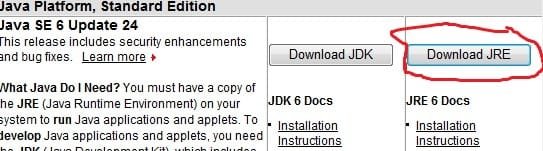
I'm not sure what you mean. The latest update to Java is JRE 6U27, however it isn't a security update, JRE 6U26 is, so you are fine with that update.

This is an example of what it looks like on the page
 

Attachments

  • JRE.jpg
    JRE.jpg
    21.9 KB · Views: 20

My Computer

Computer type
PC/Desktop
Computer Manufacturer/Model Number
Bruce ... somewhere in his 40's
OS
Windows 7 Ultimate 32bit SP1
CPU
Intel(R) Core(TM)2 Quad CPU @ 2.40GHz, 2400 MHz
Motherboard
INTEL/D975XBX2
Memory
4 GB
Graphics Card(s)
ATI Radeon HD 2600 Pro
Monitor(s) Displays
Samsung SyncMaster 914v
Screen Resolution
1280 x 1024
Hard Drives
2/500GB each ... ST3500630AS ATA Device.
One is not connected
PSU
Rocketfish 700 W
Case
G.Skill Gigabyte Chassis
Keyboard
Standard PS/2 Keyboard
Mouse
Microsoft PS/2 Mouse
Internet Speed
DSL
Antivirus
Avira Internet Security
Browser
IE 11
Other Info
ATI HDMI Audio
Results of screen317's Security Check version 0.99.18
Windows 7 (UAC is enabled)
Internet Explorer 8
``````````````````````````````
Antivirus/Firewall Check:

WMI entry may not exist for antivirus; attempting automatic update.
```````````````````````````````
Anti-malware/Other Utilities Check:

Malwarebytes' Anti-Malware
Java(TM) 6 Update 26
Adobe Flash Player
````````````````````````````````
Process Check:
objlist.exe by Laurent

``````````End of Log````````````
 

My Computer

Computer type
Laptop
OS
Windows 7 home premium 64 bit
CPU
AMD K10
Motherboard
Hewlett-Packard 1444 (Socket S1G4)
Memory
3.00GB Dual-Channel DDR3 @ 532MHz
Graphics Card(s)
ATI AMD M880G with ATI Mobility Radeon HD 4250 (HP)
Sound Card
Realtek
Screen Resolution
1366 x 768
Hard Drives
465GB Western Digital
Antivirus
MSE
Jacee is very good at these things and very busy. So I will make a recommendation in the mean time.
Your statement, Am working on getting Norton back. Please don't do that until you and Jacee get your computer fixed. Don't install anything new until Jacee requests you to do so.
 

My Computer

Computer type
PC/Desktop
Computer Manufacturer/Model Number
Home made Desktop
OS
Windows 10 Pro. 64/ version 1709 Windows 7 Pro/64
CPU
Intel i7-6800K @ 4.3
Motherboard
ASUS X-99 Deluxe II
Memory
Corsair Platinum 16 gig @2400
Graphics Card(s)
EVGA GTX 1070 OC
Monitor(s) Displays
Asus 27" LED LCD/VE278Q
Screen Resolution
1920-1080 or 1280-720 HDMI
Hard Drives
INTEL SSD 730-240 Gb Sata 3.0/
PSU
EVGA Platium 1200W
Case
Phanteks Luxe Tempered Glass 8 fans/ one radiator
Cooling
XSPC/ Water Cooled CPU
Keyboard
Das 4 Professional
Mouse
Logitech M705/MX Anywhere 2-S
Internet Speed
100 mbits
Antivirus
Microsoft Security Essentials/ Malwarebytes Premium 3.0/ SAS
Browser
I.E. 11 default/Firefox/ ISP Time Warner Cable/Spectrum
Other Info
LG BluRay Burner/
Sound system-KLipsch-THX/
Icy Dock ssd Hot Swap bays.
Tried again to do what you suggested, and ran and installed jre-6u27-windows-x64.exe (never saw anything about offline installations or multi-language - of course, I'm running Windows 7, and your mention of Add/Remove programs indicates you're giving me a script for Windows XP). I ran the security check you'd sent earlier, and you see it still indicates ju26. In my Control Panel/Programs I have 3 Java entries
  • Java 6 update 26
  • Java 6 update 27 (64-bit)
  • Java SE Development Kit 6 update 15 (64-bit)
And of course I do not have jre-6u27-windows-i586-p.exe. Since I'm running a 64 bit version of Win 7, I downloaded jre-6u27-windows-x64.exe. Should I delete all the Java entries, reboot, and run the Java utility?
 

My Computer

Computer type
Laptop
OS
Windows 7 home premium 64 bit
CPU
AMD K10
Motherboard
Hewlett-Packard 1444 (Socket S1G4)
Memory
3.00GB Dual-Channel DDR3 @ 532MHz
Graphics Card(s)
ATI AMD M880G with ATI Mobility Radeon HD 4250 (HP)
Sound Card
Realtek
Screen Resolution
1366 x 768
Hard Drives
465GB Western Digital
Antivirus
MSE
Jacee is very good at these things and very busy. So I will make a recommendation in the mean time.
Your statement, Am working on getting Norton back. Please don't do that until you and Jacee get your computer fixed. Don't install anything new until Jacee requests you to do so.
Well, he is the one who suggested installing Security Essentials. It seems a bit nonsensical to install MSE when my ISP provides Norton, which comes with its own firewall. Once I get Norton again I'd have to delete MSE anyway. But nonetheless, I have NOT put Norton back, yet. I will await further instructions....
 

My Computer

Computer type
Laptop
OS
Windows 7 home premium 64 bit
CPU
AMD K10
Motherboard
Hewlett-Packard 1444 (Socket S1G4)
Memory
3.00GB Dual-Channel DDR3 @ 532MHz
Graphics Card(s)
ATI AMD M880G with ATI Mobility Radeon HD 4250 (HP)
Sound Card
Realtek
Screen Resolution
1366 x 768
Hard Drives
465GB Western Digital
Antivirus
MSE
For the time being, download and run Norton removal tool (just incase something was left behind). Download and run the Norton Removal Tool to uninstall your Norton product | Norton Support

Next, scan your machine with ESET OnlineScan
  1. Hold down Control and click on the following link to open ESET OnlineScan in a new window.
    ESET OnlineScan
  2. Click the
    esetOnline.png
    button.
  3. For alternate browsers only: (Microsoft Internet Explorer users can skip these steps)
    1. Click on
      esetSmartInstall.png
      to download the ESET Smart Installer. Save it to your desktop.
    2. Double click on the
      esetSmartInstallDesktopIcon.png
      icon on your desktop.
  4. Check
    esetAcceptTerms.png
  5. Click the
    esetStart.png
    button.
  6. Accept any security warnings from your browser.
  7. Check
    esetScanArchives.png
  8. Push the Start button.
  9. ESET will then download updates for itself, install itself, and begin scanning your computer. Please be patient as this can take some time.
  10. When the scan completes, push
    esetListThreats.png
  11. Push
    esetExport.png
    , and save the file to your desktop using a unique name, such as ESETScan. Include the contents of this report in your next reply.
  12. Push the
    esetBack.png
    button.
  13. Push
    esetFinish.png
 

My Computer

Computer type
PC/Desktop
Computer Manufacturer/Model Number
Bruce ... somewhere in his 40's
OS
Windows 7 Ultimate 32bit SP1
CPU
Intel(R) Core(TM)2 Quad CPU @ 2.40GHz, 2400 MHz
Motherboard
INTEL/D975XBX2
Memory
4 GB
Graphics Card(s)
ATI Radeon HD 2600 Pro
Monitor(s) Displays
Samsung SyncMaster 914v
Screen Resolution
1280 x 1024
Hard Drives
2/500GB each ... ST3500630AS ATA Device.
One is not connected
PSU
Rocketfish 700 W
Case
G.Skill Gigabyte Chassis
Keyboard
Standard PS/2 Keyboard
Mouse
Microsoft PS/2 Mouse
Internet Speed
DSL
Antivirus
Avira Internet Security
Browser
IE 11
Other Info
ATI HDMI Audio
For the time being, download and run Norton removal tool (just incase something was left behind). Download and run the Norton Removal Tool to uninstall your Norton product | Norton Support
Most curious..... I clicked on the link you provided for the removal too, displayed the page, then clicked on the bullet indicating that this Norton product came from my ISP, went to the new page and clicked Download, and got 'This page cannot be displayed'.

Did it a second time - same results. Did it a third time, but this time selecting Norton Interner Security Suite. Got TPCBD again. Went to the forum using Google Chrome, clicked on your link, etc, and was able to download the removal tool to my Downloads folder. Ran it from the folder, and ..... nothing. No box indicating progress, no ridulous security code to type. Nothing.

But when I go to task manager I see Norton Removal Tool in the processes, but not the applications. I minimized all windows, and it's just not there. I'm going to end the task and try it again.

Well, I ended the task, went to Downloads, and tried it again, and got a msg box that another instance of SymNRT or another repair tool is currently running. Pleas close ths application and try to run SymNRT again.

Sigh....
 

My Computer

Computer type
Laptop
OS
Windows 7 home premium 64 bit
CPU
AMD K10
Motherboard
Hewlett-Packard 1444 (Socket S1G4)
Memory
3.00GB Dual-Channel DDR3 @ 532MHz
Graphics Card(s)
ATI AMD M880G with ATI Mobility Radeon HD 4250 (HP)
Sound Card
Realtek
Screen Resolution
1366 x 768
Hard Drives
465GB Western Digital
Antivirus
MSE
Okay, apparently when I run that tool, it initiates two process - Norton Removal Tool.exe *32 and SymNRT.exe *32. I ended both processes, restarted the exe from the Download area, and.... got the same non-result. I see the 2 processes in taskmgr but no application, and no visible screen. I will reboot into safe mode and try again.
 

My Computer

Computer type
Laptop
OS
Windows 7 home premium 64 bit
CPU
AMD K10
Motherboard
Hewlett-Packard 1444 (Socket S1G4)
Memory
3.00GB Dual-Channel DDR3 @ 532MHz
Graphics Card(s)
ATI AMD M880G with ATI Mobility Radeon HD 4250 (HP)
Sound Card
Realtek
Screen Resolution
1366 x 768
Hard Drives
465GB Western Digital
Antivirus
MSE
Are you SURE this Norton removal link works with 64-bit versions, because it does the same non-thing in safe mode. I'm thinking there may be a compatibility issue.
 

My Computer

Computer type
Laptop
OS
Windows 7 home premium 64 bit
CPU
AMD K10
Motherboard
Hewlett-Packard 1444 (Socket S1G4)
Memory
3.00GB Dual-Channel DDR3 @ 532MHz
Graphics Card(s)
ATI AMD M880G with ATI Mobility Radeon HD 4250 (HP)
Sound Card
Realtek
Screen Resolution
1366 x 768
Hard Drives
465GB Western Digital
Antivirus
MSE
Is this the file you downloaded?
Did you save it to your desktop as instructed?


Have you rebooted?
 

Attachments

  • Norton download.jpg
    Norton download.jpg
    8.2 KB · Views: 25

My Computer

Computer type
PC/Desktop
Computer Manufacturer/Model Number
Bruce ... somewhere in his 40's
OS
Windows 7 Ultimate 32bit SP1
CPU
Intel(R) Core(TM)2 Quad CPU @ 2.40GHz, 2400 MHz
Motherboard
INTEL/D975XBX2
Memory
4 GB
Graphics Card(s)
ATI Radeon HD 2600 Pro
Monitor(s) Displays
Samsung SyncMaster 914v
Screen Resolution
1280 x 1024
Hard Drives
2/500GB each ... ST3500630AS ATA Device.
One is not connected
PSU
Rocketfish 700 W
Case
G.Skill Gigabyte Chassis
Keyboard
Standard PS/2 Keyboard
Mouse
Microsoft PS/2 Mouse
Internet Speed
DSL
Antivirus
Avira Internet Security
Browser
IE 11
Other Info
ATI HDMI Audio

My Computer

Computer type
PC/Desktop
Computer Manufacturer/Model Number
Bruce ... somewhere in his 40's
OS
Windows 7 Ultimate 32bit SP1
CPU
Intel(R) Core(TM)2 Quad CPU @ 2.40GHz, 2400 MHz
Motherboard
INTEL/D975XBX2
Memory
4 GB
Graphics Card(s)
ATI Radeon HD 2600 Pro
Monitor(s) Displays
Samsung SyncMaster 914v
Screen Resolution
1280 x 1024
Hard Drives
2/500GB each ... ST3500630AS ATA Device.
One is not connected
PSU
Rocketfish 700 W
Case
G.Skill Gigabyte Chassis
Keyboard
Standard PS/2 Keyboard
Mouse
Microsoft PS/2 Mouse
Internet Speed
DSL
Antivirus
Avira Internet Security
Browser
IE 11
Other Info
ATI HDMI Audio
Is this the file you downloaded?
Did you save it to your desktop as instructed?


Have you rebooted?
No this is the page I went to. And finally.... after about 45 minutes of having those two processes in taskmgr, I got the Welcome to Norton Removal Tool box, got the miserable code, and the products are being removed. Meanwhile, I tried running ESET, and I got to step 2 of 4 with the heading Initialization, and in red it reads Can not get update. Is proxy configured?

The only option at the bottom is Back. I have no idea what it means. And now that the Norton removal process has finally completed, I will reboot and try the ESET again.
 

Attachments

  • norton.JPG
    norton.JPG
    145.2 KB · Views: 26

My Computer

Computer type
Laptop
OS
Windows 7 home premium 64 bit
CPU
AMD K10
Motherboard
Hewlett-Packard 1444 (Socket S1G4)
Memory
3.00GB Dual-Channel DDR3 @ 532MHz
Graphics Card(s)
ATI AMD M880G with ATI Mobility Radeon HD 4250 (HP)
Sound Card
Realtek
Screen Resolution
1366 x 768
Hard Drives
465GB Western Digital
Antivirus
MSE
Back
Top