Windows Firewall - Turn On or Off

How to Turn Windows Firewall On or Off in Windows 7 and Windows 8


   Information
Windows Firewall can help prevent hackers or malicious software from gaining access to your computer through the Internet or network.

This tutorial will show you how to turn Windows Firewall on or off for each type of network location (ex: Private or Public) that you use in Windows 7 and Windows 8.


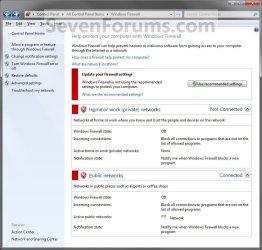
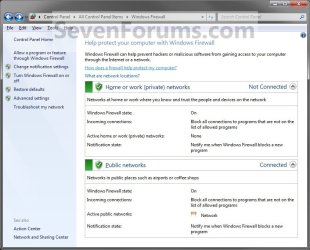
EXAMPLE: Windows Firewall On and Off
NOTE: Notice that there is a option for Windows Firewall to be on or off with Private networks and Public networks. If you have Inactive showing on a network location, this means that you do not have a network connection for that type of network location. Active means that you do.
Windows_Firewall_On.jpg

Windows_Firewall_Off.jpg

Here's How:
1. Open the Control Panel (Icons View) in Windows 7 and Windows 8.

2. Click/tap on the Windows Firewall icon.

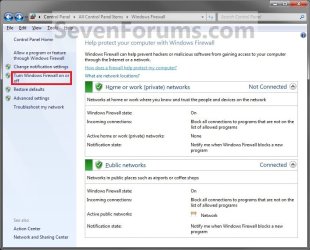
3. Click/tap on the Turn Windows Firewall on or off link in the left pane. (See screenshot below)
Windows_Firewall.jpg


OPTION ONE

Home or Work (Private) Network Location Settings


4. To Turn On Windows Firewall
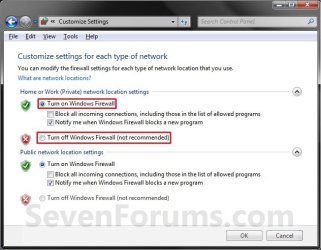
A) Select (dot) Turn on Windows Firewall. (See screenshot below step 5)

B) If prompted by UAC, then click/tap on Yes.

C) Change the Windows Firewall notifications settings you want. (See screenshot below step 5)

D) Go to OPTION TWO below.
5. To Turn Off Windows Firewall
A) Select (dot) Turn off Windows Firewall. (See screenshot below)

B) If prompted by UAC, then click/tap on Yes.

C) Go to OPTION TWO below.
Private_Settings.jpg


OPTION TWO

Public Network Location Settings


6. To Turn On Windows Firewall
A) Select (dot) Turn on Windows Firewall. (See screenshot below step 7)

B) If prompted by UAC, then click/tap on Yes.

C) Change the Windows Firewall notifications settings you want. (See screenshot below step 7)

D) Go to step 8below.
7. To Turn Off Windows Firewall
A) Select (dot) Turn off Windows Firewall. (See screenshot below)

B) If prompted by UAC, then click/tap on Yes.

C) Go to step 8 below.
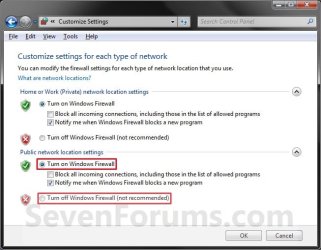
Public_Settings.jpg


8. Click/tap on OK. (See screenshot above)

9. Close the Windows Firewall window when done. (See screenshot below step 3)

That's it,
Shawn


Last edited:
Thanks for Tutorial Brink
I installed Kaspersky Internet Security and when i installed KIS automatically disabled Windows firewall but in Control panel nowhere shows i have firewall (Vista Shows if any other Firewall or Anti virus / antispyware installed in system).
Your first screen shot both is green but my one is RED.
Any advice...........
 

My Computer

OS
Windows 7
Hello Bmb, and welcome to Seven Forums.

Kaspersky has a firewall included in it, so when you installed it, it disabled the Windows Firewall since you should only have one firewall installed and running at one time. That is why this is red for you. Nothing to worry about since you have Kaspersky firewall installed. :)

Shawn
 

My Computer

Computer type
PC/Desktop
Computer Manufacturer/Model Number
Self built custom
OS
64-bit Windows 11 Pro for Workstations
CPU
Intel i7-8700K OC'd to 5 GHz
Motherboard
ASUS ROG Maximus XI Formula Z390
Memory
64 GB (4x16GB) G.SKILL TridentZ RGB DDR4 3600 MHz
Graphics Card(s)
ASUS ROG-STRIX-GTX1080TI-O11G-GAMING
Sound Card
Integrated
Monitor(s) Displays
2 x Samsung Odyssey G7 27"
Screen Resolution
2560x1440
Hard Drives
1TB Samsung 990 PRO M.2,
4TB Samsung 990 PRO PRO M.2,
TerraMaster F8 SSD Plus NAS
PSU
Seasonic Prime Titanium 850W
Case
Thermaltake Core P3
Cooling
Corsair Hydro H115i
Keyboard
Logitech wireless K800
Mouse
Logitech MX Master 4
Internet Speed
2 Gb/s Download and 100 Mb/s Upload
Antivirus
Malwarebyte Anti-Malware Premium
Browser
Google Chrome
Other Info
Logitech Z625 speaker system,
Logitech BRIO 4K Pro webcam,
HP Color LaserJet Pro MFP M477fdn,
APC SMART-UPS RT 1000 XL - SURT1000XLI,
Galaxy S23 Plus phone
Thanks Brink for your help but just wonder i mentioned in my previous post in Vista it showed everything what Firewall Anti virus Spyware installed in System Security Control panel if in Windows 7 u can check that way ......( I know myself what i installed and its not big issue but just for curiosity)
 

My Computer

OS
Windows 7
You're welcome bmb. I miss them being listed on Security Center as well for quick reference.
 

My Computer

Computer type
PC/Desktop
Computer Manufacturer/Model Number
Self built custom
OS
64-bit Windows 11 Pro for Workstations
CPU
Intel i7-8700K OC'd to 5 GHz
Motherboard
ASUS ROG Maximus XI Formula Z390
Memory
64 GB (4x16GB) G.SKILL TridentZ RGB DDR4 3600 MHz
Graphics Card(s)
ASUS ROG-STRIX-GTX1080TI-O11G-GAMING
Sound Card
Integrated
Monitor(s) Displays
2 x Samsung Odyssey G7 27"
Screen Resolution
2560x1440
Hard Drives
1TB Samsung 990 PRO M.2,
4TB Samsung 990 PRO PRO M.2,
TerraMaster F8 SSD Plus NAS
PSU
Seasonic Prime Titanium 850W
Case
Thermaltake Core P3
Cooling
Corsair Hydro H115i
Keyboard
Logitech wireless K800
Mouse
Logitech MX Master 4
Internet Speed
2 Gb/s Download and 100 Mb/s Upload
Antivirus
Malwarebyte Anti-Malware Premium
Browser
Google Chrome
Other Info
Logitech Z625 speaker system,
Logitech BRIO 4K Pro webcam,
HP Color LaserJet Pro MFP M477fdn,
APC SMART-UPS RT 1000 XL - SURT1000XLI,
Galaxy S23 Plus phone
a

whenever i try to turn it off the tab that say "Turn windows fir wall on or off" cannot be click and i know for a fact im the administrator cuz im the only account on the computer??
 

My Computer

Computer Manufacturer/Model Number
dell/ inspiron 1545
OS
windows 7
Hello Juiby, and welcome to Seven Forums.

Could you post a screenshot of this?

In the mean time, go ahead and run a sfc /scannow command to see if that may be able to help.
 

My Computer

Computer type
PC/Desktop
Computer Manufacturer/Model Number
Self built custom
OS
64-bit Windows 11 Pro for Workstations
CPU
Intel i7-8700K OC'd to 5 GHz
Motherboard
ASUS ROG Maximus XI Formula Z390
Memory
64 GB (4x16GB) G.SKILL TridentZ RGB DDR4 3600 MHz
Graphics Card(s)
ASUS ROG-STRIX-GTX1080TI-O11G-GAMING
Sound Card
Integrated
Monitor(s) Displays
2 x Samsung Odyssey G7 27"
Screen Resolution
2560x1440
Hard Drives
1TB Samsung 990 PRO M.2,
4TB Samsung 990 PRO PRO M.2,
TerraMaster F8 SSD Plus NAS
PSU
Seasonic Prime Titanium 850W
Case
Thermaltake Core P3
Cooling
Corsair Hydro H115i
Keyboard
Logitech wireless K800
Mouse
Logitech MX Master 4
Internet Speed
2 Gb/s Download and 100 Mb/s Upload
Antivirus
Malwarebyte Anti-Malware Premium
Browser
Google Chrome
Other Info
Logitech Z625 speaker system,
Logitech BRIO 4K Pro webcam,
HP Color LaserJet Pro MFP M477fdn,
APC SMART-UPS RT 1000 XL - SURT1000XLI,
Galaxy S23 Plus phone
I have the same problem with juiby. I need to turn off Windows Firewall in order to download video files from my company's website but the option to do so is not clickable. I also log in as an Administrator. I'm attaching the screenshot so please help me with this.
 

My Computer

Computer Manufacturer/Model Number
Gateway
OS
Windows 7 Home Premium 64 bit
CPU
Intel Premium Processor E5300
Memory
6GB DDR2
Hello Tanuki, and welcome to Seven Forums.

Did you have that screenshot?
 

My Computer

Computer type
PC/Desktop
Computer Manufacturer/Model Number
Self built custom
OS
64-bit Windows 11 Pro for Workstations
CPU
Intel i7-8700K OC'd to 5 GHz
Motherboard
ASUS ROG Maximus XI Formula Z390
Memory
64 GB (4x16GB) G.SKILL TridentZ RGB DDR4 3600 MHz
Graphics Card(s)
ASUS ROG-STRIX-GTX1080TI-O11G-GAMING
Sound Card
Integrated
Monitor(s) Displays
2 x Samsung Odyssey G7 27"
Screen Resolution
2560x1440
Hard Drives
1TB Samsung 990 PRO M.2,
4TB Samsung 990 PRO PRO M.2,
TerraMaster F8 SSD Plus NAS
PSU
Seasonic Prime Titanium 850W
Case
Thermaltake Core P3
Cooling
Corsair Hydro H115i
Keyboard
Logitech wireless K800
Mouse
Logitech MX Master 4
Internet Speed
2 Gb/s Download and 100 Mb/s Upload
Antivirus
Malwarebyte Anti-Malware Premium
Browser
Google Chrome
Other Info
Logitech Z625 speaker system,
Logitech BRIO 4K Pro webcam,
HP Color LaserJet Pro MFP M477fdn,
APC SMART-UPS RT 1000 XL - SURT1000XLI,
Galaxy S23 Plus phone
Thank you, Brink. I thought I attached the screeshot. Now that I'm going to do it again, I don't know how to. Please let me know. Thank you so much.
 

My Computer

Computer Manufacturer/Model Number
Gateway
OS
Windows 7 Home Premium 64 bit
CPU
Intel Premium Processor E5300
Memory
6GB DDR2

My Computer

Computer type
PC/Desktop
Computer Manufacturer/Model Number
Self built custom
OS
64-bit Windows 11 Pro for Workstations
CPU
Intel i7-8700K OC'd to 5 GHz
Motherboard
ASUS ROG Maximus XI Formula Z390
Memory
64 GB (4x16GB) G.SKILL TridentZ RGB DDR4 3600 MHz
Graphics Card(s)
ASUS ROG-STRIX-GTX1080TI-O11G-GAMING
Sound Card
Integrated
Monitor(s) Displays
2 x Samsung Odyssey G7 27"
Screen Resolution
2560x1440
Hard Drives
1TB Samsung 990 PRO M.2,
4TB Samsung 990 PRO PRO M.2,
TerraMaster F8 SSD Plus NAS
PSU
Seasonic Prime Titanium 850W
Case
Thermaltake Core P3
Cooling
Corsair Hydro H115i
Keyboard
Logitech wireless K800
Mouse
Logitech MX Master 4
Internet Speed
2 Gb/s Download and 100 Mb/s Upload
Antivirus
Malwarebyte Anti-Malware Premium
Browser
Google Chrome
Other Info
Logitech Z625 speaker system,
Logitech BRIO 4K Pro webcam,
HP Color LaserJet Pro MFP M477fdn,
APC SMART-UPS RT 1000 XL - SURT1000XLI,
Galaxy S23 Plus phone
Hi Brink,
It's not the first when I found the answer for my trouble with Wds 7 in this forum so ... here I am...
I'm glad to be around and I'm glad to know you'll be around too.
Thanks
 

My Computer

Computer Manufacturer/Model Number
American Megatrends Inc. / version 0312
OS
Windows 7 Ultimate (Alienware) x32
CPU
Intel(R) Pentium(R) 4 CPU 3.00GHz
Motherboard
ASUSTeK Computer INC. P5LD2-Deluxe
Memory
1.50 GB
Graphics Card(s)
(1) ATI Radeon X300/X550/X1050 Series (2) ATI Radeon X300/
Sound Card
Realtek High Definition Audio
Screen Resolution
1152x864
Hard Drives
(1) SAMSUNG HD080HJ ATA Device (2) WDC WD2000JS-55NCB1 ATA Device (3) A-DATA USB Flash Drive USB Device (4) IOI MediaBay 7 in 4 USB Device (5) IOI MediaBay 7 in 4 USB Device (6) IOI MediaBay 7 in 4 USB Device (7) IOI MediaBay 7 in 4 USB D
Hello Cristy, and welcome to Seven Forums. Thank you for the kind words. :)
 

My Computer

Computer type
PC/Desktop
Computer Manufacturer/Model Number
Self built custom
OS
64-bit Windows 11 Pro for Workstations
CPU
Intel i7-8700K OC'd to 5 GHz
Motherboard
ASUS ROG Maximus XI Formula Z390
Memory
64 GB (4x16GB) G.SKILL TridentZ RGB DDR4 3600 MHz
Graphics Card(s)
ASUS ROG-STRIX-GTX1080TI-O11G-GAMING
Sound Card
Integrated
Monitor(s) Displays
2 x Samsung Odyssey G7 27"
Screen Resolution
2560x1440
Hard Drives
1TB Samsung 990 PRO M.2,
4TB Samsung 990 PRO PRO M.2,
TerraMaster F8 SSD Plus NAS
PSU
Seasonic Prime Titanium 850W
Case
Thermaltake Core P3
Cooling
Corsair Hydro H115i
Keyboard
Logitech wireless K800
Mouse
Logitech MX Master 4
Internet Speed
2 Gb/s Download and 100 Mb/s Upload
Antivirus
Malwarebyte Anti-Malware Premium
Browser
Google Chrome
Other Info
Logitech Z625 speaker system,
Logitech BRIO 4K Pro webcam,
HP Color LaserJet Pro MFP M477fdn,
APC SMART-UPS RT 1000 XL - SURT1000XLI,
Galaxy S23 Plus phone
Hey, I can't turn off my firewall for some reason because I can't click on the option to turn it off.. Here's the screenshot.

forbrink.png
 

My Computer

OS
Windows 7
Hello Sweetxdevil, and welcome to Seven Forums.

From you screenshot, it appears that Windows Firewall has already been disabled or turned off by McAffee Personal Firewall that you currently have installed and using instead. :)
 

My Computer

Computer type
PC/Desktop
Computer Manufacturer/Model Number
Self built custom
OS
64-bit Windows 11 Pro for Workstations
CPU
Intel i7-8700K OC'd to 5 GHz
Motherboard
ASUS ROG Maximus XI Formula Z390
Memory
64 GB (4x16GB) G.SKILL TridentZ RGB DDR4 3600 MHz
Graphics Card(s)
ASUS ROG-STRIX-GTX1080TI-O11G-GAMING
Sound Card
Integrated
Monitor(s) Displays
2 x Samsung Odyssey G7 27"
Screen Resolution
2560x1440
Hard Drives
1TB Samsung 990 PRO M.2,
4TB Samsung 990 PRO PRO M.2,
TerraMaster F8 SSD Plus NAS
PSU
Seasonic Prime Titanium 850W
Case
Thermaltake Core P3
Cooling
Corsair Hydro H115i
Keyboard
Logitech wireless K800
Mouse
Logitech MX Master 4
Internet Speed
2 Gb/s Download and 100 Mb/s Upload
Antivirus
Malwarebyte Anti-Malware Premium
Browser
Google Chrome
Other Info
Logitech Z625 speaker system,
Logitech BRIO 4K Pro webcam,
HP Color LaserJet Pro MFP M477fdn,
APC SMART-UPS RT 1000 XL - SURT1000XLI,
Galaxy S23 Plus phone
Is there a way to turn off my McAfee firewall ? Because whenever I open the McAfee security center, it tells me that my license expired and I need to renew it, and I can't seem to turn off the firewall.

I'm using another anti-virus besides McAfee..
 

My Computer

OS
Windows 7
You would need to uninstall McAfee in Programs and Features first, then you should be able to turn on Windows Firewall if it has not already automatically done so afterwards. :)
 

My Computer

Computer type
PC/Desktop
Computer Manufacturer/Model Number
Self built custom
OS
64-bit Windows 11 Pro for Workstations
CPU
Intel i7-8700K OC'd to 5 GHz
Motherboard
ASUS ROG Maximus XI Formula Z390
Memory
64 GB (4x16GB) G.SKILL TridentZ RGB DDR4 3600 MHz
Graphics Card(s)
ASUS ROG-STRIX-GTX1080TI-O11G-GAMING
Sound Card
Integrated
Monitor(s) Displays
2 x Samsung Odyssey G7 27"
Screen Resolution
2560x1440
Hard Drives
1TB Samsung 990 PRO M.2,
4TB Samsung 990 PRO PRO M.2,
TerraMaster F8 SSD Plus NAS
PSU
Seasonic Prime Titanium 850W
Case
Thermaltake Core P3
Cooling
Corsair Hydro H115i
Keyboard
Logitech wireless K800
Mouse
Logitech MX Master 4
Internet Speed
2 Gb/s Download and 100 Mb/s Upload
Antivirus
Malwarebyte Anti-Malware Premium
Browser
Google Chrome
Other Info
Logitech Z625 speaker system,
Logitech BRIO 4K Pro webcam,
HP Color LaserJet Pro MFP M477fdn,
APC SMART-UPS RT 1000 XL - SURT1000XLI,
Galaxy S23 Plus phone
You're most welcome. :)
 

My Computer

Computer type
PC/Desktop
Computer Manufacturer/Model Number
Self built custom
OS
64-bit Windows 11 Pro for Workstations
CPU
Intel i7-8700K OC'd to 5 GHz
Motherboard
ASUS ROG Maximus XI Formula Z390
Memory
64 GB (4x16GB) G.SKILL TridentZ RGB DDR4 3600 MHz
Graphics Card(s)
ASUS ROG-STRIX-GTX1080TI-O11G-GAMING
Sound Card
Integrated
Monitor(s) Displays
2 x Samsung Odyssey G7 27"
Screen Resolution
2560x1440
Hard Drives
1TB Samsung 990 PRO M.2,
4TB Samsung 990 PRO PRO M.2,
TerraMaster F8 SSD Plus NAS
PSU
Seasonic Prime Titanium 850W
Case
Thermaltake Core P3
Cooling
Corsair Hydro H115i
Keyboard
Logitech wireless K800
Mouse
Logitech MX Master 4
Internet Speed
2 Gb/s Download and 100 Mb/s Upload
Antivirus
Malwarebyte Anti-Malware Premium
Browser
Google Chrome
Other Info
Logitech Z625 speaker system,
Logitech BRIO 4K Pro webcam,
HP Color LaserJet Pro MFP M477fdn,
APC SMART-UPS RT 1000 XL - SURT1000XLI,
Galaxy S23 Plus phone
Windows Registry Editor Version 5.00

[HKEY_LOCAL_MACHINE\SYSTEM\ControlSet001\services\MpsSvc]
"Start"=dword:00000004

[HKEY_LOCAL_MACHINE\SYSTEM\CurrentControlSet\services\MpsSvc]
"Start"=dword:00000004
 

My Computer

OS
windows7 ultimate x32
CPU
DualCore Intel Core 2 Duo E8400, 3000 MHz (9 x 333)
Motherboard
ASRock 4Core1333-GLAN (3 PCI,1 PCI-E x16,4 DDR2 DIMM...)
Memory
4Gb (1x4 DDR2-800 DDR2 SDRAM)
Graphics Card(s)
NVIDIA GeForce 9600 GT (512 mb)
Sound Card
onboard
Monitor(s) Displays
lg flatron w2242t
Screen Resolution
1680 x 1050
Hard Drives
WDC WD5000AAJS-00YFA0 ATA Device
PSU
-
Case
-
Cooling
-
Other Info
d-link dir100
Back
Top