Windows Folder is Too Big

vividshock

New member
Local time
8:07 PM
Messages
7


As you can see my windows folder is very large and I would like some help reducing its size. I have deleted the Hiberfil.sys file and used the Windows disk clean up program which did not help at all.
 

My Computer

Computer type
PC/Desktop
OS
Windows 7 Home Premium 64bit
Hi Vividshock, welcome to the Seven Forums.

There's no way the Windows folder can grow to be so big without the user saving a huge amount of files in it. Your Windows folder is about 10 times as big as it should, containing almost 30 times as many files as it should.

The windows folder is a system folder and should not be used for storage. If this is not a hoax, please begin by telling what have you saved in Windows folder (other than Windows system files).

Kari
 

My Computer

Computer type
Laptop
Computer Manufacturer/Model Number
HP ENVY 17-1150eg
OS
Windows 10 Pro x64 EN-GB
CPU
1.6 GHz Intel Core i7-720QM Processor
Memory
6 GB
Graphics Card(s)
ATI Mobility Radeon HD 5850 Graphics
Sound Card
Beats sound system with integrated subwoofer
Monitor(s) Displays
17" laptop display, 22" LED and 32" Full HD TV through HDMI
Screen Resolution
1600*900 (1), 1920*1080 (2&3)
Hard Drives
Internal: 2 x 500 GB SATA Hard Disk Drive 7200 rpm
External: 2TB for backups, 3TB USB3 network drive for media
Cooling
As Envy runs a bit warm, I have it on a Cooler Master pad
Keyboard
Logitech diNovo Media Desktop Laser (bluetooth)
Mouse
Logitech Performance Mouse MX
Internet Speed
50/10 Mbps VDSL
Antivirus
Windows Defender 4.3.9431.0
Browser
Maxthon 3.5.2., IE11
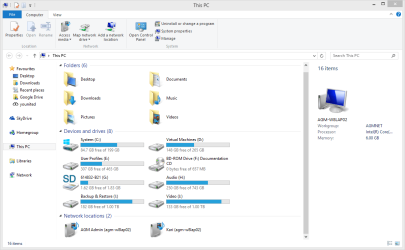
In addition to my previous post, please take a screenshot of your Computer view showing all drives and post it here. This is what I mean, from my Windows 8.1 PC so it looks a bit different but you understand which view I mean:

2014-01-06_15h13_06.png
 

My Computer

Computer type
Laptop
Computer Manufacturer/Model Number
HP ENVY 17-1150eg
OS
Windows 10 Pro x64 EN-GB
CPU
1.6 GHz Intel Core i7-720QM Processor
Memory
6 GB
Graphics Card(s)
ATI Mobility Radeon HD 5850 Graphics
Sound Card
Beats sound system with integrated subwoofer
Monitor(s) Displays
17" laptop display, 22" LED and 32" Full HD TV through HDMI
Screen Resolution
1600*900 (1), 1920*1080 (2&3)
Hard Drives
Internal: 2 x 500 GB SATA Hard Disk Drive 7200 rpm
External: 2TB for backups, 3TB USB3 network drive for media
Cooling
As Envy runs a bit warm, I have it on a Cooler Master pad
Keyboard
Logitech diNovo Media Desktop Laser (bluetooth)
Mouse
Logitech Performance Mouse MX
Internet Speed
50/10 Mbps VDSL
Antivirus
Windows Defender 4.3.9431.0
Browser
Maxthon 3.5.2., IE11
An easier way to find out what you have in there would be for you to run the Dir command through cmd.

If you could follow these steps and then upload the file for us to look at?

How to Create a File List at a Command Prompt

  1. Click Start, point to Programs, and then click MS-DOS Prompt (or Command Prompt in Windows NT).
  2. At a command prompt, locate the drive that contains the folder whose contents you want to list. For example, if you want to create a text file that contains a list of the contents of a folder on drive C, type the following command at a command prompt, and then press ENTER: c:
  3. At a command prompt, locate the folder whose contents you want to list. For example, if you want to create a text file that contains a list of the contents in the Windows folder on drive C, type the following commands at a command prompt, and press ENTER after you type each command: cd\
    cd windows
  4. Type the following command at a command prompt, and then press ENTER, where filename is the name of the text file that you are creating: dir > filename.txt
    For example, if you want to create a file named Windowsfolderlist.txt, type the following command at a command prompt, and then press ENTER: dir > windowsfolderlist.txt
    NOTE: The text file that you create is located in the folder that you are in when you follow these steps. In the earlier example, the Windowsfolderlist.txt file is located in the Windows folder.
  5. Use a text editor, such as Notepad, to view or print this file.
 

My Computer

Computer type
PC/Desktop
Computer Manufacturer/Model Number
Custom Build
OS
Windows 8.1
CPU
Intel i5 3750k OC'd 4.0Ghz
Motherboard
P8Z77-V LX3
Memory
16GB Vengence Corsair
Graphics Card(s)
GTX 770 OC 2GB Windforce
Sound Card
C-Media 7.1 Surround Card
Monitor(s) Displays
Asus 3D 23" & BenQ 24" & LG 19"
Screen Resolution
1920*1080, 1920*1080, 1440*900
Hard Drives
Crucial 512GB SSD
WD 1.5 TB
WD 500Gb
PSU
850MW Silverstone
Case
inWin DragonRider
Cooling
4 * 140mm LED Akasa, One 140mm Fan Akasa
Keyboard
Corsair k95
Mouse
R.A.T 7 Contagion
Internet Speed
152 Mb Fiber Optic
Antivirus
ESET Nod32
Browser
Waterfox x64 / Chrome x64
Other Info
Freenas / Plex Media server
Q6600
6Gb DDR3
6TB ZFS Raid
500W PSu
2 x Intel NIC's

My Computer

Computer type
PC/Desktop
Computer Manufacturer/Model Number
Home Built Desktop By DataTech
OS
Windows 7 Ultimate X64 SP1
CPU
Intel i5-2550K, Differing ~4.4-4.8GHz No built in GPU
Motherboard
ASUS P8Z68-V PRO/GEN3
Memory
16GB G.Skill Sniper 1866MHz @ 2133MHz 2x8GB
Graphics Card(s)
ASUS GTX650TIB-DC2OC-2GD5, (650TI Boost)
Sound Card
Onboard Realtek 5-1
Monitor(s) Displays
Samsung P2570HD
Screen Resolution
1920x1080
Hard Drives
Samsung 840 Pro 256GB SSD for OS, 500GB Seagate Constellation (Enterprise drive) for Data
PSU
Corsair HX650W
Case
Inwin Dragon Rider
Cooling
Hyper 212 EVO w/two Noctua fans, push-pull, @1300 RPM
Keyboard
E-Z Eyes, bright yellow keys with large characters
Mouse
steelseries SENSEI Laser Pro Gaming
Internet Speed
48-51Mbs Mbs down, 11 Mbs up Xfinity Cable
Antivirus
Norton Internet Security 2013
Browser
IE 10, Opera, Pale Moon if needed
Other Info
4 case fans, LG BluRay-RE, ASUS DVD-RW, Mr. Fusion power supply, 1.21 gigawatts.

My Computer

Computer type
PC/Desktop
Computer Manufacturer/Model Number
Home made Desktop
OS
Windows 10 Pro. 64/ version 1709 Windows 7 Pro/64
CPU
Intel i7-6800K @ 4.3
Motherboard
ASUS X-99 Deluxe II
Memory
Corsair Platinum 16 gig @2400
Graphics Card(s)
EVGA GTX 1070 OC
Monitor(s) Displays
Asus 27" LED LCD/VE278Q
Screen Resolution
1920-1080 or 1280-720 HDMI
Hard Drives
INTEL SSD 730-240 Gb Sata 3.0/
PSU
EVGA Platium 1200W
Case
Phanteks Luxe Tempered Glass 8 fans/ one radiator
Cooling
XSPC/ Water Cooled CPU
Keyboard
Das 4 Professional
Mouse
Logitech M705/MX Anywhere 2-S
Internet Speed
100 mbits
Antivirus
Microsoft Security Essentials/ Malwarebytes Premium 3.0/ SAS
Browser
I.E. 11 default/Firefox/ ISP Time Warner Cable/Spectrum
Other Info
LG BluRay Burner/
Sound system-KLipsch-THX/
Icy Dock ssd Hot Swap bays.

My Computer

Computer type
PC/Desktop
Computer Manufacturer/Model Number
Build #1
OS
Windows 8.1 Pro x64
CPU
Intel i7 3770K @4.5GHz
Motherboard
ASUS P8Z77-V PRO
Memory
Corsair Vengeance 2x4GB DDR3 1600MHz Low Profile (White)
Graphics Card(s)
Gigabyte Radeon HD 7850 (2GB GDDR5)
Sound Card
Integrated on motherboard
Monitor(s) Displays
23" LG LCD/LED IPS
Screen Resolution
1920*1080
Hard Drives
Samsung EVO 128GB SSD
Seagate Barracuda 2GB 7200rpm
2x Seagate FreeAgent [500gb]
PSU
Corsair TX650W V2 (80+ Bronze)
Case
NZXT Phantom 410 White
Cooling
Corsair H100 Water Cooler
Keyboard
Microsoft Desktop 2000 Wireless Keyboard
Mouse
Microsoft Desktop 2000 Wireless Mouse
Internet Speed
95 Mb/s Download 70 Mb/s Upload
Antivirus
MSE + MBAM Pro
Browser
Firefox
I narrowed down my problem towards the SYSWOW64 folder which I was unable to scan with Free TreeSize and WinDirStat.


Volume in drive C is Dem Windows
Volume Serial Number is 88E4-E300

Directory of C:\Windows

01/11/2014 07:33 PM <DIR> .
01/11/2014 07:33 PM <DIR> ..
10/27/2013 11:47 AM <DIR> .jagex_cache_32
07/13/2009 09:32 PM <DIR> addins
07/13/2009 07:20 PM <DIR> AppCompat
12/10/2013 03:57 AM <DIR> AppPatch
02/27/2013 10:08 AM 44,066 atiogl.xml
05/25/2013 11:27 AM 0 ativpsrm.bin
11/20/2010 05:24 AM 71,168 bfsvc.exe
07/13/2009 09:32 PM <DIR> Boot
07/13/2009 09:32 PM <DIR> Branding
06/29/2013 08:39 PM 38 camcodec100.ini
11/05/2012 07:06 PM 5,120 Cmicnfgp.ini.cfg
07/02/2013 07:36 PM 45,397 Cmicnfgp.ini.cfl
07/02/2013 07:36 PM 858 Cmicnfgp.ini.imi
03/07/2013 09:08 PM 5,874 cmudaxp.ini
07/13/2009 09:32 PM <DIR> Cursors
12/21/2013 05:09 PM <DIR> debug
07/13/2009 09:32 PM <DIR> diagnostics
02/08/2010 09:36 PM 519,048 difxapi.dll
07/13/2009 09:37 PM <DIR> DigitalLocker
12/25/2013 04:28 PM 16,921 DirectX.log
08/21/2013 07:35 PM <DIR> Downloaded Program Files
05/25/2013 10:08 PM <DIR> ehome
07/13/2009 09:37 PM <DIR> en-US
11/18/2013 09:22 PM 1,945 epplauncher.mif
02/24/2011 10:19 PM 2,871,808 explorer.exe
07/13/2009 05:39 PM 15,360 fveupdate.exe
07/13/2009 11:50 PM <DIR> Globalization
07/13/2009 09:37 PM <DIR> Help
01/11/2014 07:33 PM 0 Helpmenow.txt
07/13/2009 05:39 PM 733,696 HelpPane.exe
07/13/2009 05:39 PM 16,896 hh.exe
06/10/2009 12:30 PM 48,265 HomePremium.xml
07/13/2009 09:37 PM <DIR> IME
01/10/2014 07:56 PM <DIR> inf
11/05/2007 12:30 AM 1,144,983 KB936225x64.msu
07/13/2009 09:32 PM <DIR> L2Schemas
07/13/2009 06:34 PM <DIR> LiveKernelReports
12/28/2013 04:57 PM <DIR> Logs
12/27/2013 06:31 PM 600,382,868 MEMORY.DMP
07/13/2009 03:06 PM 43,131 mib.bin
12/16/2013 03:27 AM <DIR> Microsoft.NET
12/09/2013 11:15 PM <DIR> Migration
11/03/2013 08:17 PM <DIR> Minidump
07/13/2009 06:34 PM <DIR> ModemLogs
06/10/2009 12:36 PM 1,405 msdfmap.ini
07/13/2009 05:39 PM 193,536 notepad.exe
07/13/2009 09:32 PM <DIR> Offline Web Pages
12/21/2013 12:21 PM <DIR> Panther
12/09/2013 06:38 PM <DIR> PCHEALTH
07/13/2009 09:32 PM <DIR> Performance
01/10/2014 06:30 AM 10,058 PFRO.log
07/13/2009 07:20 PM <DIR> PLA
12/21/2013 01:03 AM <DIR> PolicyDefinitions
01/07/2014 07:11 PM <DIR> Prefetch
07/08/2013 02:38 PM 31 progress
07/13/2009 05:39 PM 427,008 regedit.exe
07/13/2009 07:20 PM <DIR> Registration
12/24/2013 06:25 PM <DIR> rescache
06/22/2013 11:10 PM <DIR> Resources
05/25/2012 05:06 PM 1,706,640 RtlExUpd.dll
07/13/2009 06:35 PM <DIR> SchCache
07/13/2009 09:32 PM <DIR> schemas
07/13/2009 07:20 PM <DIR> security
07/13/2009 08:45 PM <DIR> ServiceProfiles
05/25/2013 10:08 PM <DIR> servicing
07/13/2009 08:45 PM <DIR> Setup
01/11/2014 06:03 PM 3,046 setupact.log
12/21/2013 05:09 PM 0 setuperr.log
12/09/2013 06:37 PM <DIR> ShellNew
12/21/2013 05:15 PM <DIR> SoftwareDistribution
07/13/2009 09:37 PM <DIR> Speech
02/10/2012 10:36 PM 67,072 splwow64.exe
06/10/2009 12:31 PM 48,201 Starter.xml
10/27/2013 11:30 AM <DIR> Sun
07/27/2013 08:59 AM <DIR> system
06/10/2009 01:08 PM 219 system.ini
01/10/2014 07:56 PM <DIR> System32
01/11/2014 06:06 PM <DIR> SysWOW64
07/13/2009 08:57 PM <DIR> TAPI
05/27/2013 10:17 PM <DIR> Tasks
01/11/2014 07:26 PM <DIR> Temp
10/10/2013 05:15 AM <DIR> Temp392AAE3C-660C-47F7-251B-6A3888C1563B-Signatures
07/13/2009 06:34 PM <DIR> tracing
06/10/2009 01:41 PM 94,784 twain.dll
07/13/2009 09:32 PM <DIR> twain_32
11/20/2010 04:21 AM 51,200 twain_32.dll
06/10/2009 01:41 PM 49,680 twunk_16.exe
07/13/2009 05:14 PM 31,232 twunk_32.exe
07/13/2009 07:20 PM <DIR> Vss
07/13/2009 09:32 PM <DIR> Web
07/13/2009 09:09 PM 403 win.ini
01/11/2014 07:24 PM 1,244,582 WindowsUpdate.log
07/13/2009 05:14 PM 9,728 winhlp32.exe
12/21/2013 11:15 AM <DIR> winsxs
06/10/2009 12:52 PM 316,640 WMSysPr9.prx
08/17/2013 06:38 PM 193 WORDPAD.INI
07/13/2009 05:39 PM 10,240 write.exe
10/10/2010 11:00 AM 55,438 Xonar Audio.ico
02/14/2011 05:23 PM 15,086 Xonar Audio2.ico
04/12/2007 05:35 PM 40,358 Xonar DG Audio.ico
44 File(s) 610,344,222 bytes
58 Dir(s) 2,749,718,528 bytes free

 

My Computer

Computer type
PC/Desktop
OS
Windows 7 Home Premium 64bit
How big is your SYSWOW64 folder?
 

My Computer

Computer type
PC/Desktop
Computer Manufacturer/Model Number
Build #1
OS
Windows 8.1 Pro x64
CPU
Intel i7 3770K @4.5GHz
Motherboard
ASUS P8Z77-V PRO
Memory
Corsair Vengeance 2x4GB DDR3 1600MHz Low Profile (White)
Graphics Card(s)
Gigabyte Radeon HD 7850 (2GB GDDR5)
Sound Card
Integrated on motherboard
Monitor(s) Displays
23" LG LCD/LED IPS
Screen Resolution
1920*1080
Hard Drives
Samsung EVO 128GB SSD
Seagate Barracuda 2GB 7200rpm
2x Seagate FreeAgent [500gb]
PSU
Corsair TX650W V2 (80+ Bronze)
Case
NZXT Phantom 410 White
Cooling
Corsair H100 Water Cooler
Keyboard
Microsoft Desktop 2000 Wireless Keyboard
Mouse
Microsoft Desktop 2000 Wireless Mouse
Internet Speed
95 Mb/s Download 70 Mb/s Upload
Antivirus
MSE + MBAM Pro
Browser
Firefox
Found where my problem was.....


My Computer

Computer type
PC/Desktop
OS
Windows 7 Home Premium 64bit

My Computer

Computer type
PC/Desktop
Computer Manufacturer/Model Number
Home Built Desktop By DataTech
OS
Windows 7 Ultimate X64 SP1
CPU
Intel i5-2550K, Differing ~4.4-4.8GHz No built in GPU
Motherboard
ASUS P8Z68-V PRO/GEN3
Memory
16GB G.Skill Sniper 1866MHz @ 2133MHz 2x8GB
Graphics Card(s)
ASUS GTX650TIB-DC2OC-2GD5, (650TI Boost)
Sound Card
Onboard Realtek 5-1
Monitor(s) Displays
Samsung P2570HD
Screen Resolution
1920x1080
Hard Drives
Samsung 840 Pro 256GB SSD for OS, 500GB Seagate Constellation (Enterprise drive) for Data
PSU
Corsair HX650W
Case
Inwin Dragon Rider
Cooling
Hyper 212 EVO w/two Noctua fans, push-pull, @1300 RPM
Keyboard
E-Z Eyes, bright yellow keys with large characters
Mouse
steelseries SENSEI Laser Pro Gaming
Internet Speed
48-51Mbs Mbs down, 11 Mbs up Xfinity Cable
Antivirus
Norton Internet Security 2013
Browser
IE 10, Opera, Pale Moon if needed
Other Info
4 case fans, LG BluRay-RE, ASUS DVD-RW, Mr. Fusion power supply, 1.21 gigawatts.
Ran Disk Cleanup again and it did not delete the files in the temporary internet files folder. Tried to delete the files manually, but to load the files would take up atleast 9+ hours. Any attempts on clicking on files when the folder is loading the files would result in the explorer.exe to crash.


My Computer

Computer type
PC/Desktop
OS
Windows 7 Home Premium 64bit
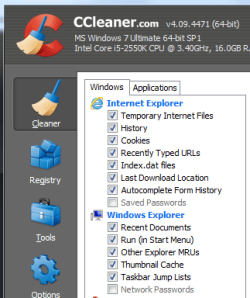
See my sig for a link to CCleaner and install it. Here is what I have checked to clean, your needs may be different, but check the Temporary Internet Files under IE.

CCleaner.PNG

If your system is running OK, you can also check Update Backup Files to get rid of 920MB. The clean up windows shows only 5.35MB of temp files?
 

My Computer

Computer type
PC/Desktop
Computer Manufacturer/Model Number
Home Built Desktop By DataTech
OS
Windows 7 Ultimate X64 SP1
CPU
Intel i5-2550K, Differing ~4.4-4.8GHz No built in GPU
Motherboard
ASUS P8Z68-V PRO/GEN3
Memory
16GB G.Skill Sniper 1866MHz @ 2133MHz 2x8GB
Graphics Card(s)
ASUS GTX650TIB-DC2OC-2GD5, (650TI Boost)
Sound Card
Onboard Realtek 5-1
Monitor(s) Displays
Samsung P2570HD
Screen Resolution
1920x1080
Hard Drives
Samsung 840 Pro 256GB SSD for OS, 500GB Seagate Constellation (Enterprise drive) for Data
PSU
Corsair HX650W
Case
Inwin Dragon Rider
Cooling
Hyper 212 EVO w/two Noctua fans, push-pull, @1300 RPM
Keyboard
E-Z Eyes, bright yellow keys with large characters
Mouse
steelseries SENSEI Laser Pro Gaming
Internet Speed
48-51Mbs Mbs down, 11 Mbs up Xfinity Cable
Antivirus
Norton Internet Security 2013
Browser
IE 10, Opera, Pale Moon if needed
Other Info
4 case fans, LG BluRay-RE, ASUS DVD-RW, Mr. Fusion power supply, 1.21 gigawatts.
Yea. I ran CCleaner and that didn't do too much.


My Computer

Computer type
PC/Desktop
OS
Windows 7 Home Premium 64bit
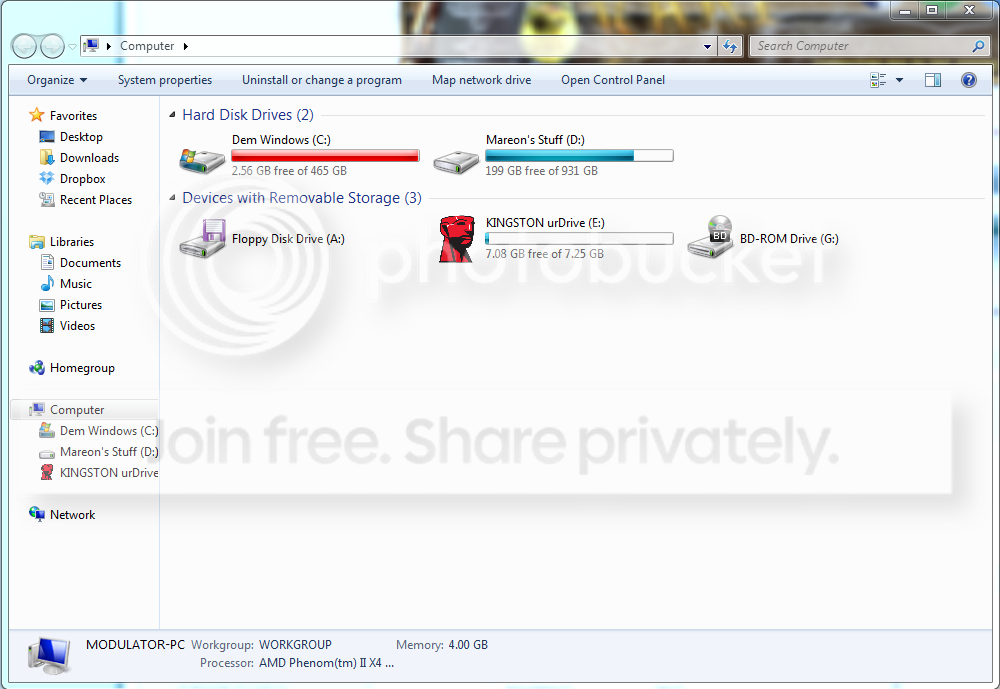
How's the free/used space look now?
 

My Computer

Computer type
PC/Desktop
Computer Manufacturer/Model Number
Home Built Desktop By DataTech
OS
Windows 7 Ultimate X64 SP1
CPU
Intel i5-2550K, Differing ~4.4-4.8GHz No built in GPU
Motherboard
ASUS P8Z68-V PRO/GEN3
Memory
16GB G.Skill Sniper 1866MHz @ 2133MHz 2x8GB
Graphics Card(s)
ASUS GTX650TIB-DC2OC-2GD5, (650TI Boost)
Sound Card
Onboard Realtek 5-1
Monitor(s) Displays
Samsung P2570HD
Screen Resolution
1920x1080
Hard Drives
Samsung 840 Pro 256GB SSD for OS, 500GB Seagate Constellation (Enterprise drive) for Data
PSU
Corsair HX650W
Case
Inwin Dragon Rider
Cooling
Hyper 212 EVO w/two Noctua fans, push-pull, @1300 RPM
Keyboard
E-Z Eyes, bright yellow keys with large characters
Mouse
steelseries SENSEI Laser Pro Gaming
Internet Speed
48-51Mbs Mbs down, 11 Mbs up Xfinity Cable
Antivirus
Norton Internet Security 2013
Browser
IE 10, Opera, Pale Moon if needed
Other Info
4 case fans, LG BluRay-RE, ASUS DVD-RW, Mr. Fusion power supply, 1.21 gigawatts.
Its gotten worse over the past few days.
 

My Computer

Computer type
PC/Desktop
OS
Windows 7 Home Premium 64bit

My Computer

Computer type
PC/Desktop
Computer Manufacturer/Model Number
Self Built
OS
Win 10 Pro x64
CPU
Intel I5-2500K @3.3GHz
Motherboard
Asrock P67 Extreme4
Memory
16GB G.Skill Ripjaws X (4x4GB)
Graphics Card(s)
EVGA GeForce 750 Ti SC 2GB
Sound Card
ASUS Xonar DG 5.1 Channels 24-bit 96KHz PCI Interface Sound
Monitor(s) Displays
auria eq2367
Screen Resolution
1920 x 1080
Hard Drives
250GB Samsung 850 EVO SSD
1TB WD Blue
1TB Hitachi
PSU
SeaSonic X 650W 80 Plus Gold
Case
Corsair Obsidian 750D
Cooling
Corsair H60, Three 140mm case fans
Keyboard
Logitech Wireless Keyboard K520
Mouse
Logitech Wireless Mouse M310
Internet Speed
Wave Broadband ~ 100 dn 5 up
Antivirus
Windows Defender, Malwarebytes Premium
Browser
Edge, IE11, Chrome
Other Info
Laptop specs: HP g7-1365dx /
CPU: AMD A6-3420M APU with Radeon(tm) HD Graphics /
RAM: Crucial 8Gb (2x4Gb) /
SSD: Crucial M4-CT128M4SSD2 ATA Device/ FW 000F /
GFX: AMD Radeon HD 6520G /
OS: Windows 10 Pro x64
What is the full path? All I can see in the image you posted is:

C:\Windows\SYSWOW64\config\systemprofile\App

I'm guessing that's AppData, but what is after that?

Something very wrong though as it shows 1,734,195 files!
 

My Computer

Computer type
PC/Desktop
Computer Manufacturer/Model Number
Lenovo IdeaCenter 450
OS
Windows 10 Pro X64
CPU
Intel Quad Core i7-4770 @ 3.4Ghz
Memory
16.0GB PC3-12800 DDR3 SDRAM 1600 MHz
Graphics Card(s)
Intel Integrated HD Graphics
Sound Card
Realtek HD Audio
Monitor(s) Displays
HP 22" LCD
Screen Resolution
1680 x 1050
Hard Drives
250GB Samsung EVO SATA-3 SSD
2TB Seagate ST2000DM001 SATA-2
1.5TB Seagate ST3150041AS SATA
Keyboard
Dell USB
Mouse
Lenovo USB
Internet Speed
Cable via Road Runner 3MB Upload, 30MB Download
Antivirus
Windows Defender, MBAM Pro, MBAE
Browser
Seamonkey
Other Info
UEFI/GPT
PLDS DVD-RW DH16AERSH
Something to try.
Remove Google Chrome and all of it's tracks. Reboot
Do another disk clean up and run Ccleaner again. Reboot
Then use another browser for a while and see if their is a change.
 

My Computer

Computer type
PC/Desktop
Computer Manufacturer/Model Number
Home made Desktop
OS
Windows 10 Pro. 64/ version 1709 Windows 7 Pro/64
CPU
Intel i7-6800K @ 4.3
Motherboard
ASUS X-99 Deluxe II
Memory
Corsair Platinum 16 gig @2400
Graphics Card(s)
EVGA GTX 1070 OC
Monitor(s) Displays
Asus 27" LED LCD/VE278Q
Screen Resolution
1920-1080 or 1280-720 HDMI
Hard Drives
INTEL SSD 730-240 Gb Sata 3.0/
PSU
EVGA Platium 1200W
Case
Phanteks Luxe Tempered Glass 8 fans/ one radiator
Cooling
XSPC/ Water Cooled CPU
Keyboard
Das 4 Professional
Mouse
Logitech M705/MX Anywhere 2-S
Internet Speed
100 mbits
Antivirus
Microsoft Security Essentials/ Malwarebytes Premium 3.0/ SAS
Browser
I.E. 11 default/Firefox/ ISP Time Warner Cable/Spectrum
Other Info
LG BluRay Burner/
Sound system-KLipsch-THX/
Icy Dock ssd Hot Swap bays.
Back
Top