Solved Windows Freezing at login screen after installing driver

ChuckDuckNorris

New member
Local time
5:10 AM
Messages
12
Hey guys somebody recommended this site for me to ask about my problem. Anyway I have a problem with some games like GTA 5, Watch dogs, CS : GO in which "audiodg.exe" process continues to use more RAM after I start one of those games. This only happens when I play these games. I saw a bunch of other threads that said mainly update your drivers and check the enhancements issue. I originally installed my audio driver using Driver pack solution Ver. 14.9. But after seeing these threads I tried updating my audio driver. I tried downloading it from the official site and from a bunch of others but each time I do so and restart Windows just freezes at login screen and then I have to boot into safe mode and use system restore to remove the new driver. Right now my audio is working but I don't have the enhancements option at all. Sorry if I got any grammatical / spelling mistakes english isn't my language. I'm also not that good at computers so please help. Here are my Laptop specs or what I managed to get from the systemrequirementslab detection tool.
---------------------------------------------
Processor Intel(R) Core(TM) i5 CPU M 480 @ 2.67GHz
Manufacturer Intel
Speed 2.7 GHz
Number of Cores 4
CPU ID BFEBFBFF00020655
Family 06
Model 25
Stepping 5
Revision 02
-------------------------------------------
Video Card 1 Intel(R) HD Graphics
Manufacturer Intel
Chipset Intel(R) HD Graphics
Dedicated Memory 64 MB
Total Memory 1.7 GB
Pixel Shader Version 4.0
Vertex Shader Version 4.0
Hardware T & L Yes
Vendor ID 8086
Device ID 0046
Plug and Play ID VEN_8086&DEV_0046&SUBSYS_1669103C&REV_02
Driver Version 8.830.6.6000
---------------------------------------------
Video Card 2 Radeon (TM) HD 6470M
Manufacturer ATI
Chipset Radeon (TM) HD 6470M
Dedicated Memory 1.0 GB
Total Memory 2.6 GB
Pixel Shader Version 5.0
Vertex Shader Version 5.0
Hardware T & L Yes
Vendor ID 1002
Device ID 6760
Plug and Play ID VEN_1002&DEV_6760&SUBSYS_1669103C&REV_00
Driver Version 8.830.6.6000
---------------------------------------
Memory 3.9 GB
---------------------------------------
Operating System Microsoft Windows 7 Ultimate Edition Service Pack 1 (build 7601), 64-bit
Service Pack 1
Size 64 Bit
Edition Ultimate
Version 6.1.7601
Locale 0409
---------------------------------------
BIOS Default System BIOS
Version Hewlett-Packard F.04
Manufacturer Hewlett-Packard
Date 02/11/11
---------------------------------------
Display Maximum Resolution 1366 x 768
---------------------------------------
Sound Device 1 IDT High Definition Audio CODEC
Driver Version 6.10.6498.0
---------------------------------------
Sound Device 2 Intel(R) Display Audio
Driver Version 6.14.0.3086
---------------------------------------
Thanks alot for taking your time to read this I'd be very grateful if someone knows how to help please.
Have a nice day. :)
 

My Computer My Computer

Computer type
PC/Desktop
Computer Manufacturer/Model Number
HP
OS
Windows 7 Ultimate x64
CPU
Intel Core i5 480M
Memory
4GB
Graphics Card(s)
AMD Radeon HD 6470M
Hard Drives
750 GB HDD
Antivirus
None
Browser
Chrome
Hello and welcome Chuck now can I make a very simple suggestion that you get a dedicated sound card? I run the Asus Xonar DG in all my desktops and have never had a problem and they are really cheap.
The GUI for the sound is just fabulous (or I think it is) for mixing and generating difference effects and if you are into gaming or music (like me - music) you will find the Xonar the real deal.

The other stuff you have ben trying to get rid of I am not quite sure what it is you are doing. The after market fix things I don't like that Driver pack solution as I have found they create more problems as sometimes than they solve.

Anyway take a look at this https://www.asus.com/au/Sound_Cards/Xonar_DG/ by the ay I run 5:1 systems off mine my favourite being the Logitec Z506 Surround Sound Speakers Z506 again not expensive at all and the sound quality really good.
 

My Computer My Computer

Computer type
PC/Desktop
Computer Manufacturer/Model Number
Own build (new) Desk1 / Asus ROG Win 7 / Desk2 1st build
OS
Desk1 7 Home Prem / Desk2 10 Pro / Main lap Asus ROG 10 Pro 2 laptop Toshiba 7 Pro Asus P2520 7 & 10
CPU
Desk1 i5 3750K / Laptop i7 GTX 860M / Desk2 i5 2500
Motherboard
Desk1 Asus P877-V / Desk2 Gigabyte H67 UD3H / Laptop ?
Memory
Desk1 8GB (1866) / Desk2 16GB (1333) / Laptop 8Gb DDR3
Graphics Card(s)
Desk 1& 2NVidia GTX 650 & Laptops on board Intel
Sound Card
Desk 1 & 2 -XONAR DG Realtek High Def audio Laptop
Monitor(s) Displays
Desk 1 Benq HD 2450 / Desk2 Philips 24" / Laptop 17.5"
Screen Resolution
1920x1080 D1 & D2 & Laptop 1
Hard Drives
Desk1 Samsung 120GB 830 SSD
Asus ROG 256GB 850 Pro SSD
Desk2 Samsung 840 256 SSD
Toshiba 120GB EVO
PSU
Desk 1 Corsair HX 1050/ Laptop ? / Desk 2 Corsair HX 650
Case
Desk 1 Cooler HAF XM ? Toshiba laptop / Desk2 Coolermaster
Cooling
Fans on all Desk1 -2 Desk2 - all Coolermasters 5 Laptop ?
Keyboard
Desk 1 MS Sidewinder X6 Desk 2 MS Sidewinder X 4
Mouse
Desk 1&2 - Gigabyte MS 900 gamer - laptop - Logitec wireless
Internet Speed
ADSL2+
Other Info
One other Desktop (tester) and spare Toshba laptop both with SSD's
Running Kaspersky 2016 ISS on all machines config'd identically
Logitec audio stereo systems on each machine (x3)
Canon MG5250MFC
Router/modem TP-Link running WPA2SK
Ok thanks alot I dunno how to replace it yet but I will try to look for a tutorial. Thanks for replying have a nice day.
 

My Computer My Computer

Computer type
PC/Desktop
Computer Manufacturer/Model Number
HP
OS
Windows 7 Ultimate x64
CPU
Intel Core i5 480M
Memory
4GB
Graphics Card(s)
AMD Radeon HD 6470M
Hard Drives
750 GB HDD
Antivirus
None
Browser
Chrome
Chuck if the audio is an on board "variety" then it is just a matter of plugging in the sound card and using the outlets from the back of the machine. The onboard stuff will be bypassed:).

Mate if I knew what model machine you have I could probably find some info for you on where to plug that card in and it is usually only putting it in a spare slot.

I have done up a pic of a motherboard and given you just for an example of what you might see inside the machine. If you do anything inside the machine make sure to "ground" yourself - say on the metal case -before touching anything inside because of static electricity. ;)
 

Attachments

  • SOUND CARD.PNG
    SOUND CARD.PNG
    260.1 KB · Views: 0

My Computer My Computer

Computer type
PC/Desktop
Computer Manufacturer/Model Number
Own build (new) Desk1 / Asus ROG Win 7 / Desk2 1st build
OS
Desk1 7 Home Prem / Desk2 10 Pro / Main lap Asus ROG 10 Pro 2 laptop Toshiba 7 Pro Asus P2520 7 & 10
CPU
Desk1 i5 3750K / Laptop i7 GTX 860M / Desk2 i5 2500
Motherboard
Desk1 Asus P877-V / Desk2 Gigabyte H67 UD3H / Laptop ?
Memory
Desk1 8GB (1866) / Desk2 16GB (1333) / Laptop 8Gb DDR3
Graphics Card(s)
Desk 1& 2NVidia GTX 650 & Laptops on board Intel
Sound Card
Desk 1 & 2 -XONAR DG Realtek High Def audio Laptop
Monitor(s) Displays
Desk 1 Benq HD 2450 / Desk2 Philips 24" / Laptop 17.5"
Screen Resolution
1920x1080 D1 & D2 & Laptop 1
Hard Drives
Desk1 Samsung 120GB 830 SSD
Asus ROG 256GB 850 Pro SSD
Desk2 Samsung 840 256 SSD
Toshiba 120GB EVO
PSU
Desk 1 Corsair HX 1050/ Laptop ? / Desk 2 Corsair HX 650
Case
Desk 1 Cooler HAF XM ? Toshiba laptop / Desk2 Coolermaster
Cooling
Fans on all Desk1 -2 Desk2 - all Coolermasters 5 Laptop ?
Keyboard
Desk 1 MS Sidewinder X6 Desk 2 MS Sidewinder X 4
Mouse
Desk 1&2 - Gigabyte MS 900 gamer - laptop - Logitec wireless
Internet Speed
ADSL2+
Other Info
One other Desktop (tester) and spare Toshba laptop both with SSD's
Running Kaspersky 2016 ISS on all machines config'd identically
Logitec audio stereo systems on each machine (x3)
Canon MG5250MFC
Router/modem TP-Link running WPA2SK
well my machine is a laptop. the model is pavilion g6 1047-sx. I saw some vids of ppl. disassembling it and it's a massive pain you have to take the whole thing apart literally just to clean the fan. manufacturers just want you to buy new laptops every couple of years greedy *******s. anyway thanks alot for your help man I really appreciate it I will get the card and search for somebody to replace it for me.
 

My Computer My Computer

Computer type
PC/Desktop
Computer Manufacturer/Model Number
HP
OS
Windows 7 Ultimate x64
CPU
Intel Core i5 480M
Memory
4GB
Graphics Card(s)
AMD Radeon HD 6470M
Hard Drives
750 GB HDD
Antivirus
None
Browser
Chrome
Sorry Chuck I thought we were talking about a desktop.

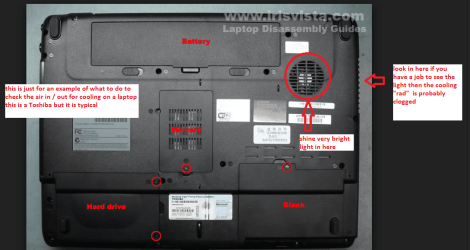
Now for the cleaning of the laptop fan try my little ditty because it doesn't involve any disassembly as such.

CLEANING A LAPTOP FAN& COOLER RAD

The thing you do is toturn over the laptop and shine a very bright light into the air intake aperture(you will see the fan there) and then while doing that look at the outlet venton the end of the laptop you should see the light quite clearly shining throughthe cooling " radiator" if not - it is clogged and will need cleaningas will probably the fan opening.

You can do this byblowing it out using a compressed air can in short bursts.

BUT ONE WORD OF WARNING DO NOT blow the air into the fan opening withoutinserting say a plastic rod or large cable tie to stop the fan from spinning asthe air blast will spin the fan at a very high speed that it is not designed totake and may wreck the bearing!!

To clean the slots in the radiator use a pipecleaner or one of those craft covered wire sticks - they are referred to aschinelle sticks - see pic. But do be very careful not to be overly heavy handedyou will find it might take a second or two or a few minutes to clear theheavier build ups.
 

Attachments

  • LAPTOP VENTING.PNG
    LAPTOP VENTING.PNG
    171.1 KB · Views: 0
  • CHINELLE.PNG
    CHINELLE.PNG
    65.6 KB · Views: 17

My Computer My Computer

Computer type
PC/Desktop
Computer Manufacturer/Model Number
Own build (new) Desk1 / Asus ROG Win 7 / Desk2 1st build
OS
Desk1 7 Home Prem / Desk2 10 Pro / Main lap Asus ROG 10 Pro 2 laptop Toshiba 7 Pro Asus P2520 7 & 10
CPU
Desk1 i5 3750K / Laptop i7 GTX 860M / Desk2 i5 2500
Motherboard
Desk1 Asus P877-V / Desk2 Gigabyte H67 UD3H / Laptop ?
Memory
Desk1 8GB (1866) / Desk2 16GB (1333) / Laptop 8Gb DDR3
Graphics Card(s)
Desk 1& 2NVidia GTX 650 & Laptops on board Intel
Sound Card
Desk 1 & 2 -XONAR DG Realtek High Def audio Laptop
Monitor(s) Displays
Desk 1 Benq HD 2450 / Desk2 Philips 24" / Laptop 17.5"
Screen Resolution
1920x1080 D1 & D2 & Laptop 1
Hard Drives
Desk1 Samsung 120GB 830 SSD
Asus ROG 256GB 850 Pro SSD
Desk2 Samsung 840 256 SSD
Toshiba 120GB EVO
PSU
Desk 1 Corsair HX 1050/ Laptop ? / Desk 2 Corsair HX 650
Case
Desk 1 Cooler HAF XM ? Toshiba laptop / Desk2 Coolermaster
Cooling
Fans on all Desk1 -2 Desk2 - all Coolermasters 5 Laptop ?
Keyboard
Desk 1 MS Sidewinder X6 Desk 2 MS Sidewinder X 4
Mouse
Desk 1&2 - Gigabyte MS 900 gamer - laptop - Logitec wireless
Internet Speed
ADSL2+
Other Info
One other Desktop (tester) and spare Toshba laptop both with SSD's
Running Kaspersky 2016 ISS on all machines config'd identically
Logitec audio stereo systems on each machine (x3)
Canon MG5250MFC
Router/modem TP-Link running WPA2SK
I was talking about the fan just as an example to show how hard it is to replace the audio card. Anyway thanks for your help I used to blow the fan and it moved too fast as they said and I used to have problems with it not working after cleaning I needed this thanks for your help alot.
 

My Computer My Computer

Computer type
PC/Desktop
Computer Manufacturer/Model Number
HP
OS
Windows 7 Ultimate x64
CPU
Intel Core i5 480M
Memory
4GB
Graphics Card(s)
AMD Radeon HD 6470M
Hard Drives
750 GB HDD
Antivirus
None
Browser
Chrome
I finally solved the problem. the process no longer takes up more than 9000kbs from the RAM. omg finally I can play those games without getting bored from the silence.I just haad to open msconfig.exe and disable all IDT audio entries from startup tab. again thanks alot for your help man.
 

My Computer My Computer

Computer type
PC/Desktop
Computer Manufacturer/Model Number
HP
OS
Windows 7 Ultimate x64
CPU
Intel Core i5 480M
Memory
4GB
Graphics Card(s)
AMD Radeon HD 6470M
Hard Drives
750 GB HDD
Antivirus
None
Browser
Chrome

My Computer My Computer

Computer type
PC/Desktop
Computer Manufacturer/Model Number
Own build (new) Desk1 / Asus ROG Win 7 / Desk2 1st build
OS
Desk1 7 Home Prem / Desk2 10 Pro / Main lap Asus ROG 10 Pro 2 laptop Toshiba 7 Pro Asus P2520 7 & 10
CPU
Desk1 i5 3750K / Laptop i7 GTX 860M / Desk2 i5 2500
Motherboard
Desk1 Asus P877-V / Desk2 Gigabyte H67 UD3H / Laptop ?
Memory
Desk1 8GB (1866) / Desk2 16GB (1333) / Laptop 8Gb DDR3
Graphics Card(s)
Desk 1& 2NVidia GTX 650 & Laptops on board Intel
Sound Card
Desk 1 & 2 -XONAR DG Realtek High Def audio Laptop
Monitor(s) Displays
Desk 1 Benq HD 2450 / Desk2 Philips 24" / Laptop 17.5"
Screen Resolution
1920x1080 D1 & D2 & Laptop 1
Hard Drives
Desk1 Samsung 120GB 830 SSD
Asus ROG 256GB 850 Pro SSD
Desk2 Samsung 840 256 SSD
Toshiba 120GB EVO
PSU
Desk 1 Corsair HX 1050/ Laptop ? / Desk 2 Corsair HX 650
Case
Desk 1 Cooler HAF XM ? Toshiba laptop / Desk2 Coolermaster
Cooling
Fans on all Desk1 -2 Desk2 - all Coolermasters 5 Laptop ?
Keyboard
Desk 1 MS Sidewinder X6 Desk 2 MS Sidewinder X 4
Mouse
Desk 1&2 - Gigabyte MS 900 gamer - laptop - Logitec wireless
Internet Speed
ADSL2+
Other Info
One other Desktop (tester) and spare Toshba laptop both with SSD's
Running Kaspersky 2016 ISS on all machines config'd identically
Logitec audio stereo systems on each machine (x3)
Canon MG5250MFC
Router/modem TP-Link running WPA2SK
Back
Top